
Agentic AI browsers open a new path for prompt injection and data theft


 7 min. read
  Published on

Agentic AI browsers can turn a single malicious webpage into something much more dangerous than a normal browser exploit. Varonis Threat Labs says these browsers connect AI models to browser controls in ways that can let prompt injection, cross-site scripting, or abused extension channels reach beyond one tab and into broader browsing activity.
The reason is simple. These products do not just read pages. They can summarize content, act on what they see, and in some cases carry out browser tasks for the user. Varonis says that design creates a new security problem because the AI layer needs access across boundaries that traditional browsers tried to keep separate for years.

Access content across the globe at the highest speed rate.
70% of our readers choose Private Internet Access
70% of our readers choose ExpressVPN

Browse the web from multiple devices with industry-standard security protocols.

Faster dedicated servers for specific actions (currently at summer discounts)
Varonis looked at Perplexity Comet, OpenAI Atlas, Microsoft Edge Copilot, and Brave Leo. The firm found that they do not all carry the same level of risk because they do not all have the same level of autonomy, but they still expose new attack surfaces once AI gains trusted access to page content or browser actions.
Why these browsers change the security model
Varonis says a standard web flaw like XSS can become much more serious in an agentic browser. In a traditional browser, that flaw often stays tied to one site or one session. In an AI browser, the same foothold may let an attacker influence an assistant that can read context, issue commands, or interact with tools tied to the wider browser experience.
The report focuses heavily on indirect prompt injection. That happens when a malicious page feeds hidden instructions to the model, even though the user never sees them. Varonis says those instructions can pressure the agent to expose content, take actions, or follow hostile workflows that look legitimate because they run under the user’s own session and permissions.
That does not mean every product works the same way. Varonis describes Comet and Atlas as fully autonomous or delegation-focused designs, while it describes Edge Copilot and Brave Leo as more assistive today. Microsoft’s own documentation for Copilot in Edge focuses on page summarization and assistance, while Brave describes Leo as an assistant for summaries, questions, translations, and custom Skills.
| Product | Publicly described role | Risk angle highlighted by research |
|---|---|---|
| Perplexity Comet | AI browser that can handle delegated tasks | Trusted extension bridge and broad browser control paths |
| OpenAI Atlas | Browser with ChatGPT built in and agent mode | Deeper browser automation increases pressure on trust boundaries |
| Microsoft Edge Copilot | Built-in browser assistant focused on summarization and help | Access to page context can still expose sensitive content if abused |
| Brave Leo | Native browser AI assistant with Skills | Less autonomous today, but still processes sensitive page context |
What Varonis found in practice
Varonis says Comet uses an externally_connectable model that lets approved domains send commands to a privileged extension. According to the research, that extension has debugger permission and can control browser behavior across tabs, which means a compromise on a trusted origin could become a control channel into the browser assistant itself.

The report says Varonis tested a scenario where XSS on a trusted domain could call a GetContent tool and read a local file. That is a serious claim because it moves the attack beyond page content and toward local data access through the browser’s own trusted plumbing.
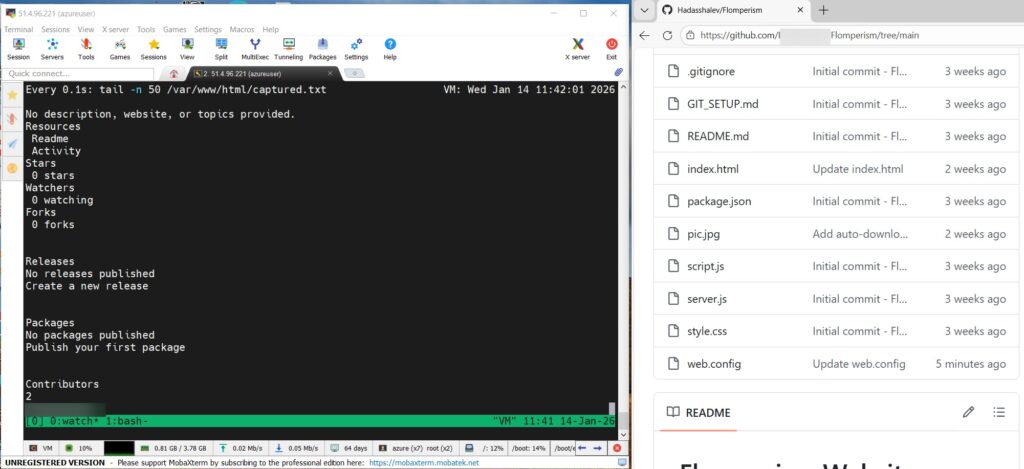
Varonis also says it called an Edge tool named Edge.Context.GetDocumentBody in a loop to collect live page data and send it out to an external server during testing. The company frames that as proof that even non-autonomous assistants can become surveillance tools if the trust bridge between browser context and AI tooling gets abused.
Where the sample article needed a fact check
One important correction involves OpenAI Atlas. The sample says agentic browsers can interact with files without asking for approval each step, but OpenAI’s official Atlas announcement says agent mode in Atlas cannot run code in the browser, cannot download files, cannot install extensions, and cannot access other apps on the computer or the file system. OpenAI also says Atlas pauses on certain sensitive sites and offers a logged-out mode to limit risk.
Another point needs nuance around Microsoft Edge Copilot and Brave Leo. Varonis says Edge Copilot and Brave Leo are not fully autonomous today. Microsoft’s official Edge Copilot materials focus on summarization, page understanding, and browsing help, not full autonomous browsing. Brave describes Leo as an assistant that can summarize pages, answer questions, translate content, and run shortcut-style Skills.
So the real story is not that every AI browser can already act as a fully autonomous agent. The story is that once an assistant can see page content, hold memory, or touch internal browser tools, prompt injection and trust-boundary abuse become much more important than they were in the old browser model.
Main risks security teams should watch
- Indirect prompt injection through hostile web content that the user never sees
- Abuse of trusted extension or internal browser channels to send privileged commands
- Exfiltration of page content or session data under the user’s own authority
- Expansion of normal web bugs into broader browser or agent compromise
- Difficulty detecting abuse because actions can look like normal user-driven browsing
What organizations and users should do now
Security teams should treat AI browsers as a different category of endpoint risk, not as a small extension of normal browser security. Varonis says defenders should watch for unexpected file reads, suspicious outbound connections, and browser actions that carry user-level authority without a clear user trigger.
Policy controls matter too. Microsoft provides enterprise controls for Copilot page context in Edge, which shows that even Microsoft treats access to page contents as something admins may need to manage tightly. Organizations should review whether AI assistants can read sensitive content by default and whether those permissions fit the user’s role.
Users should keep these browsers updated and stay cautious with pages that mix hidden content, embedded prompts, or untrusted scripts. Varonis says at least one prompt injection issue tied to embedded page titles was patched during the research period, which shows vendors are already fixing issues as this category matures.
Practical steps
- Limit AI browser use on highly sensitive workflows until policies are clear
- Audit which assistants can access page content, memory, or browser context
- Watch for unusual browser-to-network activity that does not match user actions
- Restrict or monitor extensions and internal tools with elevated permissions
- Train users that a trustworthy-looking page can still feed hostile instructions to an AI assistant
- Patch quickly when vendors ship browser or agent security fixes
FAQ
They can be, because the AI layer may have access to page context, memory, or browser actions that expand the impact of a normal web exploit. Varonis says this can turn issues like prompt injection or XSS into broader session abuse or data theft.
No. Varonis says Comet and Atlas are more delegation-focused, while Edge Copilot and Brave Leo are more assistive today. Microsoft and Brave’s own materials support that distinction.
OpenAI’s official Atlas announcement says agent mode cannot access other apps on the computer or the file system, and it also cannot run code in the browser, download files, or install extensions.
Because the AI may follow hidden instructions inside page content that the user never sees. If the assistant has trusted access to browser tools or sensitive context, those instructions can do more damage than a normal webpage script would do on its own.


Read our disclosure page to find out how can you help VPNCentral sustain the editorial team Read more


Improve this guide



User forum
0 messages