
Malicious npm package abused Hugging Face for both payload delivery and stolen-data storage


 5 min. read
  Published on
A malicious npm package called js-logger-pack turned Hugging Face into both a malware distribution point and a backend for stolen data, according to new research from JFrog. The package used a hidden postinstall script to pull platform-specific payloads from a public Hugging Face repository, then uploaded stolen files to private Hugging Face datasets controlled by the attacker.
The campaign stands out because it shows how attackers can hide a supply chain attack inside normal developer activity. Instead of sending exfiltrated data to a classic attacker server, the malware abused a trusted AI platform for storage and retrieval. That makes malicious traffic look more like routine cloud usage and gives defenders fewer obvious indicators to block.

Access content across the globe at the highest speed rate.
70% of our readers choose Private Internet Access
70% of our readers choose ExpressVPN

Browse the web from multiple devices with industry-standard security protocols.

Faster dedicated servers for specific actions (currently at summer discounts)
JFrog said the package presented itself as a harmless logger, but the real attack started after installation through an automatically executed postinstall hook. That script launched a detached background process so the install appeared to complete normally while the downloader continued running out of sight.
How the npm attack worked
According to JFrog, the malicious installer checked the victim’s operating system and downloaded one of four Node.js SEA binaries from the attacker’s Hugging Face repository, identified as Lordplay/system-releases. JFrog said it extracted the JavaScript payload from all four binaries and found the same implant logic embedded across Windows, macOS, and Linux samples.
The malware then established persistence using native mechanisms on each platform. JFrog’s write-up says it used scheduled tasks and Run keys on Windows, LaunchAgent entries on macOS, and systemd user units on Linux. After that, it contacted a command-and-control server over WebSocket and gave the attacker broad control over the infected machine.
JFrog said the implant could read and write arbitrary files, scan for credentials, log keystrokes, monitor the clipboard, and deploy additional payloads. In other words, any machine that executed the malicious package should be treated as fully compromised until it has been cleaned and all secrets have been rotated.
Why the Hugging Face abuse matters
The most unusual twist in this case was the exfiltration design. JFrog said the malware did not store stolen data directly on the command server. Instead, the operator sent the implant a Hugging Face token, a destination path, and an upload ID, then had the malware compress the target files and push them into private Hugging Face datasets under attacker-controlled accounts.
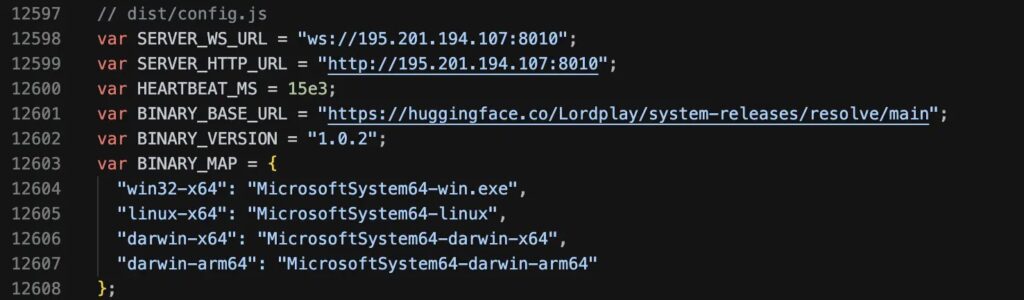
That gave the attacker two advantages. First, it reduced the need to maintain a more obvious stolen-data server. Second, it made exfiltration traffic blend into connections to a well-known platform that many developers and AI teams already use. JFrog described this as a shift from using Hugging Face only as a malware CDN to using it as a live exfiltration backend too.
The same report also says the malware could clear active browser sessions and wipe locally stored credentials, forcing victims to log in again while the keylogger remained active. That means credentials typed after the cleanup could be stolen and uploaded within minutes.
What defenders should look for
| Indicator | Why it matters |
|---|---|
js-logger-pack in dependencies | Main malicious npm package identified by JFrog |
Hidden postinstall execution | Initial trigger for the malware chain |
| Downloads from attacker-controlled Hugging Face repo | Used to fetch platform-specific payloads |
| Unexpected persistence via scheduled task, Run key, LaunchAgent, or systemd unit | Suggests the implant survived reboots |
| Hugging Face dataset uploads from developer systems | Possible exfiltration to attacker storage |
| WebSocket traffic to hard-coded infrastructure | Used for attacker tasking and control |
The table reflects the behavior JFrog documented in its April 23, 2026 analysis of the campaign.
What admins should do now
- Treat any machine that installed
js-logger-pack, especially version1.1.27, as compromised until proven otherwise. - Rotate all secrets, including cloud keys, SSH keys, npm tokens, database credentials, API keys, and passwords stored in browsers.
- Remove persistence artifacts on every affected system, including scheduled tasks, registry Run keys, LaunchAgents, and systemd user units, depending on platform.
- Purge the malicious package, clear the npm cache, and review recent dependency changes carefully.
- Consider temporarily enforcing
npm config set ignore-scripts truein environments where postinstall hooks are not required. - Hunt for unusual outbound traffic to Hugging Face repos or datasets that do not match approved workflows.
FAQ
JFrog identified it as a malicious npm package that used a fake logger front and a hidden postinstall script to infect developer systems.
The attacker used a public Hugging Face repository to host payloads and private Hugging Face datasets to store stolen data. JFrog said this let the campaign use the platform for both delivery and exfiltration.
JFrog analyzed Windows, macOS, and Linux payloads and said the same JavaScript implant logic appeared across all four Node.js SEA binaries it extracted.
Because the malware blends in with normal package installation and then talks to a trusted cloud platform many developers already use. That can make both payload delivery and exfiltration look less suspicious.


Read our disclosure page to find out how can you help VPNCentral sustain the editorial team Read more


Improve this guide




User forum
0 messages