
Fake TradingView AI tool spreads Needle Stealer through a bogus TradingClaw site


 4 min. read
  Published on

A new malware campaign is targeting traders by abusing the TradingView name and pushing a fake AI assistant called TradingClaw. Researchers at Malwarebytes say the site delivers Needle Stealer, a modular info-stealer designed to grab browser data, login sessions, and cryptocurrency wallet information from infected Windows systems.
The campaign matters because it blends brand impersonation, selective filtering, and stealthy malware delivery into a convincing lure for traders and crypto users. Malwarebytes says the fake site is not part of TradingView and has no connection to the legitimate startup at tradingclaw.chat.

Access content across the globe at the highest speed rate.
🔥 Save 81% + 2 bonus months! 🔥
70% of our readers choose Private Internet Access
70% of our readers choose ExpressVPN
2
Browse the web from multiple devices with industry-standard security protocols.
🔥 Save 73%! 🔥

Faster dedicated servers for specific actions (currently at summer discounts)
🔥 Save 69%! 🔥
TradingView users have already faced similar scams before. In April 2025, TradingView warned that fake YouTube channels were impersonating its brand, pushing malicious downloads, and putting users’ crypto wallets and personal data at risk.
How the fake TradingClaw campaign works
Malwarebytes says attackers used a site at tradingclaw[.]pro to advertise an alleged AI-powered assistant for TradingView. Some visitors saw the fake TradingClaw page, while others got redirected to a harmless-looking page at studypages[.]com, which likely helped the campaign dodge search engines and automated scanners.
If a target continued, the site offered a ZIP download that kicked off the infection chain. Malwarebytes says the archive used DLL hijacking, where a malicious DLL posed as a legitimate file and got loaded by a trusted program.
In this case, the loader used iviewers.dll, then pulled in a second-stage DLL, and finally injected Needle Stealer into RegAsm.exe through process hollowing. That gave the malware cover inside a legitimate Windows process and made detection harder.
What Needle Stealer does after infection
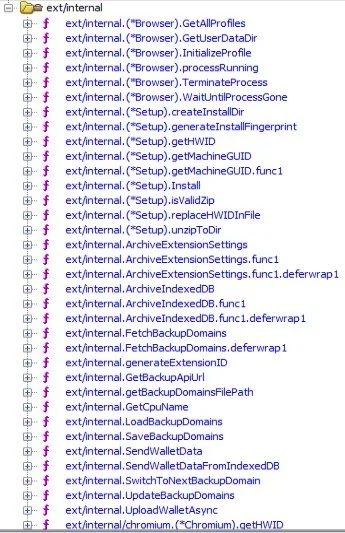
Malwarebytes describes Needle as a Golang-based modular infostealer. Its core features include form grabbing, clipboard hijacking, browser data theft, screenshots, and collection of files such as text documents and crypto wallet data.
The stealer also includes browser-focused capabilities that raise the risk even further. Malwarebytes says the malware can install malicious browser extensions that redirect traffic, inject scripts, and even replace downloads.
The operator panel listed by Malwarebytes also mentions wallet spoofing tools. Those modules target desktop wallet apps such as Ledger, Trezor, and Exodus, as well as browser wallets like MetaMask and Coinbase, including attempts to extract seed phrases.
Why traders should pay attention
This campaign does not rely on a zero-day exploit. It relies on trust, urgency, and the growing interest in AI trading tools. A trader who believes they are downloading a useful assistant may end up handing over browser sessions, saved credentials, and wallet access instead.
That angle fits a pattern TradingView has already warned about. The company said scammers have used fake or hijacked YouTube channels, fake premium offers, and bogus developer versions to lure users into installing malware.
The overlap matters because it shows attackers keep reusing the same brand and the same target profile. They want users who already trust TradingView, trade actively, and may hold valuable crypto assets.
Quick facts
| Item | Details |
|---|---|
| Fake product used as lure | TradingClaw |
| Impersonated brand | TradingView |
| Malware family | Needle Stealer |
| Reported by | Malwarebytes |
| Delivery method | ZIP archive from fake site |
| Key techniques | DLL hijacking, process hollowing into RegAsm.exe |
| Main targets | Browser data, login sessions, crypto wallets, seed phrases |
| Extra capability | Malicious browser extensions |
How to stay safe
- Download trading tools only from the vendor’s official site or verified official channels. Malwarebytes says fake tools may borrow a known brand to look trustworthy.
- Check YouTube channels carefully before trusting any link. TradingView says its only active official YouTube channel is linked from its website.
- Avoid “free premium,” “developer edition,” or AI trading offers that push ZIP files, scripts, or unusual installers. TradingView says those themes appear in active scam campaigns.
- Review browser extensions often and remove anything you did not install yourself. Malwarebytes specifically warns that Needle can deploy malicious extensions.
- Treat unexpected wallet prompts, download replacements, or session logouts as signs of compromise, especially after installing a trading-related tool from an unofficial source. This is an inference based on the browser and wallet theft features Malwarebytes documented.
FAQ
Needle Stealer is a modular Golang-based infostealer that Malwarebytes says can steal browser data, login sessions, wallet data, screenshots, and other sensitive information.
No. Malwarebytes says the fake TradingClaw site is not part of TradingView and is also unrelated to the legitimate tradingclaw.chat startup.
Malwarebytes says the infection chain ended with Needle Stealer injected into RegAsm.exe using process hollowing.
Yes. TradingView published a scam alert in April 2025 about fake YouTube channels impersonating the company and spreading malware.


Read our disclosure page to find out how can you help VPNCentral sustain the editorial team Read more


Improve this guide




User forum
0 messages