
Regular Password Resets Are Becoming a Help Desk Security Risk


 7 min. read
  Published on

Password resets are no longer just a routine IT task. Attackers now target help desks because a successful reset can give them legitimate access without exploiting a software vulnerability. The risk is especially serious when support teams rely on basic identity checks that criminals can answer using stolen or leaked personal data.
This is why regular password reset workflows need stronger verification. Self-service password reset tools can reduce help desk volume, but many organizations still need agents for enrollment issues, locked-out users, executive accounts, and edge cases. Those exceptions create openings for social engineering.

Access content across the globe at the highest speed rate.
70% of our readers choose Private Internet Access
70% of our readers choose ExpressVPN

Browse the web from multiple devices with industry-standard security protocols.

Faster dedicated servers for specific actions (currently at summer discounts)
Forrester has estimated that a single password reset can cost about $70 when IT labor and lost productivity are included. The financial cost matters, but the security cost can be much higher if attackers convince a service desk agent to reset the wrong account.
Why password resets are now a target
Attackers often do not need to break encryption or bypass endpoint defenses if they can persuade a person to give them access. A reset request can look normal from the help desk side, especially if the caller knows the employee’s name, role, email address, manager, or office location.
That information is easy to collect from data breaches, LinkedIn profiles, phishing kits, infostealer logs, or previous compromises. Once attackers have enough background data, they can sound convincing during a call or chat request.
The main weakness is process trust. If the help desk accepts knowledge-based answers or informal approval, the reset process can become a shortcut around MFA, access controls, and security monitoring.
The Marks & Spencer case shows the risk
The 2025 cyberattack on Marks & Spencer became a major example of how identity support workflows can turn into an entry point. Public reporting linked the incident to social engineering tactics and a service desk route, with attackers believed to have impersonated staff to obtain access.
M&S later confirmed that some personal customer data was taken during the incident, while its online operations suffered a prolonged disruption. The Guardian reported that the breach affected names, addresses, order histories, and other customer details, but not payment information or account passwords.
The UK’s NCSC also warned retailers about criminals impersonating IT help desks after cyberattacks hit M&S, Co-op, and Harrods. The warning showed that attackers were focusing on people and support procedures, not just technical vulnerabilities.
At a glance
| Issue | Why it matters |
|---|---|
| Password reset requests | Common enough to feel routine |
| Help desk social engineering | Attackers can impersonate employees |
| Weak identity checks | Personal details may already be leaked |
| MFA bypass risk | A reset can give attackers a fresh login path |
| Self-service reset gaps | Help desks still handle exceptions |
| Cost pressure | Resets can cost around $70 each |
| Main fix | Strong identity verification before every reset |
Why MFA does not always stop this attack
MFA helps, but attackers often target the recovery process because it sits next to MFA rather than behind it. If a service desk resets a password and also helps re-enroll a device or approve a new factor, the attacker may bypass the protection that MFA normally provides.
This is why identity verification needs to happen before the reset, not after the account has already changed hands. A caller who can answer basic questions should not automatically receive a new password or MFA reset.
Strong reset controls should use trusted devices, enrolled identity providers, manager approval for sensitive accounts, and clear audit trails. The process should not depend on how confident an individual support agent feels during a call.
What makes help desks vulnerable
Service desk teams work under pressure. They need to solve problems quickly, keep employees productive, and handle frustrated users who cannot access critical systems.
Attackers exploit that pressure. They create urgency, claim they are traveling, say they need access for a meeting, or impersonate executives and IT staff. In some cases, they may already have enough stolen information to pass simple checks.
The risk grows when organizations allow exceptions. A secure process loses value if VIP users, contractors, vendors, or remote employees can skip verification because the request feels urgent.
Common reset process weaknesses
- Agents use personal details as identity proof.
- Temporary passwords are shared over phone or email.
- MFA resets follow password resets without extra approval.
- Executives or privileged users get informal exceptions.
- Reset logs are reviewed only after an incident.
- Self-service reset enrollment remains incomplete.
- Help desk teams lack a clear escalation path for suspicious requests.
What a safer password reset process looks like
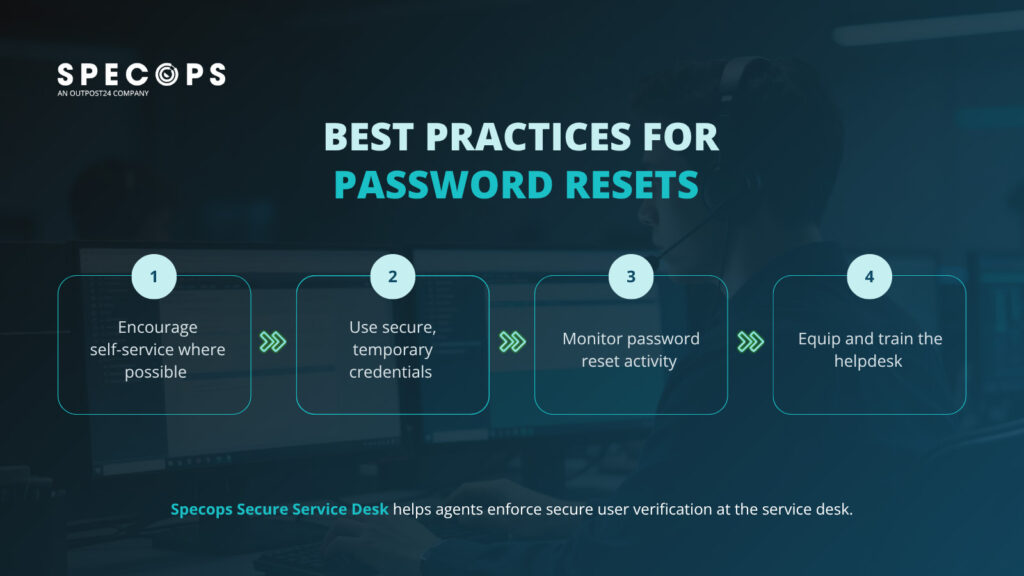
A safer process starts with verified identity. Support agents should confirm the user through a trusted factor, such as an enrolled device, approved identity provider, hardware key, or secure self-service portal.
Temporary credentials should be short-lived, single-use, and delivered through a secure channel. They should not sit in email inboxes, chat threads, or ticket notes longer than necessary.
High-risk resets need more controls. Admin accounts, finance users, IT staff, executives, and users with access to sensitive systems should require extra approval or step-up verification.
Password resets should be monitored like security events
Organizations often treat password resets as help desk metrics. They should also treat them as identity security events.
Repeated reset requests, after-hours resets, resets followed by MFA changes, and resets for privileged accounts should trigger alerts. These patterns can show account takeover attempts or internal process abuse.
Verizon’s 2025 DBIR says stolen credentials were involved in 32% of breaches, which shows why identity workflows remain a major attack surface.
What organizations should do now
- Require strong identity verification before every help desk reset.
- Stop using personal details as proof of identity.
- Enforce self-service password reset enrollment for eligible users.
- Add step-up approval for privileged or sensitive accounts.
- Use single-use temporary credentials with short expiration windows.
- Never send temporary passwords through plain email or voice calls.
- Monitor password resets, MFA resets, and account recovery events together.
- Train help desk agents on social engineering scripts and pressure tactics.
- Create a clear escalation process for suspicious requests.
- Review third-party service desk access and vendor reset permissions.
What employees should know
Employees should treat password reset requests as sensitive security actions. If someone calls pretending to be from IT and asks for codes, passwords, or approval prompts, they should stop the interaction and contact the internal help desk through an official channel.
They should also keep self-service recovery information updated. A secure recovery process only works if the user has already enrolled a trusted device or identity factor.
Employees should report suspicious calls, unusual reset emails, and unexpected MFA prompts immediately. Fast reporting can help security teams stop an attack before it spreads.
FAQ
Password resets are risky because attackers can use social engineering to convince help desk staff to give them access to an account. If the process relies on weak identity checks, a reset can bypass other security controls.
MFA helps, but it does not fully solve the problem. Attackers may try to reset both the password and the MFA method, especially through a help desk process.
They can be safer when they use strong verification and secure enrollment. However, organizations still need to secure help desk exceptions because attackers often target those edge cases.
Agents should avoid relying on personal details, caller confidence, job title, urgency, or informal approval. They should follow the same verification process every time.


Read our disclosure page to find out how can you help VPNCentral sustain the editorial team Read more


Improve this guide




User forum
0 messages