
Fake Crypto Wallet Apps Hit Apple’s App Store in China to Steal Seed Phrases


 6 min. read
  Published on

A new FakeWallet campaign placed 26 fake crypto wallet apps inside Apple’s App Store, mainly targeting iPhone users in China. The apps copied well-known wallet brands such as MetaMask, Ledger, Trust Wallet, Coinbase, TokenPocket, imToken, and Bitpie to steal recovery phrases and private keys.
Kaspersky says the apps redirected users to phishing pages that looked like App Store pages. From there, victims were pushed into installing trojanized wallet apps through iOS provisioning profiles, a legitimate Apple enterprise feature that attackers abused to sideload malware.

Access content across the globe at the highest speed rate.
70% of our readers choose Private Internet Access
70% of our readers choose ExpressVPN

Browse the web from multiple devices with industry-standard security protocols.

Faster dedicated servers for specific actions (currently at summer discounts)
The campaign mostly focused on Chinese Apple ID users because many official crypto wallet apps are not available in China’s iOS App Store. Still, Kaspersky warns that the malicious apps had no built-in geographic limits, which means the same technique could affect users outside China if the operators expand the campaign.
FakeWallet apps copied trusted crypto brands
Kaspersky found the malicious apps during a March 2026 investigation into phishing apps appearing in China’s App Store search results. The attackers used fake icons, similar names, and typosquatting to make the apps look close to real wallet products.
Some apps did not look like crypto wallets at first. They appeared as games, calculators, task planners, or other harmless tools. Kaspersky says these stub functions helped the apps look legitimate while hiding the real attack flow.
Once opened, the apps sent users to fake wallet download pages. These pages told users to install what appeared to be the real wallet app, but the installation actually relied on developer profiles that allowed a malicious app to run outside the normal App Store review path.
What the FakeWallet campaign targeted
| Targeted wallet brand | Attack method |
|---|---|
| MetaMask | Fake app branding and phishing flow |
| Ledger | Fake download page and seed phrase phishing |
| Trust Wallet | Impersonation and trojanized wallet delivery |
| Coinbase | Fake wallet interface and credential theft |
| TokenPocket | Typosquatting and fake promotional screens |
| imToken | App Store impersonation |
| Bitpie | Malicious clone delivery |
Kaspersky says the campaign has been active since at least fall 2025, based on malware metadata. The company links FakeWallet with moderate confidence to the threat actors behind SparkKitty, a previous iOS and Android malware operation that also targeted crypto assets.
SparkKitty previously used malicious apps and frameworks to steal sensitive data from mobile users. In that older campaign, Kaspersky said the malware targeted iOS and Android users and spread through official app stores and unofficial sources.
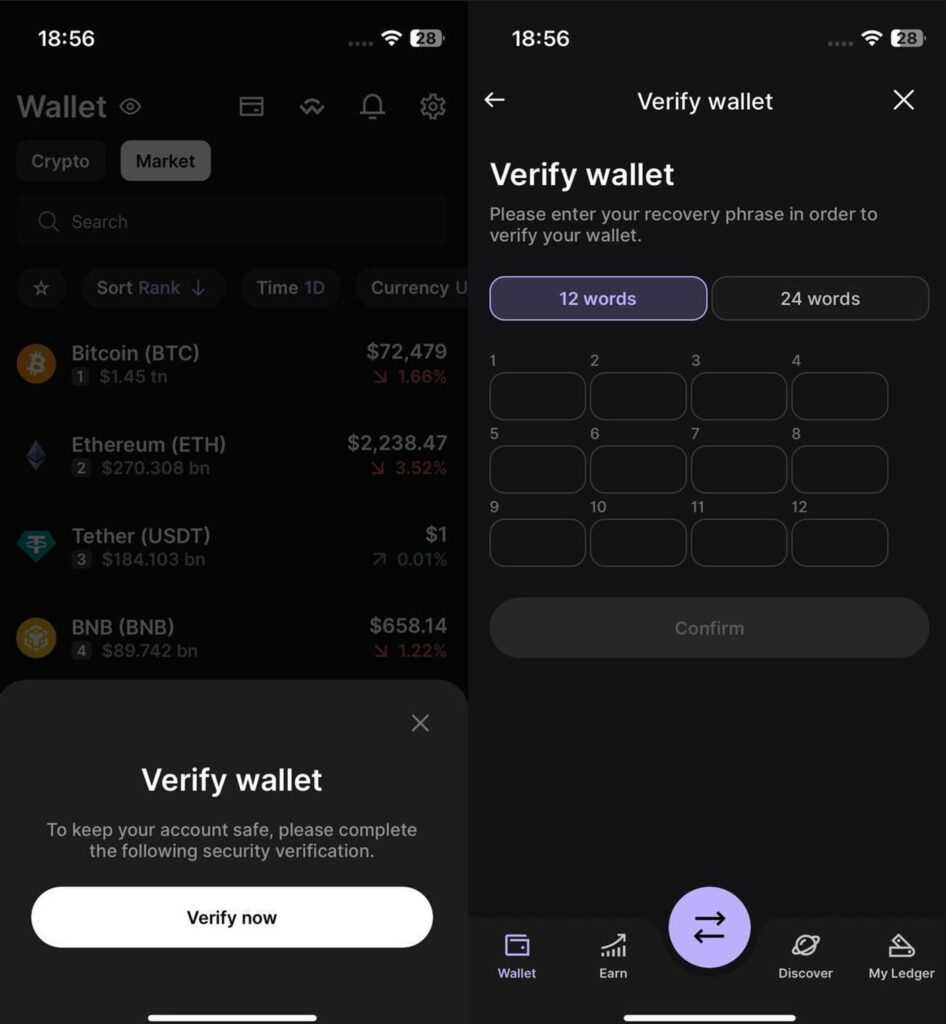
FakeWallet follows a more direct approach. Instead of relying only on image stealing or background spyware behavior, the newer campaign tricks users into entering seed phrases during wallet setup, recovery, or fake security verification screens.
Why seed phrases are so dangerous to lose
A seed phrase is the recovery key for a crypto wallet. It usually consists of 12 or 24 words and lets the owner restore access to funds on a new device.
Source: Kaspersky
If an attacker gets that phrase, they do not need the victim’s phone, password, or approval. They can restore the wallet elsewhere and move the funds to their own address.
That makes these attacks especially damaging. Crypto transactions cannot usually be reversed, and stolen funds often move quickly through mixers, bridges, or multiple wallets.
How the malicious iPhone apps worked
The FakeWallet attack used several steps to reach the victim’s crypto assets:
- The user found a fake crypto wallet app in the App Store.
- The app appeared to offer a way around regional wallet restrictions.
- The app opened a fake App Store-style web page.
- The page pushed the user to install a wallet through a provisioning profile.
- The victim trusted the developer profile on the iPhone.
- A trojanized wallet app was installed.
- The app intercepted or requested the victim’s seed phrase.
- The seed phrase was encrypted and sent to the attacker.
Kaspersky says the malicious wallet modules were adapted to the specific wallet being impersonated. In hot wallet attacks, the malware monitored wallet creation or recovery screens to capture the phrase. For cold wallet brands such as Ledger, the attackers used phishing prompts that asked users to enter their recovery phrase manually.
The use of provisioning profiles also made the campaign more deceptive. Apple created enterprise provisioning profiles so organizations can distribute internal apps to employees, but Kaspersky notes that malware operators also abuse them to run apps outside the App Store.
Apple removed the malicious apps
Kaspersky says it reported the malicious apps to Apple. Several were removed before publication, and Apple later removed the remaining app and terminated the related developer account, according to the report.
The case still shows that official app stores do not remove all risk. Attackers increasingly combine App Store listings, fake branding, phishing websites, and sideloading prompts to make scams look more credible.
For crypto users, the safest route remains simple. Download wallet apps only from official wallet websites, verify the developer name, and never enter a recovery phrase into a page or app opened from an unexpected redirect.
How iPhone users can stay safe
- Download crypto wallet apps only through links on the official wallet website.
- Check the developer name before installing any wallet app.
- Avoid apps that claim to bypass regional restrictions.
- Do not install unknown iOS configuration or provisioning profiles.
- Never type a seed phrase into a browser page.
- Treat recovery phrase verification screens as suspicious.
- Use a separate device for high-value wallets when possible.
- Move funds to a new wallet if a seed phrase was entered into a suspicious app.
FAQ
FakeWallet is a crypto theft campaign found by Kaspersky. It used 26 fake iOS apps in Apple’s App Store to impersonate popular crypto wallets and steal recovery phrases.
The fake apps copied brands including MetaMask, Ledger, Trust Wallet, Coinbase, TokenPocket, imToken, and Bitpie.
Yes. Kaspersky says most of the fake apps were available only to Chinese iOS users because official wallet apps are restricted in China’s App Store. However, the malware had no technical region lock.
The apps redirected users to fake wallet pages and pushed trojanized wallet installations through iOS provisioning profiles. The malicious apps then captured recovery phrases or tricked users into entering them.


Read our disclosure page to find out how can you help VPNCentral sustain the editorial team Read more


Improve this guide




User forum
0 messages