
New Malware Campaign Uses Fake Government Project Emails to Target Pakistan Officials


 6 min. read
  Published on
A new malware campaign is targeting government employees in Pakistan through spear-phishing emails that impersonate trusted internal communication. The attack uses fake project documents, staged payload delivery, and obfuscation to avoid detection and gain remote access to infected systems.
The campaign reportedly targeted staff linked to the Punjab Safe Cities Authority and PPIC3. The phishing email referenced a government project called the “Safe Jail Project,” which helped the message look relevant to the victims. Researchers found that the email carried two malicious attachments, a Word document named CAD Reprot.doc and a PDF named ANPR Reprot.pdf.

Access content across the globe at the highest speed rate.
70% of our readers choose Private Internet Access
70% of our readers choose ExpressVPN

Browse the web from multiple devices with industry-standard security protocols.

Faster dedicated servers for specific actions (currently at summer discounts)
Both files used different routes to reach the same goal. The Word document relied on hidden macro logic, while the PDF displayed a fake Adobe Reader error and pushed the victim toward a malicious download. This gave the attacker two chances to infect the same target.
How the phishing attack works
The attack starts with a targeted email rather than a broad spam campaign. The message uses official-sounding language and a real institutional theme to increase trust.
The Word attachment uses a technique called VBA stomping. In this method, the readable macro source code gets removed, while the compiled macro code remains inside the file. Many security tools inspect visible macro code first, so this can help the document avoid basic detection.
If the victim enables content in the Word file, the hidden macro runs in the background. It then downloads a payload named code.exe from adobe-pdfreader.b-cdn.net and writes it to the temporary folder through Windows scripting components.
Why the PDF attachment matters
The PDF gives the attacker a second delivery path. It shows a fake Adobe Reader-style error and encourages the user to update or install a reader component.
When the victim clicks the fake update button, the file starts a download tied to an unsigned .NET ClickOnce manifest that impersonates Adobe software. Hybrid Analysis data also shows a PDF sample referencing https://adobe-pdfreader.b-cdn.net/Adobe.application, matching the same kind of fake Adobe delivery path.
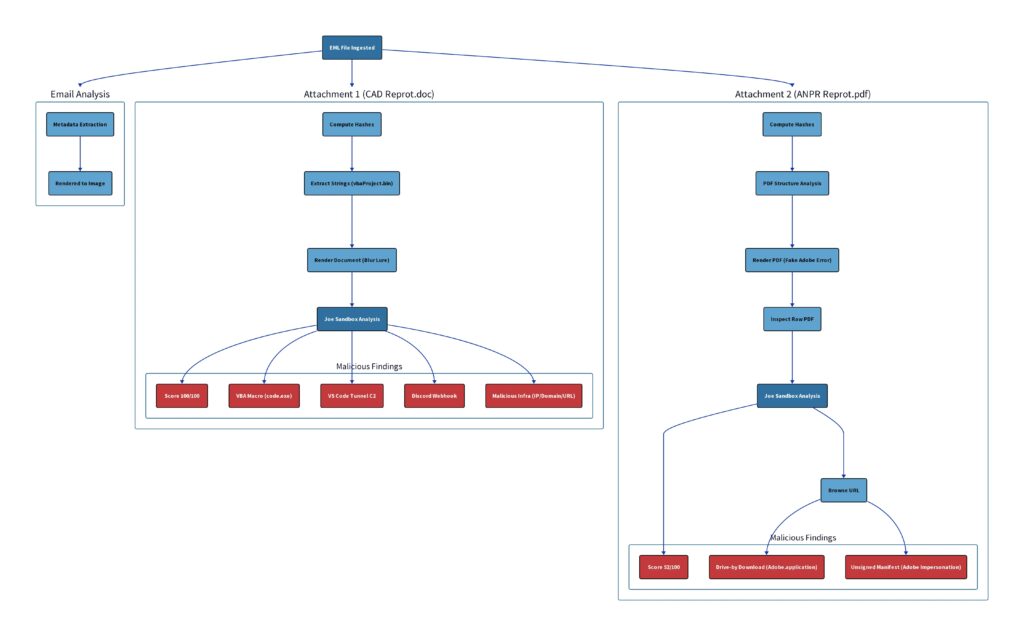
This staged approach makes the attack harder to stop. Even if one attachment fails, the second file may still convince the victim to run the payload.
Key details of the campaign
| Detail | Information |
|---|---|
| Target | Government employees in Pakistan |
| Mentioned organizations | Punjab Safe Cities Authority and PPIC3 |
| Lure theme | Safe Jail Project |
| Word attachment | CAD Reprot.doc |
| PDF attachment | ANPR Reprot.pdf |
| Main payload | code.exe |
| Delivery domain | adobe-pdfreader.b-cdn.net |
| Hosting method | BunnyCDN infrastructure |
| Main techniques | Spear phishing, VBA stomping, staged delivery, fake update prompt |
| Reported goal | Persistent remote access |
VS Code tunnels make the attack harder to spot
The most concerning part of the campaign is its abuse of Microsoft’s legitimate VS Code tunnel service. Once code.exe runs on the victim’s device, it can route activity through Microsoft infrastructure, making malicious traffic look closer to normal developer activity.
This creates a detection problem for security teams. Blocking all Microsoft developer services may break legitimate workflows, but allowing every connection without review gives attackers room to hide.
The attackers also used Discord webhooks to receive notifications when a system was compromised. Discord webhooks are easy to set up and often blend into normal web traffic, which makes them attractive for low-profile attacker communication.
Why this campaign is dangerous
The campaign does not rely on a single trick. It combines social engineering, trusted project names, fake Adobe prompts, CDN-hosted payloads, macro obfuscation, and legitimate tunnel infrastructure.
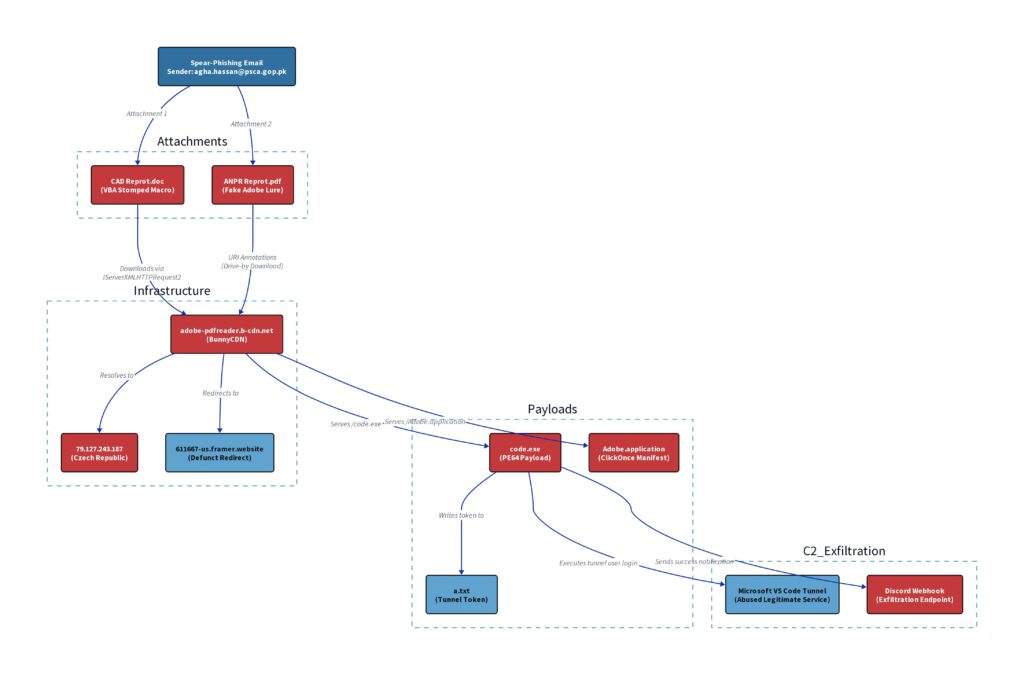
That mix gives the attacker several advantages. The email looks relevant. The attachments look work-related. The payload comes from infrastructure that may not look suspicious at first glance.
The use of a legitimate CDN also matters. Security tools often treat well-known hosting providers differently from newly registered malicious domains, so attackers can use that trust to delay detection.
Detection signals reported by researchers
| Signal | Reported finding |
|---|---|
| Sandbox rating | 100 out of 100 malicious score for the Word document |
| Confidence level | 95% confidence in malicious behavior |
| Network behavior | Payload hosted on BunnyCDN-linked infrastructure |
| C2 method | VS Code tunnel service |
| Notification method | Discord webhooks |
| Malware family match | No known Malpedia family match reported |
| Joe Sandbox Web IDs | 1903908, 1903907, 1903906 |
The lack of a known malware family match suggests the toolset may have been built or customized for this campaign. That increases risk because signature-based detection may not catch it quickly.
How organizations can defend against this attack
Security teams should treat unexpected documents that ask users to enable macros or install updates as high-risk files. This applies even when the email appears to reference an internal project.
Organizations should also review whether they allow VS Code tunnels in sensitive environments. If developers need them, security teams can monitor usage, restrict access, and alert on unusual execution from temporary folders.
The same applies to Discord webhooks. Business environments rarely need non-browser applications to connect to Discord webhook endpoints, so those connections should raise alerts.
Recommended actions:
- Block macros from internet-delivered Office documents.
- Train employees to report project documents that ask them to enable content.
- Block fake Adobe update prompts from email attachments.
- Monitor downloads from unapproved CDN domains.
- Alert when executables run from temporary folders.
- Review VS Code tunnel usage across endpoints.
- Flag Discord webhook traffic from non-browser processes.
- Use sandboxing for email attachments before delivery.
- Restrict ClickOnce execution where it is not needed.
- Hunt for connections to
adobe-pdfreader.b-cdn.net.
What security teams should check now
Teams should search email gateways for messages containing CAD Reprot.doc, ANPR Reprot.pdf, or Safe Jail Project references. They should also check proxy and DNS logs for traffic to adobe-pdfreader.b-cdn.net.
Endpoint teams should look for code.exe launched from temporary folders. They should also review suspicious Visual Studio Code tunnel activity from machines that do not normally use developer tools.
If an infection is suspected, teams should isolate the device, collect forensic data, rotate exposed credentials, and review lateral movement attempts.
FAQ
It is a targeted phishing campaign against government employees in Pakistan. It uses fake project documents, hidden macro code, staged payload delivery, and legitimate services to avoid detection.
The campaign reportedly targeted staff linked to the Punjab Safe Cities Authority and PPIC3.
The email carried a Word document named CAD Reprot.doc and a PDF named ANPR Reprot.pdf.
VBA stomping hides readable macro source code while leaving compiled macro code inside the Office document. This can make malicious documents harder to detect.


Read our disclosure page to find out how can you help VPNCentral sustain the editorial team Read more


Improve this guide

User forum
0 messages