
PoC Details Published for Android ADB Flaw That Can Expose Remote Shell Access


 7 min. read
  Published on
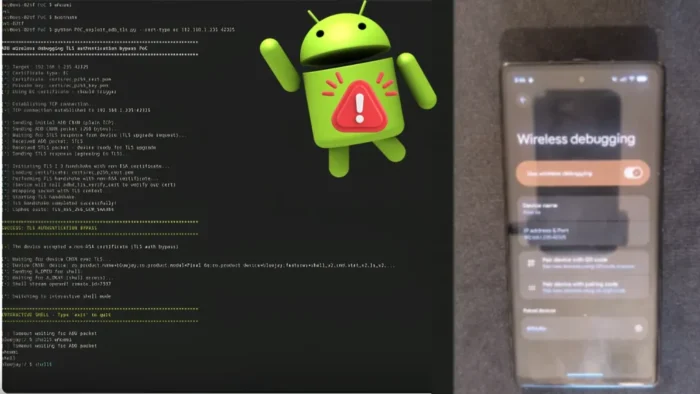
Security researchers have published technical proof-of-concept details for CVE-2026-0073, a critical Android vulnerability fixed in Google’s May 2026 Android Security Bulletin. The flaw affects Android’s ADB daemon, known as adbd, and can let a nearby attacker bypass wireless ADB authentication under specific conditions.
The issue does not affect every Android phone by default. An attacker needs adjacent network access, an exposed wireless ADB or ADB-over-TCP service, and a device that already has at least one paired RSA ADB host key. If those conditions exist, exploitation can lead to remote command execution as the Android shell user without any action from the victim.

Access content across the globe at the highest speed rate.
70% of our readers choose Private Internet Access
70% of our readers choose ExpressVPN

Browse the web from multiple devices with industry-standard security protocols.

Faster dedicated servers for specific actions (currently at summer discounts)
Google lists the flaw in the Android System component and marks it as critical. The May 2026 security patch level addresses the vulnerability for affected Android versions, including Android 14, Android 15, Android 16, and Android 16-qpr2.
What Makes CVE-2026-0073 Serious
CVE-2026-0073 targets the trust model behind wireless Android Debug Bridge connections. ADB allows developers, administrators, repair teams, and power users to debug Android devices, install apps, inspect logs, and open shell sessions. Wireless ADB brings those capabilities to a network connection instead of a USB cable.
The vulnerability sits in the certificate verification logic used by the ADB daemon. During wireless ADB authentication, Android should confirm that the connecting client matches a previously trusted host. In the vulnerable implementation, a key comparison result could be interpreted incorrectly, allowing a mismatched certificate to pass authentication.
Barghest researchers described the bug as an authentication bypass rather than classic command injection. In practice, the attack matters because it can turn a reachable debugging interface into an unauthorized shell session.
Affected Android Versions and Patch Status
| Item | Details |
|---|---|
| CVE | CVE-2026-0073 |
| Component | Android System, adbd |
| Impact | Remote code execution as the shell user |
| User interaction | Not required |
| Attack position | Proximal or adjacent network access |
| Affected versions | Android 14, Android 15, Android 16, and Android 16-qpr2 before the May 2026 patch level |
| Fix | Android security patch level 2026-05-01 or later |
Google’s bulletin says security patch levels of 2026-05-01 or later address the issue. The flaw also appears under Google Play system updates for the adbd subcomponent, which means some devices may receive the fix through system update channels depending on OEM support and device configuration.
NVD currently lists the vulnerability description and shows a CISA-ADP CVSS 3.1 score of 8.8, rated High. Google’s Android bulletin rates the issue Critical because of the potential effect on affected devices when the vulnerable debugging path can be reached.
How the ADB Authentication Bypass Works
The flaw comes from how Android handled a public key comparison inside `adbd_tls_verify_cert` in `auth.cpp`. Wireless ADB uses TLS client authentication to confirm that a connecting host matches an already trusted debugging key.
The vulnerable code used `EVP_PKEY_cmp` and treated any non-zero return value as a successful match. That logic is unsafe because key comparison APIs can return different non-zero values for cases that do not mean the keys match.
Google’s public AOSP patch confirms the fix: Android now checks for an exact match result rather than accepting every non-zero return. The patch note states, “Not all non-zero values mean success,” which directly confirms the logic error behind the vulnerability.
Why the Attack Requires Specific Device Conditions
This flaw is dangerous, but it does not mean every nearby attacker can compromise every Android phone. The attack depends on a risky device state, usually tied to development, testing, repair, or forensic workflows.
Successful exploitation requires several conditions to line up. The attacker must reach the device’s ADB TCP service, the device must have wireless debugging or ADB-over-TCP exposed, and the device must already trust at least one paired RSA host key.
- Developer options must be enabled.
- Wireless debugging or ADB-over-TCP must be active.
- The device must have a previously paired RSA ADB host key.
- The attacker must have network reachability to the exposed ADB service.
- The device must not have the May 2026 Android security patch level or later.
These requirements reduce the risk for ordinary users who never enable developer tools. However, the issue can matter in enterprise labs, repair shops, mobile testing teams, forensic environments, shared Wi-Fi networks, and developer-heavy workplaces.
What an Attacker Could Do With Shell Access
Exploitation gives the attacker access as the Android `shell` user. That does not automatically equal root access, and it does not directly bypass every Android security boundary. Still, the shell context is much more powerful than a normal app sandbox.
From that position, an attacker may inspect logs, read shell-accessible system information, interact with package management tools, change some settings, and stage further attacks. The exact impact depends on the Android version, OEM restrictions, SELinux policy, installed apps, and local configuration.
The most important risk is that the attacker becomes an unauthorized debugging host. That can give them a strong foothold for device reconfiguration, data exposure through accessible logs or storage, and follow-up exploitation.
How Users and Admins Should Respond
Users should install the May 2026 Android security update as soon as it becomes available for their device. On many Android phones, patch availability depends on the device maker and carrier, so users should manually check for both system updates and Google Play system updates.
Anyone who uses wireless debugging should turn it off when not actively needed. Users should also revoke unknown debugging authorizations, avoid using wireless debugging on public or untrusted Wi-Fi networks, and disable Developer options entirely on devices where they are not required.
- Open Settings.
- Go to System or About phone, depending on the device.
- Check the Android security patch level.
- Install the latest available system update.
- Open Developer options and turn off Wireless debugging.
- Revoke debugging authorizations if you no longer recognize paired hosts.
Enterprise Mitigation Checklist
Organizations should treat exposed ADB as a high-risk asset, especially on shared networks. Security teams should scan internal networks for ADB exposure, identify Android devices with debugging services enabled, and make sure affected devices receive the 2026-05-01 patch level or later.
| Action | Priority |
|---|---|
| Patch Android 14, 15, 16, and 16-qpr2 devices | High |
| Disable wireless debugging outside controlled workflows | High |
| Block ADB exposure on untrusted networks | High |
| Review paired ADB host keys on test devices | Medium |
| Segment mobile testing labs from corporate networks | Medium |
| Train developers to disable ADB after testing | Medium |
The public technical details raise the urgency for teams that leave wireless debugging enabled during testing. Once a proof-of-concept path becomes public, defenders should assume that scanners and opportunistic tooling may start looking for exposed ADB services on local and corporate networks.
FAQ
CVE-2026-0073 is an Android adbd vulnerability that can allow a nearby attacker to bypass wireless ADB authentication and gain code execution as the Android shell user under specific device conditions.
Google states that user interaction is not required for exploitation. However, the attack also requires adjacent network access and an exposed wireless ADB or ADB-over-TCP service, so it should not be treated as a universal remote attack against all Android devices.
Google lists Android 14, Android 15, Android 16, and Android 16-qpr2 as affected versions before the 2026-05-01 security patch level.
Install the May 2026 Android security update or a later patch level, disable wireless debugging when you do not need it, revoke unknown debugging authorizations, and avoid exposing ADB on untrusted networks.


Read our disclosure page to find out how can you help VPNCentral sustain the editorial team Read more


Improve this guide




User forum
0 messages