
Hackers Abuse OAuth Device Code Flow to Steal Microsoft 365 Tokens


 10 min. read
  Published on

Hackers are increasingly abusing OAuth device code authentication to take over Microsoft 365 accounts without stealing passwords or hosting fake Microsoft login pages.
The attack tricks users into entering an attacker-generated code on Microsoft’s real device login page. Once the victim completes the prompt, the attacker receives valid access and refresh tokens for the account.

Access content across the globe at the highest speed rate.
70% of our readers choose Private Internet Access
70% of our readers choose ExpressVPN

Browse the web from multiple devices with industry-standard security protocols.

Faster dedicated servers for specific actions (currently at summer discounts)
Proofpoint says device code phishing has grown from a niche technique into a common identity attack used by cybercriminal and state-linked actors. Microsoft has also warned that recent campaigns now use automation and dynamic code generation to scale the abuse.
What device code phishing is
OAuth device code flow is a legitimate authentication method. It helps users sign in on devices that cannot easily display a full browser login, such as smart TVs, shared devices, appliances, and command-line tools.
In a normal sign-in, the device displays a short code. The user enters that code on another device through a trusted login page, and the service grants tokens back to the original device.
Attackers abuse that process by generating the code themselves. They then send the victim to Microsoft’s real device login page and convince them to enter the code, often by calling it an OTP, verification code, document code, or voicemail code.
| Item | Details |
|---|---|
| Attack type | OAuth device code phishing |
| Main target | Microsoft 365 and enterprise user accounts |
| What attackers steal | Access tokens and refresh tokens |
| Password theft required | No |
| Fake Microsoft login page required | No |
| Main defensive control | Block or restrict device code flow with Conditional Access |
How the attack works
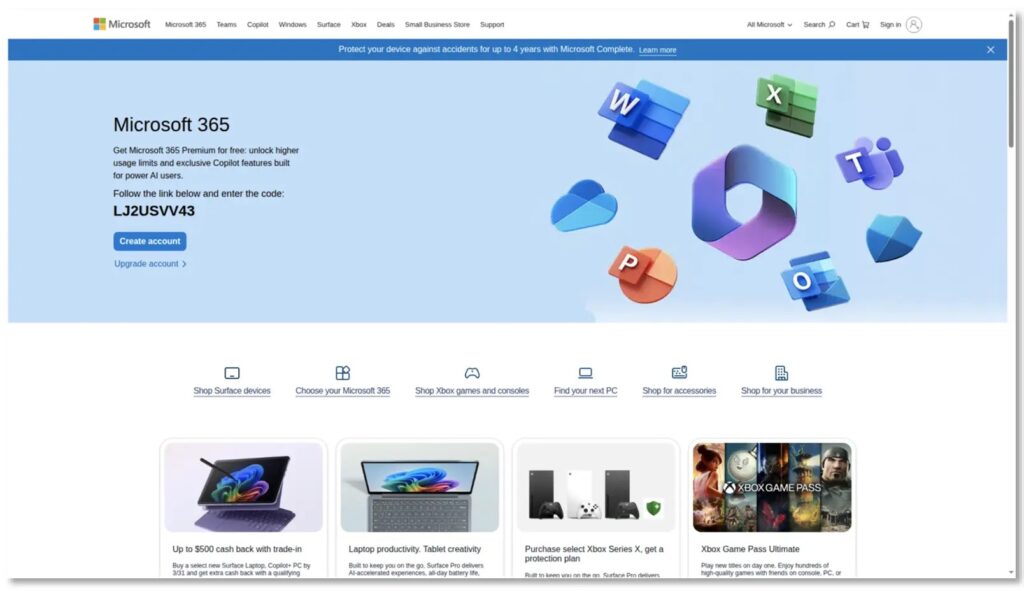
The attack usually starts with an email, PDF attachment, QR code, voicemail lure, DocuSign theme, SharePoint message, or Microsoft-branded landing page.
The lure tells the user to copy a code and visit Microsoft’s device login page. Because the final login happens on a real Microsoft domain, the process can look normal to the victim.
If the victim enters the code and completes authentication, Microsoft issues tokens to the attacker-controlled session or application. The attacker can then use those tokens to access email, files, Microsoft Graph data, and other Microsoft 365 resources available to the user.
- The attacker generates a device code through legitimate OAuth infrastructure.
- The victim receives a lure by email, PDF, QR code, or compromised account.
- The victim opens Microsoft’s real device login page.
- The victim enters the attacker’s code and completes authentication.
- The attacker receives valid tokens and accesses the account.
- The attacker may use the compromised account to send more phishing messages.
Why this bypasses normal phishing expectations
Device code phishing does not behave like traditional credential phishing. The victim may never type a password into an attacker-controlled page.
MFA also does not always stop the attack because the victim completes the real sign-in process. From Microsoft’s perspective, the user approved the device code authentication request.
This makes the tactic especially difficult for users to recognize. The final page is legitimate, the prompt looks normal, and the attacker does not need to proxy a login session like a classic adversary-in-the-middle phishing kit.
Newer campaigns generate codes on demand
Older device code phishing attacks had a practical limit. The code expired quickly, often after about 15 minutes, so attackers needed victims to act fast.
Recent campaigns changed that model. Proofpoint says many current attacks generate the code dynamically when the user clicks the phishing link. This lets the lure sit in an inbox longer and still start a fresh attack when opened.
Microsoft also observed a widespread campaign using automation and dynamic code generation to work around the normal short code lifetime. That shift makes device code phishing more scalable and harder to stop with timing alone.
Threat actors are adopting the method quickly
Proofpoint says multiple threat clusters now use device code phishing. Some campaigns focus on Microsoft accounts, while smaller volumes target other enterprise accounts.
TA4903 began using device code phishing in March 2026 and continued impersonating small businesses and government entities. In one April 2026 campaign, the actor sent salary-themed emails with PDF attachments and QR codes that led to device code phishing pages.
Proofpoint also reported activity tied to EvilTokens, Tycoon 2FA, ODx, and Kali365-style device code phishing services. This shows that the method has moved into phishing-as-a-service markets, where less skilled attackers can buy working attack kits.
| Threat or kit | Reported activity | Why it matters |
|---|---|---|
| EvilTokens | Device code phishing-as-a-service platform | Helps attackers generate lures and manage compromised accounts |
| TA4903 | Campaigns using PDFs, QR codes, DocuSign, and Microsoft themes | Shows business email compromise actors moving to device code abuse |
| Tycoon 2FA | Device code capabilities added after infrastructure disruption | Shows existing phishing kits adapting to token-based attacks |
| ODx and Kali365 | Device code capabilities tied to phishing service activity | Shows wider commercialization of the technique |
| Storm-2372 | Microsoft-tracked device code phishing campaign | Shows use by state-aligned or espionage-focused actors |
Microsoft 365 access can lead to wider compromise
Once attackers obtain valid tokens, they can use them to access services tied to the victim’s account. That can include Exchange Online, OneDrive, SharePoint, Teams, and Microsoft Graph.
Microsoft previously observed device code phishing actors using Graph API searches to look through compromised mailboxes for terms such as password, admin, credentials, secret, ministry, and government.
The attacker can also use the trusted account to send more phishing messages to coworkers, partners, or customers. Proofpoint refers to this as account takeover jumping, where one compromised inbox becomes the launch point for the next wave.
Tycoon 2FA shows how kits are changing
eSentire reported in May 2026 that Tycoon 2FA operators had adopted OAuth device code phishing after earlier disruption efforts against the platform.
The campaign analyzed by eSentire used a Microsoft 365 voicemail lure and ultimately pushed the victim to Microsoft’s real device login flow. The operator impersonated Microsoft Authentication Broker, a first-party Microsoft application that can broker tokens for Exchange Online, Microsoft Graph, and OneDrive for Business.
The campaign also used reputation laundering through legitimate platforms. A Trustifi click-tracking URL redirected through Cloudflare Workers before the victim reached the final lure.
Why password resets may not be enough
Device code phishing is token theft, not just password theft. That distinction matters during incident response.
If an attacker holds active refresh tokens, changing the user’s password may not fully end access in every situation. Responders should revoke sessions, revoke refresh tokens, review OAuth consents, and check mailbox rules after confirming compromise.
Security teams should also inspect non-interactive sign-in logs for suspicious device code activity, unusual user agents, unexpected source locations, and Microsoft Authentication Broker activity that does not match normal user behavior.
- Revoke active sessions for affected users.
- Revoke refresh tokens after confirmed compromise.
- Review OAuth app consents and remove suspicious grants.
- Check inbox rules, forwarding rules, and delegated mailbox access.
- Audit Graph API activity and unusual file access.
- Review sign-ins with the device code authentication protocol.
How organizations can block device code phishing
Microsoft recommends blocking device code flow wherever possible. Organizations that still need it should allow it only for documented and secured use cases.
The strongest mitigation is a Conditional Access policy that targets authentication flows and blocks device code flow for users and resources that do not need it.
Administrators should first test the policy in report-only mode to understand business impact. After review, they can enforce the block while excluding emergency access accounts and any tightly controlled legacy use cases.
- Open the Microsoft Entra admin center.
- Go to Entra ID, then Conditional Access, then Policies.
- Create a new policy for users or workload identities.
- Target the users and resources that should not use device code flow.
- Under Conditions, select Authentication Flows.
- Choose Device code flow.
- Set Grant controls to Block access.
- Run the policy in report-only mode first.
- Review sign-in logs and business impact.
- Turn the policy on after testing.
Other controls that reduce the risk
Blocking device code flow is the most direct control, but organizations should also reduce the damage from any token compromise.
Managed-device requirements can stop tokens from working on attacker-controlled devices. Continuous Access Evaluation can help token revocation take effect faster when suspicious activity appears.
Admin consent controls also matter. Users should not freely approve risky OAuth applications, and administrators should limit app consent to verified publishers and approved business tools.
| Control | Security benefit |
|---|---|
| Block device code flow | Removes the main attack path for most users |
| Require compliant devices | Limits access from attacker-controlled or unmanaged devices |
| Restrict OAuth consent | Prevents users from approving risky applications |
| Continuous Access Evaluation | Helps revoke access faster after compromise |
| Sign-in log monitoring | Finds suspicious device code authentication events |
| User training | Teaches users not to enter codes from emails, PDFs, or QR pages |
Detection signs to monitor
Security teams should hunt for successful device code authentication from users who rarely or never use that flow.
They should also review sign-ins where the original transfer method or authentication protocol points to device code flow. Microsoft says Conditional Access logs can help teams track these flows and understand whether policies apply correctly.
For Tycoon 2FA-style campaigns, eSentire also recommends looking for Microsoft Authentication Broker activity combined with suspicious non-interactive sign-ins and unusual user agents such as node or undici.
- AuthenticationProtocol equals deviceCode in Entra sign-in logs.
- Device code sign-ins from unusual countries, networks, or autonomous systems.
- Successful device code authentication after a phishing email click.
- Microsoft Authentication Broker activity that does not match user behavior.
- Non-interactive sign-ins with unusual user agents such as node or undici.
- Mailbox rules created shortly after a suspicious sign-in.
- Graph API searches against sensitive mailbox terms.
- OAuth refresh token reuse after password reset or user warning.
User training needs to change
Traditional phishing training often tells users to look for fake login pages. Device code phishing weakens that advice because the final login page can be legitimate.
Users need a clearer rule: never enter a device code that came from an email, PDF, QR code, Teams message, voicemail notice, salary notification, or document-signing page unless they personally started the sign-in on a device they control.
Training should also explain that device codes are not normal one-time passwords. If a message asks a user to copy a code into Microsoft’s device login page to open a document or voicemail, they should report it.
Why this attack will keep growing
Device code phishing gives attackers a practical way to abuse trusted identity infrastructure instead of defeating it directly.
It also fits modern phishing-as-a-service operations. Kits can generate codes dynamically, host landing pages on disposable infrastructure, use QR codes to move users to mobile devices, and automate access to compromised accounts.
For Microsoft 365 environments, the safest path is clear: block device code flow where possible, restrict it where required, monitor token activity, and treat suspicious device code logins as account compromise events.
FAQ
OAuth device code phishing is an attack where criminals generate a legitimate device code and trick a user into entering it on a real Microsoft device login page. If the user completes the prompt, the attacker receives valid access tokens for the account.
Usually, no. The attack focuses on access and refresh tokens, not passwords. The victim may authenticate on a real Microsoft page, which causes Microsoft to issue valid tokens to the attacker-controlled session or application.
MFA may not stop the attack because the user completes the real Microsoft authentication flow. The attacker abuses the approved token after the user unknowingly authorizes the device code request.
Organizations can block or restrict device code flow with Microsoft Entra Conditional Access policies. Microsoft recommends blocking device code flow wherever possible and allowing it only for documented, secured use cases.
Teams should revoke user sessions and refresh tokens, review OAuth consents, check mailbox rules and forwarding settings, audit Microsoft Graph activity, investigate sign-in logs, and reset credentials after containment.


Read our disclosure page to find out how can you help VPNCentral sustain the editorial team Read more


Improve this guide




User forum
0 messages