
New Windows MiniPlasma zero-day gives attackers SYSTEM access, PoC released


 7 min. read
  Published on
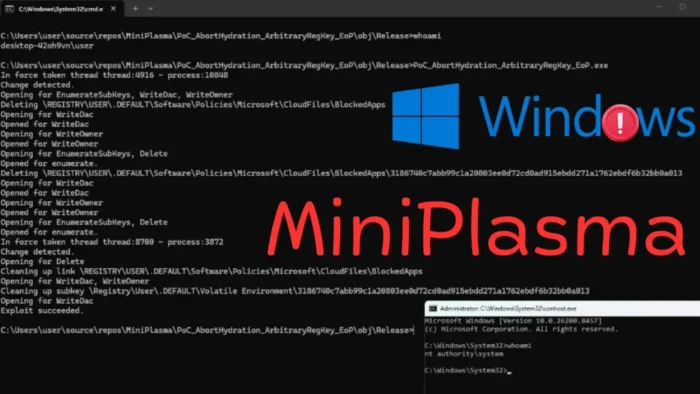
A public proof-of-concept exploit for a Windows zero-day called MiniPlasma can let a standard user gain SYSTEM privileges on fully patched Windows 11 systems.
The exploit targets the Windows Cloud Filter driver, cldflt.sys, and focuses on a routine called HsmOsBlockPlaceholderAccess. The same issue traces back to CVE-2020-17103, a vulnerability originally reported to Microsoft by Google Project Zero researcher James Forshaw in 2020.

Access content across the globe at the highest speed rate.
70% of our readers choose Private Internet Access
70% of our readers choose ExpressVPN

Browse the web from multiple devices with industry-standard security protocols.

Faster dedicated servers for specific actions (currently at summer discounts)
MiniPlasma does not give attackers initial access to a machine. Instead, it becomes dangerous after an attacker already has local code execution through malware, stolen credentials, phishing, or another exploit.
What MiniPlasma does
MiniPlasma is a local privilege escalation exploit. A low-privileged user runs the exploit, wins a race condition, and opens a command prompt with NT AUTHORITY\SYSTEM privileges.
SYSTEM is one of the most powerful local accounts in Windows. With it, an attacker can disable security tools, dump credentials, install persistence, tamper with files, and move deeper into a network.
BleepingComputer tested the exploit on a fully patched Windows 11 Pro device running the latest May 2026 updates and confirmed that it opened a SYSTEM command prompt from a standard user account.
| Detail | Information |
|---|---|
| Name | MiniPlasma |
| Bug type | Local privilege escalation |
| Target component | Windows Cloud Filter driver, cldflt.sys |
| Target routine | HsmOsBlockPlaceholderAccess |
| Related older CVE | CVE-2020-17103 |
| Impact | Standard user to SYSTEM escalation |
| Public PoC | Released on GitHub |
A 2020 Windows flaw appears to work again
The issue behind MiniPlasma is tied to a Windows Cloud Files Mini Filter Driver vulnerability that Microsoft tracked as CVE-2020-17103. Microsoft released a fix for that vulnerability in December 2020.
The researcher behind MiniPlasma, known as Chaotic Eclipse or Nightmare-Eclipse, claims the original Google Project Zero proof-of-concept still works without changes on current Windows builds.
That leaves two possible explanations. Microsoft may not have fully fixed the issue across all modern Windows branches, or a later code change may have reintroduced the vulnerable behavior.
How the exploit abuses the Cloud Filter driver
The vulnerable behavior sits in how the Cloud Filter driver handles registry key creation through cloud file placeholder logic.
The original Project Zero report said HsmOsBlockPlaceholderAccess could allow arbitrary registry keys to be created in the .DEFAULT user hive without proper access checks.
MiniPlasma weaponizes this behavior by racing token state changes and abusing the driver path until Windows writes to locations a normal user should not control.
- The exploit starts from a standard user account.
- It targets cldflt.sys, the Cloud Filter driver used by Windows cloud file features.
- It abuses registry operations tied to placeholder access logic.
- It relies on a race condition, so reliability can vary by system.
- Successful exploitation gives the attacker SYSTEM privileges.
Which Windows systems are affected?
Public testing confirms that MiniPlasma works on fully patched Windows 11 systems with the May 2026 security updates installed.
ThreatLocker says confirmed affected versions include Windows 11 and Windows Server 2022 and 2025. It also says Windows 10 does not appear to be affected.
Independent researcher Will Dormann confirmed that the exploit works on the latest public Windows 11 release, but noted that it does not appear to work on the latest Windows 11 Insider Preview Canary build.
| Platform | Current public status |
|---|---|
| Windows 11 public builds | Confirmed vulnerable in independent testing |
| Windows Server 2022 and 2025 | Listed by ThreatLocker as confirmed affected |
| Windows 10 | Does not appear affected, according to ThreatLocker |
| Windows 11 Insider Preview Canary | Exploit reportedly does not work |
No official patch is available yet
MiniPlasma was released shortly after Microsoft’s May 2026 Patch Tuesday. That timing left organizations without a normal monthly patch for the issue.
ThreatLocker says there is no official patch yet and that Microsoft is investigating the report. Microsoft has not assigned a new CVE for MiniPlasma at the time of writing.
The lack of a patch increases the risk because working exploit code is now public. Local privilege escalation flaws often become useful to attackers after they gain an initial foothold through another method.
Why SYSTEM access matters
Attackers often need more than one bug to fully compromise a Windows device. A phishing payload, malicious document, browser exploit, or stolen account can provide the first step, while a privilege escalation bug gives deeper control.
With SYSTEM privileges, malware can tamper with defenses, access protected areas of the system, and run with far more authority than a standard user account.
This makes MiniPlasma important for enterprise defenders even though it is not a remote exploit. It can turn a limited compromise into full local control.
What defenders should monitor
ThreatLocker recommends monitoring registry locations associated with MiniPlasma exploitation. These locations can help EDR teams detect suspicious activity tied to the exploit chain.
Organizations should also watch for unexpected SYSTEM shells, unusual child processes, and suspicious activity from low-privileged user accounts.
Detection alone is not a full fix, but it can help security teams respond while they wait for Microsoft’s official update.
| Indicator area | What to watch |
|---|---|
| Registry activity | Writes to CloudFiles policy and .DEFAULT volatile environment paths |
| Process behavior | cmd.exe or PowerShell launched with SYSTEM privileges from a user context |
| Endpoint alerts | Privilege escalation attempts from unsigned or newly downloaded tools |
| User activity | Standard accounts suddenly performing administrative actions |
Mitigation steps for organizations
Administrators should prioritize reducing the chance that attackers can run unknown code on Windows endpoints. MiniPlasma needs local execution, so blocking unauthorized payloads can reduce exposure.
Application control, least privilege, endpoint detection, and restricted script execution can all help limit the exploit’s practical use.
Organizations should also prepare to deploy Microsoft’s eventual patch quickly once it becomes available.
- Use application control to block unknown executables and scripts.
- Limit local user privileges wherever possible.
- Monitor for the registry paths linked to MiniPlasma activity.
- Review alerts for unexpected SYSTEM shells.
- Restrict PowerShell and command-line abuse through endpoint policy.
- Keep Windows Defender or another endpoint security platform enabled.
- Prepare emergency patch deployment for Microsoft’s future fix.
Why the disclosure raises patching questions
The most concerning part of MiniPlasma is the link to an older CVE that Microsoft had already marked as fixed. If current Windows builds still expose the same behavior, defenders may have trusted a patch state that did not fully reflect real risk.
Security researchers have raised similar concerns before when old bug classes returned in new code paths or across newer Windows versions.
The reported behavior in Windows 11 Insider Preview Canary may suggest Microsoft has already changed something in upcoming builds, but that does not help production systems until a supported update ships.
What users should do now
Home users should keep Windows Update enabled and avoid running files from unknown sources. MiniPlasma requires local code execution, so safe download and app habits still matter.
Business users should avoid using daily accounts with admin privileges and should report unexpected security prompts, command windows, or endpoint alerts.
IT teams should treat MiniPlasma as a high-priority local privilege escalation issue and follow Microsoft’s response closely.
FAQ
MiniPlasma is a public proof-of-concept exploit for a Windows local privilege escalation issue in the Cloud Filter driver, cldflt.sys. It can let a standard user gain SYSTEM privileges on affected systems.
No. MiniPlasma is a local privilege escalation exploit. An attacker needs local code execution first before using it to gain SYSTEM privileges.
No official Microsoft patch was available at the time of writing. Microsoft is reportedly investigating the issue, and defenders should prepare to deploy a fix once it ships.
Independent testing confirms the exploit works on fully patched Windows 11. ThreatLocker says Windows Server 2022 and 2025 are also affected, while Windows 10 does not appear affected.


Read our disclosure page to find out how can you help VPNCentral sustain the editorial team Read more


Improve this guide


User forum
0 messages