
Deleted Google API keys may keep working for up to 23 minutes, researchers warn


 8 min. read
  Published on

Deleted Google API keys may continue authenticating requests for several minutes after removal, creating a short but serious exposure window for leaked credentials. Security researchers found that some deleted keys kept working for nearly 23 minutes after users removed them from Google Cloud.
The Aikido research found that deleted Google API keys did not stop working immediately across Google’s infrastructure. During that window, an attacker with a leaked key could continue making requests to enabled APIs, including Gemini, BigQuery, and Maps.

Access content across the globe at the highest speed rate.
70% of our readers choose Private Internet Access
70% of our readers choose ExpressVPN

Browse the web from multiple devices with industry-standard security protocols.

Faster dedicated servers for specific actions (currently at summer discounts)
The finding matters because many incident response teams expect key deletion to act like immediate revocation. If a credential remains usable after deletion, defenders need to monitor for abuse even after they believe the key has been removed.
What researchers found
Aikido tested Google API key deletion across multiple trials by creating keys, deleting them, and then sending authenticated requests until the keys fully stopped working. The longest observed revocation window was nearly 23 minutes, the shortest was nearly eight minutes, and the median was about 16 minutes.
The success rate was also unpredictable. One minute after deletion, some trials still allowed a high share of requests to succeed, while other trials dropped much faster. That uneven behavior makes it difficult for teams to know exactly when a deleted key has truly stopped working.
The Dark Reading report highlighted the incident response problem: defenders may assume a deleted credential is dead, while attackers can still use it during the remaining propagation window.
| Finding | Details |
|---|---|
| Longest observed window | Nearly 23 minutes |
| Shortest observed window | Nearly eight minutes |
| Median observed window | About 16 minutes |
| Test method | Repeated key creation, deletion, and post-deletion authenticated requests |
| Services observed | Gemini, BigQuery, Maps, and other Google APIs |
| Main risk | Continued API access after credential deletion |
Why deleted API keys can still create risk
API keys often sit inside apps, scripts, test projects, repositories, mobile clients, serverless functions, and CI pipelines. If one leaks publicly, attackers can use it to call enabled APIs, consume quota, generate costs, and access data the key can reach.
Google’s API key documentation explains that standard API keys associate requests with a project for billing and quota. It also notes that authorization keys can authenticate as service accounts, which creates a different and more sensitive risk model.
In a normal incident response workflow, a team may delete the leaked key, create a replacement, and close the incident. A delayed revocation window changes that workflow because usage may continue after deletion.
Gemini access makes the issue more sensitive
The issue becomes more serious when a project has sensitive APIs enabled. Aikido said that when Gemini is enabled, a deleted key can still be used during the window to reach files uploaded to Gemini and cached conversation data.
BigQuery and Maps also showed the same general behavior, which suggests the delay comes from API key infrastructure rather than one individual service. In other words, teams should not assume that disabling risk for one service solves the broader key-revocation issue.
For organizations experimenting with AI services, this matters because API keys may connect to model providers, files, prompts, logs, usage data, and billing-sensitive endpoints.
Google’s own docs show eventual consistency exists elsewhere
Google Cloud already documents eventual consistency in identity and access changes. The IAM access change propagation documentation says access changes can take time to propagate, and recently revoked access may not be effective everywhere right away.
However, Aikido argued that Google does not clearly warn users that deleted API keys may keep authenticating after removal. That gap affects user expectations, especially when the console removes the key from view immediately.
The problem is not that distributed systems need time to sync. The problem is that credential deletion feels like an emergency control, and users expect it to stop an exposed key at once.
Why the Cloud Console can complicate response
Researchers also found that deleted keys disappear from the interface, while requests using deleted credentials can still appear under less helpful reporting labels. That can make it harder to attribute post-deletion traffic to one specific key.
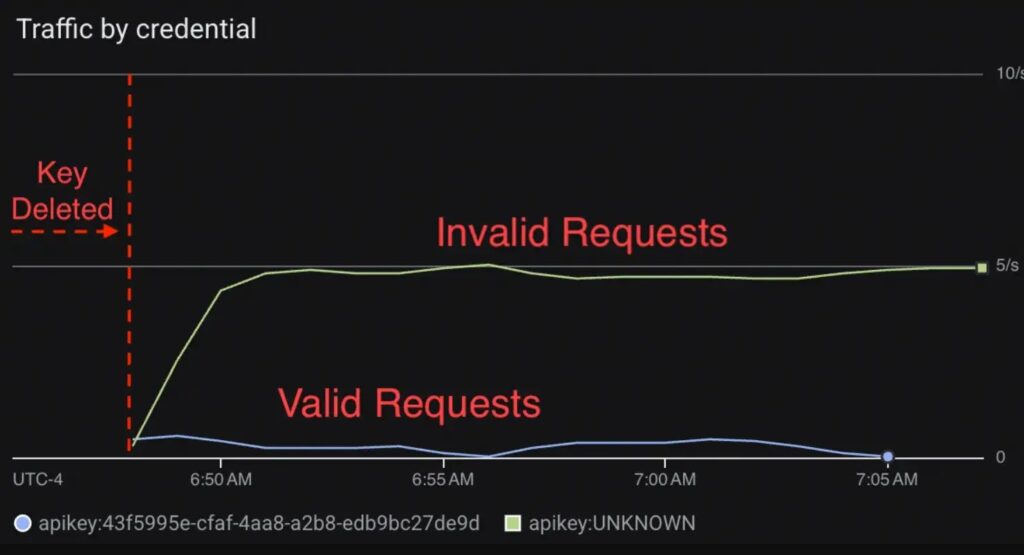
If an attacker keeps sending requests during the revocation window, the defender may not have a clean view of which deleted credential is still being tested or abused. This can slow investigation during the exact period when fast decisions matter most.
Dark Reading reported that Aikido recommended a 30-minute monitoring window after deletion because the cutoff can be unpredictable.
Different credentials revoke at different speeds
Aikido also compared other credential types. Service account key revocation propagated in about five seconds during its tests, while newer Gemini API keys with the AQ prefix propagated in about one minute.
That difference suggests faster revocation is technically possible within Google’s ecosystem. It also gives security teams a reason to review which credential types they use for sensitive workloads.
Google’s API key guidance also warns against using authorization keys in production for APIs that create or manage Google Cloud resources. Teams should choose credentials based on the API, workload type, and least-privilege design.
What attackers can do during the revocation window
The impact depends on what the exposed key can reach. Some keys may only cause billing or quota abuse, while others may expose sensitive data or connect to AI, analytics, mapping, or backend services.
- Continue calling enabled APIs after the key was deleted.
- Consume quota and create unexpected cloud costs.
- Access Gemini-related files or cached conversation data where available.
- Query BigQuery or Maps endpoints if the key can use them.
- Test whether the key still works from different regions.
- Blend post-deletion traffic into confusing credential reporting.
How teams should respond to leaked Google API keys
Security teams should still delete leaked keys immediately, but they should not treat deletion as the end of the incident. They should monitor usage for at least 30 minutes after deletion and review which APIs remained enabled during the exposure window.

The Aikido report recommends treating API key deletion as a 30-minute operation and watching API usage during that period. That gives teams a buffer beyond the longest observed 23-minute window.
- Delete the leaked key immediately.
- Create a replacement key only with the restrictions the workload needs.
- Monitor API requests by credential for at least 30 minutes.
- Review enabled APIs and disable anything unnecessary.
- Check billing, quota, and usage spikes after the leak.
- Rotate any secrets or data that the key may have exposed.
- Search repositories, logs, mobile apps, and build artifacts for old copies of the key.
Use restrictions before a leak happens
API key restrictions reduce damage when a key leaks. Teams should restrict keys by API, application type, HTTP referrer, IP address, Android app, iOS app, or other available controls depending on how the key is used.
They should also avoid sharing one key across many services. A separate key per workload makes rotation easier and reduces the blast radius when one credential leaks.
| Control | Why it helps |
|---|---|
| API restrictions | Limits which Google APIs the key can call. |
| Application restrictions | Limits where the key can be used from. |
| Separate keys per workload | Makes leaks easier to contain and investigate. |
| Usage monitoring | Detects abuse during and after revocation. |
| Budget and quota alerts | Warns teams before abuse becomes expensive. |
Why just-in-time key strategies need adjustment
Some teams use short-lived or just-in-time credential strategies to reduce exposure. A delayed revocation window can break that mental model because deleting a key does not mean it stops working instantly.
If a workflow mints Google API keys dynamically and deletes them after use, the design needs a buffer period. Otherwise, a key may still authenticate after the workflow assumes it has expired.
The Google IAM propagation page shows that distributed access changes can take time in Google Cloud, but incident response playbooks should make that behavior explicit for API key deletion.
What Google users should change now
Organizations should update their credential response procedures so API key deletion includes a monitoring period. They should also review projects with Gemini, BigQuery, Maps, Vertex AI, and other enabled services that could create data exposure or billing abuse.
Developers should avoid placing API keys in public repositories, client-side code, mobile apps, documentation, screenshots, issue trackers, and build logs. If a key must appear in a client app, it should use strict application and API restrictions.
The safest approach is to assume a deleted Google API key may remain usable for up to 30 minutes, watch API activity closely during that period, and design future workloads so a leaked key cannot reach more than it needs.
FAQ
Not always. Aikido researchers found that deleted Google API keys could continue authenticating for nearly 23 minutes in their tests, with a median revocation window of about 16 minutes.
Aikido said it observed the behavior with keys that had access to Gemini and also saw the same behavior with keys scoped to other Google Cloud APIs such as BigQuery and Maps.
If an API key leaks, attackers can continue making API calls after deletion during the revocation window. That can lead to data access, quota abuse, unexpected costs, and harder incident response.
Teams should monitor API usage for at least 30 minutes after deletion. That gives a buffer beyond the longest 23-minute window observed by Aikido.
Organizations should restrict keys by API and application source, avoid exposing keys in public code, use separate keys per workload, monitor usage, configure billing alerts, and rotate credentials quickly after leaks.


Read our disclosure page to find out how can you help VPNCentral sustain the editorial team Read more


Improve this guide




User forum
0 messages