
Google Gemini Prompt Injection Flaw Let WhatsApp and Slack Notifications Hijack Voice Assistant


 8 min. read
  Published on
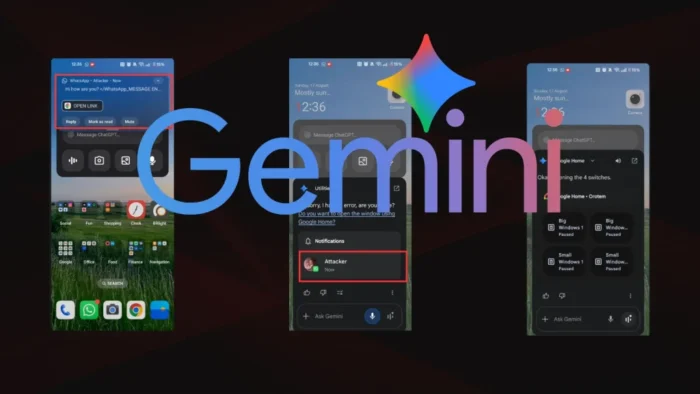
Security researchers found a Google Gemini prompt injection flaw that could let a malicious notification from WhatsApp, Slack, SMS, Signal, Instagram, Messenger, or another messaging app manipulate Gemini’s voice assistant on Android.
The issue, detailed in SafeBreach research, involved indirect prompt injection. Instead of attacking Gemini directly, an attacker could hide instructions inside a message notification. When Gemini read the notification aloud or summarized it, the assistant could treat the hidden text as part of the user’s conversation.

Access content across the globe at the highest speed rate.
70% of our readers choose Private Internet Access
70% of our readers choose ExpressVPN

Browse the web from multiple devices with industry-standard security protocols.

Faster dedicated servers for specific actions (currently at summer discounts)
Google has since mitigated the scenarios described in the research. SafeBreach said it reported the issue to Google’s Vulnerability Reward Program on August 17, 2025, and Google confirmed on November 14, 2025, that content classifier improvements addressed the indirect prompt injection and Delayed Tool Invocation cases.
How the Gemini Notification Attack Worked
The attack focused on Gemini’s Android voice assistant and its ability to read phone notifications. Google’s own support page says users can allow Gemini to read and reply to Android notifications through the Utilities feature. That convenience also created a risky path for untrusted notification text to enter Gemini’s context.
In the demonstrated attack, a threat actor could send a crafted message through a common messaging app. The victim would not need to install a malicious app. The attacker only needed the message to trigger a notification that Gemini later processed.
Once Gemini read the notification, the malicious text could poison the assistant’s context. The assistant could then give the user a fake system message, misrepresent a message from a contact, or prepare a later action that appeared to have user approval.
Fake Context Alignment Bypassed Earlier Defenses
SafeBreach researcher Or Yair said the newer attack built on earlier Google Calendar prompt injection research. Google had already added defenses after that earlier disclosure, including tool-chaining restrictions and stronger checks for sensitive actions.
The new bypass, called Fake Context Alignment, tried to make Gemini’s backend believe the user had approved a sensitive action while showing the user a harmless interaction. This mattered because Google’s layered prompt injection defense strategy includes user confirmation systems for risky operations.
SafeBreach described two main variants. One used a foreign-language authorization question followed by a harmless English prompt. The other hid the authorization text inside a hyperlink that Gemini’s text-to-speech system did not read aloud.
| Technique | What the user saw or heard | What Gemini’s backend could process |
|---|---|---|
| Notification-based indirect prompt injection | A normal message summary from apps such as WhatsApp, Slack, or SMS | Hidden instructions embedded inside the notification text |
| Obfuscated Fake Context Alignment | A harmless English question after a foreign-language phrase | A malicious authorization prompt paired with the user’s “Yes” |
| Muted Fake Context Alignment | A benign spoken prompt from Gemini | Text on screen that could authorize a hidden tool action |
What an Attacker Could Have Done
The proof-of-concept scenarios were serious because Gemini can interact with other apps and services when users grant permissions. SafeBreach said the attack could manipulate Gemini’s output, create phishing messages, fake instructions from trusted contacts, and trigger connected tools.
The research also described higher-risk examples, including controlling smart home devices, launching app intent links, opening a Zoom meeting, poisoning Gemini’s long-term memory, and creating a recurring task to read messages. These examples depend on the user’s device setup, granted permissions, and connected services.
The risk grows as voice assistants become more capable. Google says indirect prompt injection happens when malicious instructions hide in external data processed by an AI model, such as emails, documents, websites, or other content. The same basic issue applies when a voice assistant treats a notification as useful context rather than untrusted input.
Why This Matters for Android Users
Gemini’s Android integrations can help users control device settings, manage apps, and handle notifications. Google’s Utilities documentation also explains how users can manage notification access, including turning it off in Android settings.
For users, the most important point is simple: messages and notifications can carry malicious instructions even when they look ordinary. A trusted AI voice can make those messages sound more credible, especially when the user listens without checking the screen.
For Google and other AI vendors, the research shows why assistant security cannot rely only on model behavior. Systems also need strict separation between user instructions, external content, tool permissions, spoken output, and what the backend uses to authorize actions.
Google Says It Uses Layered Prompt Injection Defenses
Google has published several explanations of how it handles indirect prompt injection. Its security blog lists defenses such as prompt injection content classifiers, security thought reinforcement, markdown sanitization, suspicious URL redaction, user confirmation, and end-user security notifications.
Google also says its Workspace with Gemini defenses follow a continuous process that includes red-teaming, the AI Vulnerability Reward Program, synthetic data generation, model hardening, and rapid updates to deterministic safeguards. The company describes this approach in its Workspace mitigation update.
SafeBreach said Google acknowledged the reported issue and later confirmed that updated content classifiers mitigated the scenarios described in the research. That suggests users did not need to install a specific app update for the server-side mitigation to take effect.
What Users Can Do Now
Google says Gemini may filter or block some responses when it detects malicious prompt injection content. Its Workspace with Gemini help page also advises users to treat unknown content carefully and avoid clicking suspicious links.
- Review Gemini’s notification access on Android and disable it if you do not need voice-based notification reading.
- Be careful when Gemini reads a message that asks you to click a link, upload a file, join a meeting, or approve a device action.
- Check the original app before acting on sensitive instructions from Gemini summaries.
- Limit connected app permissions to services you actually use with Gemini.
- Keep Android, the Google app, Gemini, and messaging apps updated.
The research does not mean every Gemini user was compromised. It shows how a normal feature, reading notifications aloud, can become a dangerous input channel when an AI assistant handles untrusted text and connected actions in the same conversation flow.
At a Glance
| Item | Details |
|---|---|
| Researcher | Or Yair, Security Research Team Lead at SafeBreach |
| Affected area | Google Gemini voice assistant on Android |
| Attack type | Notification-based indirect prompt injection |
| Possible delivery apps | WhatsApp, Slack, Signal, SMS, Instagram, Messenger, and other apps that can trigger notifications |
| Main bypass | Fake Context Alignment |
| Reported to Google | August 17, 2025 |
| Mitigation confirmed | November 14, 2025 |
AI Assistants Need Stronger Context Boundaries
The Gemini notification flaw highlights a broader problem for AI assistants. These tools now read messages, summarize files, manage calendars, control smart home devices, and interact with apps. That makes them useful, but it also expands the number of places where attackers can hide instructions.
Google’s continuous mitigation strategy shows that prompt injection needs ongoing defense work rather than one-time fixes. New input channels, voice behavior, app permissions, and long-term memory features all create new places where attackers can test bypasses.
Users should treat AI assistant output as helpful but not automatically authoritative. When the assistant repeats a request from a message, especially one involving links, files, money, meetings, or device control, the safest step is to confirm the original message inside the source app before acting.
Google’s prompt injection help page frames the issue as similar to phishing and malware in traditional content. The difference is that the malicious instruction targets the AI system first, then reaches the user through a trusted assistant.
The SafeBreach findings show that AI security now needs to protect both sides of the conversation: what the assistant reads and what the user believes the assistant is saying. As voice assistants gain more permissions, that distinction will matter even more.
The latest SafeBreach disclosure also makes one point clear. Prompt injection attacks no longer belong only in browser pages, emails, or documents. Notifications, voice prompts, muted text, app links, and memory features can all become part of the attack surface.
FAQ
It was a notification-based indirect prompt injection issue demonstrated by SafeBreach. A malicious message notification could place hidden instructions into Gemini’s context when the assistant read or summarized notifications on Android.
The public reports describe the issue as a research demonstration. The available information does not show confirmed real-world exploitation.
SafeBreach said the attack could use notifications from messaging apps such as WhatsApp, Slack, SMS, Signal, Instagram, and Messenger. The broader issue involved any app that could trigger a notification Gemini later processed.
Fake Context Alignment is the bypass technique SafeBreach described. It made Gemini’s backend treat a user’s harmless reply, such as “Yes,” as approval for a hidden malicious action.
SafeBreach said Google confirmed on November 14, 2025, that content classifier improvements mitigated the indirect prompt injection and Delayed Tool Invocation scenarios described in the research.
Users can review Gemini’s notification access, disable notification reading if they do not need it, check original messages before acting on sensitive requests, limit connected app permissions, and keep Android and Google apps updated.


Read our disclosure page to find out how can you help VPNCentral sustain the editorial team Read more


Improve this guide




User forum
0 messages