
FlutterShell macOS Backdoor Spread Through Malicious Google Ads


 8 min. read
  Published on
Security researchers have uncovered a macOS malvertising campaign that used fake desktop apps and Google Ads to deliver a new backdoor called FlutterShell. Unit 42 tracks the campaign as Operation FlutterBridge and links it to a financially motivated activity cluster called CL-CRI-1089.
The campaign targeted macOS users with ads for apps that looked useful and legitimate, including a podcast player and PDF tools. Once installed, the apps could hijack Chrome search settings, communicate with attacker-controlled infrastructure, and expose users to backdoor capabilities such as command execution and file system access.

Access content across the globe at the highest speed rate.
70% of our readers choose Private Internet Access
70% of our readers choose ExpressVPN

Browse the web from multiple devices with industry-standard security protocols.

Faster dedicated servers for specific actions (currently at summer discounts)
Unit 42 says the attackers used hundreds of Google-verified advertisements and shell companies to reach users in several markets, with emphasis on English-speaking countries and Western Europe. Google told the researchers that malware has no place on its platforms and that it suspended the advertiser accounts involved.
What is FlutterShell?
FlutterShell is a macOS backdoor built with Flutter, Google’s open-source framework for building multi-platform apps from one codebase. The choice of framework helped the malware look like a normal desktop app while making static analysis more difficult.
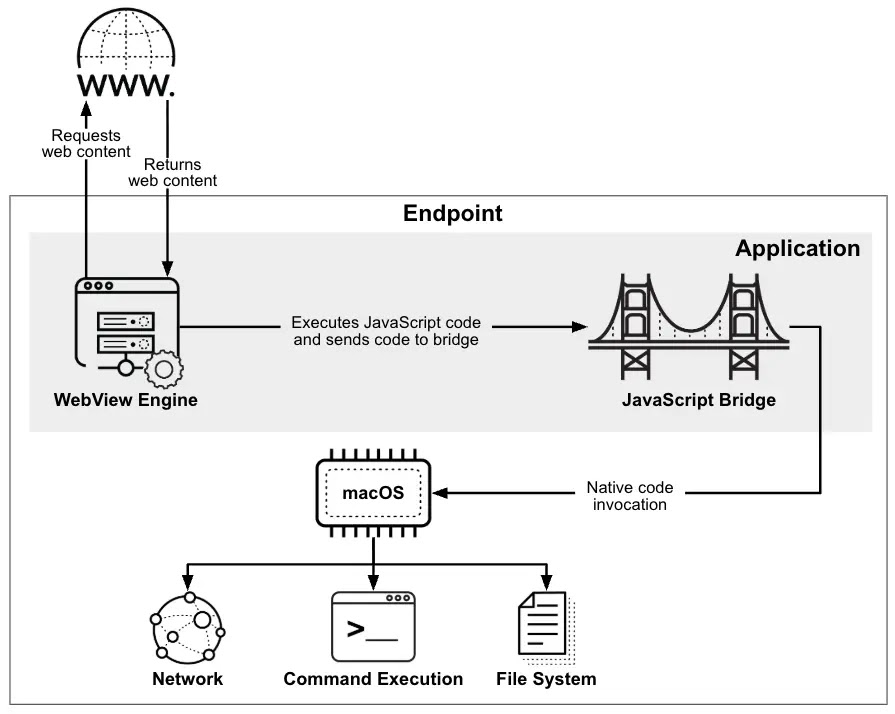
Instead of placing all malicious logic inside the app binary, FlutterShell uses a WebView-based design. The app loads remote web content and uses a JavaScript-to-native bridge to pass commands into the local macOS environment.
This architecture gives attackers flexibility. They can change the remote code on their infrastructure without sending users a new app update. That also makes the malware harder to judge from the local binary alone.
| App name used in campaign | Type of lure | Reported behavior |
|---|---|---|
| PodcastsLounge | Podcast player | Masqueraded as a functional podcast app while loading FlutterShell logic |
| PDF-Brain | PDF viewer | Included a PDF workflow and an AI summarization feature that routed document text through attacker servers |
| PDF-Ninja | PDF viewer | Used stronger obfuscation and similar backdoor capabilities |
How malicious ads delivered the apps
The attackers promoted fake app download pages through Google Ads. The ads looked like normal software promotions and sent users to pages controlled by the operators behind the campaign.
Google’s malicious software policy says advertisers cannot promote destinations that distribute malware or unwanted software. Unit 42 reported the advertiser accounts, and Google suspended them for policy violations.
The campaign shows why ad verification does not remove every risk. The shell companies behind the ads had websites, company names, and verified ad accounts, which helped the operation look more legitimate while it pushed harmful downloads.
Apple notarization did not stop the samples
Unit 42 found that the observed FlutterShell apps were signed with valid Apple Developer IDs and had passed Apple notarization at the time of submission. Apple’s notarization process checks Developer ID-signed software for known malicious components and signing issues, but it does not equal a full App Store review.
That distinction matters. A notarized app can still become dangerous if its malicious logic lives on a remote server, changes after review, or hides behind behavior that automated checks do not flag at submission time.
The samples also had zero VirusTotal detections when Unit 42 analyzed them. That does not prove the apps were safe. It shows that new macOS malware can sometimes pass through both platform checks and third-party scanning before defenders have signatures or behavior rules in place.
What FlutterShell can do on infected Macs
Unit 42 observed FlutterShell primarily acting as adware in the wild. After launch, it collected a hardware identifier, modified Chrome’s Secure Preferences file, and redirected new tabs or searches through an attacker-controlled ad site.
The backdoor capabilities make the campaign more serious than standard adware. The malware includes support for command execution, file reads and writes, and environment variable collection.
The PDF-Brain and PDF-Ninja variants added another risk. Their AI summarization feature sent document content to an attacker-controlled server before returning a result to the user. A victim might believe the app simply summarized a file, while the document content also passed through the attacker’s infrastructure.
- Remote command execution through a JavaScript-to-native bridge
- File system interaction on the infected Mac
- Environment variable collection
- Chrome search and new tab hijacking
- Document routing through attacker infrastructure in PDF variants
- Dynamic behavior changes without app updates
Why Flutter made analysis harder
Flutter apps compile Dart code into native binaries and package application logic in a way that can make reverse engineering harder than a standard script-based macOS threat. The Flutter framework is legitimate, but attackers can use its structure to reduce the visibility of strings, commands, and control flow.
Unit 42 also said the third FlutterShell variant used Flutter’s obfuscation option. That stripped debug information and randomized symbols, making the PDF-Ninja sample harder to analyze than earlier builds.
The bigger issue is the WebView design. Even if defenders analyze the local app, the real behavior can depend on remote JavaScript loaded from the attacker’s server at runtime.
Connection to JSCoreRunner
Unit 42 links FlutterShell to an earlier macOS malware campaign known as JSCoreRunner, also called FileRipple in some reports. In 2025, 9to5Mac reported that Mosyle identified JSCoreRunner spreading through a fake PDF conversion tool.
The two campaigns share technical and infrastructure links, including browser hijacking behavior and JavaScript-to-native execution patterns. Unit 42 says FlutterShell represents a more advanced stage because it separates the malicious logic from the app binary more effectively.

This evolution matters for defenders. A campaign that started with adware-style browser redirection now includes backdoor functions and document data exposure through fake AI features.
What Mac users should do
Mac users should avoid downloading productivity tools from sponsored ads unless they can verify the developer and official website. Fake PDF apps, media apps, converters, and utilities remain common lures because they seem harmless and do not require deep technical knowledge to install.
Users who installed PodcastsLounge, PDF-Brain, PDF-Ninja, or similar unfamiliar apps should remove them, check Chrome settings, and run a trusted security scan. They should also review recent downloads and browser extensions if search results or new tabs started changing unexpectedly.
- Download Mac apps only from trusted developer websites or the Mac App Store where possible.
- Be cautious with sponsored search results for PDF tools, media apps, converters, and browser utilities.
- Remove unknown apps that request unusual access or modify browser behavior.
- Check Chrome search provider and new tab settings after installing any unfamiliar app.
- Do not upload sensitive files to unknown PDF tools or AI summarization apps.
- Keep macOS, browsers, and endpoint security tools updated.
What security teams should monitor
Enterprise teams should monitor for unexpected changes to Chrome’s Secure Preferences file, forced Chrome restarts, and connections to known FlutterShell infrastructure. They should also review managed devices for suspicious macOS apps signed with unfamiliar developer IDs.
Security teams should not treat notarization as a complete trust signal. Apple’s developer guidance describes notarization as an automated security check for Developer ID software, not a full manual review of app behavior.
Ad-based delivery also deserves attention. Google’s policy guidance allows immediate suspension for malicious software violations, but attackers can use new shell entities, aged domains, and fresh accounts to keep testing the ad ecosystem.
| Detection area | What to review |
|---|---|
| Browser configuration | Chrome Secure Preferences changes affecting search or new tab URLs |
| Process activity | Unexpected Chrome termination and relaunch with unusual arguments |
| Network traffic | Connections to known C2 or ad redirect domains tied to FlutterShell |
| App inventory | PodcastsLounge, PDF-Brain, PDF-Ninja, or unknown notarized productivity apps |
| Document tools | PDF apps that send file contents to unfamiliar remote endpoints |
Why this campaign matters
Operation FlutterBridge shows how macOS malware is becoming more polished, more modular, and harder to judge at first glance. The apps worked as advertised, carried valid signatures, and passed notarization, yet still created serious risk for users.
The campaign also reflects a broader shift in macOS threats. The same group linked to JSCoreRunner moved from browser hijacking toward a Flutter-based backdoor with dynamic remote logic and possible document exfiltration paths.
For users and IT teams, the practical lesson is clear. A clean-looking ad, a signed app, and a notarization ticket do not guarantee safety. Software source, developer reputation, app behavior, and network activity still matter.
The full Operation FlutterBridge analysis gives defenders indicators and technical details for hunting the campaign across macOS environments.
FAQ
FlutterShell is a macOS backdoor built with the Flutter framework. It masquerades as legitimate desktop software while using a WebView-based bridge to load remote logic and interact with the local system.
Attackers used Google Ads to promote fake macOS apps, including a podcast player and PDF viewers. Users who clicked the ads reached download pages for apps that appeared legitimate but contained FlutterShell.
Yes. Unit 42 reported that observed FlutterShell apps were signed with valid Apple Developer IDs and had passed notarization at the time of submission. Notarization is an automated check and does not guarantee that an app is safe.
Unit 42 observed adware behavior such as Chrome search hijacking, but the malware also contains backdoor capabilities, including command execution, file system access, and environment variable collection. Some PDF variants also routed document content through attacker-controlled servers.
Mac users should avoid unfamiliar sponsored downloads, install apps only from trusted developers, review Chrome settings after installing new tools, remove unknown PDF or media apps, and avoid sending sensitive documents through untrusted AI summarization tools.


Read our disclosure page to find out how can you help VPNCentral sustain the editorial team Read more


Improve this guide




User forum
0 messages