
Kali365 Phishing Service Expands From Microsoft 365 Tokens to Okta and MAX Messenger


 8 min. read
  Published on
Kali365, a phishing-as-a-service platform first seen in April 2026, has expanded beyond Microsoft 365 token theft and now impersonates Okta, Xerox DocuShare, LiveDrive, AWS-style endpoints, GMX, Mail.ru, Yandex Disk, Odnoklassniki, and MAX Messenger.
The operation still centers on identity abuse rather than password theft. Arctic Wolf Labs said Kali365 abuses Microsoft’s OAuth device authorization flow to capture access tokens and bypass multi-factor authentication in Microsoft 365 environments.

Access content across the globe at the highest speed rate.
70% of our readers choose Private Internet Access
70% of our readers choose ExpressVPN

Browse the web from multiple devices with industry-standard security protocols.

Faster dedicated servers for specific actions (currently at summer discounts)
The FBI had already warned about Kali365 in May, describing it as an emerging PhaaS platform distributed through Telegram. The FBI public service announcement said the kit gives less-technical attackers AI-generated phishing lures, automated campaign templates, victim tracking dashboards, and OAuth token capture capabilities.
How Kali365 steals Microsoft 365 tokens
Kali365 does not need a fake Microsoft password page to work. Instead, the attacker starts a legitimate Microsoft device-code login request and shows the victim a code on a phishing page that looks like a shared document or cloud file prompt.
The victim then enters the code on Microsoft’s real device login page. If the victim signs in and approves the request, Microsoft issues access and refresh tokens to the attacker-controlled application. The attacker can then access Microsoft 365 services such as Outlook, Teams, and OneDrive without knowing the password.
Microsoft’s security team has warned that device code authentication is a legitimate OAuth flow intended for devices with limited input, such as smart TVs, printers, and IoT devices. Attackers abuse that separation between the device requesting access and the user completing authentication.
| Attack stage | What happens | Why it matters |
| Phishing lure | The victim sees a fake shared document, file access, or service login page | The page appears to support a normal business task |
| Device code request | The attacker generates a real Microsoft device code | The code works on Microsoft’s legitimate login infrastructure |
| User approval | The victim enters the code and completes authentication | The victim unknowingly authorizes the attacker’s session |
| Token capture | The attacker receives access and refresh tokens | The attacker can access Microsoft 365 without the victim’s password |
| Persistence | The attacker uses tokens until they expire or get revoked | Password resets alone may not remove access |
New research shows a wider phishing network
The latest findings show that Kali365 is no longer only a Microsoft 365 phishing kit. Arctic Wolf mapped a 126-host cluster serving the same phishing-kit infrastructure between May 6 and May 27, 2026. The hosts impersonated enterprise and consumer services across several regions.
That cluster included Microsoft Outlook and Live, Okta SSO, Xerox DocuShare, LiveDrive, AWS-style naming patterns, GMX, Mail.ru, Yandex Disk, and Odnoklassniki. Arctic Wolf said this was one shared infrastructure cluster, not 126 unrelated phishing threats.
The operator also used rotating front-end hosts and a shared backend. This makes single-domain blocking less effective because the phishing pages can move quickly while keeping the same page template, control panel, and victim-tracking workflow.
MAX Messenger campaign targets Russian users
The most notable expansion involves MAX Messenger, a Russian messaging platform developed by VK and promoted by the Russian government as a national messenger. According to Arctic Wolf, the Kali365 operator built a fake prize-claim page designed to steal MAX account access from Russian users.
The page asks victims to enter a Russian phone number, then requests the real one-time code sent by MAX Messenger. It also asks for a two-factor password if the account uses one. Once submitted, the attacker can take over the account and access messages, media, files, and contacts.
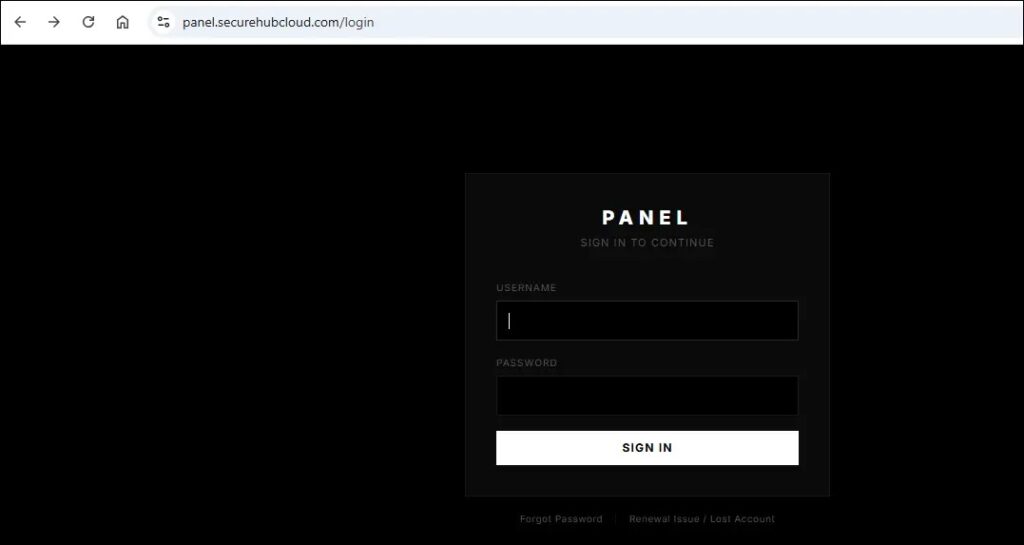
This propagation model can spread quickly through contact lists. A stolen account can push the same prize lure to the victim’s contacts, turning one compromise into a broader social phishing chain.
- Microsoft 365 campaigns focus on access tokens instead of passwords.
- Okta and other enterprise brands expand the kit’s reach into single sign-on environments.
- MAX Messenger targeting shows a move into consumer messaging account takeover.
- Russian services such as Mail.ru, Yandex Disk, and Odnoklassniki suggest regional targeting.
- Cloudflare Workers and shared hosting help the operator rotate phishing pages quickly.
Why device-code phishing can bypass MFA
Multi-factor authentication still protects against many attacks, but device-code phishing works differently. The victim performs the MFA step on the legitimate Microsoft site. The problem is that the victim authorizes the attacker’s device, not their own session.
The FBI warning said Kali365 can capture OAuth access and refresh tokens and gain persistent access to Microsoft 365 environments. That access can continue until the organization revokes tokens and removes unauthorized sessions.
Microsoft researchers also said attackers have used dynamic device-code generation, automated redirects, and cloud-hosted infrastructure to increase success rates. Dynamic code generation matters because Microsoft device codes expire quickly, so generating them only when the user lands on the phishing page keeps the attack usable.
Defensive steps for Microsoft 365 tenants
Organizations using Microsoft Entra ID should review whether they need device code flow at all. If the business does not require it, blocking it removes the main attack path used by Kali365 against Microsoft 365 accounts.
Microsoft’s Conditional Access guidance recommends getting as close as possible to a unilateral block on device code flow, while using report-only mode first to understand legitimate usage. Emergency access accounts and documented business exceptions should receive careful handling to avoid lockouts.
Security teams should also look for post-authentication signs of compromise. These include unexpected Outlook access, new inbox rules, unusual Microsoft Graph activity, unfamiliar devices, suspicious token use, and OneDrive or Teams access from locations that do not match the user’s normal behavior.
| Control | Purpose |
| Block or restrict device code flow | Stops attackers from abusing the OAuth flow used by Kali365 |
| Use report-only mode first | Helps identify legitimate business use before enforcement |
| Revoke refresh tokens after suspected compromise | Removes attacker access that may survive a password reset |
| Monitor sign-in logs | Finds suspicious device-code authentication and unusual access patterns |
| Alert on new inbox rules | Detects common persistence and data-hiding techniques |
| Train users on device-code lures | Reduces the chance that users approve attacker sessions |
Network indicators and hunting priorities
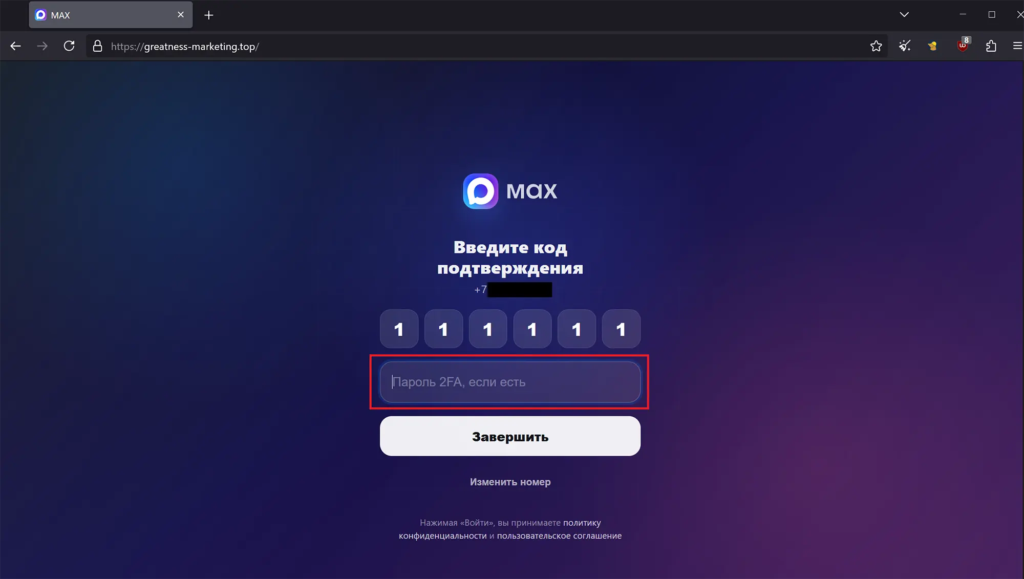
Arctic Wolf recommends treating panel[.]securehubcloud[.]com as a high-confidence command-and-control address. Any outbound connection to that host from a corporate device suggests the workstation has loaded an active Kali365 phishing page.
Defenders should also hunt for the page template rather than rely only on URLs. The string “Preparing your secure document…” and the shared banner hash observed by researchers may provide more durable clues than individual Cloudflare Worker subdomains.
The Arctic Wolf report also recommends blocking the attachedfile[.]com domain family, since all 39 observed subdomains were serving the same phishing kit. It also recommends monitoring or blocking Telegram access from corporate networks where business use does not require it.
- Block known Kali365 command-and-control domains at the network edge.
- Hunt for recurring phishing-page text rather than only disposable URLs.
- Review Cloudflare Workers links in suspicious document-sharing emails.
- Inspect sign-ins that use device code authentication.
- Alert on OAuth token use from unfamiliar geographies or devices.
- Review users who entered device codes after clicking email or chat links.
Why the expansion matters
Kali365 shows how phishing-as-a-service tools are moving from single-brand credential theft to multi-brand identity takeover. The same operator can run Microsoft 365 token theft, Okta impersonation, file-sharing lures, and messaging-account scams from related infrastructure.
This model gives less-skilled attackers a ready-made system for phishing pages, victim tracking, and token capture. It also gives experienced operators a way to test new brands and regions without rebuilding the entire platform.
For defenders, the lesson is clear. Blocking fake login pages is no longer enough. Security teams need visibility into authentication flows, OAuth tokens, session behavior, suspicious cloud-hosted phishing pages, and social engineering that moves across email, collaboration tools, and messaging apps.
Microsoft’s policy guidance gives administrators a practical starting point for reducing device-code abuse. Combined with user training, token revocation workflows, and stronger sign-in monitoring, it can help close one of Kali365’s most important attack paths.
FAQ
Kali365 is a phishing-as-a-service platform first seen in April 2026. It is known for abusing Microsoft’s OAuth device authorization flow to capture Microsoft 365 access tokens and bypass MFA.
Arctic Wolf observed Kali365-linked infrastructure impersonating Microsoft Outlook and Live, Okta SSO, Xerox DocuShare, LiveDrive, AWS-style endpoints, GMX, Mail.ru, Yandex Disk, Odnoklassniki, and MAX Messenger.
Kali365 tricks victims into entering a real Microsoft device code on Microsoft’s legitimate login page. The victim completes authentication, but the attacker receives OAuth access and refresh tokens for the attacker-controlled session.
Administrators should audit device code flow usage, block or restrict device code flow through Conditional Access where possible, revoke tokens after suspected compromise, and monitor for suspicious sign-ins, new inbox rules, and unusual Microsoft Graph activity.
The MAX Messenger campaign uses a fake prize-claim page to collect Russian phone numbers, one-time codes, and two-factor passwords. Once an account is taken over, the attacker can access messages, files, media, and contacts.


Read our disclosure page to find out how can you help VPNCentral sustain the editorial team Read more


Improve this guide




User forum
0 messages