
Internet Explorer WebBrowser Control Attack Chain Can Turn User Clicks Into Windows RCE


 10 min. read
  Published on
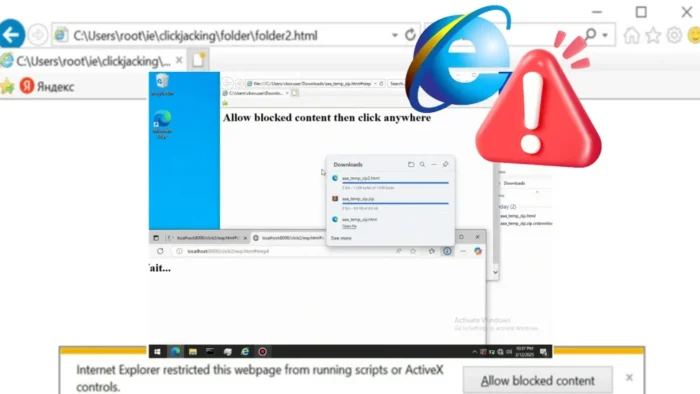
Security researchers have shown how legacy Internet Explorer technology still present in Windows apps can be abused to turn ordinary user clicks into remote code execution.
The issue centers on the Internet Explorer WebBrowser control, a legacy ActiveX-based component still embedded in some desktop applications. In a new Positive Technologies research report, researcher Igor Sak-Sakovskiy showed how attackers could combine localhost scripting, Microsoft Edge downloads, Mark of the Web behavior, ActiveX, COM objects, and clickjacking to execute commands on Windows.

Access content across the globe at the highest speed rate.
70% of our readers choose Private Internet Access
70% of our readers choose ExpressVPN

Browse the web from multiple devices with industry-standard security protocols.

Faster dedicated servers for specific actions (currently at summer discounts)
The research does not mean Internet Explorer itself has returned as a mainstream browser threat. The bigger problem is that IE’s Trident/MSHTML engine and WebBrowser control still live inside old business applications, admin tools, desktop utilities, and local web interfaces.
Legacy WebBrowser controls remain a risk after Internet Explorer’s retirement
Microsoft retired Internet Explorer as a standalone browser years ago, but several legacy technologies still exist for compatibility. That includes the WebBrowser control used by Windows Forms and other desktop apps.
Microsoft’s WebBrowser control documentation says the control provides a managed wrapper for the WebBrowser ActiveX control and can display web pages inside Windows Forms applications.
The security concern comes from where developers use it. Many older apps embed local HTML pages, help panels, configuration screens, device interfaces, and localhost web UIs without modern browser isolation or strong input sanitization.
| Attack element | Role in the chain | Security concern |
|---|---|---|
| WebBrowser control | Embeds IE rendering inside a desktop application. | Legacy IE behavior can still affect modern Windows apps. |
| Localhost XSS | Gives attacker-controlled script a foothold in a trusted local context. | Local origins can receive more trust than remote websites. |
| Microsoft Edge download | Downloads an HTML payload to the user’s Downloads folder. | The chain can abuse differences in download and MOTW handling. |
| ActiveX and COM | Allows local HTML to instantiate dangerous objects. | Objects such as WScript.Shell can launch commands after user approval. |
| Clickjacking | Tricks users into clicking embedded file or folder views. | Normal clicks can become execution triggers. |
The attack starts with script execution in a localhost context
The demonstrated chain begins when an attacker gains JavaScript execution in an application that uses the WebBrowser control to load content from localhost. This could happen through cross-site scripting in a local web UI or another weakness in an embedded HTML interface.
From there, the attacker abuses how Internet Explorer treats local and localhost origins. Positive Technologies showed that script running in a localhost context could be used to pivot toward local files and higher-trust execution paths.
Microsoft’s WebBrowser security guidance warns that the control is designed to work in full trust and that HTML shown in the control may contain unmanaged code in the form of scripts or web controls.
Edge download behavior helps bypass Mark of the Web limits
Mark of the Web is a Windows security mechanism that helps identify files downloaded from the internet. When it works as expected, Windows and SmartScreen can treat those files with extra caution.
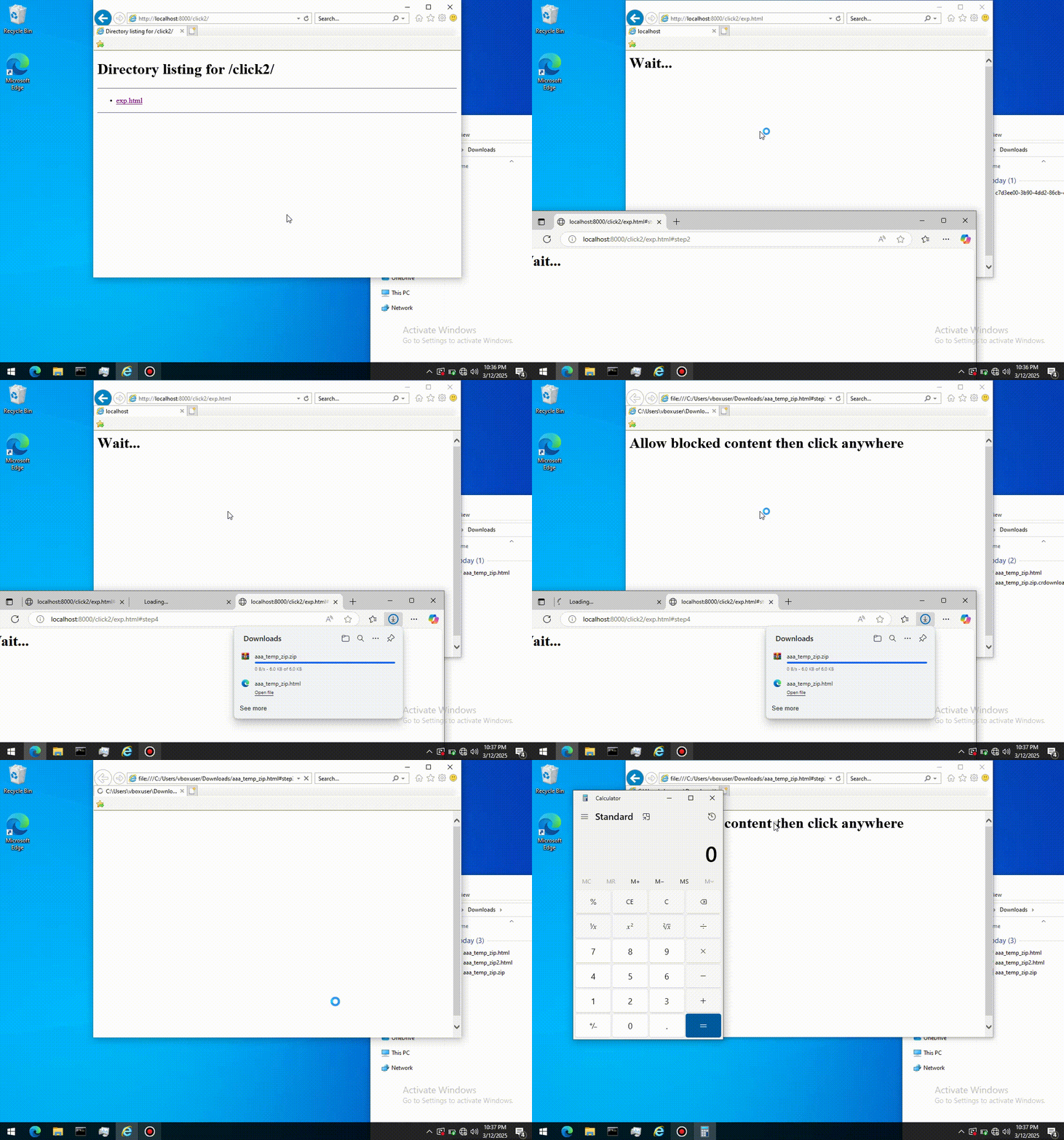
In the researched chain, Internet Explorer can open a Microsoft Edge window using a special microsoft-edge: URL. Edge can then save an attacker-controlled HTML file into the Downloads folder, while the legacy WebBrowser control later redirects to the local copy.
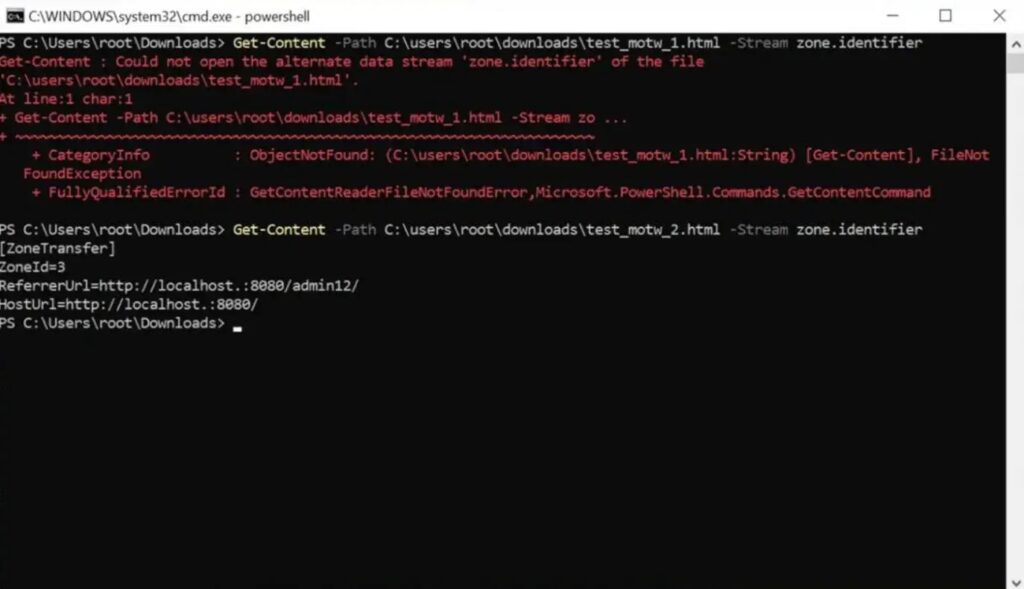
The result is a dangerous transition. What started as remote script becomes a local HTML file in a path the legacy IE component can access. The research found cases where this helped avoid the expected MOTW-based restrictions, leaving an ActiveX warning as the main barrier before code execution.
- The attacker first needs a way to run script inside an embedded localhost page.
- The script launches Edge to download an HTML payload.
- The IE-based WebBrowser control redirects to the downloaded local file.
- The local HTML attempts to instantiate high-risk COM objects through ActiveX.
- User approval on the ActiveX prompt can lead to command execution.
ActiveX and WScript.Shell turn the local file into an RCE path
The final stage uses old Internet Explorer behavior around ActiveX and COM objects. Positive Technologies used WScript.Shell as the example because it can execute commands from script when exposed to local HTML with enough trust.
Internet Explorer still shows an ActiveX security warning for this type of action. That means the demonstrated chain is not completely silent. However, researchers showed that social engineering and UI design can make the required clicks look routine or harmless.
Microsoft’s IE mode documentation says Edge’s IE mode uses the Chromium engine for modern sites and the Trident MSHTML engine from Internet Explorer 11 for legacy sites. It also lists ActiveX controls among the IE functionality supported in IE mode.
| Click requirement | What the user sees | What can happen behind the scenes |
|---|---|---|
| First click | A normal page interaction or download-related action. | The attacker prepares or downloads a local payload. |
| Second click | An ActiveX or local content security prompt. | The local HTML can instantiate a COM object and run a command. |
| Clickjacking variant | A click on a visible webpage element. | The click can be redirected into an embedded ZIP or folder view. |
Clickjacking can reduce how obvious the attack looks
The research also explores how IE folder views and ZIP browsing surfaces can be embedded through the same legacy WebBrowser behavior. This makes the attack more flexible because it can move from classic prompts to deceptive click placement.
In one scenario, the attacker overlays a tiny iframe that follows the cursor and hosts a ZIP or folder view. A user thinks they are clicking a normal page element, but the click lands on a file inside the embedded view.
Positive Technologies said this approach can lead to execution with weak or missing MOTW enforcement in some paths. It also shows why defenders should not focus only on the ActiveX prompt version of the attack.
Microsoft has already limited some IE mode entry points
The research arrives after Microsoft made separate changes to reduce risky access to Internet Explorer mode in Edge. Microsoft said in 2025 that attackers had abused IE mode through social engineering and unpatched Chakra exploits.
In its IE mode security changes post, Microsoft said it removed high-risk consumer entry points for loading pages in IE mode and kept enterprise policy-based IE mode available for managed legacy applications.
Those changes help reduce casual abuse of IE mode, but they do not remove every risk from applications that still embed the old WebBrowser control. Desktop apps that host untrusted or poorly sanitized HTML still carry legacy browser attack surface.
SmartScreen changes make MOTW enforcement even more important
Microsoft has also changed how SmartScreen works in Internet Explorer and IE mode on newer Windows versions. The company says SmartScreen remains active in Microsoft Edge, Windows Shell, and other supported environments, but it has been deprecated inside IE and IE mode on Windows 11.
In its SmartScreen deprecation notice, Microsoft says Internet Explorer and IE mode should never be used for untrusted or public internet sites because they lack modern browser protections such as site isolation and robust sandboxing.
Microsoft also says files downloaded through IE or IE mode still receive MOTW tagging, with Windows Shell SmartScreen evaluating them when opened later. That makes any path that avoids or weakens MOTW tagging especially important for defenders to review.
| Defender focus | Recommended action |
|---|---|
| Legacy app inventory | Find desktop apps that embed the IE WebBrowser control or MSHTML. |
| Localhost web UIs | Audit for XSS, weak input validation, and unsafe local origins. |
| ActiveX and COM | Restrict dangerous ActiveX behavior through policy wherever possible. |
| MOTW handling | Verify that downloaded files receive and keep Zone.Identifier metadata. |
| User prompts | Train users not to approve unexpected ActiveX or local content warnings. |
Developers should move embedded browser features to WebView2
The safest long-term fix is to remove the legacy IE-based WebBrowser control from applications that render web content. Microsoft’s modern replacement path is WebView2, which uses Microsoft Edge as the rendering engine inside native apps.
The official WebView2 documentation says the control lets developers embed HTML, CSS, and JavaScript in native apps while using Microsoft Edge for web rendering.
Migration still requires careful security design. A modern webview can still become dangerous if the app exposes privileged native APIs to untrusted script. Developers should isolate untrusted content, validate all inputs, restrict navigation, and avoid unsafe bridges between JavaScript and native code.
- Replace IE WebBrowser controls with WebView2 or another maintained modern rendering control.
- Do not load untrusted internet content inside legacy IE-based components.
- Sanitize HTML and JavaScript in local web UIs, especially on localhost.
- Disable or restrict ActiveX where business requirements allow it.
- Block unexpected script execution from local HTML files.
- Review app behavior around Downloads, ZIP files, folder views, and file associations.
- Use the Microsoft WebBrowser control overview and Microsoft WebBrowser security page to identify where old IE behavior may still exist.
The real risk is legacy trust inside modern Windows apps
This attack chain matters because it shows how old browser assumptions can survive inside modern environments. A user may never open Internet Explorer directly, but an old business app can still embed the same technology and expose the same class of risk.
Administrators should also review enterprise IE mode settings. Microsoft’s IE mode guidance says only specifically configured sites should use IE mode, while its Edge security team update explains why Microsoft restricted consumer access after real-world abuse of IE mode.
The Microsoft SmartScreen notice adds another warning for enterprises: IE and IE mode should stay limited to trusted internal use, not public browsing or arbitrary content.
For software vendors, the message from the Positive Technologies findings is direct. Legacy WebBrowser control usage needs a security review, especially when local HTML, localhost servers, user-controlled content, or file downloads are part of the workflow.
Replacing the old control with Microsoft Edge WebView2 will not automatically fix insecure app logic, but it removes a large amount of Internet Explorer-specific attack surface. That makes it one of the most practical steps for developers maintaining older Windows applications.
FAQ
It is a researcher-demonstrated attack chain that abuses legacy Internet Explorer WebBrowser control behavior, localhost scripting, Edge downloads, Mark of the Web handling, ActiveX, COM objects, and clickjacking to reach remote code execution on Windows.
No. Internet Explorer is retired as a standalone browser, but legacy IE technologies such as MSHTML, Trident, ActiveX, IE mode, and WebBrowser controls can still exist for compatibility in some Windows and enterprise scenarios.
Positive Technologies said the main Internet Explorer chain can achieve RCE with two clicks on security prompts in the demonstrated scenario. The research also explored clickjacking paths that can make user interaction less obvious.
Mark of the Web helps Windows identify files downloaded from the internet and apply extra security checks. The researched chain is dangerous because some paths can download or open local files in ways that weaken or bypass expected MOTW protections.
Organizations should inventory apps using IE WebBrowser controls, remove or replace them where possible, restrict ActiveX, prevent untrusted content from loading in IE-based components, fix localhost XSS flaws, and verify MOTW enforcement for downloaded files.
Developers should migrate embedded browser features to Microsoft Edge WebView2 or another maintained modern rendering control. They should still apply strong sandboxing, input validation, navigation restrictions, and safe JavaScript-to-native bridge design.


Read our disclosure page to find out how can you help VPNCentral sustain the editorial team Read more


Improve this guide




User forum
0 messages