
SHEETCREEP C# RAT Abuses Google Sheets API as C2 to Target Diplomatic Organizations


 8 min. read
  Published on
SHEETCREEP, a C# remote access trojan, is being used in an espionage campaign that hides command-and-control traffic inside Google Sheets API activity.
A new Securonix analysis says the latest SHEETCREEP variant is delivered through a diplomatic-themed ISO lure and uses a Google Sheets spreadsheet as its live control panel for infected systems.

Access content across the globe at the highest speed rate.
🔥 Save 81% + 2 bonus months! 🔥
70% of our readers choose Private Internet Access
70% of our readers choose ExpressVPN
2
Browse the web from multiple devices with industry-standard security protocols.
🔥 Save 73%! 🔥

Faster dedicated servers for specific actions (currently at summer discounts)
🔥 Save 69%! 🔥
The campaign targets diplomatic interests and uses a lure themed around the “UAE-India Strategic Partnership Week.” Once the victim opens the file chain, the malware installs a small C# RAT named vaultsvc.exe and communicates with attacker-controlled Google infrastructure.
SHEETCREEP Uses Google Sheets as a Command Channel
SHEETCREEP does not rely on a traditional attacker server. Instead, it authenticates to Google Sheets using a hardcoded Google Cloud service account and writes commands and responses into spreadsheet cells.
The official Google Sheets API documentation shows that the API can create, read, update, copy, and delete spreadsheet data. SHEETCREEP abuses those normal functions to turn a trusted cloud service into a covert malware channel.
This tactic makes network detection harder because traffic goes to sheets.googleapis.com over HTTPS. In many organizations, that traffic can look similar to normal Google Workspace activity.
| Campaign detail | What researchers observed |
|---|---|
| Malware name | SHEETCREEP |
| Language | C# / .NET |
| Main C2 channel | Google Sheets API |
| Delivery lure | UAE-India Strategic Partnership Week ISO file |
| Payload name | vaultsvc.exe |
| Persistence task | WindowsVaultSyncService |
The Campaign Builds on Earlier Sheet Attack Activity
Zscaler ThreatLabz documented SHEETCREEP in January 2026 as part of the Sheet Attack campaign, which targeted Indian government entities and used legitimate cloud services for command and control.
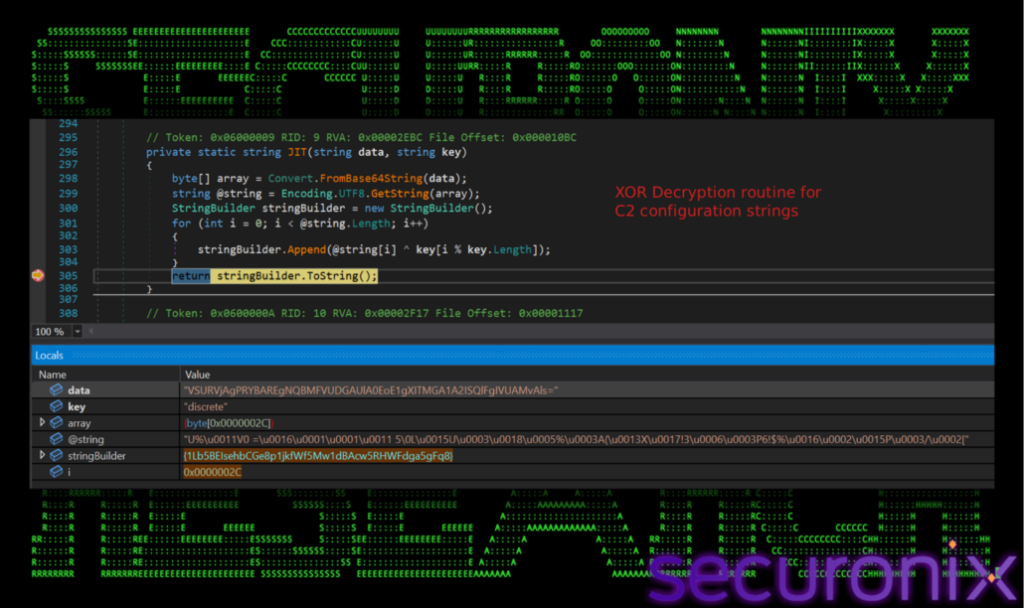
The newer activity appears to be an evolved version of that campaign. The latest variant encrypts important configuration strings, including the spreadsheet ID and service account email, with an XOR routine that uses the key “discrete.”
Securonix researchers said they extracted embedded credentials from the RAT, authenticated to the live C2 spreadsheet, and found 91 active victim tabs. They also identified 17 potential real targets after filtering out likely sandbox and research environments.
- Each victim gets a dedicated tab inside the attacker’s Google Sheet.
- The victim tab name is generated from the username, host name, and a short hash.
- Commands are written into spreadsheet cells by the attacker.
- Command output is encoded and written back into the sheet by the RAT.
- The RAT refreshes its Google access token to maintain long-running access.
How the SHEETCREEP Infection Chain Works
The attack starts with a phishing email carrying an ISO attachment. The archive contains a shortcut that looks like a document but launches a dropper when the victim opens it.
The dropper places the RAT in %LOCALAPPDATA%\Microsoft\Vault\vaultsvc.exe, a path designed to look like part of the Windows credential vault environment. It then sets Hidden and System attributes on the file to make casual discovery harder.
The malware also uses a decoy document and cleanup routine to reduce suspicion after execution. This helps the attack look like a normal document-opening flow to the victim.
| Stage | Attacker action | Purpose |
|---|---|---|
| Phishing | Sends diplomatic-themed ISO file | Uses a trusted government-style lure |
| Execution | Victim opens disguised shortcut | Launches the dropper |
| Installation | Drops vaultsvc.exe into Microsoft Vault path | Masquerades as a Windows-related component |
| Persistence | Creates WindowsVaultSyncService scheduled task | Runs the RAT at user login |
| C2 | Uses Google Sheets API over HTTPS | Receives commands and returns output |
Trusted Cloud Services Help the RAT Blend In
This behavior matches MITRE ATT&CK T1102.002, which covers attackers using legitimate web services for bidirectional command-and-control traffic.
In SHEETCREEP’s case, the spreadsheet acts like a message board between the attacker and the infected host. The attacker writes a command, the RAT reads it, runs it, and writes the response back into the same Google Sheet.
The RAT encodes commands and output with Base64. The traffic is still legitimate HTTPS traffic to Google endpoints, which means defenders need process-aware monitoring rather than simple domain blocking.
SHEETCREEP Runs PowerShell Inside Its Own Process
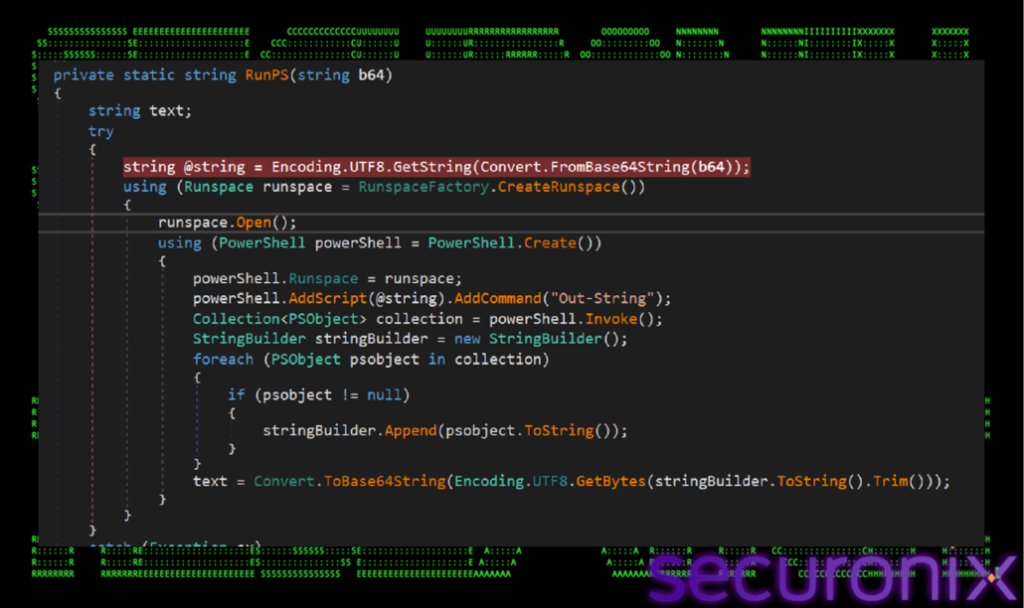
One of the newer evasion features is in-process PowerShell execution. Instead of spawning powershell.exe as a child process, the RAT uses the .NET System.Management.Automation namespace to run commands inside its own process.
That matters because many endpoint tools alert when they see suspicious PowerShell child processes. SHEETCREEP reduces that signal by avoiding a visible powershell.exe process in the process tree.
The malware also checks for tools such as dnSpy and Wireshark. If it sees signs of analysis, it can force an immediate system restart to disrupt investigation.
- In-process PowerShell can bypass process-tree detections built around powershell.exe.
- Hidden and System attributes make the RAT less visible in normal file browsing.
- XOR-obfuscated configuration makes static analysis slower.
- Google Sheets C2 blends with normal cloud activity.
- Anti-analysis checks can interrupt researchers and incident responders.
Scheduled Task Persistence Keeps Access Alive
SHEETCREEP creates a scheduled task named WindowsVaultSyncService. The task runs at user login and uses a misleading description to appear more legitimate during manual review.
This behavior maps to MITRE ATT&CK T1053.005, which covers attackers abusing scheduled tasks to execute malware, maintain persistence, or run payloads at specific triggers.
The task can be registered through COM rather than the standard command-line schtasks.exe path. That can reduce visibility in environments that only monitor common command-line task creation.
| Defense evasion method | Why it matters |
|---|---|
| Google Sheets C2 | Traffic can look like normal Google Workspace API usage |
| XOR-obfuscated config | Static scanners may not immediately recover the C2 spreadsheet details |
| In-process PowerShell | Reduces child-process evidence normally tied to PowerShell abuse |
| Hidden and System file attributes | Makes the payload less visible to users and basic checks |
| COM-based scheduled task creation | Can avoid detections that focus only on schtasks.exe |
Attribution Points Toward APT36 With Moderate Confidence
Researchers assess the campaign with moderate confidence as linked to APT36, also known as Transparent Tribe, a Pakistan-aligned threat actor known for targeting Indian government, military, and diplomatic interests.
The attribution is based on the lure theme, Google Sheets C2 tradecraft, ISO-based delivery, and overlap with previously documented Sheet Attack activity.
However, Zscaler previously noted that the Sheet Attack and Gopher Strike campaigns may represent an evolution of APT36 or a closely aligned Pakistan-linked group. That means the attribution should be treated as informed assessment rather than public confirmation.
Indicators Reported by Researchers
| Type | Indicator | Description |
|---|---|---|
| SHA-256 | 1ba67bb1cfad42446880cca53cbd05fe66d7514b2bb139b48e5c63adff14be7b | UAE-India_Strategic_Partnership_Week.iso |
| SHA-256 | 2cc7c2d8653c98e5bac32fcaf5e45b861efb4bb87df3b3f96285edb475e75bba | C# dropper |
| SHA-256 | 62d62950ff7a0e43550a5d0ba55d32d5083b9de5538e0f012e406b6d951e16aa | vaultsvc.exe SHEETCREEP RAT payload |
| Domain | sheets.googleapis.com | Google Sheets API C2 channel |
| Domain | oauth2.googleapis.com | OAuth2 authentication endpoint used by the RAT |
| IP address | 142.251.223.42 | Google API endpoint observed during beaconing |
| Service account | [email protected] | Hardcoded Google Cloud service account used for authentication |
| C2 spreadsheet ID | 1Lb5BEIsehbCGe8p1jkfWf5Mw1dBAcw5RHWFdga5gFq8 | Google Sheets document used as command-and-control infrastructure |
| Scheduled task | WindowsVaultSyncService | Persistence mechanism created by the dropper |
| File path | %LOCALAPPDATA%\Microsoft\Vault\vaultsvc.exe | RAT deployment path |
| Mutex | Global\WinSync_<username>-<hostname>-<4char-hash> | Single-instance execution mutex |
How Defenders Can Detect SHEETCREEP Activity
Organizations should look for unusual ISO attachments, shortcut files masquerading as documents, unexpected executables in the Microsoft Vault directory, and scheduled tasks with names or descriptions that imitate Windows maintenance activity.
Teams should also monitor non-browser processes making repeated connections to Google Sheets API endpoints. The Google Sheets API is legitimate, so blocking it outright may disrupt business operations, but process-level and user-context monitoring can reveal abnormal usage.
The latest SHEETCREEP report recommends watching for COM-registered scheduled tasks, unexpected vaultsvc.exe files, and .NET-hosted PowerShell behavior that may not appear in normal PowerShell process logs.
- Block or quarantine unsolicited ISO attachments from external senders.
- Flag executables dropped under %LOCALAPPDATA%\Microsoft\Vault\.
- Alert on scheduled tasks named WindowsVaultSyncService.
- Watch for non-browser processes contacting sheets.googleapis.com repeatedly.
- Use Sysmon and AMSI-aware controls to improve visibility into .NET-hosted PowerShell.
- Review Google API access patterns from endpoints that should not use Sheets programmatically.
- Map cloud-service C2 detections to bidirectional web-service C2 activity.
- Map persistence rules to scheduled-task detections when suspicious tasks appear at user login.
SHEETCREEP shows why cloud abuse remains difficult to detect. The malware does not need a suspicious attacker domain when it can hide command traffic inside a trusted productivity platform.
For diplomatic organizations and government-adjacent targets, the risk is higher because the lure content fits real workflows. Security teams should treat unexpected diplomatic documents, ISO files, and shortcut-based attachments as high-risk until proven otherwise.
FAQ
SHEETCREEP is a C# remote access trojan that uses Google Sheets as a command-and-control channel. It lets attackers send commands to infected systems and receive command output through spreadsheet cells.
The RAT authenticates to the Google Sheets API with embedded Google Cloud service account credentials. Each infected host gets a dedicated spreadsheet tab, where commands and responses are exchanged through cells.
The latest reported campaign uses diplomatic-themed lures tied to UAE-India relations. Researchers assess with moderate confidence that the activity is linked to APT36, also known as Transparent Tribe, or a closely aligned Pakistan-linked group.
SHEETCREEP hides command traffic inside legitimate Google Sheets API HTTPS traffic, encrypts configuration strings, executes PowerShell in-process, hides files with system attributes, and creates scheduled task persistence through less obvious methods.
Defenders should monitor for unsolicited ISO files, shortcut-based document lures, vaultsvc.exe under %LOCALAPPDATA%\Microsoft\Vault, the WindowsVaultSyncService scheduled task, and non-browser processes repeatedly connecting to sheets.googleapis.com.


Read our disclosure page to find out how can you help VPNCentral sustain the editorial team Read more


Improve this guide




User forum
0 messages