
152 Chrome Live Wallpaper Extensions Hid Ad Tracking and Faked Google Search Traffic


 8 min. read
  Published on
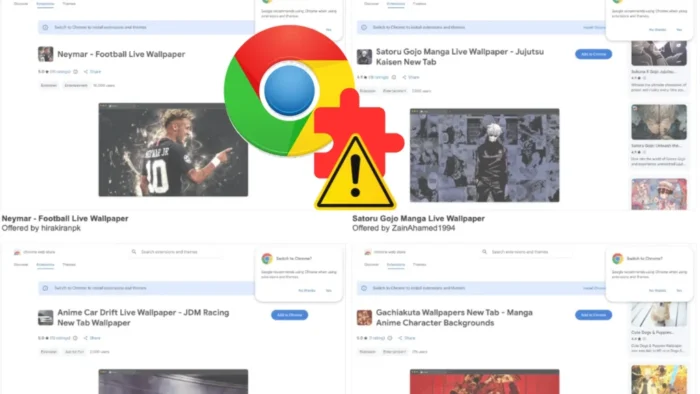
A network of 152 Chrome live wallpaper extensions used misleading privacy disclosures while funneling users to ad-monetized websites, according to the Socket Threat Research Team. The extensions appeared on the Chrome Web Store as new-tab wallpaper tools with themes based on anime, games, football, cars, and other popular topics.
The campaign involved 38 publisher accounts and three main brand backends: tabplugins.com, yowgames.com, and chromewallpaper.com, which redirects to owhit.com. Together, the extensions reported about 105,000 installs, although Chrome Web Store install counts are rounded, so the figure is only an estimate.

Access content across the globe at the highest speed rate.
🔥 Save 81% + 2 bonus months! 🔥
70% of our readers choose Private Internet Access
70% of our readers choose ExpressVPN
2
Browse the web from multiple devices with industry-standard security protocols.
🔥 Save 73%! 🔥

Faster dedicated servers for specific actions (currently at summer discounts)
🔥 Save 69%! 🔥
The main risk for users was not device takeover. The bigger issue was undisclosed telemetry, deceptive traffic attribution, and privacy statements that did not match the linked policies or observed behavior.
How the Chrome extension network worked
The extensions promised live wallpapers and new-tab customization. Once installed, they replaced the user’s new-tab page and connected the user to operator-controlled websites that were monetized through advertising.
The campaign did not inject ads into every website the user visited. Instead, it pushed users toward the operator’s own pages, where programmatic advertising and analytics tools could turn extension-driven visits into revenue.
The Hacker News reported that the extensions functioned as a potentially unwanted program family and were tied to adware-like behavior, fake traffic, and data collection concerns.
| Finding | Details |
| Total extensions | 152 Chrome live wallpaper and new-tab extensions |
| Publisher accounts | 38 Chrome Web Store publisher accounts |
| Main domains | tabplugins.com, yowgames.com, chromewallpaper.com, and owhit.com |
| Reported installs | About 105,000, based on rounded Chrome Web Store figures |
| Main impact | Undisclosed tracking, deceptive attribution, and fake organic-search traffic |
Fake Google organic traffic was used by one major subset
The most notable behavior appeared in a 54-extension subset using the newer tabplugins template. On install, these extensions opened a tabplugins.com page with utm_source=google and utm_medium=organic in the URL.
That made extension-generated traffic look like a normal Google organic search visit in analytics tools. In reality, the user did not search Google and click a result. The extension opened the tab itself.
The uninstall behavior went further. The extension set an uninstall URL that used a google.com/url redirect wrapper, which resembles the format used for real Google search-result clicks. That could make the uninstall ping look like another Google-originated visit.
Why fake organic traffic matters
Organic search traffic is valuable because advertisers, affiliate partners, and site operators often treat it as a sign of real user interest. When software generates that traffic and labels it as Google organic, it can distort analytics and ad measurement.
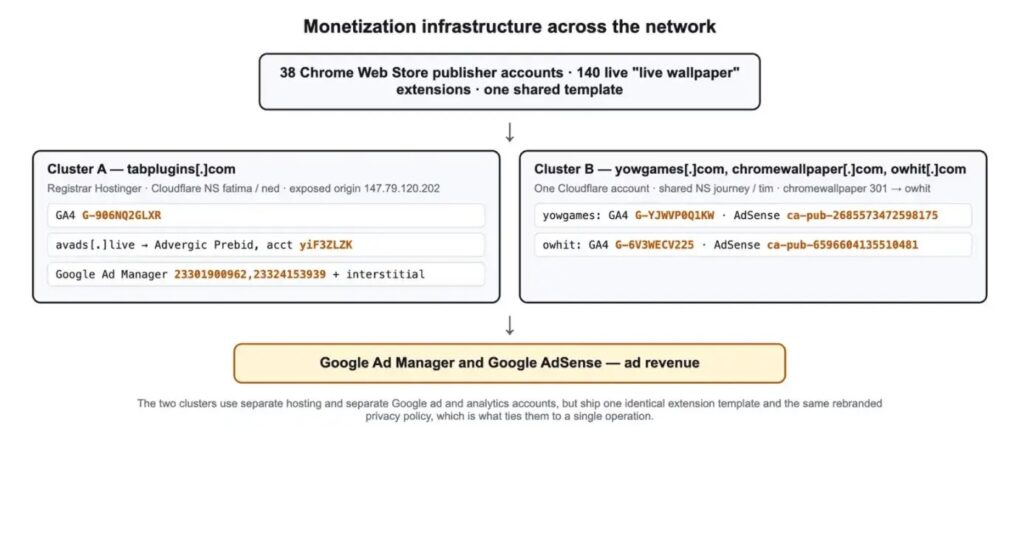
This kind of attribution fraud can make a website look more popular and trustworthy than it is. It can also pollute data used by advertisers, ad networks, and analytics systems.
The campaign shows how a browser extension can become a traffic machine. The user installs a wallpaper tool, but the operator gains visits, ad impressions, install telemetry, and misleading attribution signals.
Privacy disclosures did not match the linked policies
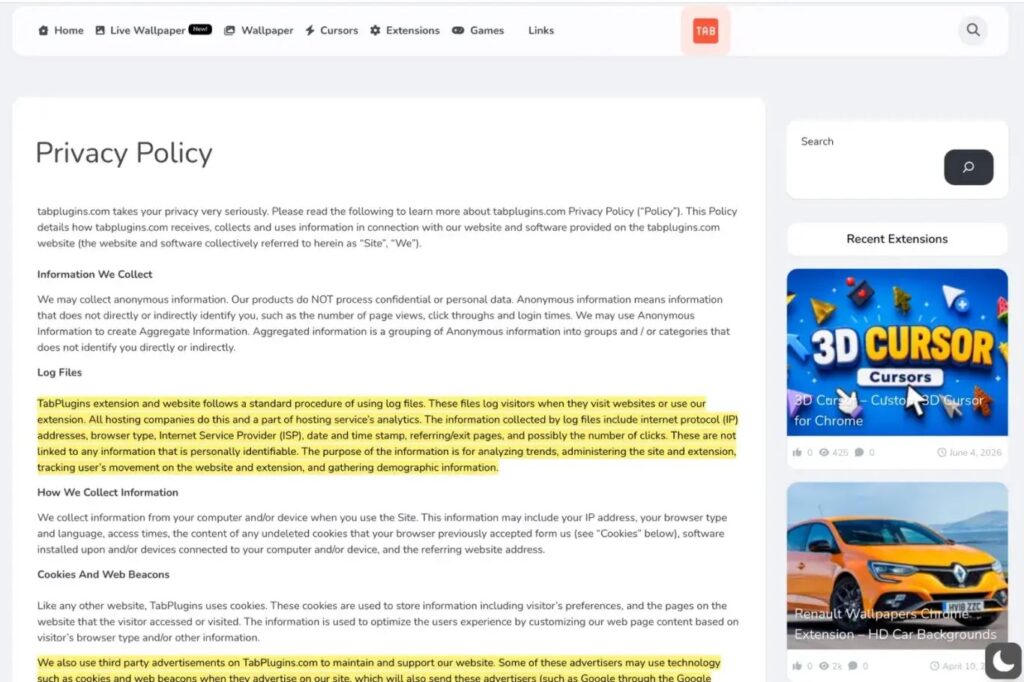
The Chrome Web Store listings reviewed by Socket said the extensions did not collect or use user data. But the linked privacy policies described logging information such as IP addresses, browser type, ISP, timestamps, referrers, exit pages, click counts, and device-related details.
This matters because the Chrome Web Store Program Policies require developers to keep extension information and data collection disclosures accurate. The policies also require developers to disclose how user data is collected, used, and shared.
Google’s Chrome Web Store user data FAQ says discrepancies between dashboard disclosures, privacy policies, and extension behavior can violate Chrome Web Store developer policies and can lead to publisher-level enforcement.
| Public listing claim | Linked policy or observed behavior |
| No user data collected | Privacy policy described IP address, ISP, timestamp, referrer, and click logging. |
| No unrelated data transfer | Privacy policy named ad and analytics partners, including Google ad products and third-party advertisers. |
| Wallpaper customization tool | Some extensions also generated install and uninstall traffic with fake Google attribution. |
IndexedDB wiping added an anti-forensic signal
Every analyzed family member included an IndexedDB wipe routine in its background service worker. The code enumerated IndexedDB databases visible to the extension’s own origin and attempted to delete them on service-worker startup.
The Socket report says the wipe did not delete website data, cookies, sessions, or the user’s normal browsing storage. It was limited to the extension’s own origin.
That still matters because a wallpaper extension has no clear reason to silently wipe its own IndexedDB databases on every start. Socket described the behavior as a reliable fingerprint of the family and an undisclosed anti-forensic capability.
The campaign used mass production and many publisher accounts
The same shared codebase appeared across dozens of publisher accounts. This made the campaign more resilient because removing one listing or one account would not remove the full network.
Socket found 152 unique extension IDs. It downloaded and verified the background service worker for 141 of them, while 11 were already delisted at the time of analysis.
Some extensions even shipped broken background scripts, which suggests rushed production. In those cases, parts of the tracking logic may not have executed, but the extensions still installed and replaced the user’s new-tab page.
What users should do now
Users should review any live wallpaper, new-tab wallpaper, anime wallpaper, sports wallpaper, or game wallpaper extension installed in Chrome. Extra caution is needed if the extension came from tabplugins.com, yowgames.com, chromewallpaper.com, or owhit.com.
Google’s Chrome Web Store Help explains that users can remove an extension by opening Chrome, going to Extensions, selecting Manage extensions, and clicking Remove on the extension they no longer want.
- Open Chrome and go to Extensions, then Manage extensions.
- Remove suspicious live wallpaper or new-tab extensions.
- Check whether your new-tab page and default search engine changed.
- Review extension permissions, especially search and new-tab permissions.
- Compare the Chrome Web Store Privacy practices tab with the linked privacy policy.
- Avoid extensions from publishers that use vague names, copied templates, or unclear privacy policies.
What security teams should hunt for
Security teams should not rely only on extension names because the network used many themes and publisher accounts. Behavioral fingerprints are more useful.
The strongest indicators include a Manifest V3 extension with a background worker that logs Deleted IndexedDB database:, runs an indexedDB.databases() loop, opens an install page tagged with utm_source=google and utm_medium=organic, or sets an uninstall URL pointing to a google.com/url wrapper.
Google’s program policies also give administrators a useful baseline for judging whether extension behavior matches what the listing claims. The user data FAQ further explains that privacy disclosures, policies, and actual behavior must stay consistent.
| Hunt signal | Why it matters |
Deleted IndexedDB database: | Shared log string used by the family’s background code. |
indexedDB.databases() plus deleteDatabase | Undisclosed IndexedDB wipe routine. |
utm_source=google and utm_medium=organic | Fake organic-search attribution on install. |
chrome.runtime.setUninstallURL with google.com/url | Uninstall ping disguised as a Google search-result click. |
Domains such as tabplugins.com or yowgames.com | Operator-controlled brand infrastructure linked to the campaign. |
Why this case matters for Chrome extension security
The campaign shows how risky browser extensions can be even when they do not steal passwords or install malware. A simple new-tab extension can still collect telemetry, change browsing behavior, and feed misleading data into ad systems.
The broader lesson is that users should not trust a Chrome Web Store privacy panel by itself. The linked privacy policy, requested permissions, publisher history, and real behavior all matter.
The Hacker News coverage also highlights the scale of the issue, with more than 100,000 reported installs tied to one coordinated extension family. Users and administrators should remove suspicious wallpaper extensions and follow Google’s extension management instructions to confirm Chrome is back to the expected settings.
FAQ
The extensions replaced the Chrome new-tab page, funneled users to ad-monetized domains, used misleading privacy disclosures, and in one 54-extension subset faked Google organic-search attribution for install and uninstall traffic.
No. Socket said the fake Google organic-search attribution appeared in a 54-extension subset using the newer tabplugins template. The wider 152-extension family shared other suspicious behavior and misleading privacy disclosures.
Socket did not report password theft or device-level compromise in this campaign. The main harms were undisclosed tracking, deceptive traffic measurement, fake attribution, and a suspicious IndexedDB wipe routine.
The main domains linked to the campaign were tabplugins.com, yowgames.com, chromewallpaper.com, and owhit.com, with chromewallpaper.com redirecting to owhit.com.
Users can open Chrome, go to Extensions, select Manage extensions, find the suspicious extension, and click Remove. They should also check that the default search engine and new-tab page were restored.


Read our disclosure page to find out how can you help VPNCentral sustain the editorial team Read more


Improve this guide




User forum
0 messages