
70% of Visible WordPress Sites With PHP Version Data Run Outdated PHP


 7 min. read
  Published on
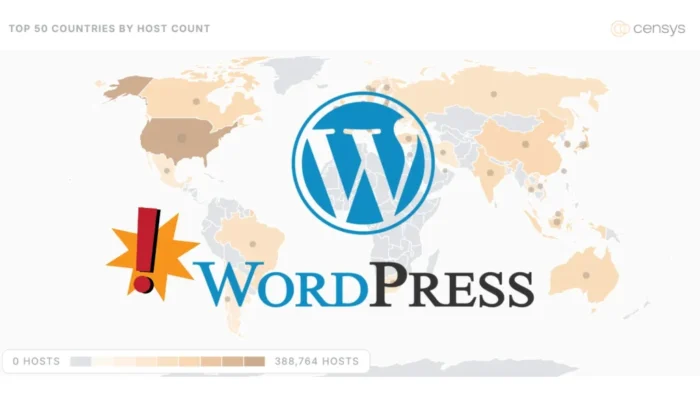
More than 70% of publicly reachable WordPress sites with visible PHP version data are running outdated PHP versions, according to new Censys research.
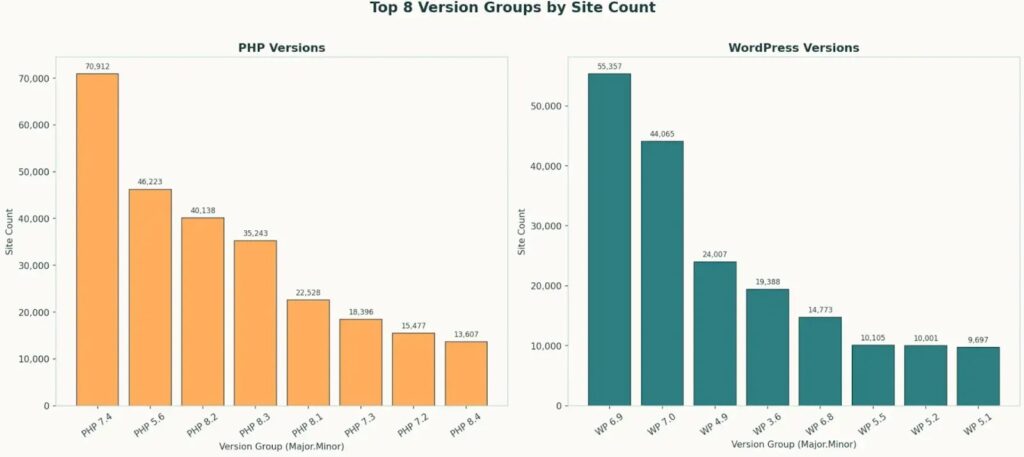
The finding means many WordPress sites may have updated themes, plugins, or core files while still relying on an old backend runtime. In its Censys research, the company analyzed more than 316,500 WordPress PHP sites that exposed version headers and found that only about 94,000 were on a current PHP patch.

Access content across the globe at the highest speed rate.
70% of our readers choose Private Internet Access
70% of our readers choose ExpressVPN

Browse the web from multiple devices with industry-standard security protocols.

Faster dedicated servers for specific actions (currently at summer discounts)
WordPress depends on PHP to run server-side code. When PHP reaches end of life, it no longer receives community security fixes, which can leave sites exposed even if the WordPress dashboard looks current.
Outdated PHP creates a hidden WordPress security gap
Censys found that PHP 7.4 was the most common PHP version in its observed dataset, appearing on more than 20% of sites. That version reached end of life in November 2022.
The PHP supported versions page explains that once a branch reaches end of life, it no longer receives support and users should upgrade because they may face unpatched security vulnerabilities.
This creates a problem for site owners who focus only on visible WordPress updates. A site can run a newer WordPress version while still using an old PHP branch underneath.
| Finding | What it means |
|---|---|
| Over 70% used outdated PHP | Most visible WordPress PHP sites in the Censys sample ran backend software outside the current patch baseline. |
| About 30% used current PHP | Only a minority of observed sites had a current PHP patch level. |
| Only 14% used the latest WordPress patch | WordPress core updates also lagged across visible sites. |
| PHP 7.4 was the most common version | A large share of sites still relied on a PHP branch that ended community support in 2022. |
| Yoast updates also lagged | Plugin patching appeared to be deprioritized across many visible installs. |
Why WordPress sites stay on old PHP versions
Upgrading PHP can break older themes, abandoned plugins, custom code, checkout flows, forms, or integrations. That fear often pushes administrators to delay backend upgrades.
WordPress also keeps some compatibility with older PHP versions so legacy sites can still function. The Make WordPress Hosting handbook says PHP 8.3 or later is recommended for production environments, while older end-of-life branches exist only for backward compatibility.
That distinction matters. Compatibility does not mean security support from the PHP project. A site may still run on an old PHP branch, but that does not make the branch safe for internet-facing production use.
Attackers are scanning for weak WordPress setups
Outdated PHP rarely acts alone. Attackers usually combine old backend software with exposed admin paths, weak passwords, outdated plugins, open SSH services, or misconfigured WordPress files.
Censys highlighted the “Hacked by MR.GREEN” defacement campaign as one visible example. The company observed more than 900 defaced websites as of June 2026, with nearly every victim being a CMS and WordPress appearing as the most common platform.
The same Censys data notes that many affected sites showed a similar risk profile, including outdated software, exposed installation paths, or xmlrpc.php exposure.
xmlrpc.php remains a common weak point
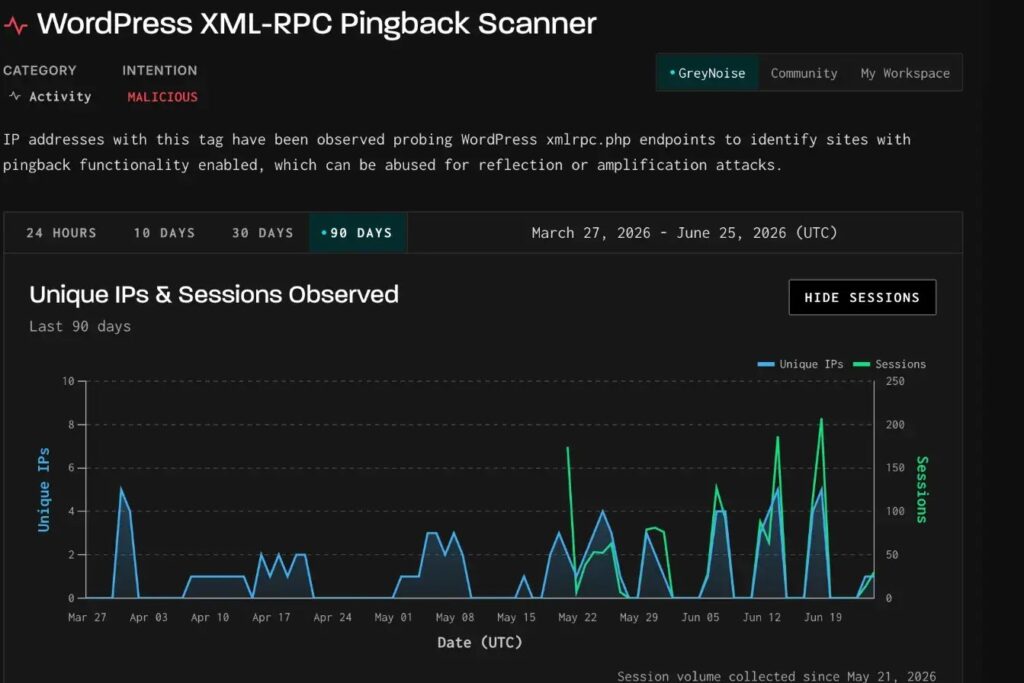
The xmlrpc.php file has long supported remote communication with WordPress sites. Modern sites often no longer need it because the REST API handles many newer integrations.
A Kinsta guide on xmlrpc.php explains that XML-RPC enabled communication between WordPress and other systems, but it can also become a security liability when attackers target it for brute-force activity or abuse.
Security teams should not assume xmlrpc.php caused every defacement. The safer conclusion is that exposed legacy endpoints add risk when they appear beside outdated software and weak access controls.
- Disable XML-RPC if the site does not need it.
- Restrict wp-admin access with strong authentication and IP controls where possible.
- Remove exposed installation files and unused scripts.
- Block password-based SSH access on hosting accounts.
- Review server logs for repeated scanner traffic and login attempts.
Plugins add another layer of exposure
Plugins give WordPress its flexibility, but they also expand the attack surface. A site with a secure WordPress core can still fall through an old plugin, abandoned theme, or vulnerable add-on.
Censys found that less than 22% of sites advertising Yoast versions were on the newest visible release in its dataset. Including the previous release brought that figure to 40%.
The pattern suggests that plugin updates, like PHP updates, often lag behind. That creates more opportunities for attackers who automate scans across large blocks of WordPress sites.
What site owners should do now
WordPress administrators should check PHP first, then update WordPress core, plugins, and themes in a controlled order. Backups and staging tests can reduce the risk of broken pages or failed checkouts.
The WordPress hosting guidance recommends PHP 8.3 or later for production. Administrators should confirm the exact version in hosting control panels, server dashboards, or WordPress Site Health.
PHP support timelines should guide upgrade planning. The PHP project lists active support, security support, and end-of-life dates for each maintained branch, making it easier to plan before a version expires.
- Create a full file and database backup.
- Test the site on a staging copy with a supported PHP version.
- Update WordPress core, themes, and plugins.
- Replace abandoned plugins that do not support modern PHP.
- Upgrade PHP on production after testing critical pages.
- Monitor logs, forms, checkout pages, and search visibility after the change.
Why this affects small sites and enterprises
Small business sites often delay updates because one broken plugin can disrupt revenue. Enterprise teams face a different challenge: they may manage many WordPress installs across marketing, support, documentation, regional teams, and legacy microsites.
Both groups need asset visibility. Unknown WordPress instances create risk because teams cannot patch what they do not track.
Attackers benefit from that gap. Automated scanners do not care whether a vulnerable site belongs to a local shop, a media brand, or an enterprise subdomain.
The practical security message
The Censys findings show that WordPress security depends on more than the WordPress update button. PHP, plugins, themes, hosting configuration, and exposed endpoints all shape the real attack surface.
Administrators should also review whether XML-RPC remains necessary. The Kinsta XML-RPC guide notes that many modern WordPress integrations can use newer methods instead, reducing the need to keep the legacy endpoint exposed.
For site owners, the next step is simple: check PHP version, move to a supported branch, remove unused plugins, and close exposed legacy paths. Outdated PHP is no longer just a maintenance issue. It is a security exposure that attackers can find at scale.
FAQ
The 70% figure applies to publicly reachable WordPress sites where Censys could observe both WordPress and PHP version data. It does not cover every WordPress site on the internet.
Outdated PHP can expose a site to unpatched vulnerabilities. Even if WordPress core is current, an unsupported backend runtime can still increase the risk of compromise.
WordPress hosting guidance recommends PHP 8.3 or later for production environments. Site owners should test upgrades first, especially if they use older plugins or custom themes.
Open WordPress Site Health, check the hosting control panel, or ask the hosting provider for the active PHP version. Compare that version with the official PHP support timeline.


Read our disclosure page to find out how can you help VPNCentral sustain the editorial team Read more


Improve this guide


User forum
0 messages