
Mullvad’s Public DNS Shut Down: Which Settings Should You Change?


 3 min. read
 Published on
Mullvad discontinued its public encrypted DNS service in November 2026. If you entered dns.mullvad.net in a browser, phone or router, replace that setting. If you use Mullvad VPN with its default DNS settings, keep using the app. Its internal resolver still handles lookups when you connect.
An old Mullvad hostname can explain why your device joins Wi-Fi yet websites fail to load. DNS translates a website name into an address. If the device insists on contacting a retired resolver, its internet link can be working while name lookups fail. Mullvad’s migration announcement identifies which settings need attention.

Access content across the globe at the highest speed rate.
🔥 Save 84% + 4 bonus months! 🔥
70% of our readers choose Private Internet Access
70% of our readers choose Private Internet Access
2
Browse the web from multiple devices with industry-standard security protocols.
🔥 Save 81% + 4 bonus months! 🔥

Faster dedicated servers for specific actions (currently discounted)
🔥 Save 77% + 3 bonus months! 🔥

Which Mullvad DNS setting did you use?
| Your setup | What to do |
|---|---|
| Mullvad VPN app with its default DNS | Keep the VPN resolver. There is no public hostname to replace in this setup. |
| Mullvad Browser with its default encrypted DNS | Update the browser. Version 16 introduced Quad9 as the default encrypted DNS provider. |
| A custom Mullvad DNS hostname or URL | Change it in the browser, operating system or router where you originally entered it. |
| Mullvad encrypted DNS profile on an iPhone, iPad or Mac | Replace the old public DNS profile using the instructions for that operating system. |
Choose the right option in Mullvad Browser
In browser settings, search for Encrypted DNS. When browsing outside a VPN, select Quad9 from the provider menu if you want to use Mullvad Browser’s default encrypted resolver. A manually entered provider can survive a browser update. Check for an old Mullvad hostname beginning with base., extended. or family..
When connected to a VPN that supplies DNS, Mullvad recommends the Operating system DNS option so the browser follows the VPN’s resolver settings. Mullvad’s release notes show the two choices.
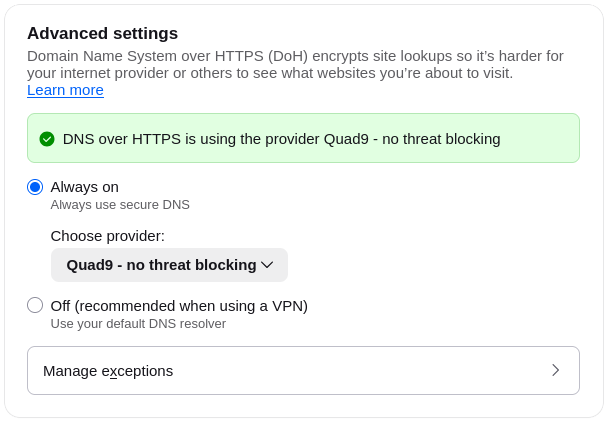
Replace a manually entered hostname or URL
Android Private DNS. On Android 9 or later, search Settings for Private DNS. Select Private DNS provider hostname, enter dns.quad9.net and save. This field expects the hostname alone. These steps cover the device’s encrypted DNS when a VPN is not handling its lookups. Quad9’s Android guide lists the setting.
A custom DNS-over-HTTPS field. Enter the complete URL https://dns.quad9.net/dns-query. If you previously chose a Mullvad family or ad-blocking profile, review what you want filtered. Quad9’s standard secure resolver blocks known threat domains. Family controls and general ad blocking serve different purposes. Quad9 lists its available services.
Apple configuration profiles. If you installed Mullvad’s old public DNS profile yourself, use Quad9’s instructions for iPhone and iPad or Mac. Check the profile name before replacing it. For a company-managed profile, ask the administrator who installed it.
Check which resolver answered
After selecting Quad9, open Quad9’s connection check in the browser you usually use. It reports whether that browser reached Quad9. If a second browser gives a different result on the same device, inspect each browser’s encrypted DNS settings before changing your router.
If you selected operating system DNS while using Mullvad VPN, use Mullvad’s connection check and inspect the DNS result. In that configuration you expect the VPN to handle the lookup. Changing DNS alone affects name resolution. Websites still see the public address of the connection you use to reach them.


Read our disclosure page to find out how can you help VPNCentral sustain the editorial team Read more


Improve this guide
User forum
0 messages