
Bitwarden Launches “Cupid Vault” for Secure Password Sharing Between Two Users


 4 min. read
  Published on
Bitwarden has introduced a new feature called Cupid Vault, designed to let two people securely share passwords under its free plan. The feature allows users to create a small shared vault using Bitwarden’s existing Organization system, making it easier to share streaming accounts, household logins, and other credentials safely.
Cupid Vault is available at no additional cost and supports two users and up to two shared collections. It is positioned as a simple way for couples, friends, or family members to manage shared logins without upgrading to a paid Family or Teams plan.

Access content across the globe at the highest speed rate.
70% of our readers choose Private Internet Access
70% of our readers choose ExpressVPN

Browse the web from multiple devices with industry-standard security protocols.

Faster dedicated servers for specific actions (currently at summer discounts)
What Is Cupid Vault?
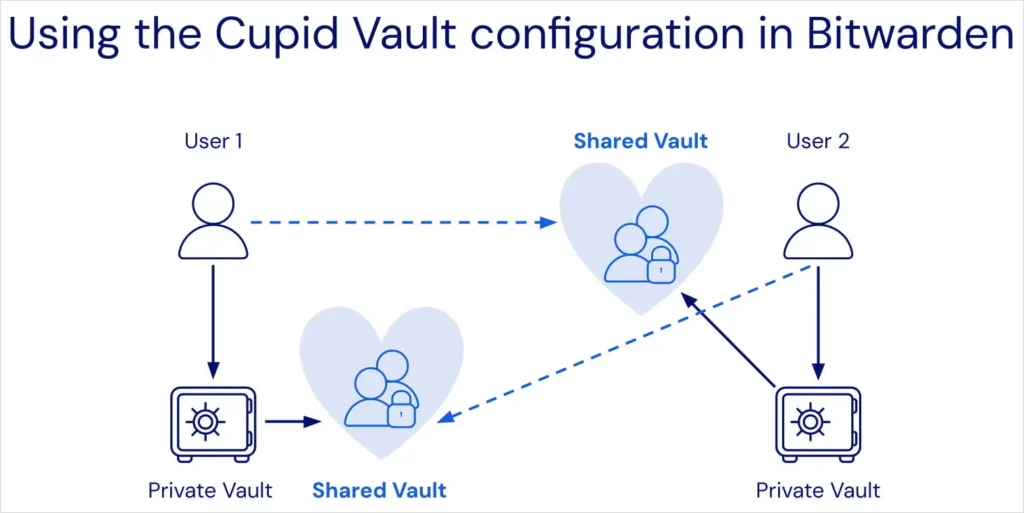
Cupid Vault is built on Bitwarden’s Organization feature. Instead of sharing passwords manually or sending credentials through insecure messaging apps, users can create a two-person Organization and place shared logins inside that space.
According to Bitwarden: “Cupid Vault allows two users to securely share logins through a free Organization.”
The shared vault is separate from each user’s personal vault. This separation ensures that personal passwords remain private while selected credentials are accessible to both members.
How Cupid Vault Works
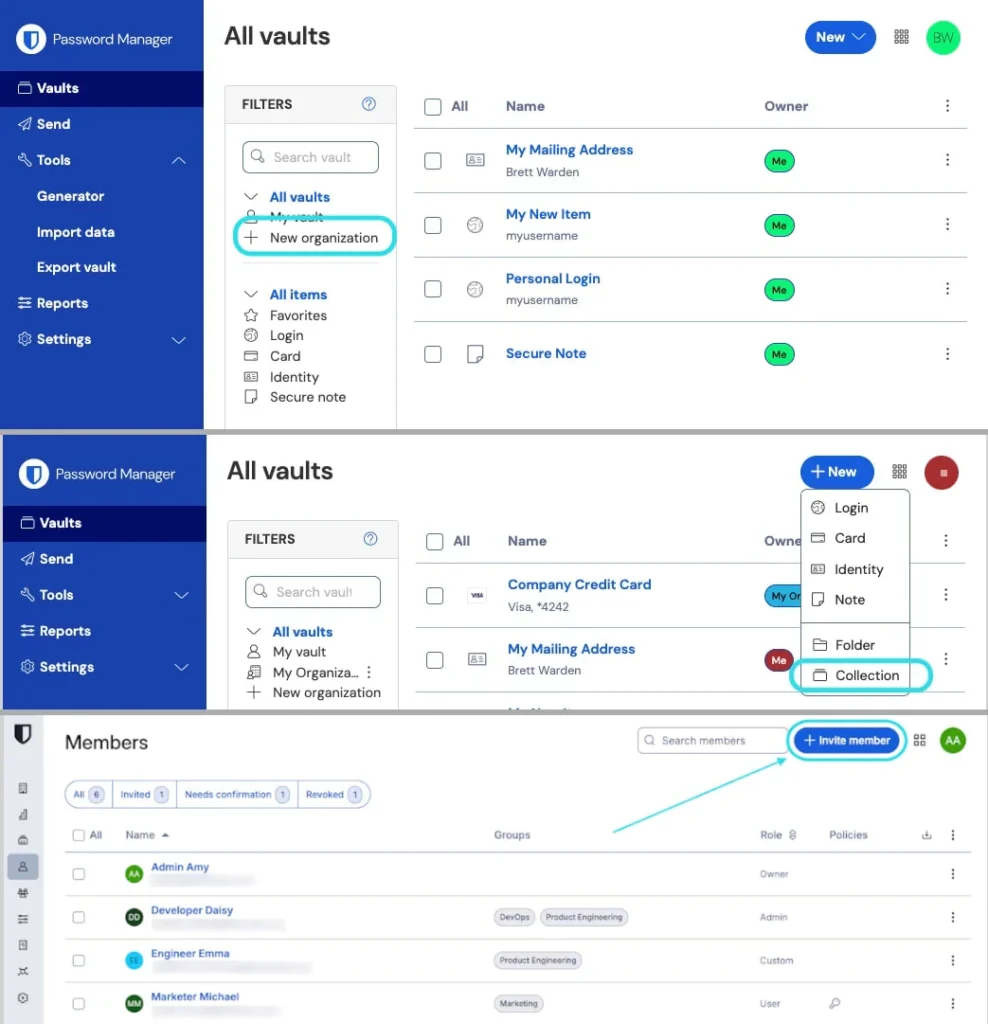
Setting up Cupid Vault involves three main steps:
- Create a new Organization under the free Bitwarden plan.
- Create up to two Collections inside that Organization.
- Invite a second user via email address.
Once accepted, both users can view, edit, and manage items inside the shared vault space.
Bitwarden explains that shared items are not tied to the creator. Both members can modify or remove credentials within the shared Organization.
Security Features
Bitwarden emphasizes that Cupid Vault uses the same end-to-end encryption model as its main vault system.
Key protections include:
- End-to-end encryption for stored credentials
- Isolation from personal vault data
- Ability to revoke access instantly
- Verification using a fingerprint phrase to prevent enrollment attacks
Bitwarden states: “Users can verify each other using a fingerprint phrase to ensure they are sharing with the correct person.”
The fingerprint phrase helps protect against adversary-in-the-middle attacks during account linking.
Feature Limits in the Free Plan
Cupid Vault is intentionally limited compared to paid plans.
| Feature | Cupid Vault (Free) | Family Plan | Teams / Enterprise |
|---|---|---|---|
| Users supported | 2 | Up to 6 | Multiple |
| Collections | 2 | Multiple | Granular |
| Role-based access control | No | Yes | Yes |
| Admin permissions | Basic | Advanced | Full |
Users who already subscribe to Family, Teams, or Enterprise plans already have broader sharing options and do not need Cupid Vault.
Why Bitwarden Introduced Cupid Vault
Password sharing remains common among couples and families. Many people still send passwords through SMS, email, or messaging apps, which exposes them to interception and account compromise.
Bitwarden’s approach offers:
- Controlled sharing
- Easy revocation
- Audit visibility
- Encrypted storage
The feature was introduced ahead of Valentine’s Day, reflecting its target audience of couples and close partners.
Advantages of Cupid Vault
- No additional cost
- Built into the existing free plan
- Secure Organization-based sharing
- Simple email invitation setup
- Instant access revocation
Potential Limitations
- Only supports two users
- Limited to two shared collections
- No advanced access roles
- Not suitable for larger families or teams
Organizations that require more control should consider paid tiers.
How to Set It Up
- Log into your Bitwarden web vault.
- Navigate to Organizations.
- Create a new Organization under the free plan.
- Create Collections for shared items.
- Invite the second member via email.
- Verify identity using the fingerprint phrase.
Frequently Asked Questions (FAQ)
Yes. It is available under Bitwarden’s free plan for two users and two collections.
Yes. It uses Bitwarden’s end-to-end encryption model.
Yes. Access can be revoked at any time by the Organization owner.
No. The Family plan supports up to six users and includes more advanced permissions.
It is not designed for business use. Teams and Enterprise plans offer structured role-based access controls and compliance tools.


Read our disclosure page to find out how can you help VPNCentral sustain the editorial team Read more


Improve this guide


User forum
0 messages