
Attackers Are Abusing Trusted Windows Drivers to Kill AV and EDR Tools


 10 min. read
  Published on
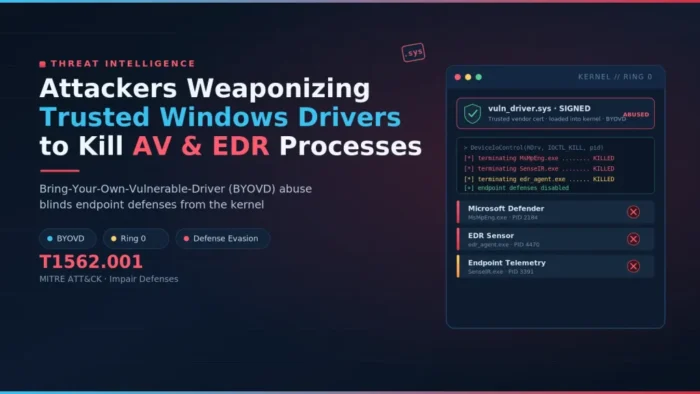
Attackers are increasingly using trusted but vulnerable Windows drivers to disable antivirus and endpoint detection and response tools before deploying malware, ransomware, or hands-on-keyboard attacks.
The technique is known as Bring Your Own Vulnerable Driver, or BYOVD. A new Security.com report warns that BYOVD has moved from a niche tradecraft technique into a common defense-evasion method used in modern intrusions.

Access content across the globe at the highest speed rate.
🔥 Save 81% + 2 bonus months! 🔥
70% of our readers choose Private Internet Access
70% of our readers choose ExpressVPN
2
Browse the web from multiple devices with industry-standard security protocols.
🔥 Save 73%! 🔥

Faster dedicated servers for specific actions (currently at summer discounts)
🔥 Save 69%! 🔥
The method works because Windows drivers run with very high privileges. If attackers can load a signed driver that contains a known flaw, they may abuse that driver to interfere with security tools from the kernel layer.
What BYOVD Means In Windows Attacks
BYOVD attacks do not rely on a malicious unsigned driver. Instead, the attacker brings a legitimate driver that Windows may trust because it has a valid or previously valid signature.
Many of these drivers come from hardware vendors, diagnostic utilities, system tools, or older enterprise software. The problem starts when the driver exposes unsafe control functions that let user-mode code perform sensitive kernel operations.
Once the driver loads, the attacker can send commands to it. Those commands may terminate security processes, change permissions, interfere with callbacks, or weaken the telemetry that endpoint tools need to detect suspicious behavior.
| BYOVD stage | What the attacker does | Why it matters |
|---|---|---|
| Initial access | Compromises the machine through phishing, VPN credentials, malware, or another route | The attacker needs a foothold before driver abuse becomes useful |
| Privilege level | Obtains administrative rights or enough control to load a driver | Windows driver loading normally requires elevated privileges |
| Driver loading | Installs or starts a signed vulnerable driver | The driver runs in kernel mode and can interact with protected system areas |
| Defense evasion | Uses the driver to stop, blind, or weaken AV and EDR tools | Security products may lose visibility before the main payload runs |
Why Signed Drivers Are Dangerous When They Are Vulnerable
Windows uses driver signing to reduce the risk of unknown kernel code. However, signing does not mean a driver is safe forever. A signed driver can still contain vulnerable input/output control handlers, unsafe memory operations, or weak access checks.
This creates a trust problem. Attackers do not need to write a new rootkit driver when they can reuse an older signed driver that already exposes powerful operations.
The public LOLDrivers project tracks drivers that defenders can hunt for in their environments. These databases help security teams identify drivers that attackers may abuse during BYOVD campaigns.
How Attackers Use Drivers To Disable Security Tools
Most BYOVD campaigns focus on defense impairment. Instead of only hiding from antivirus or EDR, the attacker tries to stop the protection layer from working.
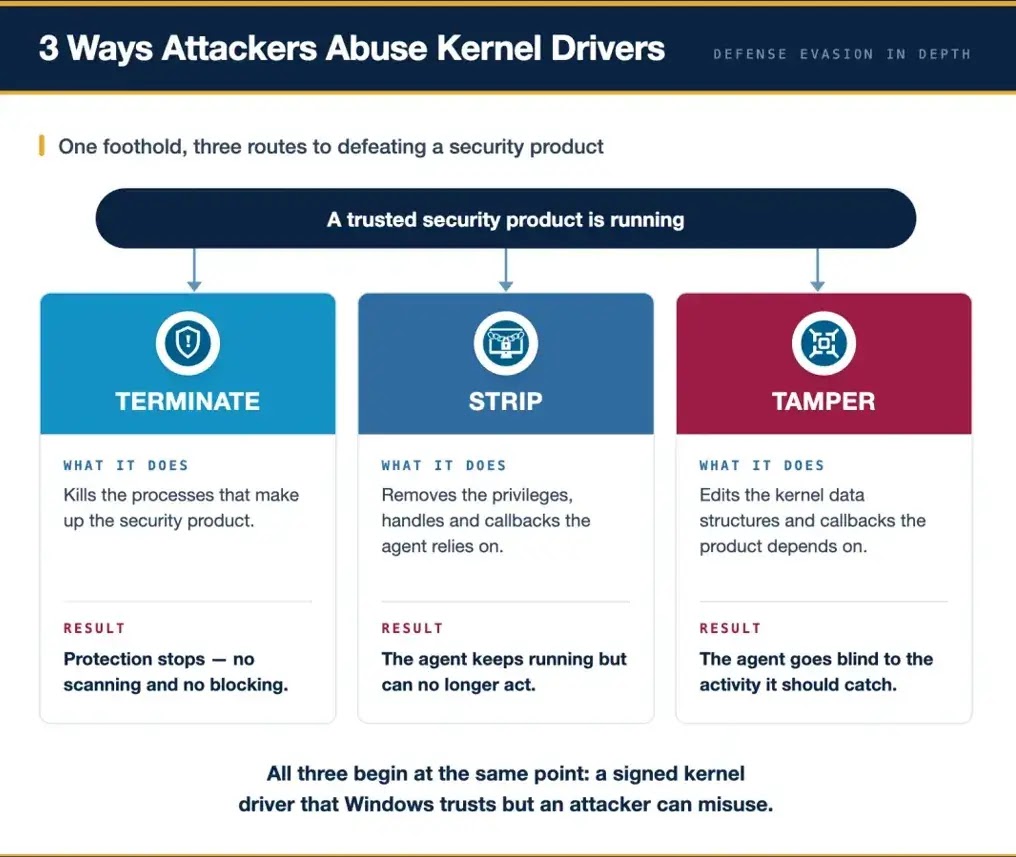
Some tools terminate AV and EDR processes directly. Others suspend processes, strip security tool permissions, modify kernel data, or interfere with event callbacks that security products depend on.
Sophos documented one example in its AuKill analysis, where attackers abused an outdated Process Explorer driver to disable EDR processes before deploying further malware.
- Terminate endpoint security processes from kernel mode.
- Suspend protected security services so they appear present but stop working.
- Remove callbacks that security tools use to monitor process or image loading.
- Change process privileges or protection levels.
- Disrupt communication between local agents and cloud security services.
- Prepare the machine for ransomware deployment, credential theft, or data exfiltration.
Why Kernel Access Gives Attackers An Advantage
Windows separates ordinary applications from the kernel. User-mode applications have limits, while kernel-mode code can interact with core operating system structures, drivers, memory, and device interfaces.
Security tools use kernel components to monitor behavior and resist tampering. A vulnerable driver can put the attacker in the same privileged space, which gives them a better chance of bypassing those protections.
Microsoft’s Windows security servicing criteria says a non-administrative process crossing into the kernel is a security boundary, but administrator-to-kernel escalation is not a strict boundary for the NT kernel. This matters because many BYOVD attacks start after the attacker already has administrative control.
| Attack technique | Typical effect | Defender concern |
|---|---|---|
| Process termination | Stops AV or EDR services | Alerts and protection may stop before ransomware runs |
| Process suspension | Security tool stays visible but no longer performs normally | Automated recovery may not trigger because the process still exists |
| Kernel callback tampering | Security tool loses telemetry | Detection can weaken without an obvious service crash |
| Permission changes | Security agent loses access to actions or data | Protection may degrade silently |
| Cloud communication disruption | Endpoint agent cannot reach backend intelligence | Detection and response may slow down |
Why Microsoft’s Blocklist Helps But Does Not Solve BYOVD
Microsoft provides a vulnerable driver blocklist to stop known bad or vulnerable drivers from loading. The recommended driver block rules can be used through App Control for Business and related Windows protections.
Microsoft also recommends enabling HVCI, also called memory integrity, or using S mode where possible. The block rules can reduce exposure to known drivers that threat actors have abused.
The limitation is timing and coverage. Blocklists work best after defenders know which driver to block, while attackers can switch to another signed vulnerable driver, use a less common driver, or modify tooling to avoid simple detection logic.
HVCI And Kernel Hardening Reduce Risk, But Attackers Adapt
Windows includes hardening features such as kernel address randomization, hypervisor-protected code integrity, and other exploit mitigations. These controls make several kernel attack paths harder.
However, BYOVD often abuses legitimate driver functionality rather than injecting entirely new unsigned kernel code. The Security.com analysis notes that some attacks focus on changing existing kernel data rather than adding new code.
That is why defenders should not treat one operating system setting as a complete answer. BYOVD defense needs patching, driver control, privilege reduction, telemetry, and behavioral detection working together.
| Control | What it helps block | Limitation |
|---|---|---|
| Vulnerable driver blocklist | Known exploited or risky drivers | May lag behind newly abused drivers |
| HVCI or memory integrity | Many unsafe kernel code paths | Does not replace driver allowlisting and monitoring |
| Application control | Unapproved binaries and drivers | Requires testing to avoid business disruption |
| Least privilege | Unauthorized driver loading | Does not help if attackers already gain admin control |
| Behavioral detection | Suspicious driver activity and security-tool tampering | Needs high-quality telemetry and fast response |
Ransomware Groups Use BYOVD Before Encryption
BYOVD has become useful to ransomware operators because endpoint protection often blocks the final payload. If attackers can blind or disable the defense layer first, encryption and data theft become easier.
The Sophos report said AuKill appeared in incidents where attackers attempted to disable EDR clients before deploying a backdoor or ransomware. This pattern fits a wider shift toward killing security controls before executing the most visible part of an attack.
The technique also appears in commercialized tooling. Public and underground tools can automate driver loading, target process selection, and EDR-kill actions, which lowers the skill needed to use BYOVD in intrusions.
What Defenders Should Monitor
Defenders should watch for new or unusual driver loads, especially from temporary folders, user profile paths, downloads folders, or unusual service names. A signed driver loading from a strange location deserves investigation.
The LOLDrivers database provides detections and references that can help teams hunt for known vulnerable or malicious drivers. It should complement, not replace, organization-specific driver allowlists.
Security teams should also monitor what drivers do after loading. A driver that suddenly receives unusual IOCTL requests, touches security processes, or appears shortly before AV and EDR failures should trigger high-priority investigation.
- New kernel driver installation or service creation events.
- Drivers loaded from unexpected paths or with unfamiliar hashes.
- Known vulnerable drivers listed in public BYOVD databases.
- Security process termination, suspension, or repeated restart failures.
- Sudden loss of EDR telemetry from a single host.
- EDR agent present on disk but no longer reporting normally.
- Unusual IOCTL activity involving drivers that normally should not control processes.
- Security tools disabled shortly before file encryption, credential dumping, or lateral movement.
How Organizations Can Reduce BYOVD Risk
The first step is to stop attackers from reaching the stage where driver loading becomes possible. Strong identity controls, patching, phishing resistance, and endpoint hardening still matter because BYOVD usually comes after initial compromise.
Next, organizations should restrict who can install drivers and which drivers can run. Microsoft’s driver block rules guidance recommends validating policies in audit mode before enforcement because blocking kernel drivers without testing can break devices or software.
Teams should also review Microsoft’s servicing criteria when setting expectations. BYOVD defense cannot rely only on waiting for every admin-to-kernel technique to receive a CVE or an urgent security patch.
- Enable the Microsoft vulnerable driver blocklist where supported.
- Use application control or driver allowlisting for high-risk systems.
- Enable HVCI or memory integrity on compatible devices.
- Remove local administrator rights from standard users.
- Patch hardware utilities and uninstall old vendor tools that install risky drivers.
- Block driver loading from user-writable directories where possible.
- Alert on new driver services and unexpected kernel driver loads.
- Investigate security-tool failures as potential attack activity, not only software instability.
Why Behavioral Detection Is Becoming More Important
Signature-based detection can catch known driver hashes and known EDR-killer tools. However, attackers can change loaders, rename files, or move to a different vulnerable driver.
Behavioral detection focuses on actions instead of names. A newly loaded driver that receives commands to terminate several security processes should look suspicious even if the driver itself has not appeared in a blocklist yet.
This is where defenders can gain time. Watching for driver behavior, service changes, process tampering, and sudden telemetry loss can reveal an attack before ransomware or data theft reaches its final stage.
Bottom Line
BYOVD attacks show how trusted software can become an attacker’s tool when old drivers remain installable and security teams lack visibility into kernel activity.
Windows hardening, driver blocklists, and EDR tamper protection all help, but none of them solves the problem alone. Attackers keep looking for signed drivers that still load and still expose dangerous operations.
Organizations should treat unexpected driver activity as a serious signal, especially when it appears near AV or EDR failures. The faster defenders detect security-tool impairment, the better chance they have to stop ransomware before it spreads.
FAQ
BYOVD stands for Bring Your Own Vulnerable Driver. It is an attack technique where threat actors load a legitimate but vulnerable Windows driver and abuse it to perform privileged actions, often to disable antivirus or EDR tools.
Attackers use trusted drivers because they can run in kernel mode and may already have valid signatures. If a signed driver contains a vulnerability, attackers can abuse it without needing to create a new unsigned driver.
In most cases, attackers need administrator-level access or an equivalent post-compromise foothold to load or start a vulnerable driver. BYOVD is usually a defense-evasion step after initial compromise.
The blocklist helps stop known vulnerable drivers, but it is not a complete defense. Attackers can move to drivers not yet listed, use uncommon drivers, or rely on behavior that signature-based blocking does not catch.
Organizations should monitor new driver loads, driver services, known vulnerable driver hashes, unusual IOCTL behavior, security process termination, suspended EDR services, and sudden loss of endpoint telemetry.


Read our disclosure page to find out how can you help VPNCentral sustain the editorial team Read more


Improve this guide




User forum
0 messages