
Claude Can Now Learn a Skill by Recording Your Screen


 9 min. read
  Published on
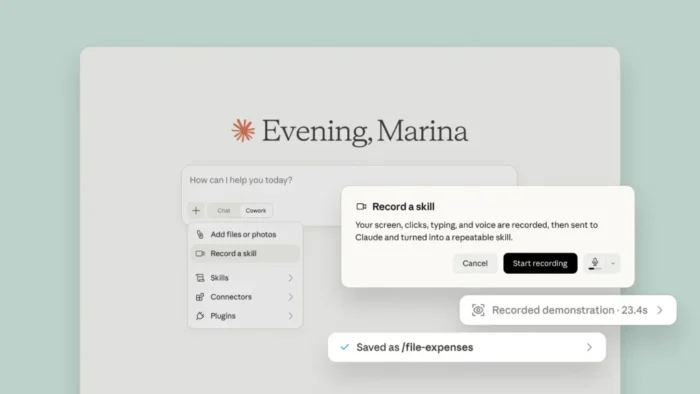
Anthropic has introduced “Record a skill,” a Claude Cowork feature that converts a screen-recorded demonstration into a reusable workflow. Users perform a task, explain their decisions aloud, and let Claude create a skill that can run the process again.
The feature removes much of the manual work involved in creating detailed instructions. Instead of documenting every step or writing a script, users can show Claude how they complete a repeatable task.

Access content across the globe at the highest speed rate.
70% of our readers choose Private Internet Access
70% of our readers choose ExpressVPN

Browse the web from multiple devices with industry-standard security protocols.

Faster dedicated servers for specific actions (currently at summer discounts)
According to the official Claude announcement, Record a skill is available through Cowork in the Claude desktop application. Anthropic lists Pro, Max, and Team subscribers as eligible at launch.
How Claude’s Record a Skill Feature Works
Users begin by opening Cowork in Claude Desktop and selecting “Record a skill” from the plus menu. They then start recording and complete the task they want Claude to learn.
Anthropic encourages users to explain the process while working. The narration can clarify why they select particular options, how they make decisions, and what result the workflow should produce.
Claude analyzes the demonstration and turns it into a saved skill. When the same task arises later, the user can run the skill instead of completing the entire process manually.
| Step | What the user does | What Claude does |
|---|---|---|
| 1. Open Cowork | Launch Claude Desktop and enter Cowork. | Provides access to Cowork tools and available skills. |
| 2. Start recording | Select “Record a skill” from the plus menu. | Begins capturing the demonstrated workflow. |
| 3. Perform the task | Complete the process normally on screen. | Observes the visible sequence of actions. |
| 4. Explain decisions | Describe important choices and exceptions aloud. | Uses the explanation to understand the workflow’s logic. |
| 5. Save the skill | Review the generated workflow. | Creates a reusable skill for future tasks. |
| 6. Run it again | Ask Claude to complete the same type of task. | Loads the skill and follows its saved instructions. |
Claude Skills Store More Than a Simple Prompt
Claude skills provide reusable instructions for specialized tasks. They can capture personal working methods, company procedures, document requirements, data-analysis processes, and other repeatable workflows.
Anthropic’s explanation of how Claude skills work describes them as folders containing instructions, scripts, and supporting resources. Claude loads the relevant information when a task requires it.
A skill can range from a short set of instructions to a more advanced package containing executable code and reference files. Record a skill gives non-technical users another way to begin creating these packages.
Skills require Claude’s code execution capability to remain enabled. However, the recording process reduces the need for users to understand the internal file structure or write the initial workflow manually.
Tasks Users Could Teach Claude
Record a skill suits processes that follow a clear and repeatable sequence. It may prove less useful for tasks that depend heavily on changing circumstances, subjective judgment, or information that appears differently each time.
- Preparing a recurring report from several files
- Formatting documents according to company guidelines
- Organizing invoices and expense information
- Collecting information from approved websites
- Updating a spreadsheet with recurring data
- Creating content in a consistent format
- Processing standard customer requests
- Sorting files into a defined folder structure
- Checking documents against an internal checklist
- Completing routine browser-based administrative work
Clear narration can improve the resulting skill. Users should explain rules that might not be visible on screen, such as why they reject an entry, choose one source over another, or stop the process for manual review.
The user should also demonstrate the complete workflow, including the desired final result. A partial recording may leave Claude without enough information to determine when the task has finished successfully.
Record a Skill Availability and Claude Plan Prices
Anthropic’s launch announcement lists Record a skill for Claude Pro, Max, and Team subscribers. The company has not included the Free plan in the initial availability list.
The current Claude pricing page lists Pro at $20 per month or $200 per year. Max offers two monthly tiers costing $100 and $200, with higher usage allowances than Pro.
| Claude plan | US price | Record a skill access at launch |
|---|---|---|
| Free | $0 | Not listed |
| Pro | $20 monthly or $200 annually | Available |
| Max 5x | $100 monthly | Available |
| Max 20x | $200 monthly | Available |
| Team Standard | $25 per seat monthly or $20 per seat with annual billing | Available |
| Team Premium | $125 per seat monthly or $100 per seat with annual billing | Available |
The listed prices apply to US customers and may exclude taxes. Local prices, currencies, mobile subscription costs, and available billing options can differ by region.
The Claude Team plan now requires at least two members. Organizations can combine Standard and Premium seats, allowing heavier users to receive larger usage allowances.
Record a Skill Differs From General Skill Access
Claude skills themselves are available across Free, Pro, Max, Team, and Enterprise plans when code execution is enabled. The new screen-recording creation method has a narrower launch audience.
Anthropic currently limits screen-recorded skill creation to Pro, Max, and Team plans. Free users can still use supported skills but do not receive Record a skill under the announced rollout.
This distinction matters because users may see skill-related controls without seeing the recording option. They also need Claude Desktop and must open Cowork before selecting the feature from the plus menu.
Why Screen Recording Lowers the Automation Barrier
Traditional workflow automation often requires scripts, rule builders, or carefully written technical instructions. Record a skill allows employees to demonstrate processes using the applications they already understand.
This approach may help organizations document knowledge held by experienced employees. A specialist can demonstrate a process while explaining exceptions that would otherwise remain undocumented.
The resulting skill can also provide a consistent starting point for repeated work. Users should still test it across different inputs and review its actions before relying on it for sensitive or irreversible processes.
Users Should Review Skills Before Running Them
Screen recordings may expose confidential information, personal messages, account details, customer records, or internal company systems. Users should close unrelated applications and remove sensitive information before starting a recording.
Anthropic’s Claude Cowork safety guidance notes that Cowork can read files, browse the web, run code, and use applications when users grant the required access. Those capabilities can increase the impact of an incorrect instruction.
- Do not display passwords, recovery codes, or private encryption keys.
- Close unrelated email, messaging, and document windows.
- Use sample data when demonstrating sensitive business processes.
- Review the generated skill before its first full run.
- Test the skill with low-risk information.
- Limit access to only the files and applications the task requires.
- Require manual confirmation before payments, deletions, or external messages.
- Update the skill when an application or business process changes.
Organizations should establish rules covering who can record, approve, distribute, and modify skills. Team administrators can manage shared skills, while individuals may retain personal workflows for their own accounts.
Anthropic’s documentation says skills load dynamically when Claude determines that they apply to a task. Users should give each skill a specific purpose and clearly describe when Claude should use it.
Human Review Still Matters
A recorded demonstration does not guarantee that Claude will handle every future variation correctly. Websites change, software interfaces move, and new inputs can create situations that the original recording did not cover.
Users should add decision rules and clear stopping conditions for uncertain situations. High-risk workflows should require confirmation before Claude changes files, sends messages, submits forms, or performs financial actions.
The Cowork safety recommendations encourage users to review permissions and consider what Claude can see and do. Limiting access reduces the potential damage from errors or malicious instructions encountered during a task.
What the Feature Means for Claude Cowork
Record a skill expands Cowork from a task-execution tool into a system that can learn repeatable processes through demonstrations. It gives users a more visual alternative to writing automation instructions.
The feature may prove particularly useful for administrative, reporting, research, document, and operations workflows. Teams can capture established processes and reuse them without asking every employee to build a workflow from scratch.
Pro and Max subscriptions target individual users, while Claude’s paid plans also provide Cowork access with different usage limits. Organizations considering Team subscriptions should compare seat types before deciding which employees need Premium capacity.
Team administrators should also account for the current two-member minimum for Claude Team. The previous five-seat requirement no longer appears in Anthropic’s current support documentation.
FAQ
Record a skill lets users demonstrate a task through a narrated screen recording. Claude converts the demonstration into a saved skill that it can use for similar work later.
Open Cowork in the Claude desktop application, select Record a skill from the plus menu, start recording, complete the task, and explain important decisions aloud.
Anthropic lists Record a skill as available on Claude Pro, Max, and Team plans at launch. The Free plan was not included in the availability announcement.
Anthropic says users record their screen and explain the task aloud. The company has not stated that the feature separately logs every mouse click and keystroke.
Users do not need to write the initial workflow manually when using Record a skill. However, Claude skills can contain instructions, scripts, and resources, and they require code execution to be enabled.
Users should avoid displaying passwords, private keys, customer records, and unrelated confidential information. They should review generated skills, limit permissions, and require confirmation for high-risk actions.


Read our disclosure page to find out how can you help VPNCentral sustain the editorial team Read more


Improve this guide
User forum
0 messages