
EtherRAT campaign targets enterprise admins through fake GitHub tool pages


 6 min. read
  Published on
A new EtherRAT malware campaign is targeting enterprise administrators, DevOps engineers, and security analysts by abusing the way they search for trusted administrative tools online.
The campaign uses SEO poisoning to push fake GitHub repositories into search results for tools such as PsExec, AzCopy, Sysmon, Windows LAPS, Kusto Explorer, Process Explorer, TCPView, ProcDump, BgInfo, and other utilities used by IT teams.

Access content across the globe at the highest speed rate.
70% of our readers choose Private Internet Access
70% of our readers choose ExpressVPN

Browse the web from multiple devices with industry-standard security protocols.

Faster dedicated servers for specific actions (currently at summer discounts)
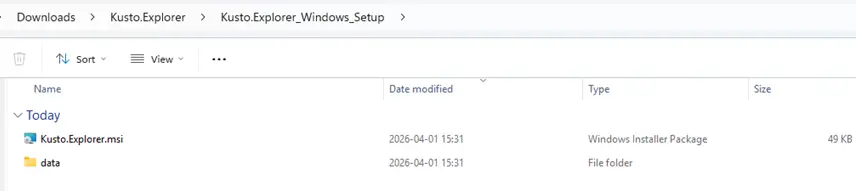
Researchers found that the attackers use clean-looking GitHub pages as a first step. These pages do not host malware directly. Instead, they send users to a second GitHub repository that delivers a malicious MSI installer.
How the EtherRAT campaign works
The attack starts when an IT worker searches for a common admin or troubleshooting tool on search engines such as Bing, Yahoo, DuckDuckGo, or Yandex. The poisoned results can lead to a GitHub repository that looks like a legitimate download page.
The first repository acts as a facade. It usually includes a professional-looking README file and may appear safe because it does not contain obvious malicious code.
The danger begins when the user follows the download link. That link points to another GitHub account or repository where the malicious MSI file is hosted. Once the installer runs, the infection chain starts on the victim’s system.
Why enterprise admins are the main target
This campaign is dangerous because it focuses on users with elevated access. Tools such as PsExec, Sysmon, LAPS, RSAT, WinDbg, AzCopy, and Kusto Explorer are usually searched for by system administrators, security teams, cloud engineers, and enterprise support staff.
If attackers compromise one of those machines, they may gain a strong foothold inside a company network. An admin workstation can hold credentials, management tools, VPN access, cloud permissions, and internal documentation.
This makes the campaign more targeted than a typical malware operation. Instead of trying to infect as many random users as possible, the attackers try to reach the people who already manage sensitive infrastructure.
At a glance
| Category | Details |
|---|---|
| Malware | EtherRAT |
| Main delivery method | SEO-poisoned GitHub repositories |
| Targeted users | Enterprise admins, DevOps engineers, security analysts, and IT support teams |
| Fake tools used as lures | PsExec, AzCopy, Sysmon, LAPS, Kusto Explorer, Process Explorer, TCPView, ProcDump, and others |
| Payload format | Malicious MSI installers |
| Command-and-control method | Ethereum smart contracts and public Ethereum RPC endpoints |
| Main risk | Remote access, persistence, data theft, and deeper enterprise compromise |
GitHub facades help the campaign survive takedowns
The two-stage GitHub setup gives the attackers more resilience. If defenders report or remove the second repository that hosts the payload, the attackers can update the link in the first repository and keep the search-visible page alive.
Atos researchers identified dozens of malicious GitHub facades connected to this operation. The fake repositories impersonated tools across several categories, including Sysinternals utilities, Active Directory tools, remote access software, cloud transfer tools, debugging tools, and business utilities.
This approach also gives the operation a trust advantage. Many IT professionals already use GitHub to find scripts, documentation, tools, and open-source projects, so a polished GitHub page can lower suspicion during a busy troubleshooting session.
How the malware runs after installation
After the victim launches the MSI installer, the package extracts several files and starts a Windows command script through an MSI Custom Action. The script runs with high privileges and prepares the next stage of the attack.
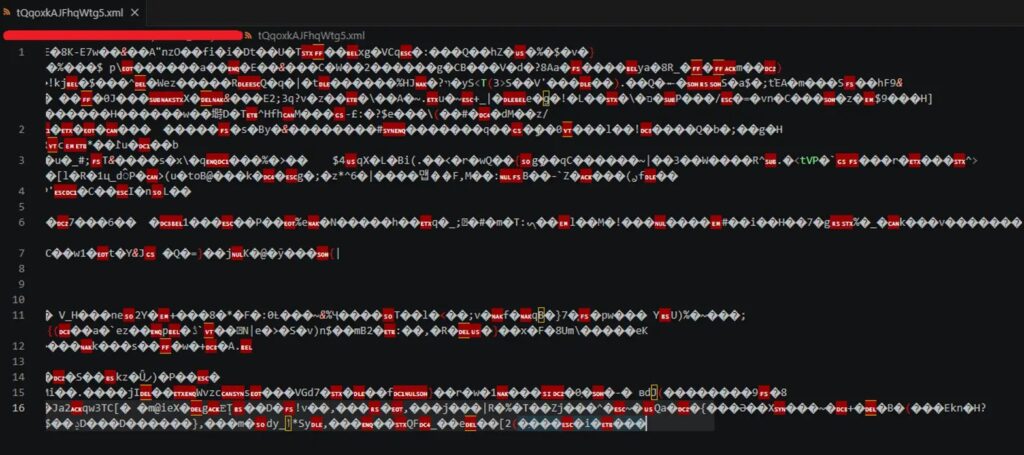
The malware then uses Node.js and JavaScript-based stages to decrypt and execute additional code. Some payloads run in memory, which reduces the number of obvious files security tools can inspect.
Later stages create persistence through the Windows registry and run the main RAT payload through conhost.exe with a headless argument. This helps the process look less suspicious in normal system views.
Ethereum-based C2 makes blocking harder
EtherRAT does not rely only on a fixed command-and-control domain. Instead, it queries Ethereum smart contracts through public Ethereum RPC services to find the current C2 server address.
This matters because defenders cannot fully disrupt the campaign by blocking a single domain or taking down one server. The attacker can update the value stored in the smart contract, and the malware can retrieve the new C2 location during its next lookup cycle.
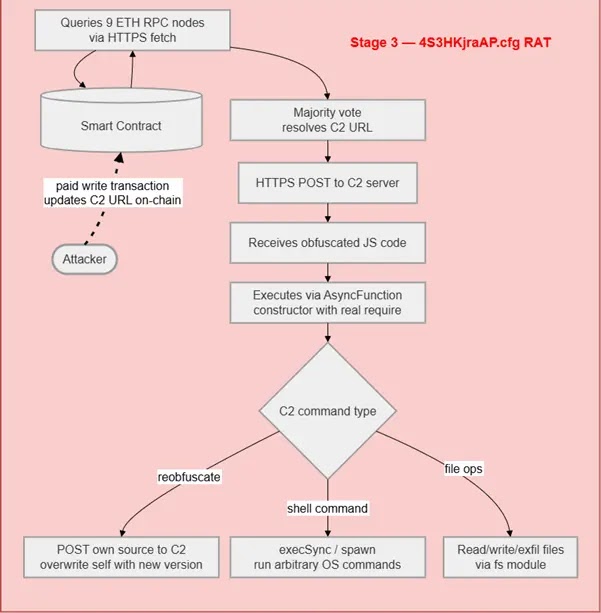
Researchers also observed periodic communication with public Ethereum RPC endpoints, high-frequency beaconing, and suspicious process behavior involving node.exe and conhost.exe. These patterns can help defenders build detection rules.
Why this campaign is hard to spot
- The first GitHub repository can look clean and harmless.
- The malware hides behind trusted administrative tool names.
- The payload uses multiple stages instead of one obvious executable.
- Some JavaScript stages run in memory.
- The C2 address can change through blockchain-based resolution.
- The campaign targets tools that technical users already expect to download.
What IT teams should do now
Organizations should stop relying on search results for administrative software downloads. Internal software portals, vendor download pages, package allowlists, and signed installer verification should become the default for admin tools.
Security teams should also review historical network logs for outbound traffic to Ethereum RPC endpoints and known EtherRAT C2 infrastructure. This can help identify older infections that may still have persistence on admin workstations.
Endpoint teams should hunt for node.exe launching unusual scripts, MSI installers spawning command shells, conhost.exe running with headless arguments, suspicious registry Run keys, and high-frequency outbound beaconing to unknown infrastructure.
Recommended checks
| Area | What to check |
|---|---|
| Downloads | Look for MSI installers downloaded from unofficial GitHub repositories. |
| Processes | Review node.exe, msiexec.exe, cmd.exe, PowerShell, and conhost.exe process trees. |
| Persistence | Check registry Run keys for random names or Node.js execution paths. |
| Network | Look for repeated calls to Ethereum RPC services and unknown C2 domains. |
| Admin tools | Confirm that tools such as PsExec, Sysmon, LAPS, RSAT, and Kusto Explorer came from official sources. |
FAQ
EtherRAT is a JavaScript-based remote access trojan that can execute attacker-supplied commands, collect system details, and maintain communication with a command-and-control server.
EtherRAT uses Ethereum smart contracts to store or retrieve the current C2 address. This gives attackers a flexible way to change infrastructure without rebuilding the malware.
No. GitHub itself is a legitimate developer platform. The risk comes from attackers abusing GitHub pages and repositories to impersonate trusted tools and distribute malicious installers.
Admins should download tools only from official vendor pages, internal software catalogs, trusted package managers, or verified repositories. They should avoid search-result downloads for sensitive administrative utilities.


Read our disclosure page to find out how can you help VPNCentral sustain the editorial team Read more


Improve this guide
User forum
0 messages