
Hackers Abuse Legitimate HWMonitor Binary To Load STX RAT Malware


 8 min. read
  Published on
Hackers are using a trojanized HWMonitor download to deliver STX RAT, a remote access trojan that can monitor infected systems and give attackers stealthy control.
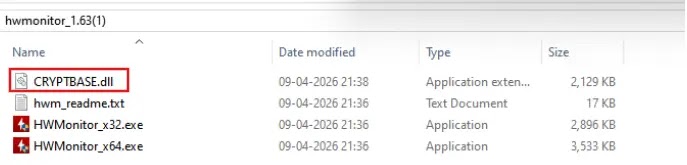
Security researchers at Gurucul found that the campaign uses a legitimate CPUID HWMonitor executable together with a malicious CRYPTBASE.dll file. When the user launches the program, Windows loads the malicious DLL from the same folder and starts a multi-stage infection chain.

Access content across the globe at the highest speed rate.
70% of our readers choose Private Internet Access
70% of our readers choose ExpressVPN

Browse the web from multiple devices with industry-standard security protocols.

Faster dedicated servers for specific actions (currently at summer discounts)
The attack matters because HWMonitor is a trusted hardware monitoring utility used by many Windows users, including IT workers and system administrators. By abusing a familiar tool, attackers can make the infection look like a normal software launch.
How the HWMonitor attack works
The campaign starts with a malicious ZIP archive that pretends to contain HWMonitor version 1.63. Gurucul said the archive was hosted on a Cloudflare R2 endpoint and was discovered after analysis of a Reddit post.
After extraction, the archive contains a legitimate HWMonitor_x64.exe file and a malicious CRYPTBASE.dll file in the same folder. This setup lets attackers abuse a technique known as DLL sideloading.
When HWMonitor_x64.exe runs, it loads CRYPTBASE.dll from the local application folder. Instead of loading only the legitimate Windows library from the system directory, the trusted executable runs attacker-controlled code placed beside it.
| Attack element | Details |
|---|---|
| Abused software | CPUID HWMonitor |
| Legitimate executable | HWMonitor_x64.exe |
| Malicious file | CRYPTBASE.dll |
| Technique | DLL sideloading and in-memory payload loading |
| Final malware | STX RAT |
| Main risk | Remote access, surveillance, data theft, and credential exposure |
Why attackers chose HWMonitor
HWMonitor is a legitimate Windows utility from CPUID that reads hardware sensor data such as voltages, temperatures, fan speeds, clock speeds, and system health information.
That reputation makes it attractive to attackers. Users often trust utilities from known vendors, especially when the file name and program behavior look familiar.
In this campaign, the real HWMonitor program still appears to run normally. Gurucul said the malicious DLL also loads the legitimate system cryptbase.dll to preserve expected behavior and reduce suspicion.
DLL sideloading helps the malware hide
DLL sideloading takes advantage of how Windows applications search for required libraries. If a program does not specify the full path to a DLL, Windows checks a defined search order.
Microsoft’s documentation says the folder where the application loaded appears before the system folder in the standard search order for unpackaged apps. Attackers can exploit this by placing a malicious DLL with the expected name beside a trusted executable.
MITRE tracks this behavior as DLL Search Order Hijacking under T1574.001. Attackers use it to run malicious code inside a legitimate process, which can help evade simple file reputation checks.
- The user runs a trusted executable.
- The executable looks for a DLL it needs.
- A malicious DLL with the same name sits in the application folder.
- Windows loads the local DLL before checking the system folder.
- The trusted program appears normal while malicious code runs.
STX RAT loads through several memory stages
After the malicious CRYPTBASE.dll starts, the malware does not immediately drop a simple executable payload to disk. Gurucul found that it begins a multi-stage reflective loading chain.
The DLL extracts obfuscated data from its .rdata section, allocates executable memory through VirtualAlloc, and passes execution through several loader stages. Each stage decrypts and loads the next payload in memory.
This design reduces obvious forensic traces. Traditional file-based detection can miss parts of the attack because the intermediate loaders and final STX RAT payload do not need to appear as normal files on disk.
| Stage | Reported behavior |
|---|---|
| Initial execution | User runs HWMonitor_x64.exe from the extracted archive |
| DLL sideloading | HWMonitor loads malicious CRYPTBASE.dll from the local folder |
| Loader stage | Malware extracts and decrypts obfuscated data from memory |
| Reflective loading | Additional payload stages load directly into memory |
| Final payload | STX RAT runs and contacts attacker infrastructure |
What STX RAT can do on infected systems
Gurucul’s analysis describes STX RAT as a stealthy remote access trojan with surveillance and data collection features.
The malware can collect system information, capture screen activity, check for debugging tools, and enumerate installed security products. It also uses API hashing to resolve Windows functions at runtime, which makes static analysis harder.
Researchers said the RAT communicates with its command-and-control server through JSON-based messages over HTTPS. This can make malicious traffic harder to spot if defenders only look for unusual protocols.
- Collects hostname, username, and operating system details.
- Captures screenshots from the infected device.
- Checks for debugging and analysis tools.
- Looks for security products such as antivirus and EDR tools.
- Uses API hashing to hide Windows function usage.
- Communicates with command-and-control infrastructure over HTTPS.
Why this campaign is risky for IT teams
The campaign creates a serious risk because hardware monitoring tools often run on administrator workstations. These machines may hold privileged credentials, VPN access, management tools, and internal documentation.
If attackers infect an administrator system, they may gain a useful foothold for broader network access. The malware’s screen capture and remote-control features can also expose sensitive internal workflows.
For businesses, the issue goes beyond one compromised utility. It shows how attackers can combine trusted binaries, familiar software names, and memory-only payloads to bypass user suspicion and weaken basic defenses.
Indicators defenders should monitor
Security teams should watch for HWMonitor_x64.exe loading CRYPTBASE.dll from a non-standard application folder. The legitimate Windows cryptbase.dll should normally load from the Windows system directory.
Teams should also search for suspicious outbound HTTPS traffic to unfamiliar domains after HWMonitor launches. This is especially important on administrator endpoints and systems that recently downloaded HWMonitor from unofficial links.
Gurucul listed several indicators tied to the campaign, including the Cloudflare R2 archive URL, the STX RAT callback endpoint, the HWMonitor_x64.exe file name, and the malicious CRYPTBASE.dll file name.
| Indicator type | What to look for |
|---|---|
| Process behavior | HWMonitor_x64.exe loading CRYPTBASE.dll from its local folder |
| Suspicious file | CRYPTBASE.dll located beside HWMonitor_x64.exe |
| Network activity | Unexpected HTTPS callbacks after HWMonitor execution |
| Memory activity | Unusual executable memory allocation from a hardware monitoring process |
| User activity | Recent download of HWMonitor from an unofficial or shortened link |
How users and organizations can reduce risk
Users should download HWMonitor only from CPUID’s official website or other trusted, verified software distribution channels. They should avoid links shared through forums, file-hosting pages, social posts, or unfamiliar redirects.
Organizations should review recent HWMonitor downloads and remove any copy that came from unofficial sources. If the local folder contains both HWMonitor_x64.exe and an unexpected CRYPTBASE.dll file, teams should treat the system as potentially compromised.
Security teams should also review endpoint telemetry for DLL sideloading patterns. A trusted hardware utility should not normally allocate executable memory, launch hidden payload stages, or connect to suspicious remote servers.
- Check whether HWMonitor was downloaded from CPUID’s official site.
- Look for CRYPTBASE.dll in the same folder as HWMonitor_x64.exe.
- Block the malicious Cloudflare R2 archive URL and related callback domain.
- Review endpoint logs for suspicious DLL loads from application folders.
- Monitor HWMonitor_x64.exe for unexpected outbound HTTPS traffic.
- Quarantine affected devices before rotating credentials.
- Reset passwords and revoke sessions if administrator machines were exposed.
- Use memory-based detection and EDR rules for reflective loading behavior.
Trusted tools are now high-value targets
The HWMonitor campaign shows why software trust cannot rely only on file names or familiar vendor branding. Attackers increasingly abuse legitimate utilities because users and security tools are more likely to trust them.
For defenders, the key lesson is behavioral monitoring. A legitimate executable can still become dangerous if it loads a malicious DLL, allocates suspicious memory, or contacts attacker infrastructure.
For users, the advice is simpler. Download utilities from official pages, avoid rehosted archives, and treat unexpected ZIP files as risky even when they appear to contain a known application.
FAQ
Attackers distributed a trojanized HWMonitor archive that contained the legitimate HWMonitor_x64.exe file and a malicious CRYPTBASE.dll file. When launched, the trusted executable loaded the malicious DLL and started a multi-stage STX RAT infection chain.
DLL sideloading is a technique where attackers place a malicious DLL where a trusted application will load it. The trusted program then runs attacker-controlled code while appearing to behave normally.
STX RAT can collect system information, capture screen activity, check for analysis tools, identify installed security products, and communicate with attacker-controlled servers over HTTPS.
Users should download HWMonitor only from CPUID’s official website or trusted verified sources. They should avoid ZIP archives from forums, file-hosting links, redirects, or unfamiliar download pages.


Read our disclosure page to find out how can you help VPNCentral sustain the editorial team Read more


Improve this guide



User forum
0 messages