
Hackers abuse Obsidian plugin to launch Windows and macOS malware in finance-focused campaign


 5 min. read
  Published on
Attackers have found a new way to turn a trusted productivity app into a malware delivery tool. Elastic Security Labs says a campaign it tracks as REF6598 abuses Obsidian’s community plugin system, specifically the Shell Commands plugin, to execute attacker-controlled commands when a victim opens a cloud-synced vault.
The campaign does not rely on a software vulnerability in Obsidian itself. Instead, it uses social engineering, a malicious vault controlled by the attackers, and a plugin that already has the power to run local shell commands. That makes this case more about trust abuse than about a traditional exploit.

Access content across the globe at the highest speed rate.
70% of our readers choose Private Internet Access
70% of our readers choose ExpressVPN

Browse the web from multiple devices with industry-standard security protocols.

Faster dedicated servers for specific actions (currently at summer discounts)
Elastic says the activity targets people in the financial and cryptocurrency sectors. The researchers found that the attackers posed as a venture capital firm on LinkedIn, then moved conversations to Telegram before directing victims to Obsidian and providing credentials for a shared vault under attacker control.
How the attack starts
Once the target opens the attacker-controlled vault and enables community plugin sync, the malicious configuration can trigger commands automatically. Elastic says the Shell Commands plugin was configured so that opening the vault led to attacker-defined execution with no extra clicks needed from the victim.
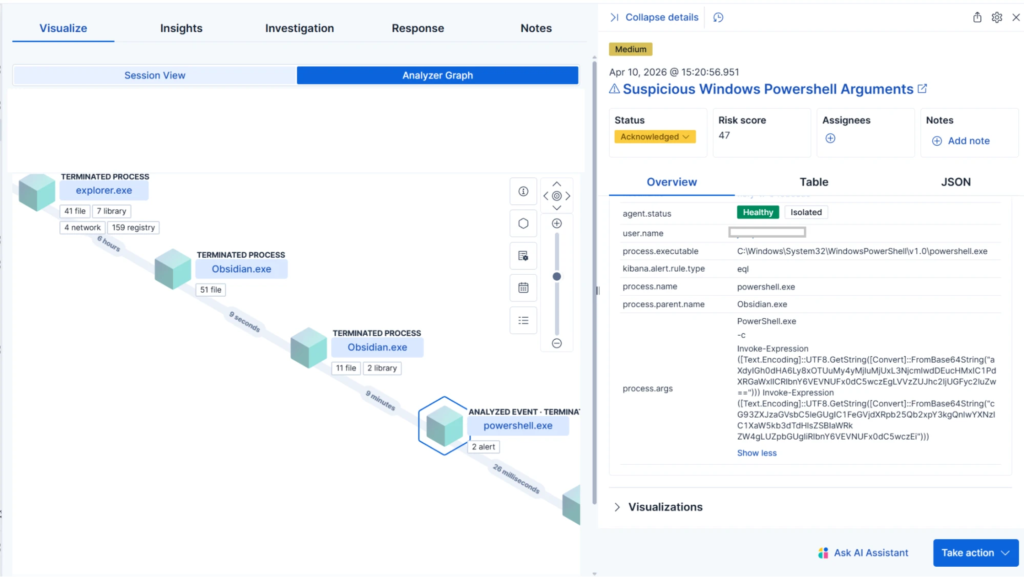
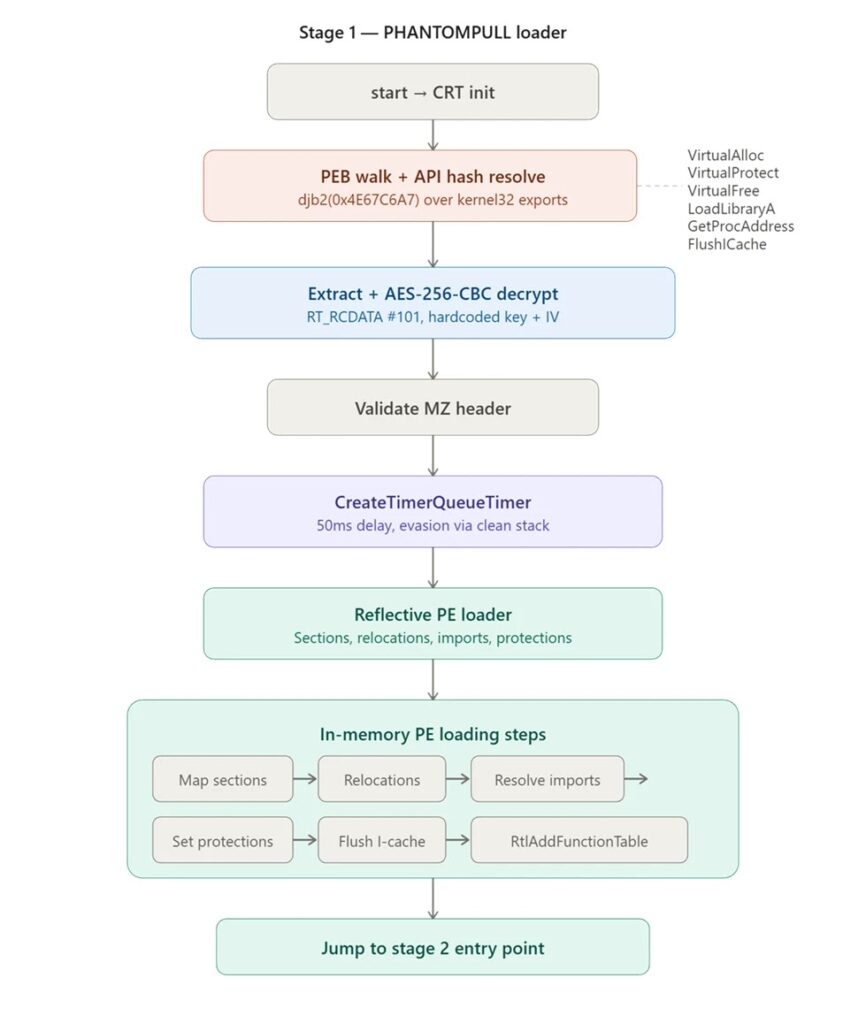
On Windows, Elastic says the plugin launched PowerShell commands that reached out to staging infrastructure and downloaded a file named syncobs.exe. That file then unpacked and reflectively loaded a final in-memory payload, which Elastic named PHANTOMPULSE. The final malware never wrote its last stage to disk, which made standard file-based detection less useful.
On macOS, Elastic observed a different branch that used an obfuscated AppleScript dropper and included a Telegram-based fallback for command-and-control communication. The researchers say both paths were built to hide behind normal-looking application behavior, which can make response slower if teams only watch for classic exploit chains.
Why this campaign stands out
This campaign matters because it shows how dangerous legitimate features can become in the wrong hands. Obsidian’s own documentation says community plugins are disabled by default in Restricted Mode, and warns that community plugins can access files on the computer, connect to the internet, and install additional programs. That warning lines up directly with what Elastic observed in REF6598.
The Shell Commands plugin itself also carries obvious execution risk by design. Public plugin documentation says it lets users define and run custom shell commands from inside Obsidian, while the plugin’s documentation warns that it is not among the safest community plugins and comes with risks.
Elastic also found an unusual command-and-control design in the Windows path. PHANTOMPULSE queried Blockscout APIs across multiple blockchain networks and read encrypted C2 URLs from transaction input data tied to a hardcoded wallet address. Elastic noted a flaw in that design too: because the malware picked the most recent transaction without verifying the sender, defenders could potentially redirect infected hosts to a sinkhole if they extracted the required values from the sample.
What defenders should watch for
The attack chain blends user trust, cloud sync, and plugin execution. That means security teams should not look only for exploits or suspicious documents. They should also monitor business apps that can spawn child processes, especially Electron-based apps that users trust and run daily. This aligns with Elastic’s detection advice for unusual child process creation from Obsidian.
Organizations in finance and crypto face the clearest risk because Elastic says those sectors were the campaign’s focus. The broader lesson, though, applies to any environment that allows unsupervised community plugins, shared vaults, or sync-based configuration delivery.
Your sample captured the core of the attack, including the LinkedIn-to-Telegram lure, the Shell Commands abuse, the Windows and macOS branches, and the PHANTOMPULSE payload. I used it as the starting context for this rewrite.
Attack summary
| Item | Confirmed detail |
|---|---|
| Campaign | REF6598 |
| Initial lure | Fake VC outreach on LinkedIn, then Telegram |
| Main abuse point | Obsidian shared vault plus Shell Commands plugin |
| User interaction needed | Victim opens vault and enables community plugin sync |
| Windows payload | PHANTOMPULSE RAT via staged PowerShell and loader |
| macOS branch | Obfuscated AppleScript with Telegram fallback |
| Main targets | Financial and cryptocurrency sector users |
Elastic is the primary source for each of these points.
What security teams should do
- Keep Obsidian in Restricted Mode unless a business need requires community plugins.
- Restrict or review community plugin use in managed environments, especially plugins that can run local commands.
- Hunt for child processes spawned by Obsidian or other Electron-based apps.
- Look for file or path activity tied to
obsidian-shellcommandsartifacts. - Block or investigate the infrastructure and indicators published by Elastic.
- Use behavior-based EDR rules, not only signature-based file scanning, because the final Windows stage loads in memory.
FAQ
Attackers are abusing Obsidian’s community plugin ecosystem and the Shell Commands plugin, not a newly disclosed Obsidian software bug. Elastic says the attack depends on social engineering and a malicious shared vault.
Elastic says the malicious plugin configuration executed when the vault was opened after community plugin sync was enabled, so no extra interaction was required at that stage.
Because the chain uses trusted software behavior, legitimate plugin capability, and in the Windows path an in-memory final payload that avoids writing the last stage to disk.
Treat plugins and synced app configurations as part of your attack surface. Obsidian’s own documentation warns that community plugins can access files, connect to the internet, and install programs, so teams should apply the same scrutiny they would use for scripts or admin tools.


Read our disclosure page to find out how can you help VPNCentral sustain the editorial team Read more


Improve this guide


User forum
0 messages