
Apple News Not Working With VPN? Here's The Fix


 6 min. read
  Published on

You open Apple News on your iPhone or Mac, but the feed refuses to load while your VPN is on. Stories stay blank, error messages appear, and even your News+ subscription will not verify. Other apps like Safari and Mail keep working fine.
This guide explains why Apple News fails with a VPN, the most common errors, and how to fix it on iPhone, iPad, and macOS. At the end, you will find the best VPN settings and providers that keep Apple News running smoothly.
Table of contents
- Step by Step Fixes For Apple News Not Working With VPN (2025)
- Fix 1: Switch to IKEv2 or Automatic (Easy)
- Fix 2: Use a server in a supported country (Easy)
- Fix 3: Delete and re-add the VPN profile (Medium, iOS/iPadOS)
- Fix 4: Disable ad/tracker blocking or custom DNS (Medium)
- Fix 5: Reset network settings (Medium, iOS/iPadOS)
- Fix 6: Refresh DNS on macOS (Advanced)
- Fix 7: Match device region and language (Easy)
- Fix 8: Update OS and VPN app (Easy)
- Fix 9: Re-sign into Apple ID (Medium)
- Fix 10: Try providers that work better with Apple services (Easy)
- Why Apple News Fails With a VPN
- Does using a VPN change availability of Apple News?
- Is Apple News available worldwide?
- Apple News Features affected by VPN, proxy, or firewall
- How to choose the best VPN settings
- Conclusion
Step by Step Fixes For Apple News Not Working With VPN (2025)
Fix 1: Switch to IKEv2 or Automatic (Easy)
- Open your VPN app.
- Open Protocol settings.
- Select IKEv2 or Automatic.
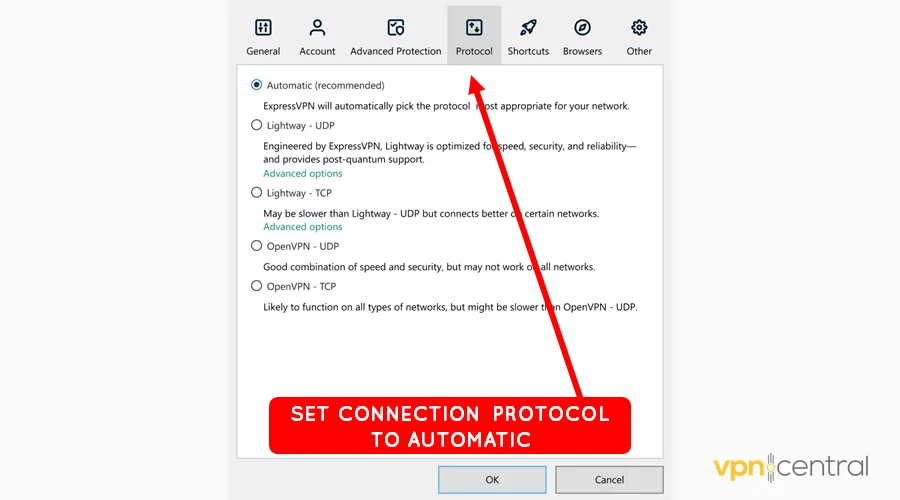
- Reconnect and relaunch Apple News.
Why this helps: IKEv2 matches Apple’s routing expectations, which stops “No Internet Connection” errors triggered by handshake or routing quirks.
Fix 2: Use a server in a supported country (Easy)
- Open the VPN server list.
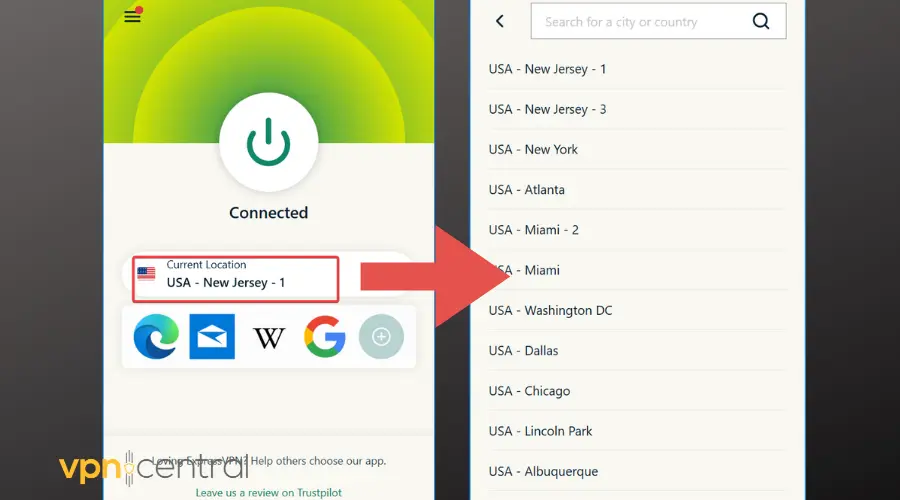
- Choose a city in the US, UK, Canada, or Australia.
- Connect, force-quit Apple News, reopen, and refresh.
Why this helps: This aligns your IP with Apple’s availability checks, which stops “not available in your region” errors tied to licensing.
Fix 3: Delete and re-add the VPN profile (Medium, iOS/iPadOS)
- Go to Settings > General > VPN & Device Management > VPN.
- Delete the active profile.
- Restart the device.
- Reinstall the VPN profile or app.
Why this helps: Clears leftover configs that block News. This also resolves iMessage not working with VPN issues.
Fix 4: Disable ad/tracker blocking or custom DNS (Medium)
- Open your VPN app settings.
- Turn off ad blocking, tracker blocking, and secure DNS.
- Reconnect and test Apple News.
- Re-enable features one by one if needed.
Why this helps: Restores access to Apple servers filtered by VPN extras. Similar cases occur with Apple Mail VPN issues.
Fix 5: Reset network settings (Medium, iOS/iPadOS)
- Open Settings > General > Transfer or Reset > Reset.
- Tap Reset Network Settings.
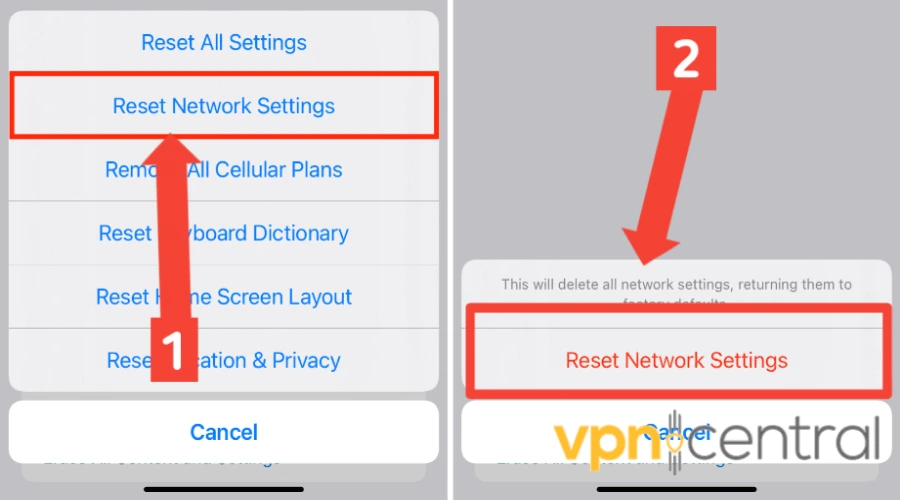
- Reconnect Wi-Fi and VPN.
- Open Apple News.
Why this helps: Clears corrupt caches that block Apple News. This reset also helps if your iPhone hotspot VPN won’t connect.
Fix 6: Refresh DNS on macOS (Advanced)
- Disconnect the VPN.
- Open Terminal and run:
sudo dscacheutil -flushcache; sudo killall -HUP mDNSResponder - Reconnect VPN.
- Relaunch Apple News.
Why this helps: Flushes old DNS records so Apple News endpoints resolve correctly.
Fix 7: Match device region and language (Easy)
- On iPhone/iPad: Settings > General > Language & Region.
- On Mac: System Settings > General > Language & Region.
- Select the VPN server’s country.
- Restart and test.
Why this helps: Aligns Apple ID, device, and VPN country to prevent subscription errors.
Fix 8: Update OS and VPN app (Easy)
- Update iOS/iPadOS/macOS in Settings.
- Update the VPN app from the App Store or provider site.
- Restart and reconnect.
Why this helps: Fixes OS bugs that break Apple News. This step also solves Apple CarPlay VPN failures.
Fix 9: Re-sign into Apple ID (Medium)
- iPhone/iPad: Settings > [your name] > Media & Purchases > Sign Out.
- Mac: System Settings > Apple ID > Media & Purchases > Sign Out.
- Sign back in, relaunch News.
Why this helps: Resets entitlements and subscription checks after network changes.
Fix 10: Try providers that work better with Apple services (Easy)
If your current VPN keeps breaking Apple News, consider switching to one that handles Apple apps reliably:
| Provider | Best For | Why It Helps |
|---|---|---|
| ExpressVPN | iPhone/iPad | Fast servers in the US and UK, IKEv2 support, and private DNS reduce Apple News errors. |
| NordVPN | macOS users | Wide server network and multiple protocols, with Threat Protection you can toggle off if it blocks content. |
| Surfshark | Budget-friendly | Unlimited devices, quick switching, and many supported regions. Disable CleanWeb if News doesn’t refresh. |
Why this helps: Providers with stable IKEv2 servers and private DNS avoid Apple’s region and routing conflicts.
Why Apple News Fails With a VPN
Apple News checks your IP, Apple ID country, device region, and network path. A VPN can create mismatches that trigger errors. If your IP comes from an unsupported country, or DNS routes block Apple’s endpoints, News fails. Apple also notes that VPNs and security tools can interfere with Apple services. Similar conflicts appear when the App Store stops working with a VPN or when you hit Apple Music VPN errors.
Symptoms and what they mean
- Blank Today feed or endless spinner: the VPN blocks News servers.
- “No Internet Connection”: stricter VPN routing breaks only Apple News.
- Region message: your VPN server sits in an unsupported country.
- News+ cannot verify: Apple ID country mismatches the VPN IP.
- Notifications missing: push routing fails when the VPN alters paths.
- Sync stalls: Saved Stories do not update across devices.
Typical error messages
- “No Internet Connection.”
- “Apple News is not available in your region.”
- “Can’t verify subscription.”
- “This story is unavailable.”
- “Unable to load stories. Please try again later.”
Does using a VPN change availability of Apple News?
Yes. Apple News and News+ are limited to supported countries. A VPN in an unsupported region blocks feeds or prevents subscription checks.
Is Apple News available worldwide?
No. It is only supported in select countries. Even with a VPN, your Apple ID’s billing region can prevent News+ access.
Apple News Features affected by VPN, proxy, or firewall
- Personalized Today feed
- News+ subscription verification
- Search and publisher availability
- Push notifications
- iCloud sync of Saved Stories
How to choose the best VPN settings
- Protocol: Stick to IKEv2 or Automatic.
- Region: Connect to a supported country.
- DNS: Use default first, test custom DNS only if issues remain.
- Extras: Disable blocking features while testing.
- Stability: Pick low-latency servers.
- Simplicity: Avoid complex multi-hop setups.
Conclusion
To fix Apple News with a VPN, confirm the VPN is the cause, then switch to IKEv2, use a supported country, and remove blocking features. If issues persist, reset network settings or refresh DNS. Updating iOS, macOS, and your VPN app often solves post-update bugs. If nothing works, switch to a VPN that reliably supports Apple services.


Read our disclosure page to find out how can you help VPNCentral sustain the editorial team Read more


Improve this guide



User forum
0 messages