
How to Make DuckDuckGo Your Default Search Engine


 2 min. read
 Published on
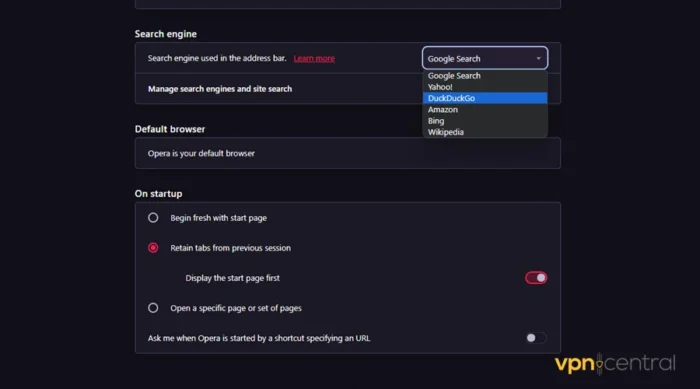
You can send your address-bar searches to DuckDuckGo while keeping the browser you already use. Choose DuckDuckGo as the search engine, then test the change by typing a phrase at the top of a new tab. Your homepage and the app that opens email links are separate settings.
Chrome and Firefox
Chrome on a computer. From the three-dot menu go to Settings → Search engine → Change. Select DuckDuckGo and confirm. A site shortcut works only when you invoke it, so adding a shortcut alone leaves ordinary address-bar searches with the existing default. Google explains both controls.

Access content across the globe at the highest speed rate.
🔥 Save 84% + 4 bonus months! 🔥
70% of our readers choose Private Internet Access
70% of our readers choose Private Internet Access
2
Browse the web from multiple devices with industry-standard security protocols.
🔥 Save 81% + 4 bonus months! 🔥

Faster dedicated servers for specific actions (currently discounted)
🔥 Save 77% + 3 bonus months! 🔥

Firefox on a computer. Open the three-line menu and go to Settings → Search. Select DuckDuckGo under Default Search Engine. If you have a separate default for private windows, review it on the same page. Mozilla’s search settings guide shows the available options.
Microsoft Edge
Visit DuckDuckGo in Edge and run a search so the browser can discover the provider. Open Settings → Privacy, search, and services → Search and connected services → Address bar and search. Choose DuckDuckGo for the address bar. You can also search Edge settings for “address bar” to reach the control. Microsoft documents the current path.
Safari on Mac
Choose Safari → Settings → Search. Select DuckDuckGo in the search-engine menu. If a private window still searches somewhere else, review the private-browsing search preference in that same pane. Apple explains Safari’s search preferences.
Check your results
Open a normal tab in the browser profile you use. Type lunar eclipse dates in the address bar and press Enter. The results should open at duckduckgo.com. A search box inside a website can still use that site’s own engine. If the setting is locked on a work computer, check with the administrator.


Read our disclosure page to find out how can you help VPNCentral sustain the editorial team Read more


Improve this guide



User forum
0 messages