
How to Watch Borley Rectory on Netflix in the US with a VPN (2026)


 18 min. read
  Published on
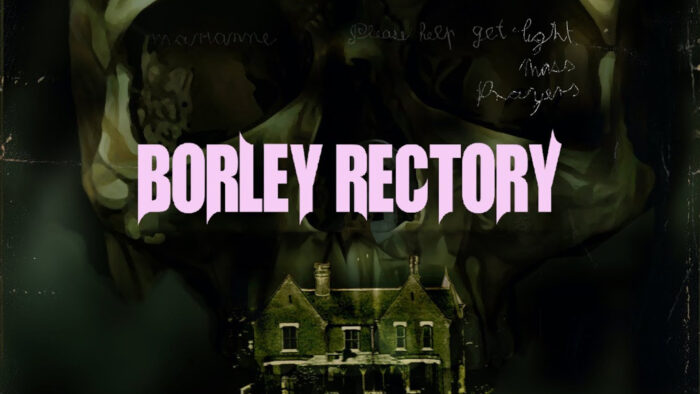
Borley Rectory (2017), the animated supernatural documentary directed by Ashley Thorpe, is available in Netflix UK’s catalog. The film explores paranormal investigator Harry Price’s research into Borley Rectory, a building once described as England’s most haunted house. It features Jonathan Rigby, Reece Shearsmith, Annabel Bates, and narration by Julian Sands. The official Netflix UK page for Borley Rectory lists the film, its cast, English original audio, and several subtitle languages.
However, Borley Rectory is not available through Netflix US as of October 2026. American viewers can currently find the movie on Tubi and Xumo Play, which offer free streaming with advertisements. Private Internet Access, ExpressVPN, and NordVPN all provide UK VPN server connections, allowing users to establish connections with British IP addresses. Each provider offers different server locations, connection protocols, and streaming-related features.

Access content across the globe at the highest speed rate.
🔥 Save 81% + 2 bonus months! 🔥
70% of our readers choose Private Internet Access
70% of our readers choose Private Internet Access
2
Browse the web from multiple devices with industry-standard security protocols.
🔥 Save 73%! 🔥

Faster dedicated servers for specific actions (currently discounted)
🔥 Save 69%! 🔥
Connecting to a British VPN server does not guarantee access to Borley Rectory on Netflix. Netflix can recognize VPN connections and restrict users to movies with worldwide licensing. The company’s official VPN support policy explains these limitations. VPN users must also respect their provider’s terms and Netflix’s applicable restrictions.
How to watch Borley Rectory on Netflix with a VPN
Netflix UK currently lists Borley Rectory, but establishing a British VPN connection does not automatically provide access to the UK Netflix catalog. If Netflix and your VPN provider permit the connection, follow these eight steps to check the movie’s availability.
- Choose a VPN service. Private Internet Access is our Editor’s Choice for its documented UK locations and connection controls, followed by ExpressVPN and NordVPN. Review each provider’s geographic-access restrictions before subscribing.
- Download and install the official VPN application on your Windows PC, Mac, smartphone, or another supported device. Open the application and sign in using your VPN account.
- Open the VPN server list and select the United Kingdom. Choose a documented British location, such as London, rather than allowing the application to connect to another country automatically.
- Fully close Netflix, including open browser tabs and any Netflix applications running in the background.
- After establishing the VPN connection, reopen Netflix through your browser or the official application.
- Sign in using your existing Netflix account credentials. A VPN connection does not require a separate Netflix account.
- Search for Borley Rectory (2017). Confirm that the result identifies Ashley Thorpe’s animated documentary rather than another production about the haunted building.
- If Netflix displays Borley Rectory and permits playback, select the movie and start watching. If the title remains unavailable or Netflix reports a VPN error, follow the service’s official guidance.
Borley Rectory combines documentary storytelling, animation, archival-inspired imagery, and dramatized performances to reconstruct the supernatural stories surrounding the building. Jonathan Rigby portrays paranormal investigator Harry Price, while Reece Shearsmith appears as V. C. Wall.
The film explores the investigations and alleged paranormal phenomena that made Borley Rectory famous. Its story draws on historical accounts rather than presenting the supernatural claims as independently established facts.
The official Netflix UK listing for Borley Rectory identifies English as the original audio language. Available subtitles listed on the page include English, Spanish, French, Italian, Polish, and Portuguese.
There is an important verification detail. During our October 2026 checks, the English-language Netflix UK page displayed the film without an unavailability warning, while the standard UK page returned a warning. JustWatch UK independently lists the film on Netflix, and a UK catalog tracker records its return on September 20, 2026. These conflicting page responses mean viewers should verify availability rather than assume Netflix will permit playback.
Streaming agreements change, so check the movie’s current listing before purchasing a VPN subscription.
Best VPNs for watching Borley Rectory on Netflix
Private Internet Access, ExpressVPN, and NordVPN all offer British VPN connections. They differ in their available locations, specialized streaming features, protocol selection, and automatic server recommendations.
The following comparison uses official provider documentation. UK server availability does not guarantee access to Netflix UK’s regional catalog.
| VPN | Server locations in the United Kingdom | Option to try first |
|---|---|---|
| Private Internet Access (Editor’s Choice) | UK London, UK Manchester, UK Southampton, and UK Streaming Optimized | UK London for permitted connections; UK Streaming Optimized for eligible streaming activity |
| ExpressVPN | UK Docklands, East London, London, Manchester, Midlands, Tottenham, and Wembley | UK London, followed by UK Manchester |
| NordVPN | 440+ UK servers, with Edinburgh, Glasgow, London, and Manchester documented | Automatically selected UK server, with London as a manual alternative |
All three providers offer British IP addresses, but Netflix can recognize VPN traffic and limit users to titles with worldwide licensing. None of these services guarantees that Borley Rectory will become available through Netflix UK.
1. Private Internet Access
Private Internet Access (PIA) is our Editor’s Choice because it offers several documented British server locations, a dedicated streaming-optimized option, and flexible VPN connection settings.
According to the official PIA server directory, the provider offers four British connections: UK London, UK Manchester, UK Southampton, and UK Streaming Optimized.
UK London provides a practical starting point for legitimate British VPN connections. Manchester and Southampton offer alternatives in different parts of England when the London connection experiences congestion or other network problems.
UK Streaming Optimized is a specialized connection designed to improve performance for permitted streaming activity. However, users should not confuse streaming optimization with guaranteed access to geographically restricted Netflix content.
To establish a British connection, open the PIA application and select the VPN SERVER section. Search for the United Kingdom and choose UK London or another available location.
To locate the streaming-specific option, enter streaming into the server search field. PIA displays its specialized connections, including UK Streaming Optimized.
However, PIA has an important usage restriction that US viewers must understand.
According to the company’s official streaming support guide, customers should select a VPN server matching the country where they currently reside.
PIA also explicitly prohibits using its service to circumvent geographic restrictions imposed by content providers. Consequently, US customers should not interpret the availability of UK Streaming Optimized as authorization to bypass Netflix UK’s regional licensing rules.
For permitted VPN connections, PIA supports WireGuard and OpenVPN. These protocols encrypt internet traffic while providing different performance characteristics and configuration options.
WireGuard offers efficient connections with relatively low overhead, making it a reasonable starting point when responsiveness matters. OpenVPN provides additional compatibility and can help on networks that interfere with specific connection types.
Users can change protocols through Settings and Protocols in the PIA application.
The provider’s official WireGuard documentation confirms support for Windows, macOS, Linux, Android, iOS, Android TV, and Fire TV.
PIA also distinguishes physical servers from virtual server locations. Virtual locations provide IP addresses associated with one country while routing traffic through physical infrastructure elsewhere.
The United Kingdom does not appear among the countries in PIA’s current published virtual server directory. Its documentation therefore does not identify the standard British connections as virtual locations.
For streaming performance, connection stability matters as much as maximum download speed. A congested route, unreliable Wi-Fi connection, or outdated VPN application can interrupt video playback even when the VPN establishes a connection successfully.
PIA recommends clearing browser cookies and cached data, updating its application, and disconnecting and reconnecting when users encounter technical problems during permitted streaming activities.
Users can also compare London, Manchester, and Southampton to determine whether another route provides a more stable connection.
However, Netflix detection remains a separate limitation. Switching between UK servers cannot guarantee that Netflix will display Borley Rectory or permit playback from the United States.
PIA ranks first for its documented UK server choices, streaming-specific connection, and protocol flexibility, not because it guarantees access to regional Netflix titles.
2. ExpressVPN
ExpressVPN provides a wider selection of named British server locations than PIA.
Its official directory lists seven UK connections: UK Docklands, UK East London, UK London, UK Manchester, UK Midlands, UK Tottenham, and UK Wembley.
These connections provide several choices across the London area, alongside Manchester and the Midlands.
According to the official ExpressVPN server directory, all seven British locations support multiple VPN protocols, including Lightway UDP, Lightway TCP, WireGuard, OpenVPN UDP, and OpenVPN TCP.
IKEv2 also appears in the directory, although individual protocol availability can depend on the operating system and application.
For a permitted British VPN connection, UK London is a reasonable first choice. UK Manchester provides an alternative for users who experience congestion or connectivity problems through London.
Docklands, East London, Tottenham, and Wembley offer additional London-area options, while Midlands provides another regional choice.
To connect, open ExpressVPN and access the VPN Locations menu. Search for the United Kingdom and select the preferred British location.
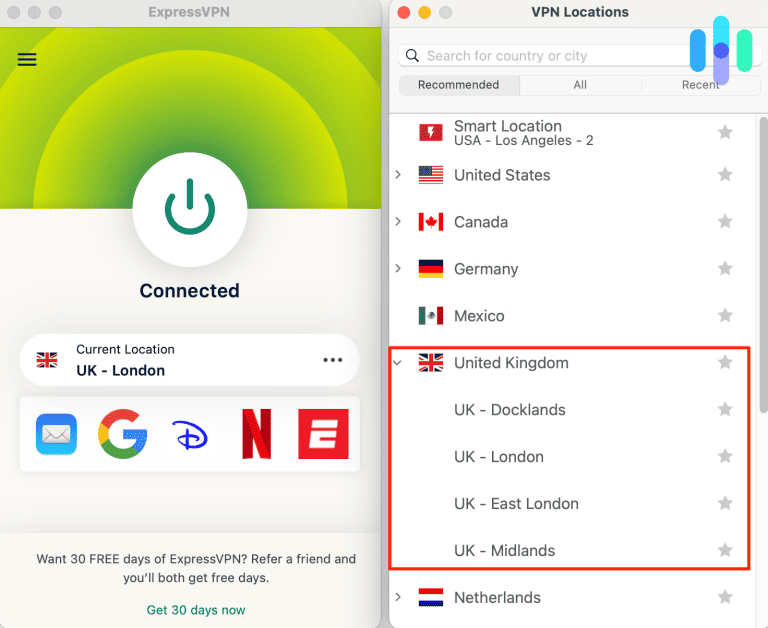
ExpressVPN also provides Smart Location, which recommends a connection based on factors such as latency, distance, and download speed.
However, Smart Location may recommend a country other than the United Kingdom. Users who specifically need a British IP address should select a UK location manually.
The provider’s official UK VPN page explains how to install the application and establish a British connection.
ExpressVPN’s Lightway protocol focuses on efficient encrypted connections and quick reconnection when network conditions change.
WireGuard offers another modern protocol option, while OpenVPN provides additional compatibility and configuration flexibility.
Users can compare supported protocols when a particular network restricts VPN connections or causes frequent disconnections.
ExpressVPN also distinguishes physical server locations from virtual locations.
With a virtual server, the VPN assigns an IP address associated with one country while hosting the underlying infrastructure in another.
The United Kingdom does not appear on ExpressVPN’s published list of virtual locations. According to the provider’s virtual server documentation, locations outside that list use infrastructure physically located in their advertised countries.
Therefore, the documented British ExpressVPN connections use physical infrastructure in the United Kingdom rather than virtual UK IP addresses hosted elsewhere.
For video streaming, network stability depends on server congestion, distance, routing conditions, and the quality of the user’s internet connection.
If the VPN experiences technical problems, users can compare UK London with Manchester, select another documented British location, or change to another supported protocol.
For example, switching from Lightway to OpenVPN may help identify whether a particular protocol causes connection problems on the local network.
However, these changes address VPN connectivity rather than Netflix’s regional licensing restrictions.
Netflix may recognize any of ExpressVPN’s British connections as VPN traffic and restrict the catalog to movies licensed worldwide.
ExpressVPN ranks second because of its seven documented British connection options, physical UK infrastructure, and flexible protocol selection. None of these features guarantees access to Borley Rectory on Netflix UK.
3. NordVPN
NordVPN offers a substantial British VPN network, automatic server selection, and several features designed to improve secure connections.
According to NordVPN’s official UK server page, the provider currently advertises more than 440 servers in the United Kingdom.
The company identifies four British cities: Edinburgh, Glasgow, London, and Manchester.
These locations provide alternatives across England and Scotland, although individual server availability can change as NordVPN reorganizes or expands its network.
To establish a British connection, open NordVPN and select the United Kingdom from the map or country list.
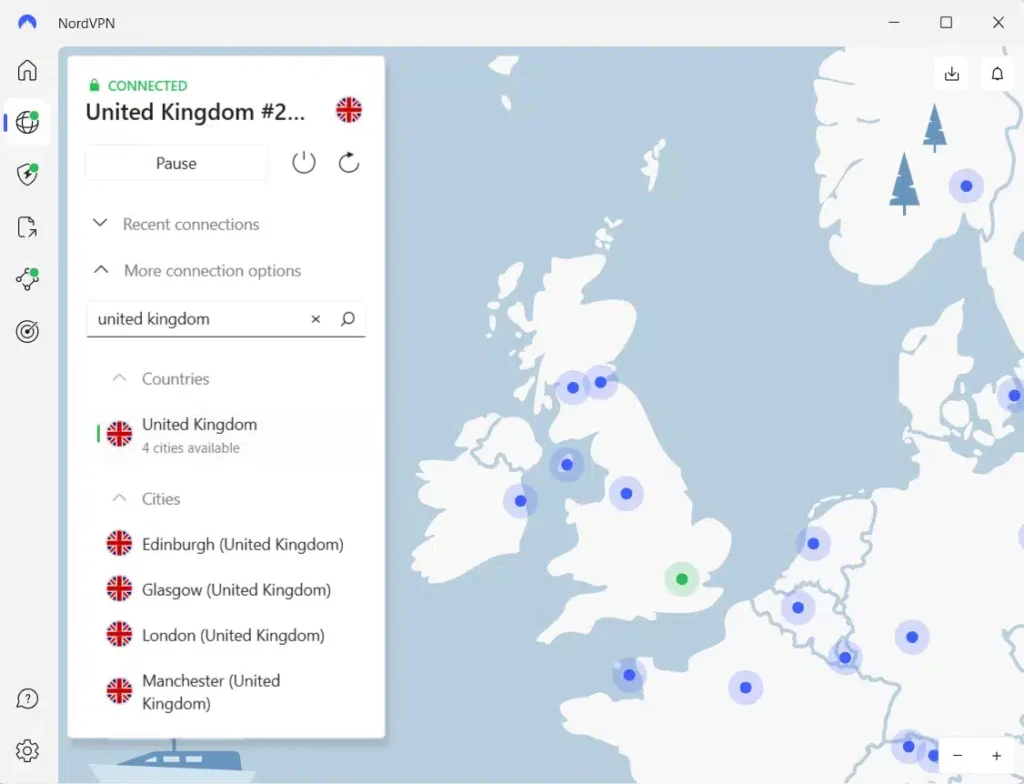
The application automatically chooses an available server, making the initial connection straightforward for users who do not want to select individual servers.
Users who prefer manual selection can open the location controls beside the United Kingdom and choose Edinburgh, Glasgow, London, or Manchester.
London provides a practical starting point for a standard British connection. Manchester offers another English location, while Edinburgh and Glasgow provide Scottish alternatives.
NordVPN also offers NordLynx, its VPN protocol built around WireGuard technology.
According to the company’s official NordLynx documentation, the protocol focuses on efficient encrypted connections while maintaining privacy and security.
Users can select NordLynx through the application settings on supported devices. Other available protocols provide alternatives when particular networks interfere with VPN traffic.
Another important feature is SmartPlay, which NordVPN includes with its applications.
The company’s official SmartPlay documentation explains that the feature combines VPN encryption with DNS-related technology.
SmartPlay activates automatically when users connect to a NordVPN server. It does not require a separate extension, subscription, or manual configuration.
However, SmartPlay does not override Netflix’s licensing agreements and cannot guarantee access to movies available only in another country.
Netflix may still detect a NordVPN connection and limit the available catalog to titles with worldwide streaming rights.
For permitted British VPN connections, users can begin with NordVPN’s automatically selected server.
If the connection becomes unstable, they can disconnect and reconnect or manually select another available British city.
Switching between London, Manchester, Edinburgh, and Glasgow may help identify network congestion or routing issues.
Connection quality also depends on local internet speed, Wi-Fi stability, and the distance between the user and the selected server.
NordVPN’s advertised server count can change as the provider updates its infrastructure. Users should check the application for currently available British servers.
With more than 440 advertised UK servers, four documented cities, NordLynx, and automatic SmartPlay functionality, NordVPN provides a practical third option for permitted British VPN connections.
However, none of these features guarantees that Borley Rectory will appear on Netflix for someone connecting from the United States.
What to do if Borley Rectory does not appear
If Borley Rectory does not appear in Netflix search results, the problem may involve regional licensing, VPN detection, outdated browser data, or Netflix profile settings. For permitted VPN connections, the following steps can help identify technical problems.
- Close Netflix completely, including all browser tabs and any applications running in the background.
- Disconnect from your current VPN server.
- Reconnect to the United Kingdom using a connection permitted by Netflix and your VPN provider.
- Try another available British server or location if the original connection experiences technical problems.
- Clear Netflix-related cookies and browser cache to remove outdated session information.
- Open an incognito or private browser window to determine whether existing browser data contributes to the problem.
- Reopen Netflix and sign in using your existing account credentials.
- Search for Borley Rectory (2017) again and check whether Netflix displays the correct movie and permits playback.
Private Internet Access users can compare UK London, UK Manchester, and UK Southampton when diagnosing permitted connection problems. UK Streaming Optimized provides another documented option for eligible streaming activity, although PIA prohibits circumventing geographical restrictions.
ExpressVPN users can compare UK London, Manchester, Midlands, Docklands, East London, Tottenham, and Wembley when investigating connection instability.
NordVPN users can reconnect through the automatically selected UK server or manually choose Edinburgh, Glasgow, London, or Manchester.
Changing servers may improve network stability, but it does not guarantee that Netflix will display Borley Rectory.
If the movie remains unavailable, check your Netflix profile’s maturity rating and language settings.
Netflix UK lists Borley Rectory with a 12 age classification. Profiles configured with a lower maturity rating may not display the title in search results.
The official Netflix missing-title troubleshooting guide explains that licensing restrictions, VPN detection, maturity settings, blocked titles, and profile languages can affect movie availability.
Also confirm that you are searching for Ashley Thorpe’s 2017 animated documentary rather than another production about the same haunted location.
Netflix may recognize VPN traffic and restrict access to regional titles even when the VPN establishes a working British connection.
If Netflix reports a VPN-related error, follow its recommendation to disconnect the VPN. Users must also respect their provider’s service restrictions.
Netflix may detect the VPN
A VPN routes internet traffic through a remote server and changes the public IP address that websites and streaming platforms see.
When someone connects to a British VPN server, websites may identify the connection as originating from the United Kingdom rather than the user’s physical location in the United States.
However, a British IP address does not automatically provide access to every movie licensed for Netflix UK.
Netflix maintains different regional catalogs because studios and distributors license movies and television shows for particular countries.
The platform also detects certain VPN and proxy connections.
When Netflix recognizes a VPN, it may restrict viewers to movies and shows that have worldwide licensing.
This means that Borley Rectory can appear in Netflix UK’s regular catalog while remaining unavailable to someone connecting through a British VPN server from the United States.
Users may encounter missing search results, unavailable-title notices, or playback errors.
Netflix’s official VPN documentation explains these restrictions and recommends disabling the VPN when it prevents access to content available in the user’s region.
Private Internet Access, ExpressVPN, and NordVPN cannot independently change Netflix’s licensing agreements.
Their British server networks provide privacy and networking features, not guaranteed access to UK Netflix titles.
Can you use a Netflix ad-supported plan with a VPN?
No. Netflix explicitly states that its ad-supported experience does not support VPN connections.
Subscribers using an ad-supported plan may encounter a playback error when attempting to watch Netflix through a VPN or proxy service.
Netflix identifies error E121 as one possible indication that the platform has detected an unsupported VPN connection.
According to the company’s official guidance for VPN errors on ad-supported subscriptions, disconnecting the VPN is the recommended solution.
An ad-free Netflix subscription avoids this particular plan restriction.
However, regional licensing restrictions and VPN detection can still apply to ad-free plans.
Consequently, upgrading to an ad-free subscription does not guarantee that a US subscriber can watch Borley Rectory through Netflix UK.
Before changing subscriptions, consider the movie’s existing US streaming options.
Does changing the VPN location change your Netflix account?
Connecting through a British VPN server does not automatically change your Netflix username, password, profiles, subscription, or billing information.
A VPN primarily changes the public IP address associated with your internet connection. It does not convert an existing US Netflix account into a British account.
Netflix maintains different catalogs across countries because its licensing agreements vary by geographic region.
According to Netflix’s account country guidance, subscribers generally cannot change the country associated with their account unless they move to another country.
The service may also recognize VPN connections and restrict the available catalog to titles with worldwide licensing.
For Borley Rectory, establishing a British VPN connection does not automatically alter your Netflix account or guarantee access to the documentary.
American viewers can check the current US streaming options for Borley Rectory on JustWatch.
At the time of our October 2026 check, the movie was available for free with advertisements on Tubi and Xumo Play. JustWatch also identified Fawesome as another free option.
These alternatives provide ways to watch the film without depending on another country’s Netflix licensing.
Which VPN should you use?
Private Internet Access is our Editor’s Choice because it offers four documented British connections, including London, Manchester, Southampton, and UK Streaming Optimized. It also supports WireGuard and OpenVPN and provides flexible connection settings. However, PIA explicitly prohibits circumventing geographic restrictions imposed by content providers and instructs customers to select servers matching their current country. US users must consider that restriction before attempting to access Netflix UK’s regional catalog.
ExpressVPN provides seven documented British connections across London-area locations, Manchester, and the Midlands, with Lightway, WireGuard, and OpenVPN support on compatible devices. NordVPN advertises more than 440 UK servers, with Edinburgh, Glasgow, London, and Manchester available. It also offers automatic server selection, NordLynx, and SmartPlay. Both services provide useful features for secure British connections, but neither guarantees access to Netflix UK.
Borley Rectory (2017) currently appears in Netflix UK’s regional catalog, while Netflix US does not offer the film through its subscription service. The English-language UK Netflix page, JustWatch UK, and recent catalog records support its British availability, although the standard Netflix UK page returned a conflicting warning. Regional licensing, VPN detection, subscription restrictions, and VPN provider terms mean that playback from the United States is not guaranteed.
Borley Rectory (2017) appears on Netflix UK as of October 2026. JustWatch UK and Netflix’s English-language title page support its availability, although another official UK page returned a conflicting warning. Netflix US does not currently offer it.
Borley Rectory is not currently available on Netflix US, although Netflix UK lists the film. VPN providers offer British connections, but Netflix may detect VPN traffic and restrict regional titles. US viewers can also watch it free with advertisements on Tubi or Xumo Play.
Private Internet Access ranks first for its four documented UK connections, followed by ExpressVPN and NordVPN. However, PIA prohibits circumventing geographic content restrictions, and none of these VPN services guarantees access to Netflix UK.
Check the movie’s current Netflix availability, confirm you are searching for Ashley Thorpe’s 2017 documentary, and review your profile settings. For permitted VPN connections, check connectivity and browser data. If Netflix detects a VPN, its official guidance recommends disconnecting it.
No. Netflix does not support VPN connections on its ad-supported experience. Disconnecting the VPN is Netflix’s recommended solution for related playback errors. Ad-free subscriptions avoid this specific restriction, but regional licensing and VPN detection still apply.


Read our disclosure page to find out how can you help VPNCentral sustain the editorial team Read more


Improve this guide



User forum
0 messages