
How to Watch Shrek the Third on Netflix in the US with a VPN (2026)


 15 min. read
  Published on

Shrek the Third (2007) is available in Netflix’s Brazil catalog under the localized title Shrek Terceiro. The official Netflix Brazil page lists the animated comedy, which follows Shrek, Donkey, and Puss in Boots as they search for a new heir to the kingdom of Far Far Away. Chris Miller directed the movie, which features Mike Myers, Eddie Murphy, Cameron Diaz, Antonio Banderas, and Justin Timberlake.
Unfortunately, Shrek the Third is not currently available through Netflix US. According to JustWatch’s US streaming information, viewers can instead watch the movie on Peacock or through other supported services. Netflix Brazil offers an international listing, and Private Internet Access, ExpressVPN, and NordVPN all have Brazilian VPN connections that users can select for supported purposes.

Access content across the globe at the highest speed rate.
🔥 Save 81% + 2 bonus months! 🔥
70% of our readers choose Private Internet Access
70% of our readers choose Private Internet Access
2
Browse the web from multiple devices with industry-standard security protocols.
🔥 Save 73%! 🔥

Faster dedicated servers for specific actions (currently discounted)
🔥 Save 69%! 🔥
However, connecting to a Brazilian VPN server does not guarantee that Netflix will display or play Shrek the Third. Netflix can detect VPN connections and limit viewers to movies with worldwide streaming rights. The company’s official VPN policy also confirms that VPN connections do not work with its ad-supported experience. Users should follow Netflix’s rules and their VPN provider’s terms before attempting to access regional content.
How to watch Shrek the Third on Netflix with a VPN
Netflix Brazil currently lists Shrek the Third, but accessing an international catalog depends on Netflix’s licensing restrictions and the terms of your VPN service. These steps explain how to check the movie’s availability with an eligible connection.
- Choose a VPN provider. Private Internet Access is our first recommendation for its documented Brazilian server options, followed by ExpressVPN and NordVPN.
- Download the VPN application from the provider’s official website and install it on your Windows PC, Mac, smartphone, or another supported device.
- Connect to a Brazilian VPN server where your location and provider terms permit that connection. PIA offers Brazil and BR Streaming Optimized, ExpressVPN lists Brazil and Brazil – 2, and NordVPN offers Brazilian servers.
- Close Netflix completely before changing your connection. Exit the Netflix app or close any browser tabs where Netflix is running.
- Reopen Netflix after the VPN connection is active and your device has established a stable internet connection.
- Sign in using your existing Netflix account and select the profile you normally use to watch movies.
- Search for Shrek the Third. You can also check its Brazilian title, Shrek Terceiro, to identify the correct movie.
- Start playback if Netflix displays the movie and your account, physical location, subscription, and applicable terms permit access.
You can use the official Shrek Terceiro listing on Netflix Brazil to confirm that you have found the correct movie. The page identifies the 2007 film and includes its description, cast, available audio languages, and subtitles.
The Brazilian listing includes English original audio and Portuguese audio, along with English and Portuguese subtitles. Netflix may change the available language choices depending on your device and account settings.
Remember that opening the Netflix movie page does not automatically mean Netflix will authorize playback. The service may still detect the VPN, display a limited catalog, or show an error. If that happens, follow Netflix’s troubleshooting recommendations rather than assuming another server will solve the problem.
Best VPNs for watching Shrek the Third on Netflix
Private Internet Access, ExpressVPN, and NordVPN all provide Brazilian server connections. Their differences include streaming-optimized locations, protocol support, available endpoints, and connection controls.
| VPN | Server locations in Brazil | Option to try first |
|---|---|---|
| Private Internet Access (Editor’s Choice) | Brazil and BR Streaming Optimized | BR Streaming Optimized, where permitted |
| ExpressVPN | Brazil and Brazil – 2 | Brazil |
| NordVPN | São Paulo, with 20+ Brazilian servers advertised | Automatic Brazil connection |
PIA provides a dedicated Brazilian streaming-optimized option, while ExpressVPN publishes two Brazilian locations. NordVPN advertises more than 20 servers in Brazil and supports automatic server selection.
These locations provide encrypted internet connections with Brazilian IP addresses. They do not guarantee that Netflix will show content licensed only for Brazil. Netflix’s own detection and licensing controls still apply.
1. Private Internet Access
Private Internet Access is our Editor’s Choice because it clearly documents its Brazilian connections, offers a streaming-optimized option, and provides flexible connection settings. Its official documentation also explains important limitations that users need to understand before using a VPN with streaming platforms.
According to the PIA server location directory, users can choose between two Brazilian locations: Brazil and BR Streaming Optimized.
The Brazil entry provides a standard VPN connection, while BR Streaming Optimized is designed to offer a more stable streaming experience. Neither entry specifies a Brazilian city in PIA’s published app directory, so users should not assume that they can manually select São Paulo, Rio de Janeiro, or another city.
If you are eligible to use the Brazilian connection, BR Streaming Optimized is the logical starting option for streaming performance. If ordinary connectivity problems occur, the standard Brazil endpoint provides an alternative.

To find these connections, open the PIA application and select the VPN SERVER section. Search for Brazil or streaming, choose the appropriate entry, and connect using the main power button. The PIA Windows application guide explains how to select locations, view latency information, and save favorites.
PIA also supports WireGuard and OpenVPN. WireGuard provides an efficient connection option that may reduce overhead and improve responsiveness. OpenVPN offers another established protocol for networks or devices where the default connection behaves differently.
Changing protocols can help with connection stability, but it cannot change Netflix’s licensing restrictions. A faster VPN connection does not necessarily mean that a geographically restricted movie will become available.
Another consideration is server infrastructure. PIA distinguishes physical locations from virtual server locations, where the advertised country and physical hosting country differ. Its virtual server documentation explains this distinction. However, the published information does not identify a separate physical hosting country for its Brazilian entries. Users should avoid assuming an exact data center location without confirmation.
For normal streaming troubleshooting, PIA recommends clearing browser cookies, disconnecting and reconnecting to the VPN, and keeping the application updated. These actions may resolve connection or session problems, although they cannot guarantee that Netflix will show Shrek the Third.
There is also an important restriction. PIA’s official streaming guidance instructs users to connect to a server matching their actual country and prohibits circumventing geographic restrictions imposed by content providers.
Consequently, US viewers should not interpret the availability of a Brazilian PIA server as permission to bypass Netflix’s regional restrictions. PIA remains a useful privacy service for supported connections, but it does not guarantee regional Netflix access.
2. ExpressVPN
ExpressVPN ranks second because it provides two documented Brazilian locations and a broad selection of connection protocols. Its straightforward application also lets users search for destinations and change endpoints without navigating complicated settings.
The official ExpressVPN server directory identifies two Brazilian location entries: Brazil and Brazil – 2.
Both entries support Lightway UDP, Lightway TCP, WireGuard on compatible devices, OpenVPN UDP, and OpenVPN TCP. The directory also lists IKEv2 availability, although protocol support depends on the operating system and application.
For an eligible Brazilian connection, the standard Brazil location is a sensible starting point. Brazil – 2 provides an alternative when the first location has general connection problems or unusually high latency.
To choose a destination, launch ExpressVPN, open the location selector, and search for Brazil. Select the preferred Brazilian entry and allow the app to establish the connection. Confirm that the VPN reports an active session before reopening Netflix.
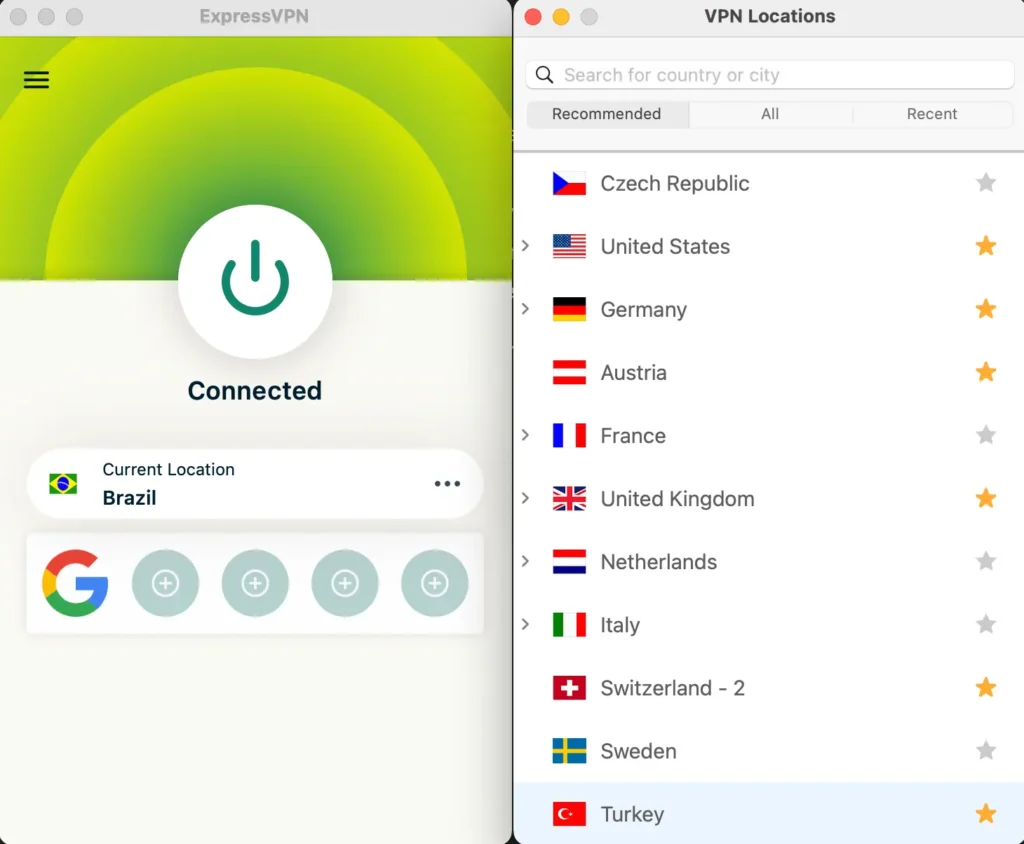
ExpressVPN’s Lightway protocol focuses on efficient connections and responsive switching between networks. WireGuard provides another modern option, while OpenVPN can be useful on networks where other protocols encounter problems.
The provider’s directory does not mark its Brazilian locations as virtual. ExpressVPN explains that most of its locations use servers physically hosted in the advertised country, while some countries use virtual infrastructure. The virtual server location documentation explains how the provider distinguishes these arrangements. It does not justify assigning an undocumented Brazilian city to either entry.
For streaming performance, connection stability matters as much as raw download speed. Long-distance routing, crowded networks, unstable Wi-Fi, and device limitations can contribute to buffering or playback interruptions.
If a website fails to load while ExpressVPN is active, its content access troubleshooting guide recommends checking whether the server location matches the region where the user has authorization to access the service.
ExpressVPN also prohibits using its service to circumvent geographic restrictions imposed by content providers. Therefore, a US subscriber should not assume that connecting to Brazil grants permission to watch Shrek the Third through Netflix Brazil.
Even where a Brazilian connection is legitimate, Netflix may recognize VPN traffic and display only worldwide-licensed titles. ExpressVPN cannot override that restriction or guarantee access to a particular movie.
3. NordVPN
NordVPN takes third place in our comparison. It offers Brazilian server coverage, automatic connection selection, the NordLynx protocol, and SmartPlay functionality for supported streaming use.
According to the official NordVPN Brazil server page, the provider advertises more than 20 Brazilian VPN servers and identifies São Paulo as a location. The company can change its server inventory, so the app remains the best place to inspect currently available endpoints.
To connect, open NordVPN and select Brazil on the map or country list. The application can choose an appropriate server automatically. If ordinary connectivity problems arise, users can manually select another available server within the same country.
NordVPN’s automatic selection uses network conditions and server availability to help identify a suitable connection. A manually selected endpoint may perform differently, although the provider does not guarantee that switching servers will resolve streaming restrictions.
NordLynx is NordVPN’s WireGuard-based protocol. It aims to provide efficient encrypted connections without unnecessary overhead. Users who experience connection instability can review their protocol settings, restart the VPN, and test the connection independently of Netflix.
Another feature is SmartPlay. NordVPN explains in its official SmartPlay documentation that the feature activates automatically when users connect through the NordVPN application.
SmartPlay combines VPN encryption and DNS-related functionality to help users access supported streaming services privately. Unlike a standalone SmartDNS configuration, it works as part of the normal VPN connection and requires no separate activation.
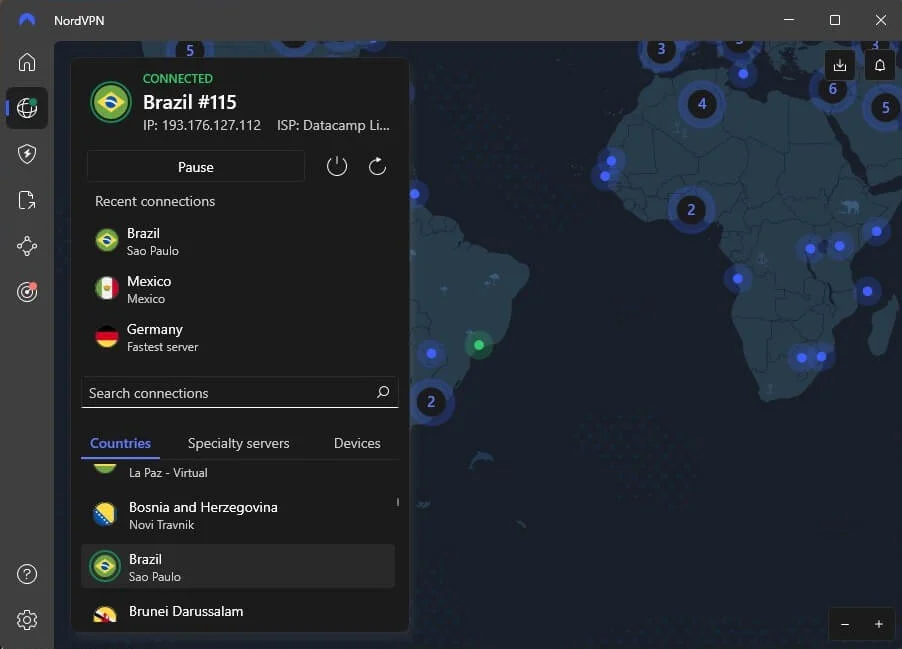
However, SmartPlay does not guarantee that Netflix will unlock the Brazilian catalog. Netflix may still identify the VPN and restrict the available library, even when the connection itself works normally.
NordVPN provides different server types for privacy and security, but specialty connections should not be confused with verified Netflix streaming locations. Double VPN, for example, routes traffic through additional infrastructure and may increase connection overhead.
For Shrek the Third, the relevant country remains Brazil. If Netflix does not display the movie, verify the title information and your subscription eligibility before treating the problem as a VPN performance issue.
What to do if Shrek the Third does not appear
Shrek the Third might not appear in Netflix search results even when a regional movie page exists. Netflix may restrict VPN connections, change its licensing agreements, or apply account-level content settings.
- Close Netflix completely, including any open browser tabs and background app sessions.
- Disconnect from your current VPN connection.
- Reconnect to Brazil if your physical location and the service terms authorize that connection.
- Try another documented server or location in Brazil when you need to troubleshoot an ordinary connection problem.
- Clear Netflix cookies and the browser cache to remove outdated session information.
- Open a new incognito or private browsing window.
- Reopen Netflix and sign in with your existing account.
- Search for Shrek the Third or its Brazilian title, Shrek Terceiro, and confirm the release year.
PIA users can compare the standard Brazil entry with BR Streaming Optimized for permitted streaming activity. ExpressVPN users have Brazil and Brazil – 2, while NordVPN users can select another available Brazilian server through the application’s country list.
These alternatives may resolve network congestion or temporary connection failures. They do not guarantee access to Netflix content that carries geographic licensing restrictions.
Netflix’s missing TV show and movie guidance explains that titles may disappear because of licensing agreements, regional rights, profile restrictions, and other availability factors.
It is also worth checking whether you have selected the correct Shrek movie. The third installment came out in 2007, after Shrek 2 and before Shrek Forever After. In Brazil, Netflix uses Shrek Terceiro, while JustWatch identifies it as Shrek o Terceiro.
If Netflix reports a VPN or proxy error, follow its official instructions. Disconnecting the VPN may restore normal access to your home catalog, although Shrek the Third will remain unavailable on Netflix US unless the service acquires the appropriate rights.
Netflix may detect the VPN
A VPN routes internet traffic through another server and changes the public IP address that websites see. When a device connects to a Brazilian VPN endpoint, online services may identify the connection as coming from Brazil rather than the user’s actual location.
However, Netflix does not rely solely on the visible IP address when determining which movies subscribers can watch. The platform also enforces regional licensing agreements and identifies certain VPN or proxy connections.
Under Netflix’s official VPN and proxy error guidance, viewers may encounter a message asking them to turn off the VPN. Other users may see a smaller content selection that includes only movies and shows licensed worldwide.
These restrictions explain why a title can appear on Netflix Brazil’s public website but remain absent from the search results of a US subscriber using a VPN.
Private Internet Access, ExpressVPN, and NordVPN can provide encrypted connections and alternative IP addresses, but none controls Netflix’s movie licensing or guarantees regional playback.
Can you use a Netflix ad-supported plan with a VPN?
No. Netflix does not support VPN connections with its ad-supported streaming experience. Users on these plans may encounter playback errors or messages asking them to disable their VPN.
According to Netflix’s ad-supported VPN error guidance, disconnecting the VPN is the recommended solution when the service identifies an unsupported connection.
An ad-free Netflix subscription avoids this specific restriction, but it does not guarantee access to movies from other countries. Netflix may still detect the VPN and limit the titles available for playback.
Therefore, upgrading to an ad-free plan should not be treated as a guaranteed way to watch Shrek the Third through an international Netflix catalog.
Does changing the VPN location change your Netflix account?
Changing the VPN location does not automatically change your Netflix account’s registered country, email address, password, payment information, or saved profiles. It changes the public IP address associated with your internet connection.
Netflix catalogs differ because streaming rights depend on geographic licensing agreements. A movie available to subscribers in Brazil may not appear in the United States, even when both countries use the same Netflix platform.
Netflix’s account country documentation explains that users cannot simply change the country associated with their Netflix account unless they move to another country. VPN recognition can also restrict the titles Netflix displays.
For viewers in the United States, current US streaming alternatives for Shrek the Third include Peacock Premium and Peacock Premium Plus. JustWatch also lists free ad-supported streaming through The Roku Channel. These options provide a straightforward way to watch the movie without relying on another country’s Netflix catalog.
Which VPN should you use?
Private Internet Access is our first choice for its clearly documented Brazil and BR Streaming Optimized locations, flexible protocol settings, and streaming troubleshooting resources. Its optimized connection may help with normal streaming performance, but PIA prohibits circumventing geographic content restrictions and instructs users to select a server matching their physical country. It does not guarantee Netflix Brazil access for US viewers.
ExpressVPN provides Brazil and Brazil – 2 connections, along with Lightway, WireGuard on supported devices, and OpenVPN. NordVPN offers more than 20 Brazilian servers, identifies São Paulo as a location, and includes NordLynx and automatically enabled SmartPlay. Both services provide useful encrypted networking options, although Netflix can still detect their connections and limit regional content.
As of October 29, 2026, Shrek the Third is listed on Netflix Brazil under Shrek Terceiro, while Netflix US does not offer the movie through its subscription catalog. Regional licensing, VPN detection, subscription restrictions, and provider terms mean playback through another country’s catalog is not guaranteed. If Netflix blocks access, Peacock and The Roku Channel provide alternative options for US viewers.
Shrek the Third (2007) is listed on Netflix Brazil under the title Shrek Terceiro. The official Netflix Brazil page and JustWatch Brazil confirm the movie’s listing. Availability can change.
Shrek the Third is not currently on Netflix US. Netflix Brazil lists the movie, but VPN connections do not guarantee access and may face regional restrictions. US viewers can also check Peacock or The Roku Channel.
Private Internet Access ranks first because it offers Brazil and BR Streaming Optimized connections. ExpressVPN and NordVPN also have Brazilian servers. PIA prohibits circumventing geographic restrictions, and no VPN guarantees Netflix playback.
Restart Netflix, check your subscription and profile settings, and search for Shrek Terceiro. If Netflix detects a VPN, follow its guidance and disconnect the VPN. Changing servers cannot guarantee access.
No. Netflix does not support VPN connections on its ad-supported experience. Disconnect the VPN if Netflix displays an error. Ad-free plans still face regional licensing and VPN detection restrictions.


Read our disclosure page to find out how can you help VPNCentral sustain the editorial team Read more


Improve this guide




User forum
0 messages