
How to Watch The Heat on Netflix in the US with a VPN (2026)


 15 min. read
  Published on

The Heat (2013), the action comedy directed by Paul Feig, is available on Netflix in the United Kingdom. Sandra Bullock plays Sarah Ashburn, a meticulous FBI agent, while Melissa McCarthy plays Shannon Mullins, a blunt Boston detective. The two reluctant partners must work together to investigate a dangerous drug operation despite having almost nothing in common.
The movie is not currently listed in the Netflix US catalog, even though it appears on Netflix UK. The official Netflix UK page for The Heat confirms the title, cast, and 2013 release year. Private Internet Access, ExpressVPN, and NordVPN offer British VPN locations, but connecting to one does not guarantee that a US Netflix account can play a UK-licensed film.

Access content across the globe at the highest speed rate.
🔥 Save 81% + 2 bonus months! 🔥
70% of our readers choose Private Internet Access
70% of our readers choose Private Internet Access
2
Browse the web from multiple devices with industry-standard security protocols.
🔥 Save 73%! 🔥

Faster dedicated servers for specific actions (currently discounted)
🔥 Save 69%! 🔥
Netflix may recognize VPN traffic and show only globally licensed movies. It also does not support VPN viewing on ad-supported plans. Before testing a different network location, check the streaming service’s rules and the VPN provider’s terms, because access to another country’s catalog may be restricted.
How to watch The Heat on Netflix with a VPN
Start by checking that you want The Heat from 2013, not Heat (1995), the crime thriller starring Al Pacino and Robert De Niro. The correct movie is a comedy about two incompatible law enforcement officers working a case in Boston.
- Compare VPN providers before subscribing. Private Internet Access is our first infrastructure choice, followed by ExpressVPN and NordVPN. Check their streaming rules and refund conditions.
- Install the latest official VPN application on your Windows computer, Mac, phone, tablet, or other supported device. Avoid unofficial installers and browser extensions from unknown publishers.
- Review the United Kingdom server options if connecting there is permitted for your use. PIA lists UK Streaming Optimized, ExpressVPN offers London, and NordVPN provides UK country selection.
- Close the Netflix app and any open Netflix browser tabs. This prevents an old viewing session from confusing your next account check.
- Connect to an appropriate VPN endpoint and confirm the connection indicator is active. A connected status verifies routing, not regional Netflix access.
- Open Netflix and sign in to your existing account. Your profile, password, and billing country do not automatically change when you use a VPN.
- Search for The Heat (2013). Check for Sandra Bullock, Melissa McCarthy, and the Boston police setting before opening the title page.
- Play the film only if Netflix displays it and authorizes playback for your subscription. If Netflix detects a VPN, follow its guidance rather than assuming another server will unlock the film.
The UK movie page lists English original audio and English subtitles. It classifies The Heat as a comedy suitable for viewers aged 15 and older under its British rating. The exact audio, subtitle, and playback choices visible inside Netflix can differ according to the account and device.
The film’s theatrical running time is approximately 117 minutes. Bullock’s tightly controlled FBI agent and McCarthy’s unpredictable street detective supply most of the humor as an increasingly messy investigation forces them to cooperate. The US release is rated R, making this a better choice for adult comedy fans than for a family movie night.
Best VPNs for watching The Heat on Netflix
All three services below have documented British endpoints, but none has been independently verified here to play The Heat through a US Netflix account. Their listed locations are useful for assessing VPN coverage and general streaming performance, not proof of catalog access.
| VPN | UK server locations | Connection option |
|---|---|---|
| Private Internet Access (Editor’s Choice) | London, Manchester, Southampton, Tottenham, UK Streaming Optimized | UK Streaming Optimized for permitted use |
| ExpressVPN | Docklands, East London, London, Manchester, Midlands, Tottenham, Wembley | London |
| NordVPN | London, Manchester, Edinburgh, Glasgow; more than 440 UK servers | United Kingdom automatic selection |
A higher server count does not establish better Netflix compatibility. Factors such as local internet quality, server load, protocol choice, and the streaming service’s own detection systems can matter more than the number of locations advertised.
1. Private Internet Access
Private Internet Access is our Editor’s Choice for its transparent UK location directory, streaming-oriented endpoint, and clearly documented connection controls. These features make the provider easy to evaluate, although its terms place an important limit on using the service for regional streaming.
The official PIA server directory identifies UK London, UK Manchester, UK Southampton, UK Tottenham, and UK Streaming Optimized. The app’s VPN SERVER menu contains the current list available to a particular account and device.
UK Streaming Optimized is designed for streaming-related network performance. It may be useful for supported services when the user’s actual location and the provider’s rules permit that connection. Its name does not mean Netflix will approve a geographically restricted title.
To locate it, open PIA, select VPN SERVER, and search for streaming. For ordinary British networking, users can also select London or Manchester from the same menu. Southampton and Tottenham supply alternatives if general connection performance varies between endpoints.
These options do not necessarily represent separate physical data centers at the precise places named. PIA’s virtual server guide distinguishes an IP address’s advertised country from the country where equipment is hosted. The United Kingdom is not listed among its offshore virtual locations.
That information helps explain routing, but it should not be stretched into a claim about the exact address of an individual server. A British city label describes a selectable VPN location, while actual latency depends on the internet provider and network path.
PIA supports WireGuard and OpenVPN. WireGuard can reduce VPN overhead on modern devices, while OpenVPN offers an established alternative when certain networks or firewalls behave differently. Neither protocol makes a Netflix account eligible for an otherwise unavailable movie.
The Heat runs close to two hours, so consistent speed and an uninterrupted Wi-Fi connection are more useful than a single high benchmark result. A congested home network or unstable broadband connection can cause buffering even when the VPN application reports a successful connection. For example, a laptop far from its router may struggle despite a good internet plan, while a wired connection can reduce local packet loss. Start with basic connection checks before blaming the British endpoint.
For ordinary troubleshooting, compare performance with the VPN disconnected, check for application updates, and test an appropriate endpoint or supported protocol. PIA also suggests clearing browser cookies and cached information when older streaming sessions create errors.
There is a critical policy limitation. PIA’s official streaming instructions tell users to connect to a server matching the country where they are physically located. They explicitly prohibit using PIA to circumvent geographic restrictions imposed by content providers.
For that reason, PIA takes first place for its documentation and VPN features, not because it offers an authorized workaround for watching UK-only Netflix titles from the United States. Its streaming-optimized location is not a guarantee that The Heat will play.
2. ExpressVPN
ExpressVPN ranks second because it provides seven documented UK endpoints and several modern VPN protocols. Its range of selectable British locations makes it practical to compare network performance, but that flexibility is separate from Netflix playback eligibility.
The official ExpressVPN server directory lists Docklands, East London, London, Manchester, Midlands, Tottenham, and Wembley. These are actual location names published by the provider rather than guesses about servers in British cities.
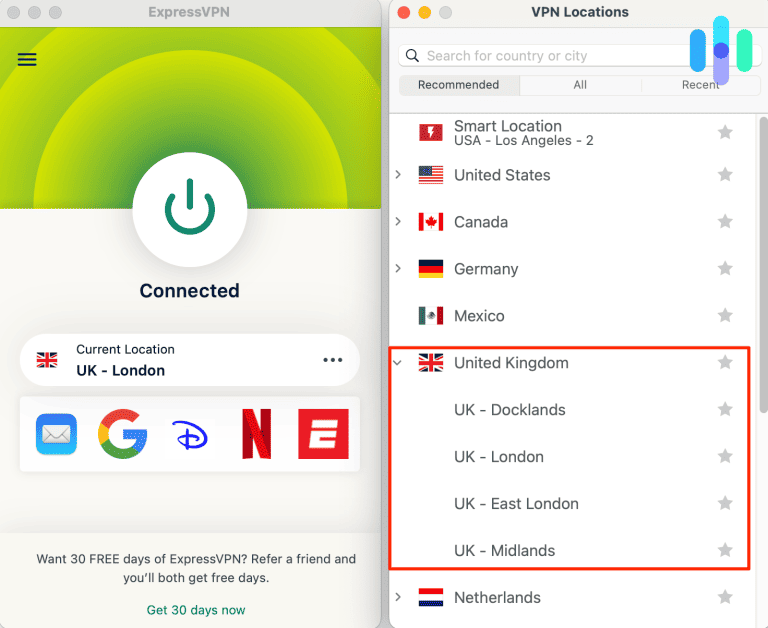
To establish a connection for permitted use, open ExpressVPN, select VPN Locations, and search for United Kingdom. London provides a straightforward starting point. Manchester and Midlands provide alternatives outside central London, while the other entries offer additional routing choices.
ExpressVPN also offers Smart Location, which recommends an endpoint based on connection conditions. It may choose a country other than Britain, so check the selected location when a particular network route matters for a legitimate reason.
Supported protocols include Lightway UDP and TCP, WireGuard, and OpenVPN on compatible applications. Lightway emphasizes efficient connections and quick reconnection after interruptions. OpenVPN is useful on networks where compatibility is more important than minimizing overhead.
The provider’s virtual location documentation explains when an advertised country differs from the server’s physical hosting country. Its British endpoints are not listed as offshore virtual locations, though the company does not publish each machine’s street address.
Video performance can change from one endpoint to another because of server demand and internet-provider routing. For a 117-minute comedy, prioritize a stable connection rather than repeatedly switching locations in pursuit of a marginal speed improvement.
If normal browsing becomes unreliable, verify your original internet connection, update the application, and check its connection protocol. Comparing supported locations can help diagnose networking problems; it does not establish authorization to view British-licensed content.
ExpressVPN also provides network protection on supported devices when a VPN connection drops. That is a privacy feature. It cannot change Netflix’s catalog rules, and the service does not guarantee that The Heat will appear in a US account using a British connection.
3. NordVPN
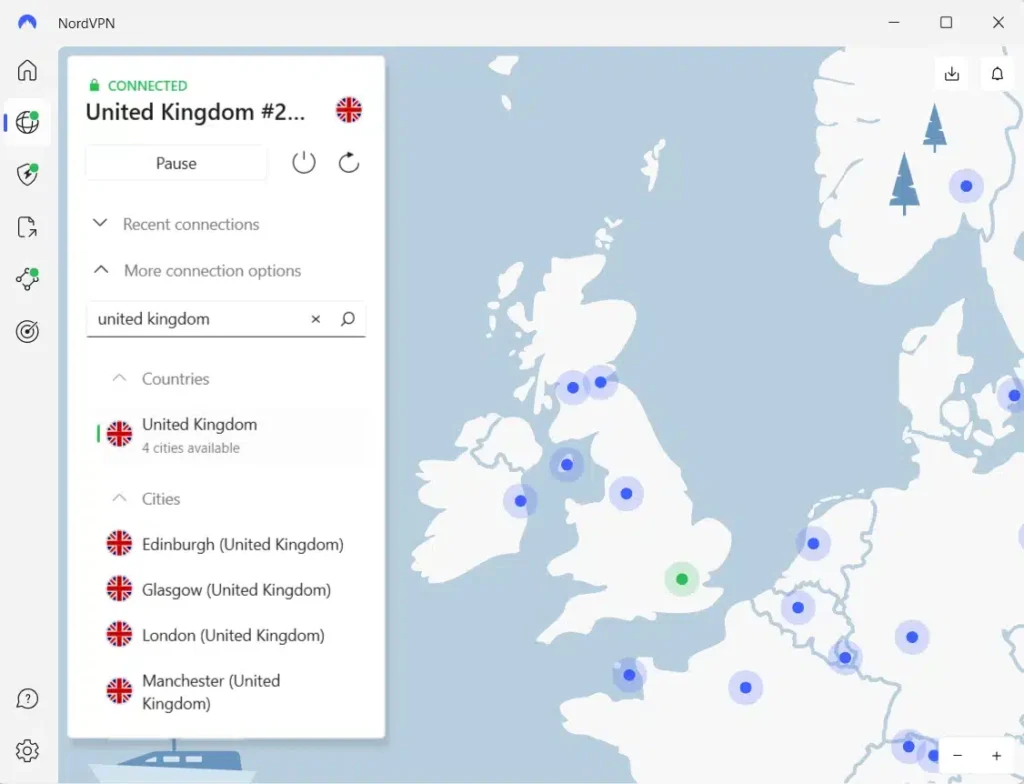
NordVPN takes third place and offers a large network of UK servers. Its official United Kingdom server page advertises more than 440 British servers, with selectable locations including London, Manchester, Edinburgh, and Glasgow.
Open the NordVPN app and choose the United Kingdom country pin to connect automatically. Subscribers who need to compare ordinary network routes can also select a specific documented city through the available location options.
London and Manchester provide two familiar English locations, while Glasgow and Edinburgh extend the selection into Scotland. Physical distance and server congestion may influence latency, so the best-performing connection will not necessarily be the geographically closest one.
NordVPN supports NordLynx, its WireGuard-based protocol. The official NordLynx guide explains its role in efficient encrypted connections. It is built into supported NordVPN applications without requiring a separate WireGuard installation.
The company also offers SmartPlay, a feature combining VPN routing and DNS-related functionality. According to NordVPN’s SmartPlay documentation, it activates automatically with the VPN application and does not require another setup step.
SmartPlay should not be understood as an exception to Netflix’s regional restrictions. The presence of the feature does not guarantee that an American account can stream every movie in the British library.
For ordinary network problems, start by testing the connection without the VPN, then reconnect and review the selected protocol. If one server is heavily congested, automatic selection or another documented UK location may offer more consistent performance.
A working VPN tunnel does not determine the titles Netflix will authorize. NordVPN’s server count and protocol features describe its network, not a verified method for unlocking The Heat on a US subscription. NordVPN users should also check whether their device already has a second VPN or security application enabled, as overlapping tunnels can create misleading location or connectivity problems.
What to do if The Heat does not appear
If The Heat is missing from search results, check the movie’s release year, your Netflix profile, and your network configuration. A title can disappear because of geographic licensing, maturity settings, a recognized VPN, or language preferences.
- Close the Netflix app and all browser tabs containing Netflix so that you are not looking at an old search session.
- Disconnect the VPN and confirm that your ordinary internet connection works as expected.
- Reconnect to an appropriate British endpoint only when doing so complies with the streaming and VPN provider’s terms.
- If the VPN itself has connection problems, compare another officially documented location for normal network troubleshooting.
- Clear Netflix-related cookies and browser cache where appropriate, then restart the browser completely.
- Test a private browsing window to determine whether saved browser information is causing a display problem.
- Sign in again and review your Netflix profile’s maturity restrictions and preferred languages.
- Search for The Heat (2013), verify Sandra Bullock and Melissa McCarthy in the cast, and follow Netflix’s instructions if playback is blocked.
The correct movie features Sarah Ashburn and Shannon Mullins investigating a drug operation in Boston. Do not confuse it with Heat (1995), a serious crime drama, or similarly titled documentaries. The official UK title number is 70259168.
Netflix’s missing movie support guide identifies licensing, profile age ratings, blocked titles, and language settings as possible explanations. If the title appears in Britain but not in the US, regional distribution rights are an especially relevant factor.
PIA documents five UK entries, ExpressVPN lists seven, and NordVPN offers several hundred British servers. Those choices can help troubleshoot general connectivity, but changing endpoints is not proof that Netflix must permit regional playback.
If Netflix detects a VPN or proxy, follow its troubleshooting guidance. Repeated server switching may not solve the underlying restriction, because the streaming service ultimately decides whether a movie can play on the account.
Netflix may detect the VPN
A VPN sends traffic through a remote server and can change the public IP address websites associate with your connection. An IP address registered in Britain does not automatically make a US subscriber eligible for content licensed to British Netflix members.
Netflix’s help center says a recognized VPN connection may result in only globally licensed movies and television shows appearing. The Heat can therefore have a valid UK title page while remaining absent or unplayable during a particular account session.
If Netflix identifies a location mismatch, open Fast.com, choose Show more info, and note the country displayed under Client. Netflix recommends disconnecting a VPN if this country does not match your actual location.
A speed test can diagnose routing and connection quality, but it does not establish streaming rights. A VPN can be technically connected and working properly even when Netflix refuses access to a region-specific title. If the Netflix page opens but the Play button is absent, treat that as a catalog or account eligibility issue rather than an automatic sign of poor VPN speed.
Can you use a Netflix ad-supported plan with a VPN?
No. Netflix does not support VPN playback for subscribers using its ad-supported experience. This restriction applies independently of whether The Heat is offered to eligible ad-supported subscribers in Britain.
The Netflix ad-supported VPN troubleshooting page describes error E121, which can appear when the service detects a VPN or proxy. Netflix instructs affected users to disable the VPN and try again.
JustWatch UK lists the movie on Netflix Standard with Ads, but that refers to ordinary eligible viewing within the supported region. It is not evidence that a US ad-supported plan can access the British catalog through a VPN.
An ad-free Netflix plan avoids the specific ad-plan incompatibility. It still does not guarantee regional access, so changing plans just to watch this movie through a foreign connection may not help. Check your existing plan in Netflix account settings before spending more money; the most important limitation may be geographic licensing, not advertising.
Does changing the VPN location change your Netflix account?
No. Changing your VPN endpoint affects how your network connection appears online. It does not automatically change your Netflix account email, password, profiles, payment details, billing address, or subscription country.
Netflix maintains account information separately from the public IP address your device uses. A UK connection therefore does not convert a US account into a British account or transfer the distribution rights attached to a regional movie library.
For the film itself, JustWatch UK confirms Netflix availability. If you are in the United States, check JustWatch US for current local options. It has listed Starz through Apple TV and rentals through Amazon Video, Apple TV Store, and Fandango At Home. The film’s studio also advertises Hulu, so verify a service’s current catalog before subscribing.
Domestic rental or another licensed US streaming option may be simpler than relying on regional Netflix access. Streaming rights can change quickly, even when an older title page remains visible. If you rent it, check the allowed viewing window and whether the film supports your preferred device, audio output, and subtitle format.
Which VPN should you use?
Private Internet Access ranks first for transparent UK coverage, five documented locations, and support for WireGuard and OpenVPN. Its UK Streaming Optimized endpoint is a network feature, not a Netflix-unlocking promise. PIA explicitly prohibits circumventing geographic content restrictions, and subscribers should follow that policy.
ExpressVPN ranks second for seven British locations and flexible protocol options, including Lightway. NordVPN ranks third with more than 440 UK servers, NordLynx, and SmartPlay. Neither provider guarantees that a particular regionally licensed movie will play through a US Netflix account.
As of October 18, 2026, The Heat (2013) is listed on Netflix UK but not Netflix US. Confirm the current British listing and US alternatives before committing to a subscription, and remember that VPN recognition, account eligibility, advertising-plan limits, and provider terms ultimately determine what you can watch.
Netflix United Kingdom lists The Heat (2013), starring Sandra Bullock and Melissa McCarthy. JustWatch UK also confirms Netflix availability. The movie is not currently listed on Netflix US.
The Heat is in the Netflix UK catalog, and VPN providers offer British connections. However, Netflix may detect VPN traffic, and geographic restrictions or VPN provider terms can prevent playback. Access is not guaranteed.
Private Internet Access ranks first for its documented UK server locations and streaming-optimized option, followed by ExpressVPN and NordVPN. None guarantees access, and PIA prohibits using its service to bypass content-provider geographic restrictions.
Confirm you are searching for the 2013 movie starring Sandra Bullock and Melissa McCarthy, rather than Heat (1995). Check profile restrictions, restart Netflix, and follow Netflix VPN troubleshooting. Switching servers cannot guarantee access.
No. Netflix does not support VPN connections on its ad-supported experience. It recommends disconnecting the VPN when a related playback error occurs.


Read our disclosure page to find out how can you help VPNCentral sustain the editorial team Read more


Improve this guide




User forum
0 messages