
macOS textutil and KeePassXC Can Create Security Risks in Automated Pipelines


 6 min. read
  Published on
Security researchers are warning that two trusted tools, macOS textutil and KeePassXC, can become risky when automated systems process attacker-controlled files with unsafe assumptions.
The issue is not a classic software vulnerability. Researchers did not describe memory corruption, remote code execution, authentication bypass, or password theft. Instead, the findings show how normal features can become attack primitives when teams place them inside CI jobs, backend workers, document processors, or file-scanning pipelines.

Access content across the globe at the highest speed rate.
70% of our readers choose Private Internet Access
70% of our readers choose ExpressVPN

Browse the web from multiple devices with industry-standard security protocols.

Faster dedicated servers for specific actions (currently at summer discounts)
The warning matters because automation often treats local tools as safe by default. If a tool makes network requests or performs heavy computation based on untrusted input, attackers can abuse that behavior without exploiting a bug in the traditional sense.
Why trusted tools become dangerous in automation
Cipher Security Labs tested both behaviors on macOS 26.3 using /usr/bin/textutil and a local KeePassXC 2.8.0-snapshot build. The researchers found that both tools behaved as designed, but not always as engineers might expect in security-sensitive pipelines.
That distinction matters. Many automated workflows assume local file-processing tools stay offline, finish quickly, and only operate on the file given to them.
When those assumptions fail, attackers may gain a new way to trigger outbound requests, consume CPU resources, or expose internal infrastructure to untrusted content.
The macOS textutil issue
The first case involves Apple’s textutil, a command-line tool used to convert and process text documents on macOS. It often appears in scripts, internal services, document pipelines, and backend conversion jobs.
Researchers found that when textutil converts HTML containing remote resources, such as linked images or stylesheets, the tool can fetch those resources over the network. Apple’s documented textutil options include -noload, which tells the tool not to load subsidiary resources, confirming that remote resource loading is part of the expected behavior for HTML-related processing.

In a normal desktop workflow, this may look harmless. In a backend service that converts user-submitted HTML, it can become a server-side request primitive similar to SSRF.
How attackers could abuse textutil
An attacker could submit an HTML file that points to a remote image, stylesheet, or internal URL. If the conversion worker has network access, textutil may try to fetch that resource during conversion.
That behavior could expose internal network reachability, trigger requests to attacker-controlled servers, or help map backend infrastructure.
The important point is that textutil does not need to be broken for this to matter. The risk comes from placing it inside a network-enabled automation environment without strict egress controls.
| Tool | Risky behavior | Main automation risk |
|---|---|---|
macOS textutil | Loads remote HTML resources during conversion | Server-side request primitive |
| KeePassXC | Processes KDF parameters from KDBX file metadata | CPU exhaustion or worker slowdown |
| CI/CD jobs | Process files from pull requests or uploads | Attacker-controlled input reaches trusted tools |
| Backend converters | Run with internal network access | Internal systems may receive unwanted requests |
The KeePassXC KDF boundary problem
The second case involves KeePassXC and how it handles key derivation function settings inside KDBX password database files.
Password managers intentionally make key derivation expensive. This helps slow down brute-force attacks against stolen password databases. KeePassXC supports the KeePass 2.x .kdbx database format, including KDBX 3.1 and KDBX 4.
The problem appears when an automated system opens or validates many untrusted KDBX files. A crafted database can carry extreme KDF parameters in its metadata, forcing the processor to spend far more CPU time before it can continue.
Why KDF parameters can slow down systems
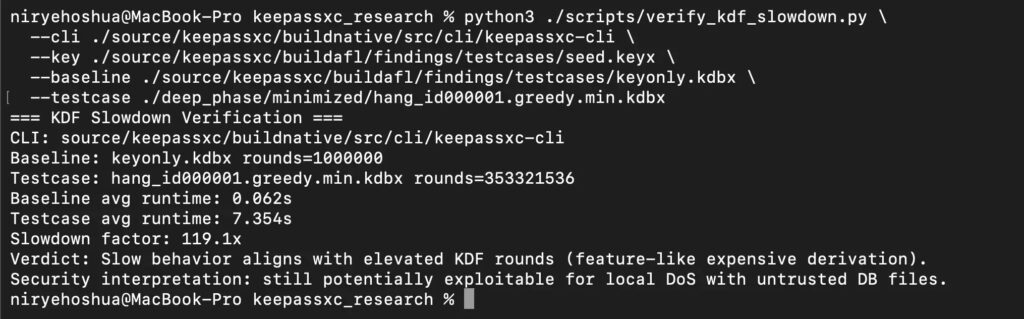
Researchers reported that a normal test database with about 1,000,000 transform rounds took around 0.06 seconds to process. A crafted test case with 353,321,536 rounds took about 7.35 seconds, creating a slowdown of roughly 119 times.
For one person opening one file, a few seconds may not matter much. For an automated service scanning thousands of uploaded files, those delays can stack quickly.
This does not mean KeePassXC leaked passwords or weakened encryption. The risk sits in resource consumption, not cryptographic failure.
What makes this a design-level security issue
These findings point to a broader problem in automation design. Developers often build pipelines around trusted command-line tools without defining what those tools may do with untrusted input.
A document converter may fetch remote resources. A password database parser may perform expensive computation. A file scanner may follow embedded references.
Attackers look for those gaps because they do not always trigger standard vulnerability checks. The tool works correctly, but the system around it creates the security exposure.
Practical defenses for textutil
Teams using textutil should review every workflow that processes user-submitted or externally supplied HTML files.
The most direct mitigation is to use the -noload option when converting HTML or WebArchive content, so the tool does not load subsidiary resources. Teams should also run conversion jobs in restricted environments with no unnecessary outbound network access.
Recommended actions:
- Use
textutil -noloadfor untrusted HTML conversion. - Sanitize HTML before conversion.
- Block outbound traffic from document conversion workers by default.
- Run converters in containers or sandboxes.
- Deny access to internal metadata services and private IP ranges.
- Log and alert on unexpected outbound requests from conversion jobs.
Practical defenses for KeePassXC processing
Teams that process KDBX files in automated systems should treat KDF parameters as untrusted metadata.
That means systems should set maximum allowed KDF values, stop processing files that exceed safe limits, and isolate untrusted password database handling from critical services.
Recommended actions:
- Apply maximum KDF thresholds before full processing.
- Add time limits for each file.
- Queue untrusted KDBX analysis away from production workers.
- Alert on unusually expensive unlock or validation attempts.
- Show clear warnings before processing extreme KDF values.
- Rate-limit batch submissions from the same user or source.
Why this matters for security teams
The warning does not mean companies should stop using textutil or KeePassXC. Both tools remain useful and trusted in the right context.
The lesson is that automation needs boundaries. A tool that behaves safely on a laptop may behave very differently when placed inside a backend workflow with network access, high privileges, or large-scale file processing.
Security teams should audit local utilities in automated pipelines the same way they review third-party APIs, parsers, and upload handlers.
FAQ
Researchers found that macOS textutil can make outbound requests while processing HTML with remote resources, and KeePassXC can spend heavy CPU time processing extreme KDF settings in crafted KDBX files.
No. The findings do not describe remote code execution, memory corruption, or authentication bypass.
No. The reported issue concerns resource consumption caused by attacker-controlled KDF metadata, not password exposure.
textutil can fetch remote resources when converting HTML. In backend workflows, this can create an SSRF-like request primitive if the worker processes attacker-controlled HTML.


Read our disclosure page to find out how can you help VPNCentral sustain the editorial team Read more


Improve this guide


User forum
0 messages