
Microsoft investigates Chrome 147 issue that disrupts Microsoft 365 web sign-ins


 4 min. read
  Published on
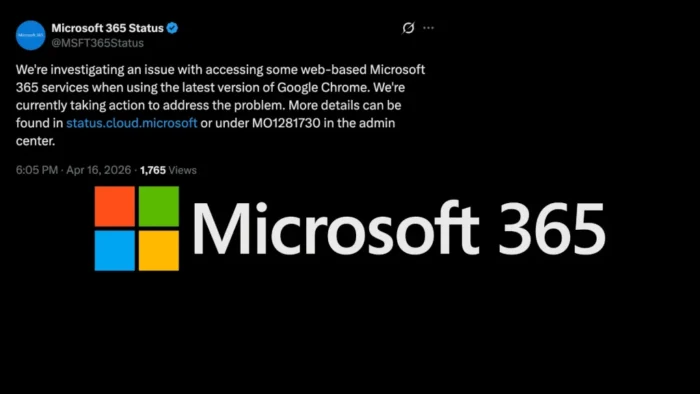
Microsoft is investigating a Microsoft 365 web access issue tied to Google Chrome version 147. Publicly mirrored service health notices say the problem affects authentication in some configurations, which can stop users from signing in or fully loading Microsoft 365 web apps in Chrome 147.
The issue appears limited to the latest Chrome 147 builds rather than Microsoft 365 broadly across all browsers. In one public mirror of Microsoft’s service health updates, Microsoft said users might get temporary relief by refreshing the page while engineers identify the affected authentication configurations and apply changes.

Access content across the globe at the highest speed rate.
70% of our readers choose Private Internet Access
70% of our readers choose ExpressVPN

Browse the web from multiple devices with industry-standard security protocols.

Faster dedicated servers for specific actions (currently at summer discounts)
Chrome 147 is a current stable release, which makes the compatibility problem more disruptive for organizations that standardize on Chrome for browser-based Microsoft 365 access. Google’s release notes show Chrome 147 reached stable in early April 2026.
What Microsoft says is going wrong
Microsoft’s publicly mirrored status text says the company believes the issue only affects the latest versions of Google Chrome, specifically version 147. The same update says Microsoft is taking action to identify the impacted authentication configurations and apply the relevant fixes.
That wording matters because it suggests the outage is not a blanket failure across all Microsoft 365 tenants or all sign-in paths. Instead, the problem appears to involve certain authentication flows that no longer behave correctly in Chrome 147.
Microsoft has not publicly detailed the exact browser-side change behind the problem in the sources reviewed here. Chrome’s official release notes confirm version 147 shipped in April, but they do not identify a Microsoft 365-specific breaking change.
Who may be affected
The service health wording points to Microsoft 365 web services, not desktop apps. That likely means browser-based access to services such as Outlook on the web, SharePoint Online, Teams on the web, and OneDrive web sessions may see sign-in or loading problems when Chrome 147 is in use. This is an inference based on how Microsoft describes service health coverage for Microsoft 365 web services, not a product-by-product impact list confirmed in the mirrored notice.
Organizations that rely heavily on browser-based Microsoft 365 workflows may feel the biggest impact, especially if Chrome is the managed default browser across the company. The issue also appears less likely to affect users who switch to a different browser or use native desktop apps instead of the web versions.
Because Microsoft 365 service health details usually sit behind the admin center, public visibility remains limited. The strongest public evidence available here comes from Microsoft’s general service health documentation and a university mirror of Microsoft’s incident text.
Temporary workarounds
- Refresh the affected Microsoft 365 page, since Microsoft said some users may see relief after a refresh.
- Switch to another browser such as Edge, Firefox, or Safari until Microsoft completes its fix. This is a reasonable workaround based on the issue being tied specifically to Chrome 147.
- Use desktop Microsoft 365 apps where available to avoid the affected browser path. This is an operational workaround rather than a step Microsoft explicitly published in the mirrored notice.
- Check the Microsoft 365 admin center service health page for the latest tenant-specific status updates.
Issue summary
| Item | Detail |
|---|---|
| Main problem | Microsoft 365 web authentication issue in Google Chrome 147 |
| First publicly mirrored update seen | April 16, 2026 |
| Affected platform | Microsoft 365 web services in Chrome 147 |
| Known workaround | Refresh the page; use another browser if needed |
| Status | Microsoft investigating and applying configuration changes |
| Chrome release context | Chrome 147 stable released in early April 2026 |
FAQ
The public status wording does not say that. It points to users on Chrome 147 and says Microsoft is identifying the affected authentication configurations, which suggests partial rather than universal impact.
No public source reviewed here says that. The mirrored Microsoft notice specifically points to the latest versions of Google Chrome, version 147.
Sometimes. Microsoft’s mirrored status text says users may need to refresh their browser page to experience relief.
Not in the sources reviewed here. Chrome’s official release notes confirm the version rollout, but they do not mention a Microsoft 365 authentication conflict.


Read our disclosure page to find out how can you help VPNCentral sustain the editorial team Read more


Improve this guide


User forum
0 messages