
Microsoft Says New Windows LNK Spoofing Techniques Do Not Qualify as Security Vulnerabilities


 4 min. read
  Published on
Microsoft says newly disclosed Windows LNK shortcut spoofing techniques do not meet its criteria for security vulnerabilities. The company confirmed that while the techniques can mislead users into running malicious files, they require user interaction and do not bypass security boundaries under Microsoft’s severity classification guidelines.
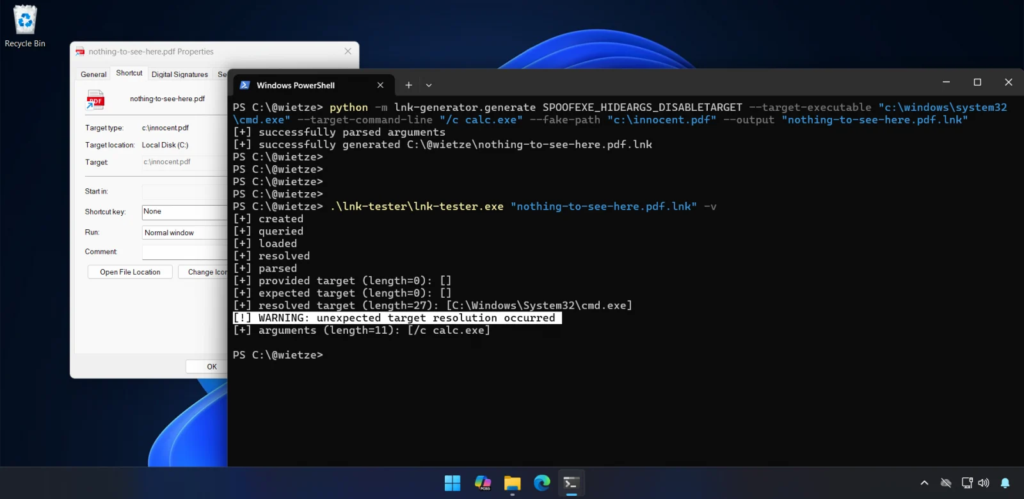
The disclosure came from security researcher Wietze Beukema, who presented multiple shortcut manipulation techniques at Wild West Hackin’ Fest. According to Beukema, specially crafted Windows shortcut files can display one target in Windows Explorer while executing a different program when opened.

Access content across the globe at the highest speed rate.
70% of our readers choose Private Internet Access
70% of our readers choose ExpressVPN

Browse the web from multiple devices with industry-standard security protocols.

Faster dedicated servers for specific actions (currently at summer discounts)
Microsoft responded publicly, stating that protections already exist in Windows Defender and Smart App Control to mitigate malicious LNK abuse.
What Are Windows LNK Files?
Windows LNK files are shortcut files introduced in Windows 95. They point to applications, files, folders, or commands and are widely used across enterprise and consumer systems.
LNK files rely on a complex binary structure that can include multiple optional data blocks. These blocks can store:
- Target file paths
- Command-line arguments
- Environment variable references
- Link metadata
The complexity of this structure is what allows inconsistencies to occur between what Windows Explorer displays and what actually executes.
What the Researcher Discovered
Beukema documented four new techniques that manipulate how Windows Explorer prioritizes path information inside LNK files.
In his presentation, he explained: “This results in the strange situation where the user sees one path in the Target field, but upon execution, a completely other path is executed.”
Why Microsoft Says It Is Not a Vulnerability
When Beukema submitted one of the techniques to the Microsoft Security Response Center, the company declined to classify it as a vulnerability.
A Microsoft spokesperson said: “These techniques do not meet the bar for immediate servicing under our severity classification guidelines as they require an attacker to trick a user into running a malicious file.”
Microsoft emphasized that:
- LNK files downloaded from the internet trigger security warnings.
- Microsoft Defender detects malicious activity tied to LNK abuse.
- Smart App Control blocks untrusted applications.
Relation to CVE-2025-9491
The discussion around LNK spoofing recalls CVE-2025-9491, a previously exploited issue that allowed attackers to hide command-line arguments using excessive whitespace padding.
Trend Micro reported in March 2025 that at least 11 state-sponsored and cybercrime groups were exploiting CVE-2025-9491 in real-world attacks.
Groups reportedly involved included:
- Evil Corp
- APT37
- APT43
- Mustang Panda
- Konni
Microsoft initially stated CVE-2025-9491 did not break security boundaries. However, in June 2025, changes to LNK handling appeared to mitigate the issue.
Technical Breakdown of the New Techniques
| Technique | Description | Risk |
|---|---|---|
| Conflicting path structures | Explorer shows one path while another executes | User deception |
| Invalid path characters | Using forbidden characters to manipulate parsing | Hidden execution |
| Non-conforming LinkTargetIDList | Mismatch between displayed and executed paths | Concealment |
| EnvironmentVariableDataBlock abuse | Fake target shown while real command runs | High deception potential |
Why Attackers Continue Using LNK Files
LNK files remain attractive for attackers because:
- They are trusted and widely used
- They trigger warnings users often ignore
- They support embedded arguments
- They can hide execution details
Beukema noted that users frequently click through warnings, which reduces the effectiveness of protective prompts.
Security Recommendations
Microsoft and researchers recommend:
- Do not open shortcut files from unknown sources
- Heed Windows security warnings
- Enable Microsoft Defender real-time protection
- Use Smart App Control where available
- Restrict execution of downloaded content via enterprise policy
- Monitor for suspicious LNK file behavior in security logs
Enterprise administrators can also disable LNK file execution in sensitive environments through group policies.
Frequently Asked Questions
No. Microsoft says they do not meet its vulnerability classification because they require user interaction and do not bypass security boundaries.
Yes. If a user opens a malicious shortcut file, it can execute hidden commands.
Microsoft has not issued patches because the company does not classify the techniques as vulnerabilities. However, Defender and Smart App Control offer protection.
Yes. Both involve hiding execution details within LNK files. CVE-2025-9491 was actively exploited by multiple threat groups.
Yes. While not classified as vulnerabilities, these techniques increase phishing effectiveness and social engineering risks.


Read our disclosure page to find out how can you help VPNCentral sustain the editorial team Read more


Improve this guide


User forum
0 messages