
Microsoft Store app Vibing.exe raises privacy concerns over screen and audio collection


 6 min. read
  Published on
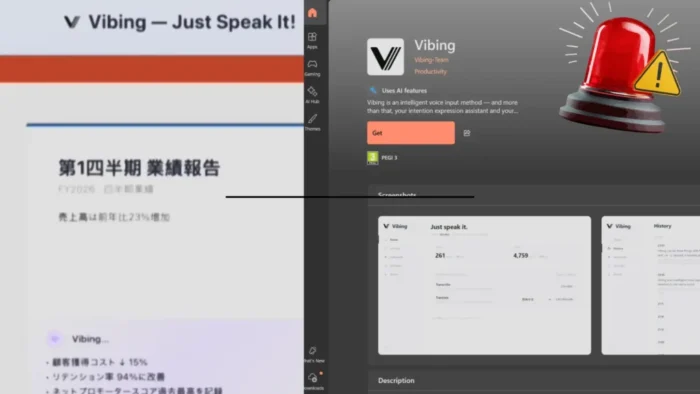
A Microsoft Store app called Vibing.exe has raised privacy and security concerns after researcher Kevin Beaumont reported that it captured screenshots, microphone audio, clipboard content, window information, and other local context from Windows devices. The app was marketed as an intelligent voice input tool for the “AI-native world,” but the reported behavior goes far beyond simple voice typing.
Beaumont said Vibing was delivered through the Microsoft Store and published by “Vibing-Team.” He also reported that the app sent traffic to an Azure Front Door endpoint without clearly telling users in the app that this data was being transmitted.

Access content across the globe at the highest speed rate.
70% of our readers choose Private Internet Access
70% of our readers choose ExpressVPN

Browse the web from multiple devices with industry-standard security protocols.

Faster dedicated servers for specific actions (currently at summer discounts)
The main concern is consent. A voice input app may need microphone access to work, but researchers flagged Vibing because it allegedly collected screen and system context in ways that users may not expect from a typing assistant.
What Vibing.exe reportedly collected
Beaumont’s analysis says Vibing configured itself to start when the user logged into Windows. Once active, it could capture screenshots, collect clipboard content, read window titles and app names, and transmit data through WebSocket connections.
A separate GitHub issue in Microsoft’s VibeVoice repository described similar behavior. The issue said the Windows build of Vibing silently captured a screenshot on hotkey press and uploaded it to a backend hosted on Azure, without a consent prompt or visible capture indicator.
The GitHub report also said the screenshot feature appeared to sit behind a configuration option called preprocess: true, which does not clearly tell users that screen capture is involved. That detail matters because a screenshot can contain emails, passwords, documents, chat messages, financial portals, or private work data.
Why the Microsoft connection matters
The app’s origin has attracted extra attention because Beaumont linked Vibing to Microsoft research infrastructure and employees. His report says the binary was digitally signed by Yaoyao Chang using an SSL.com co-signer and that Chang works for Microsoft’s GenAI research lab in Beijing.
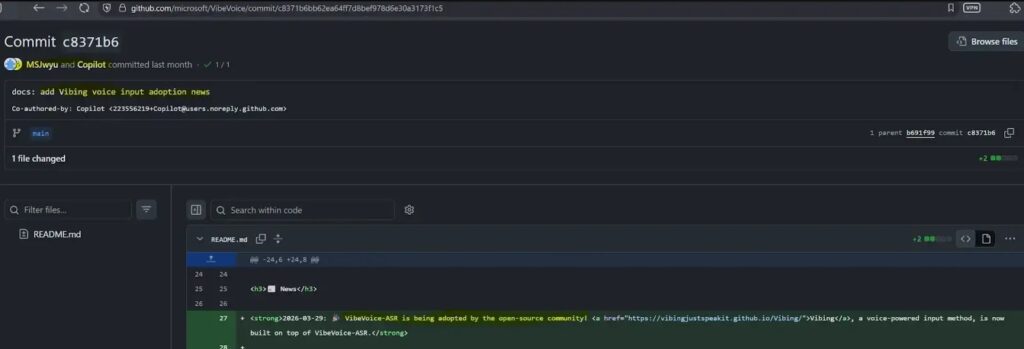
Beaumont also reported that Vibing first appeared online through Microsoft’s VibeVoice GitHub repository, where it was presented as a community-built project. However, he said the Vibing GitHub repository did not contain source code and instead hosted a large binary file.
That point has already caused friction in the developer community. A GitHub issue opened in March asked where the source code and license were, noting that the project did not appear to be open source. The issue remained visible in the Microsoft VibeVoice repository.
At a glance
| Item | What current reporting shows |
|---|---|
| App name | Vibing.exe |
| Store listing | Microsoft Store listing for Vibing |
| Publisher name | Vibing-Team |
| Main pitch | Intelligent voice input and intent assistant |
| Reported data collection | Screenshots, microphone audio, clipboard content, window titles, app names |
| Reported transport | WebSocket and Azure Front Door endpoint |
| Researcher who flagged it | Kevin Beaumont |
| Related Microsoft project | VibeVoice |
| Key concern | Data collection without clear in-app consent |
| Reported status | Downloads and service were reportedly removed or shut down pending review |
What security researchers found
The security issue is not only that Vibing collected data. It is also that the app reportedly tied that data to a unique machine identifier. Beaumont said screenshots were base64-encoded and sent with a per-machine hardware GUID, which could allow screenshots to link back to the same device over time.
The GitHub security analysis said the app used a PyInstaller bundle and included modules for screenshot capture, clipboard reading, window context scraping, speech recognition calls, server communication, hotword handling, and active-window text insertion.
That combination makes the app sensitive from a privacy standpoint. A tool that can hear the user, view the screen, read copied content, and type into active windows needs very clear disclosure and controls.
What happened after the report
Beaumont later updated his report to say Microsoft removed the Vibing downloads and shut down the service pending a compliance review on April 24, 2026. He also reported follow-up activity around commits connected to the project after the review began.
The report said developers had raised concerns with Microsoft-linked accounts on GitHub before the public write-up. One issue in Microsoft’s VibeVoice repository, opened on April 2, specifically warned that Vibing uploaded screenshots without proper disclosure.
This leaves a wider question for Microsoft and the AI developer ecosystem. If experimental AI tools can move from research pages to public downloads, users and admins need clear answers about review, ownership, privacy policy accuracy, and data retention.
Why this matters for Windows users
Vibing shows how AI assistants can blur the line between helpful automation and intrusive monitoring. A voice input tool may sound simple, but “context-aware” behavior can require access to sensitive parts of a device.
For regular users, the issue centers on visibility. If an app captures the screen or reads the clipboard, it should say so plainly before collection starts. It should also show controls that let users disable those features.
For businesses, the risk is bigger. Corporate screens may show customer records, credentials, source code, contracts, internal chats, dashboards, and financial data. Even a small AI utility can create a major data exposure problem if teams install it without review.
What users and admins can do now
- Check endpoints for
Vibing.exeandVibing Installer.exe. - Look for connections to
vibing-api-ccegdhbrg2d6bsd7.b02.azurefd.net. - Review Microsoft Store app installs across managed Windows devices.
- Remove Vibing from any device where it appears.
- Check startup entries for apps that launch automatically at login.
- Audit microphone, clipboard, and screen-capture permissions for AI tools.
- Block unknown AI assistants until security and privacy teams approve them.
Indicators mentioned in reports
| Type | Indicator |
|---|---|
| Executable | Vibing.exe |
| Installer | Vibing Installer.exe |
| Network endpoint | vibing-api-ccegdhbrg2d6bsd7.b02.azurefd.net |
| Related GitHub organization | VibingJustSpeakIt |
| Related Microsoft repository | microsoft/VibeVoice |
FAQ
Vibing appeared on the Microsoft Store under the publisher name “Vibing-Team.” Beaumont also reported links between the app, Microsoft research employees, Microsoft’s VibeVoice GitHub page, and a Microsoft-owned Azure tenant.
The public reports focus on behavior such as screenshot capture on hotkey press, microphone use for voice input, clipboard access, and context collection. Beaumont also reported that the app started automatically on Windows login.
The project was described in some places as community or open source, but a GitHub issue in Microsoft’s VibeVoice repository asked where the source code and license were. Beaumont also reported that the Vibing repository contained no source code at the time he reviewed it.
Screenshots can expose private messages, passwords, work documents, admin panels, financial information, and customer data. Silent or unclear screen capture creates a serious privacy risk.


Read our disclosure page to find out how can you help VPNCentral sustain the editorial team Read more


Improve this guide


User forum
0 messages