
Microsoft Warns Attackers Abused HPE Operations Agent in 123-Day Intrusion


 7 min. read
  Published on
Microsoft says attackers abused a trusted enterprise management setup involving HPE Operations Agent and HPE Operations Manager during a stealthy intrusion that lasted 123 days before incident response teams became involved.
The attack began through a compromised third-party IT services provider. From there, the threat actor used legitimate administrative channels to run scripts, steal credentials, move laterally, and maintain access inside the victim’s environment.

Access content across the globe at the highest speed rate.
70% of our readers choose Private Internet Access
70% of our readers choose ExpressVPN

Browse the web from multiple devices with industry-standard security protocols.

Faster dedicated servers for specific actions (currently at summer discounts)
Microsoft stressed that the campaign did not involve a vulnerability or flaw in HPE Operations Agent. The attackers instead exploited trust. They used approved management tools and delegated service-provider access to make malicious activity look like normal IT operations.
How attackers abused trusted HPE tooling
HPE Operations Manager, or HPOM, acts as a centralized management console for monitoring and managing infrastructure. HPE Operations Agent runs on managed hosts and can collect telemetry or execute administrative actions.
In this case, a third-party IT services provider managed the HPOM environment for the targeted organization. After compromising that relationship, the attacker used the trusted platform to deploy and run VBScript files on multiple systems.
Microsoft identified a VBScript named abc003.vbs that performed system discovery, network discovery, Active Directory discovery, and external IP address checks through PowerShell.
| Attack stage | Observed activity |
|---|---|
| Initial access | Compromised third-party IT services provider used trusted management access. |
| Execution | VBScript files were deployed through HPE Operations Manager. |
| Credential theft | Malicious network provider and password filter DLLs captured credentials. |
| Persistence | Web shells, authentication hooks, and ngrok tunnels maintained access. |
| Lateral movement | Attackers used valid credentials, RDP, WMI, and covert tunneling. |
The intrusion lasted 123 days
Microsoft’s timeline shows a slow-moving campaign built for long-term access. The threat actor established an initial foothold on Day 1, then introduced credential interception on domain infrastructure between Days 9 and 14.
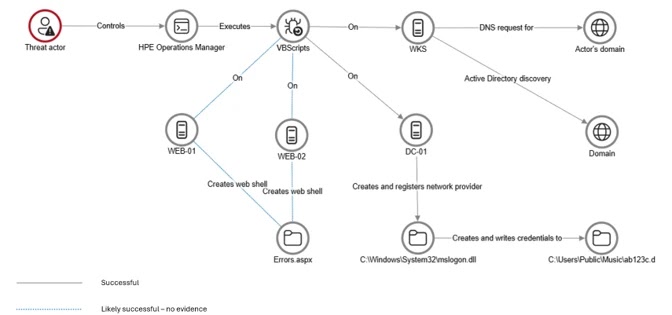
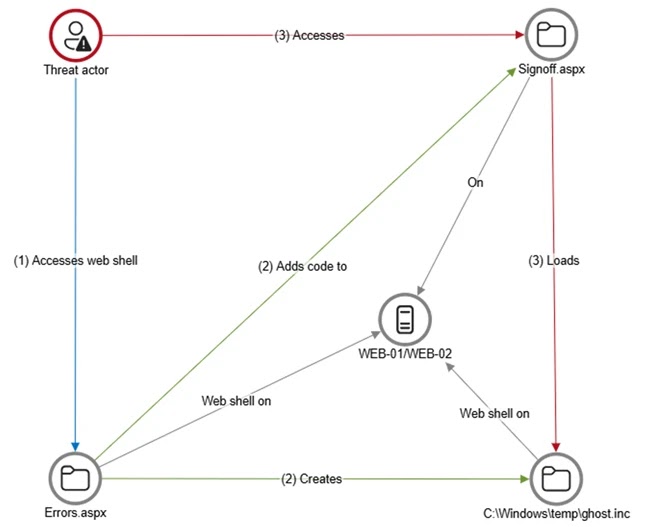
Between Days 24 and 32, the attacker established web-based persistence on internet-facing servers. Microsoft found a web shell named Errors.aspx on two web servers and a modified Signoff.aspx page that loaded a secondary web shell called ghost.inc from the Windows temporary directory.
Between Days 40 and 60, the attacker used stolen credentials and covert connectivity to move laterally. Microsoft said the threat actor reached sensitive systems, including SQL servers and domain controllers.
Credential theft reached domain controllers
The most serious part of the attack involved credential interception. Microsoft said the threat actor registered a malicious network provider named mslogon on a domain controller through the same trusted management channel.
The related DLL, mslogon.dll, abused Windows Credential Manager APIs to capture usernames and passwords during sign-ins and password changes. Microsoft said the stolen cleartext credentials were stored under C:\Users\Public\Music\abc123c.d.
Later, the attacker registered a malicious password filter named passms.dll on two domain controllers. Password filters run inside the Windows authentication process and can receive passwords when users set or change them.
- mslogon.dll captured cleartext credentials during sign-in and password change events.
- passms.dll intercepted password data at the domain-controller level.
- msupdate.dll helped transfer encoded credential data through SMB and email.
- icon02.jpeg was used as a disguised filename for staged credential data.
- The email exfiltration component used the subject line Update Service.
Web shells and ngrok helped maintain access
The attacker also used web shells to keep access to internet-facing servers. The initial Errors.aspx shell could write files to disk, while the modified Signoff.aspx page loaded the secondary ghost.inc shell.
This method helped the attacker avoid creating obvious new services. By modifying existing application files, the campaign made persistence harder to spot during routine checks.
The attacker also deployed ngrok on internal servers. This created encrypted tunnels that enabled RDP access without exposing firewall ports directly to the internet.
Why this attack was hard to detect
The campaign avoided the usual signs defenders expect from noisy malware or exploit-driven activity. Much of the activity flowed through tools and relationships the organization already trusted.
That made the attack difficult to separate from ordinary IT administration. Scripts ran through a legitimate management platform. Credentials were stolen through Windows authentication mechanisms. Remote access moved through encrypted tunnels and valid accounts.
Microsoft said this type of tradecraft shows why organizations need to validate trusted tools, third-party access, and identity infrastructure instead of assuming approved channels are safe by default.
| Trusted component abused | Security risk created |
|---|---|
| Third-party IT provider | Expanded trust boundary gave attackers a route into the customer environment. |
| HPE Operations Manager | Scripts and binaries could run under a trusted administrative workflow. |
| Windows network providers | Attackers captured credentials during normal sign-in activity. |
| Windows password filters | Attackers intercepted password changes on domain controllers. |
| ngrok tunnels | RDP sessions reached internal systems through encrypted external tunnels. |
Defenders should watch authentication changes
Microsoft recommends stronger endpoint visibility across all devices, especially servers that face the internet or support domain infrastructure. The investigation noted that some web servers lacked endpoint detection and response coverage, which limited visibility into how certain web shells were created.
Security teams should monitor changes to Local Security Authority notification packages, network provider registrations, and unusual DLLs in authentication-related paths. These changes can reveal credential-theft mechanisms before attackers collect large volumes of passwords.
Organizations should also restrict outbound traffic by default. Microsoft recommends a default-deny egress model so servers can only connect to approved destinations. This can reduce the attacker’s ability to use tunneling tools, command-and-control channels, or data exfiltration paths.
Key indicators linked to the campaign
| Indicator | Type |
|---|---|
| abc003.vbs | Discovery script deployed through HPE Operations Manager |
| Errors.aspx | Web shell on internet-facing servers |
| Signoff.aspx | Modified page used to load a secondary web shell |
| ghost.inc | Secondary web shell loaded from a temporary directory |
| mslogon.dll | Malicious network provider DLL used for credential theft |
| passms.dll | Malicious password filter DLL registered on domain controllers |
| msupdate.dll | Module used to transfer captured credential data |
| ngrok | Tunneling tool used for covert RDP access |
What organizations should do now
Organizations that rely on third-party IT providers should review delegated access, management-tool permissions, and monitoring coverage. Trusted service-provider access should have clear limits, strong logging, and regular validation.
Admins should remove unnecessary tools from servers, monitor web directories for unexpected changes, and review outbound connectivity from systems that should not initiate external tunnels. Domain controllers need especially close monitoring for authentication-related registry changes and unsigned DLLs.
The main lesson is clear. Attackers do not always need a new exploit or a custom malware loader. Sometimes, they only need access to a trusted tool that already has permission to reach the most sensitive parts of the network.
FAQ
No. Microsoft said the intrusion did not involve a flaw or vulnerability in HPE Operations Agent. The attackers abused trusted access through a compromised third-party IT services provider and legitimate management tooling.
Microsoft said the intrusion lasted 123 days before Microsoft Incident Response was engaged. The attacker used that time to establish persistence, steal credentials, move laterally, and restore access after initial detection.
The attackers used HPE Operations Manager to deploy and run scripts such as abc003.vbs across multiple systems. The script performed system, network, and Active Directory discovery while blending into trusted administrative activity.
The attackers registered malicious authentication components, including mslogon.dll and passms.dll, on domain controllers. These components captured credentials during sign-ins and password changes.
Organizations should deploy endpoint detection and response across all servers, restrict outbound traffic by default, monitor authentication-related registry changes, review third-party access, remove unnecessary tools, and enable detailed logging on web servers.


Read our disclosure page to find out how can you help VPNCentral sustain the editorial team Read more


Improve this guide

User forum
0 messages