
New Android spyware platform lets buyers rebrand and resell surveillance malware


 7 min. read
  Published on

A new Android spyware platform called KidsProtect is raising concern because it lets buyers rebrand the malware and sell it as their own product.
The tool presents itself as a parental monitoring app, but security researchers say it works as a full surveillance platform. Once installed, it can run silently in the background and give an operator access to sensitive data from the victim’s phone.

Access content across the globe at the highest speed rate.
70% of our readers choose Private Internet Access
70% of our readers choose ExpressVPN

Browse the web from multiple devices with industry-standard security protocols.

Faster dedicated servers for specific actions (currently at summer discounts)
The bigger issue is the business model. Instead of selling only one spyware app, the operators offer a white-label reseller plan. That means another person can add their own logo, set their own pricing, and launch a new spyware brand with little technical work.
What is KidsProtect?
KidsProtect is an Android remote access trojan that uses child-safety branding to appear legitimate. Certo researchers found it being advertised on a clear-web hacking forum, where the listing focused on stealth and stability rather than child protection.
The spyware is sold as a subscription product, with pricing reportedly starting at $60. Buyers can also purchase a reseller package that lets them repackage the same technology under a different name.
This makes the tool more dangerous than a standard spyware app. If one brand disappears, another operator can quickly relaunch the same platform with new branding, a new website, and a new sales funnel.
At a glance
| Category | Details |
|---|---|
| Name | KidsProtect |
| Platform | Android |
| Disguise | Parental monitoring app |
| Real function | Covert phone surveillance |
| Business model | Subscription access plus white-label reseller package |
| Visible app name | WiFi Service or WiFiService Installer |
| Package name | com.example.parentguard |
| Main risk | Silent monitoring of calls, messages, location, screen activity, microphone, camera, and notifications |
What the spyware can access
KidsProtect gives the operator a web dashboard for remote monitoring. From there, the person controlling the spyware can access several types of private phone data.
Researchers said the app can track GPS location, read SMS messages, access contacts, browse stored photos, record calls, capture notifications, log keystrokes, and activate the microphone or cameras remotely.
The spyware also targets messaging activity. It can intercept notifications from apps such as WhatsApp, Viber, and Telegram, which makes it especially invasive for personal conversations.
Main surveillance features
- Live GPS tracking and location history
- SMS message access
- Call recording
- Live microphone streaming
- Remote camera access
- Screen viewing
- Keystroke logging
- Contact list access
- Photo access
- Notification interception from messaging apps
How KidsProtect hides on Android phones
KidsProtect does not appear under its own name after installation. Instead, it uses labels such as WiFi Service or WiFiService Installer to blend in with normal Android system components.
Its related services also use harmless-looking names. The accessibility service appears as WiFiService Assistant, while the notification listener appears as WiFiService Monitor.
This naming strategy makes the spyware harder for a normal user to spot. Many people may ignore an app that looks like a Wi-Fi component, especially if they do not remember installing it.
Why Accessibility access makes it more invasive
The spyware requests Android Accessibility Service access, which creates a serious privacy risk when abused. Accessibility features exist to help people with disabilities use their devices, but malware can misuse the same access to monitor screen content and activity.
Once granted, this type of access can help spyware observe what appears on the screen and interact with apps. In practice, that can expose messages, passwords, app activity, and other private information.
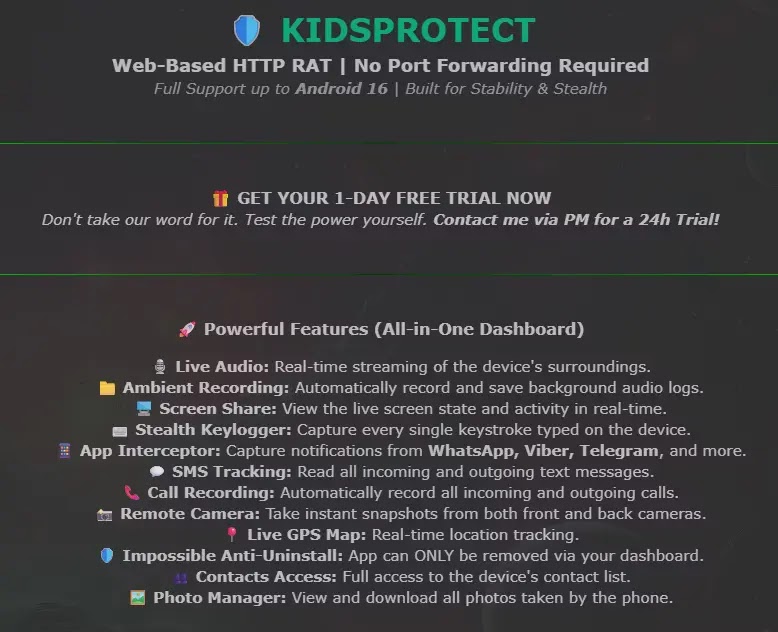
KidsProtect also requests permissions such as camera, microphone, location, SMS, call logs, contacts, usage stats, and storage access. Together, these permissions give the operator broad visibility into the victim’s phone.
How the app resists removal
KidsProtect uses several techniques to remain active after installation. It registers itself as a Device Administrator, which can block normal uninstall attempts from Android settings.
The app also includes a BootReceiver component, allowing it to restart after the phone reboots. It asks for battery optimization exemptions as well, which helps it keep running in the background.
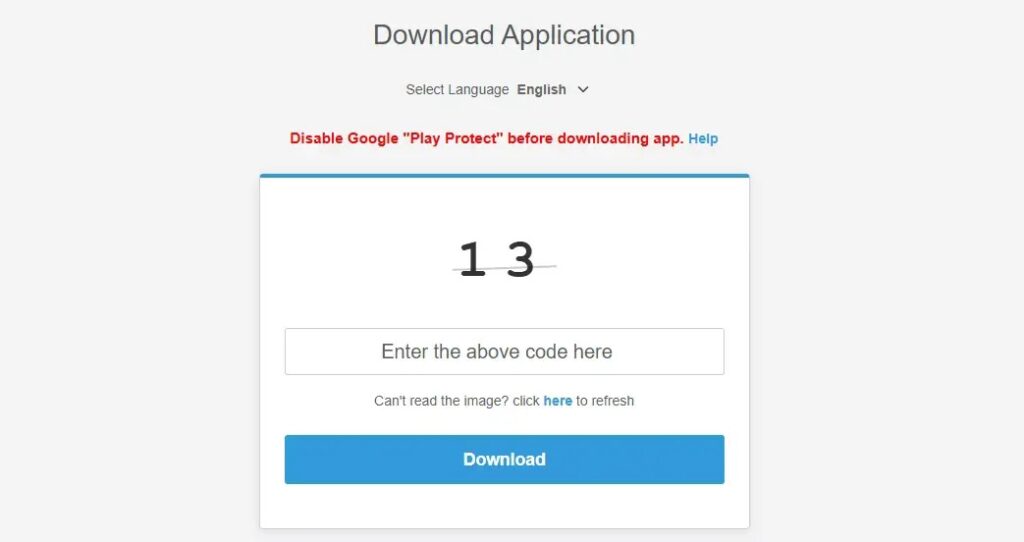
Another major red flag is the installation flow. The download instructions reportedly tell users to disable Google Play Protect before installing the APK, which strongly suggests the app expects Android’s built-in protection to flag it.
Warning signs users should check
| Warning sign | Why it matters |
|---|---|
| App named WiFi Service | The spyware may use this name to hide in plain sight. |
| Package name com.example.parentguard | This is a known indicator connected to KidsProtect. |
| Unknown Device Administrator entry | This can prevent normal app removal. |
| Unknown Accessibility Service | This can expose screen content and typed information. |
| Request to disable Google Play Protect | Legitimate apps should not need users to turn off Android malware protection. |
| APK installed outside Google Play | Sideloaded apps carry higher risk when the source is unknown. |
Why the reseller model matters
The white-label model turns spyware into a ready-made business. A buyer does not need to build malware, design a dashboard, or create mobile surveillance features from scratch.
This creates a franchise-style threat. One developer can provide the technology, while many resellers market the same spyware under different names.
That makes enforcement harder. If authorities or hosting providers remove one spyware brand, another reseller can bring the same tool back online with different branding.
Legal pressure has not stopped the stalkerware market
Stalkerware companies have faced growing legal pressure in recent years. In the United States, the Federal Trade Commission finalized an order in 2021 banning SpyFone and its CEO from the surveillance business after allegations that the company secretly harvested phone data.
PhoneSpector and Highster Mobile also appeared to shut down after a New York settlement over allegations linked to spyware promotion. Those cases showed that regulators can disrupt individual stalkerware operators.
KidsProtect shows why the problem may not disappear quickly. A white-label platform can help new sellers enter the market faster, even after older brands face legal or commercial pressure.
How Android users can reduce the risk
- Keep Google Play Protect turned on.
- Install apps only from trusted sources.
- Do not install APK files sent through links, forums, or unknown websites.
- Review Accessibility access under Android settings.
- Review Device Administrator apps and remove unknown entries.
- Check for unfamiliar apps with generic names such as WiFi Service.
- Update Android and installed apps regularly.
- Use a trusted mobile security scanner if you suspect spyware.
What to do if you find suspicious signs
If a device shows the package name com.example.parentguard, treat it as a serious compromise. The phone may need a full security review before normal use continues.
Users should avoid alerting a suspected abuser if personal safety may be at risk. In cases involving stalking, domestic abuse, or coercive monitoring, the safer step may be to use another trusted device to contact a local support organization, legal adviser, or law enforcement agency.
For general cleanup, users can check Device Administrator settings, remove unknown Accessibility permissions, run Play Protect, and consider backing up essential files before performing a factory reset. A reset can remove many spyware apps, but users should avoid restoring suspicious apps afterward.
FAQ
KidsProtect is an Android surveillance tool that presents itself as a parental monitoring app. Researchers describe it as spyware because it can secretly monitor a phone and send data to an operator.
The white-label feature lets buyers rebrand and resell the spyware. This can create many copycat spyware brands using the same underlying platform.
It can appear as WiFi Service or WiFiService Installer. Its background components also use generic Wi-Fi-related names to avoid suspicion.
Accessibility Service access is one of the most concerning permissions. When abused, it can help spyware observe screen content, app activity, and typed information.


Read our disclosure page to find out how can you help VPNCentral sustain the editorial team Read more


Improve this guide


User forum
0 messages