
New PureRAT malware hides code in PNG files and runs filelessly on Windows


 6 min. read
  Published on
A newly detailed PureRAT campaign uses PNG image files to hide malware payloads, then executes them in memory to avoid leaving an obvious file on disk. Trellix says the attack starts with a malicious Windows shortcut, pulls a second-stage payload from a remote server, and uses steganography plus in-memory loading to keep the infection harder to spot with traditional file-based defenses.
The campaign matters because it combines several defense-evasion techniques in one chain. Trellix says PureRAT uses PowerShell, sandbox checks, UAC bypass through cmstp.exe, and process hollowing into msbuild.exe, which lets attackers run malicious code under the cover of trusted Windows components. MITRE separately documents cmstp.exe abuse, proxy execution through MSBuild, and process hollowing as known attacker techniques.

Access content across the globe at the highest speed rate.
70% of our readers choose Private Internet Access
70% of our readers choose ExpressVPN

Browse the web from multiple devices with industry-standard security protocols.

Faster dedicated servers for specific actions (currently at summer discounts)
In plain terms, the attack tries to look normal at every step. The victim opens what looks like a harmless shortcut, PowerShell runs quietly in the background, a PNG file arrives from a remote server, and the hidden payload loads directly into memory instead of dropping a normal executable onto disk.
How the PureRAT infection chain works
According to Trellix, the infection begins with a malicious .lnk file. When the user opens it, the shortcut launches an obfuscated PowerShell command that downloads a PNG image from the attacker’s infrastructure. That image contains a Base64-encoded portable executable hidden inside what appears to be normal image data.
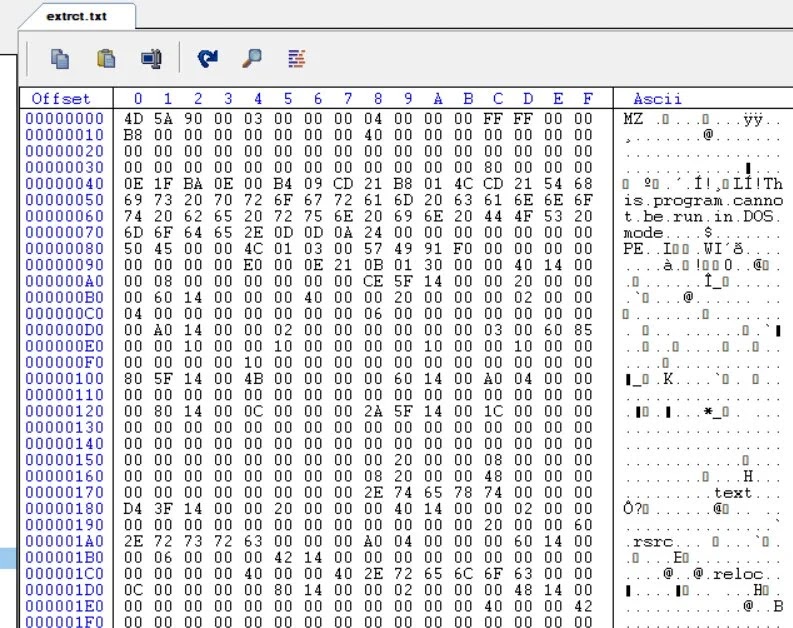
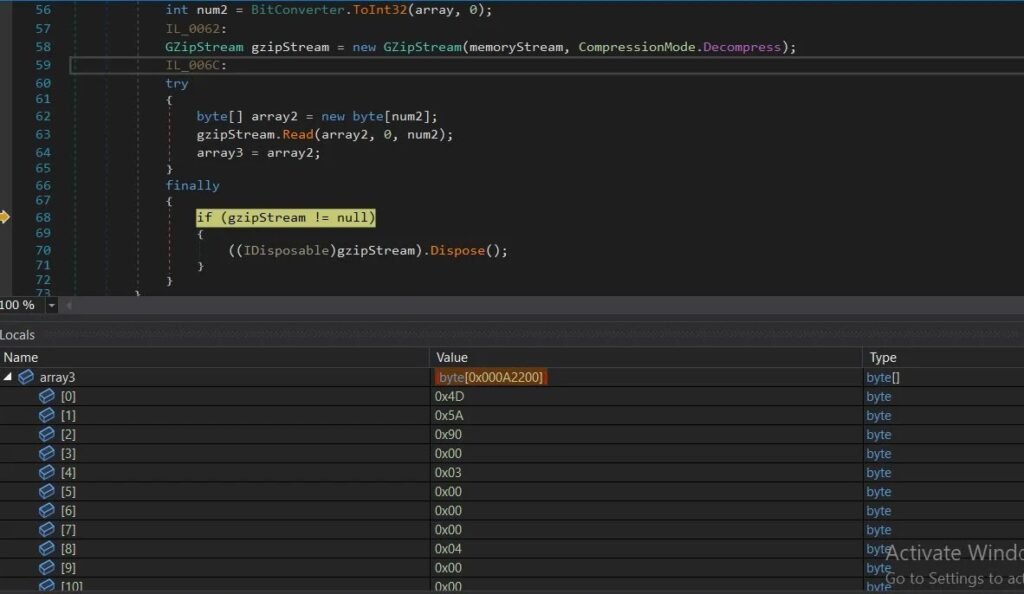
Trellix says the loader extracts the hidden payload by locating specific start and end points inside the PNG, then modifying and decoding the data before turning it into a byte array. From there, the malware loads it into memory as a .NET assembly with System.Reflection.Assembly.Load(), which allows the operation to continue without writing the full payload to disk.
The researchers also found anti-analysis checks for VMware and QEMU. If the malware detects a virtual environment often used by analysts and sandboxes, it can terminate early. That step helps the attackers reduce exposure during automated analysis.
Why this campaign is harder to detect
The stealth here comes from layering. Trellix says the PowerShell-based stage is heavily obfuscated, padded with junk data, and designed to confuse both researchers and automated tools. That alone would make analysis harder, but the attackers also move execution into memory and then into a trusted Windows process.
MITRE describes process hollowing as a technique where attackers inject malicious code into a live process to evade process-based defenses. In this case, Trellix says PureRAT hollows out msbuild.exe, a legitimate Microsoft build utility, so the malicious activity blends in with a signed and trusted binary. MITRE also documents MSBuild abuse as a proxy execution method used by adversaries.
Trellix says the malware also abuses cmstp.exe to bypass User Account Control. MITRE identifies CMSTP as a known system binary proxy execution vector, and LOLBAS lists suspicious cmstp.exe usage as a detection signal because attackers can use it to launch malicious code through specially crafted installation files or related mechanisms.
What PureRAT does after execution
Once active, PureRAT performs host fingerprinting. Trellix says it collects system details such as installed security tools, hardware identifiers, and user privilege information, then reaches out to its command-and-control infrastructure for follow-on tasking.
The RAT supports plugin-based activity, which gives operators room to expand what they do on an infected machine. Trellix says those plugins can support capabilities such as keylogging, monitoring, and remote desktop access, turning the malware into a flexible foothold rather than a single-purpose loader.
Persistence also plays a role. Trellix says the malware maintains re-execution through a scheduled task stored in the Windows Registry, which helps the attackers keep access even after the original infection stage finishes.
Key techniques seen in the campaign
| Technique | How it was used | Why it matters |
|---|---|---|
| Malicious .lnk file | Triggers the initial execution chain | Shortcuts can look harmless to users |
| Obfuscated PowerShell | Downloads and prepares the next stage | Helps hide behavior from users and tools |
| PNG steganography | Conceals payload data inside an image | Makes the delivery file look benign |
| In-memory .NET loading | Loads malware without a standard disk artifact | Reduces file-based detection chances |
| CMSTP abuse | Helps with UAC bypass and proxy execution | Uses a legitimate Windows binary |
| Process hollowing into msbuild.exe | Runs malware inside a trusted process | Blends malicious code into normal system activity |
What defenders should do now
Security teams should treat unexpected .lnk files as a serious initial access vector, especially when they trigger PowerShell. Monitoring for suspicious shortcut execution, encoded or obfuscated PowerShell commands, unusual use of cmstp.exe, and abnormal msbuild.exe behavior can help spot this type of chain earlier. MITRE and LOLBAS both flag these binaries and methods as attacker tradecraft worth monitoring closely.
Defenders should also focus on behavior, not just files. This campaign shows why fileless delivery, reflective loading, and process injection still create blind spots for organizations that rely too heavily on signature-driven scanning. Memory inspection, EDR telemetry, and detection content built around execution chains matter more here than simple file reputation checks. This is an inference based on Trellix’s findings and MITRE’s documentation of the techniques involved.
At the user level, the advice stays familiar but important. Do not open unexpected shortcut files, especially from email attachments, downloads, or archives. Keep endpoint protection active, restrict risky scripting behavior where possible, and investigate any machine that shows unusual PowerShell, cmstp.exe, or msbuild.exe activity. Trellix specifically recommends stronger PowerShell controls, monitoring of built-in Windows binaries, blocking known C2 infrastructure, timely patching, and user training around suspicious .lnk files.
Quick defense checklist
- Block or tightly control suspicious PowerShell execution.
- Alert on unexpected
.lnkfile launches from user-writable locations. - Monitor
cmstp.exeandmsbuild.exefor unusual child processes or network activity. - Watch for in-memory .NET assembly loading and process hollowing behavior.
- Block known attacker domains and unusual outbound connections.
- Train users not to trust shortcut files just because they look familiar.
FAQ
PureRAT is a remote access trojan that gives attackers ongoing access to infected Windows systems. Trellix says the latest campaign uses a multi-stage, fileless chain with steganography and process hollowing.
Because image files look harmless to many users and tools. In this campaign, Trellix says the PNG acted as a carrier for hidden Base64-encoded payload data.
It means the malware runs mainly in memory instead of relying on a normal executable written to disk. That can make detection and forensic recovery harder.
They are legitimate Windows utilities that attackers can abuse to blend malicious activity into trusted processes. MITRE documents both as known execution or evasion paths.


Read our disclosure page to find out how can you help VPNCentral sustain the editorial team Read more


Improve this guide


User forum
0 messages