
North Korea-aligned hackers use GitHub repositories to infect developers


 9 min. read
  Published on
North Korea-aligned hackers are targeting software developers with phishing emails that lead to malicious GitHub and GitLab repositories. The campaign, tracked as UNK_DeadDrop, uses fake job offers and code review requests to trick developers into opening infected projects in their coding tools.
Proofpoint said the activity ran between April and May 2026 and targeted individuals at close to 100 organizations. The main sectors included technology, education, business services, finance, and cryptocurrency.

Access content across the globe at the highest speed rate.
🔥 Save 81% + 2 bonus months! 🔥
70% of our readers choose Private Internet Access
70% of our readers choose ExpressVPN
2
Browse the web from multiple devices with industry-standard security protocols.
🔥 Save 73%! 🔥

Faster dedicated servers for specific actions (currently at summer discounts)
🔥 Save 69%! 🔥
The attack is dangerous because it abuses normal developer behavior. A victim does not need to open a suspicious document or install a fake app. In many cases, cloning a repository and opening it in an editor starts the infection chain.
How the UNK_DeadDrop campaign works
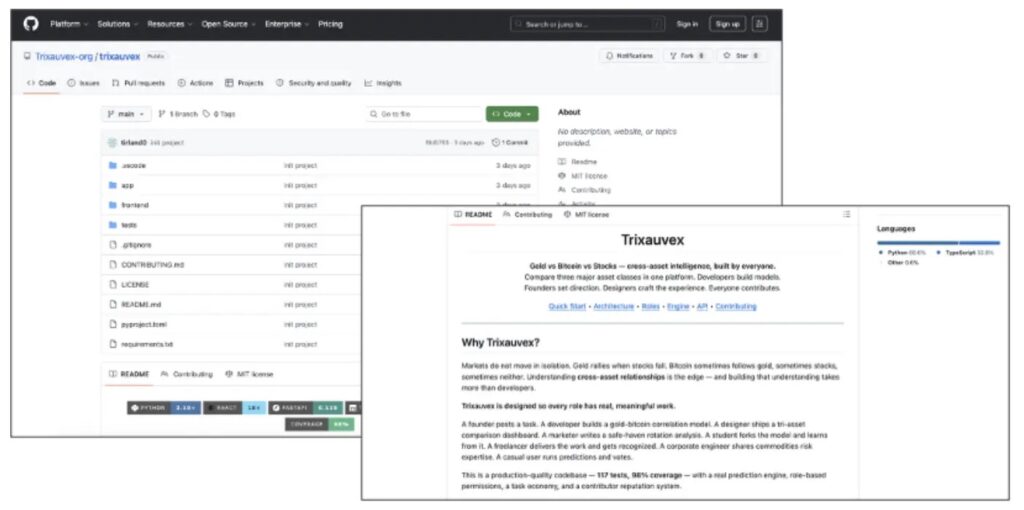
The phishing emails pose as recruitment messages, technical assignments, or peer review requests. Some messages impersonate real companies, while others use fabricated brands such as Pulsynk or Trixauvex to make the outreach look professional.
The repositories look like real coding projects. Some mimic crypto prediction platforms, trading engines, exploit archives, Foundry testing projects, or AI payment tools. They use realistic project structures, working scripts, and references to real developer frameworks.
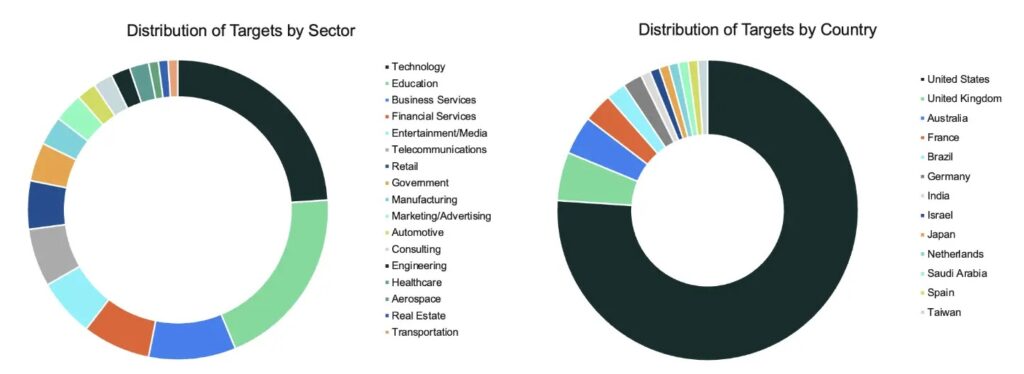
Microsoft has separately warned that the Contagious Interview campaign uses fake developer job interviews to persuade victims to run malicious packages or commands. UNK_DeadDrop follows the same broad theme, but Proofpoint says it uses email at scale instead of relying mainly on social media conversations and staged interviews.
| Campaign detail | What researchers found |
|---|---|
| Threat cluster | UNK_DeadDrop |
| Attribution | Likely North Korea-aligned activity |
| Observed period | April to May 2026 |
| Targets | Developers at close to 100 organizations |
| Main lures | Job offers, coding assignments, and code review requests |
| Delivery | GitHub and GitLab repository links |
The hidden tasks.json file starts the attack
The malicious repositories contain a hidden .vscode folder with a tasks.json file. Inside that file, the attackers define a task with runOptions.runOn set to folderOpen, which means the task can run when the project folder opens in the editor.
The VS Code tasks reference documents folderOpen as a valid task run option. In legitimate projects, developers use it to start build tools, watchers, terminals, or other automation when a workspace opens.
UNK_DeadDrop turns that productivity feature into an initial access path. On Linux and macOS, the task runs a shell script. On Windows, it launches a VBS script, which then starts the Windows payload chain.
- Linux and macOS command path: /bin/bash vendor/run-update.sh
- Windows command path: wscript.exe running a hidden VBS launcher
- Editor feature abused: folderOpen task automation
- Persistence method on macOS and Linux: malicious VSIX extension
VS Code and Cursor behave differently
Proofpoint said VS Code requires user interaction before the malicious task runs. If automatic tasks were not previously allowed, VS Code can show an additional prompt before execution.
Microsoft’s Workspace Trust guidance says Restricted Mode helps prevent automatic code execution from untrusted project folders by limiting features such as tasks, debugging, terminal use, workspace settings, extensions, and AI agents.
Cursor behaved differently in Proofpoint’s testing. Opening a folder with the malicious tasks.json file caused the task to run silently without a trust dialog, which made the attack much harder for a developer to notice.
| Editor | Observed behavior in the campaign |
|---|---|
| Visual Studio Code | Requires user interaction before the task runs |
| Cursor | Runs the folder-open task silently in Proofpoint’s test |
| VSCodium | Targeted by the malicious extension installation flow on Linux and macOS |
Malware targets macOS, Linux, and Windows
The payload differs by platform. On macOS and Linux, the attack installs a malicious VSIX extension disguised as a Google service and launches a Go-based backdoor derived from the open-source Overlord framework.
That backdoor keeps a persistent WebSocket connection to the command-and-control server at 23.137.105[.]75:5173. It can perform remote command execution, system reconnaissance, credential theft, and wallet data collection.
Windows gets a different chain. Instead of dropping a Go binary, the malware runs JavaScript inside the editor’s Electron process by using ELECTRON_RUN_AS_NODE=1. That lets the payload operate through the editor process, which can make the activity less obvious to the victim.
| Platform | Main payload behavior |
|---|---|
| macOS | Installs a malicious VSIX extension, launches an Overlord-based RAT, prompts for the device password, and steals browser and wallet data |
| Linux | Uses a Go backdoor, Zenity credential prompts, and GNOME Keyring access attempts |
| Windows | Runs JavaScript inside the editor process, steals browser credentials, cookies, and crypto wallet data |
Credential and crypto wallet theft are the main goals
After infection, the malware focuses on high-value developer assets. It targets browser credentials, cryptocurrency wallet extensions, standalone wallet apps, cookies, Safe Storage keys, and keychain data.
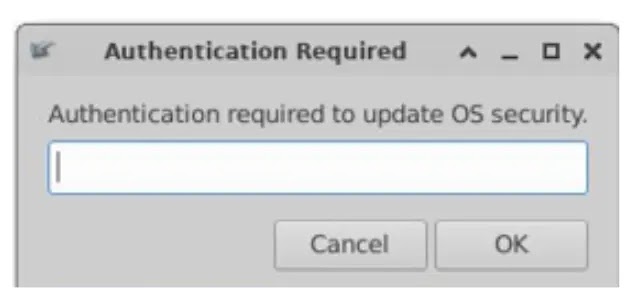
On macOS, the malware uses a fake password prompt and then modifies browser keychain access. On Linux, it uses a fake system dialog through Zenity and attempts to query GNOME Keyring. On Windows, it attempts to extract Chromium credentials protected by DPAPI and App-Bound Encryption.
This focus fits a wider pattern. The GitLab Threat Intelligence report on North Korean tradecraft found that developers seeking work in cryptocurrency, finance, and related sectors have remained frequent targets for malicious code projects and fake employment activity.
- Browser password databases
- Chrome, Edge, Brave, Firefox, Opera, Vivaldi, Arc, Yandex, and Chromium data
- Cryptocurrency wallet browser extensions
- Standalone wallets such as Exodus, Electrum, Ledger Live, Monero, and Solana CLI
- Browser cookies and profile files
- macOS Keychain and Linux GNOME Keyring data
Why this campaign is different from earlier fake interview attacks
UNK_DeadDrop overlaps with earlier North Korea-linked developer targeting, but Proofpoint tracks it separately because of its scale, infrastructure, and delivery style. The campaign sent more than 250 phishing emails over six weeks and used attacker-controlled repositories with self-contained payloads.
Earlier Contagious Interview activity often involved longer social engineering conversations and fake technical interviews. The Microsoft analysis described staged recruitment processes that included technical discussions, assignments, and follow-ups before malware execution.
UNK_DeadDrop reduces that process. It sends professional-looking emails that push targets directly to repository links. That makes the operation easier to scale and gives attackers more chances to reach developers across many organizations.
| Feature | UNK_DeadDrop | Contagious Interview pattern |
|---|---|---|
| Initial contact | Phishing emails | Social media and recruiter conversations |
| Lure | Job offers and code review requests | Fake interviews and technical assessments |
| Delivery | GitHub and GitLab repositories | GitHub, GitLab, Bitbucket, packages, or remote payloads |
| Payload style | Self-contained repository payloads and VSIX persistence | Malicious packages, remote payloads, or editor workflow abuse |
What developers and security teams should check
Developers should inspect unfamiliar repositories before opening them in any IDE. A hidden .vscode folder, a tasks.json file with runOn set to folderOpen, encoded scripts, strange vendor folders, or unexpected VSIX installation commands should trigger immediate caution.
Organizations should review editor policies and teach developers to keep unfamiliar repositories in Restricted Mode. The VS Code Workspace Trust model exists for this reason, but it only helps when users avoid granting trust too quickly.
Security teams should also monitor for outbound connections to suspicious WebSocket endpoints, unexpected VSIX installations, editor processes launching shell scripts, and unusual credential access from developer workstations.
- Search developer endpoints for hidden .vscode/tasks.json files from unfamiliar repositories.
- Flag tasks that use runOn: folderOpen in external codebases.
- Block or review unknown VSIX extensions installed outside approved marketplaces.
- Monitor Code.exe, Cursor, and related editor processes launching scripts or interpreters.
- Inspect traffic to 23.137.105[.]75:5173 and related attacker infrastructure.
- Review phishing emails impersonating recruiters, crypto firms, AI startups, or open-source maintainers.
- Use the VS Code tasks schema to identify risky automatic task settings during code review.
Key indicators from the campaign
Proofpoint published a long list of indicators, including attacker-controlled domains, GitHub and GitLab repository URLs, hashes, emails, and the command-and-control IP address. Teams should use these indicators as investigation leads, not as the only detection method.
The Proofpoint report also notes that the operators created multiple repository builds with small changes, which suggests active development and an effort to keep the campaign useful as defenders respond.
The broader GitLab analysis shows why platform and repository abuse remains difficult to stop completely. North Korea-aligned actors often use legitimate developer services, realistic code structures, and disposable accounts to blend into normal software workflows.
| Indicator type | Example | Use |
|---|---|---|
| Command-and-control IP | 23.137.105[.]75:5173 | Check firewall, proxy, EDR, and DNS logs |
| Sender IP | 170.205.29[.]83 and 170.205.30[.]227 | Review inbound mail logs from April 2026 |
| Sender domains | pulsynk[.]org, trixauvex[.]org, ondofinance[.]tech | Hunt for recruitment-themed phishing emails |
| Repository themes | pulsynk, trixauvex, rekt-db, forge-4626-invariants, x402-kit | Review developer systems for cloned copies |
| Suspicious files | tasks.json, google-update-support.vsix, run-update.sh, run-update.cmd | Search workstations and code review systems |
UNK_DeadDrop shows how attackers can turn trusted developer workflows into malware delivery paths. The safest response is to treat unsolicited repositories like executable files, review automation before opening projects, and make editor trust decisions part of software supply chain security.
FAQ
UNK_DeadDrop is a threat activity cluster tracked by Proofpoint. It is linked to likely North Korea-aligned hackers who used phishing emails and malicious GitHub or GitLab repositories to target software developers.
The repositories contain a hidden .vscode/tasks.json file that defines a folder-open task. When the project opens in a supported editor, the task can run platform-specific scripts that install malware or launch payloads.
Proofpoint says VS Code requires user interaction before any task runs. If automatic tasks were never accepted before, VS Code may show an additional prompt. Cursor executed the folder-open task silently in Proofpoint’s testing.
The malware targets cryptocurrency wallets, browser credentials, cookies, Safe Storage keys, macOS Keychain data, Linux GNOME Keyring data, and other sensitive developer assets.
Developers should inspect unfamiliar repositories before opening them in an IDE, keep untrusted folders in Restricted Mode, review .vscode/tasks.json files, avoid running unexpected scripts, and treat unsolicited job or code review repositories as high risk.


Read our disclosure page to find out how can you help VPNCentral sustain the editorial team Read more


Improve this guide




User forum
0 messages