
Shai-Hulud Payload Targets Developers to Steal GitHub, npm, Cloud and SSH Credentials


 9 min. read
  Published on
A new Shai-Hulud payload wave is targeting developers through malicious npm packages tied to the Leo/RStreams ecosystem. The attack can steal GitHub, npm, cloud, CI/CD, Docker, SSH and package registry credentials during package installation.
The latest campaign was detailed by JFrog Security Research, which said the new wave affects 20 packages used in AWS-native event streaming and serverless data pipelines. The packages belong to a legitimate software family, which makes the attack more dangerous for developers who trust existing dependencies.

Access content across the globe at the highest speed rate.
🔥 Save 81% + 2 bonus months! 🔥
70% of our readers choose Private Internet Access
70% of our readers choose ExpressVPN
2
Browse the web from multiple devices with industry-standard security protocols.
🔥 Save 73%! 🔥

Faster dedicated servers for specific actions (currently at summer discounts)
🔥 Save 69%! 🔥
The payload is part of the Shai-Hulud and Hades malware lineage. It does not introduce a completely new architecture, but it reuses a proven credential theft and propagation system against a fresh set of package targets.
Why the Leo/RStreams compromise is serious
Leo, now commonly known as RStreams, is used for AWS-native event streaming and messaging. Its packages help developers work with services such as Kinesis, Firehose, S3, Lambda and DynamoDB.
That position makes the affected packages attractive to attackers. Developers who install these packages may work inside environments that already contain AWS credentials, GitHub tokens, npm publishing tokens and deployment secrets.
JFrog said the affected package set had about 127,000 npm downloads in the previous month at the time of analysis. That does not mean every download led to compromise, but it shows why the campaign creates a large exposure window for cloud and CI/CD environments.
| Attack area | What is at risk |
|---|---|
| Developer machines | Local tokens, SSH keys, shell history, .env files and credentials stored on disk |
| GitHub accounts | Personal access tokens, GitHub CLI tokens, repositories and workflow changes |
| Cloud environments | AWS, Azure, GCP, Kubernetes and Vault secrets if available to the current identity |
| Package registries | npm, PyPI, RubyGems, Docker and Artifactory credentials |
| CI/CD systems | Pipeline secrets, runner environments and malicious workflow injection |
How the payload runs during npm install
The campaign uses a quieter install-time execution method. Instead of relying only on obvious preinstall or postinstall scripts in package.json, the attacker hides execution in a binding.gyp file.
The npm scripts documentation explains that if a package has a binding.gyp file at its root and does not define its own install or preinstall scripts, npm defaults the install command to node-gyp rebuild. Attackers can abuse that behavior to run payload code during installation.
In this wave, the malicious binding.gyp file can trigger node index.js while appearing less suspicious to tools that mainly scan package.json lifecycle scripts. That makes dependency auditing more difficult if teams only check common install hooks.
What Shai-Hulud steals from developers
The payload searches broadly across the machine and the runtime environment. It can collect credentials from files, environment variables, shell history, GitHub CLI authentication data, package manager tokens and cloud configuration.
According to JFrog’s analysis, the campaign keeps several behaviors from earlier Shai-Hulud waves, including broad credential collection, GitHub dead-drop exfiltration, package-registry abuse, GitHub Actions manipulation and AI-tool persistence hooks.
Stolen data can be placed into encrypted result files and committed to GitHub repositories created under a stolen GitHub token. This GitHub dead-drop approach lets attackers use a trusted developer platform as the storage point for stolen secrets.
- GitHub personal access tokens and GitHub CLI tokens
- npm, PyPI, RubyGems and Artifactory tokens
- AWS, Azure, GCP, Kubernetes and Vault credentials
- Docker credentials and package registry secrets
- SSH private keys and shell history
- GitHub Actions secrets and runner environment data
The campaign builds on earlier Shai-Hulud activity
This is not the first time Shai-Hulud-style malware has targeted the npm ecosystem. In May, Microsoft reported a Mini Shai-Hulud attack involving compromised AntV npm packages and CI/CD credential theft.
That earlier campaign showed how a compromised maintainer account can push malicious package versions into trusted dependency chains. Microsoft said the AntV payload focused on stealing credentials from GitHub Actions environments and cloud workloads.
The latest Leo/RStreams wave shows the same general threat model moving into another trusted package ecosystem. Attackers do not need to trick developers with fake package names when they can compromise legitimate packages that already appear in real projects.
Persistence and lateral movement raise the risk
The payload does not only steal data once and stop. It includes persistence mechanisms that can help it keep running after the first install.
JFrog reported persistence through gh-token-monitor components, updater services, AI-tool hooks and suspicious GitHub Actions workflow files. The payload can also use SSH keys to attempt lateral movement into systems the developer can already access.
That means the response cannot stop at uninstalling the affected dependency. Teams should treat any exposed developer workstation or CI runner as potentially compromised until persistence is removed and credentials are rotated.
| Persistence or movement method | Defensive check |
|---|---|
| gh-token-monitor | Search user config and local bin paths for monitor scripts and token files |
| systemd service | Review user-level services for unexpected update or token monitor entries |
| macOS LaunchAgent | Inspect LaunchAgents for unfamiliar plist files |
| GitHub Actions workflow injection | Audit workflows for secret-dumping logic and unknown automation files |
| AI-tool hooks | Review Cursor, Gemini, Copilot, Aider and MCP configuration files |
Developers should audit GitHub tokens and repositories
GitHub tokens are a major target because they can give attackers access to source code, package publishing workflows and organization resources. A stolen token can also create repositories used to store stolen data.
The GitHub personal access token guidance says fine-grained personal access tokens offer more control than classic tokens because they can be limited to specific repositories and permissions. GitHub also recommends adding expiration dates to personal access tokens.
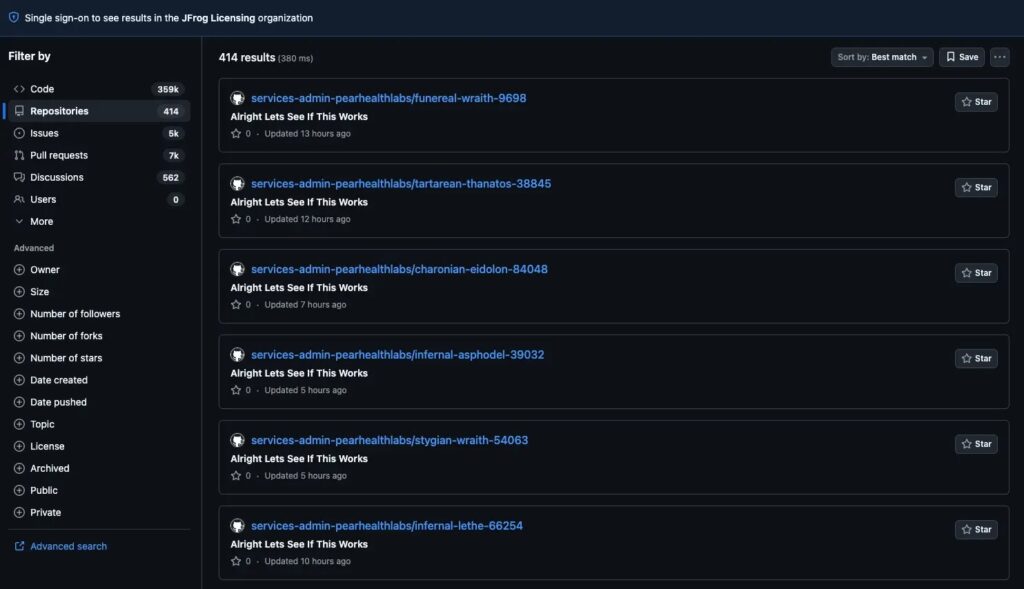
Organizations should review active tokens, revoke anything suspicious, and check for unexpected public repositories. They should also inspect repository descriptions and commits for campaign markers such as Alright Lets See If This Works and RevokeAndItGoesKaboom.
npm publishing controls can reduce future damage
Attackers can cause more damage when stolen npm tokens allow them to publish poisoned package versions. That makes publishing controls just as important as workstation cleanup.
The npm trusted publishing documentation recommends token-free publishing through trusted publishers where possible. It also advises using read-only granular access tokens for installing dependencies to reduce damage if a token is compromised.
Package maintainers should review who can publish, remove unused tokens, enable stronger publishing controls and watch for unexpected patch versions. Teams should also regenerate lockfiles from trusted metadata after removing compromised versions.
Affected npm packages in the Leo/RStreams wave
The following package versions were listed by JFrog as affected in the Leo/RStreams package set. Teams should check package-lock files, CI logs, caches, developer workstations and container images for these versions.
| Package | Affected version | JFrog Xray ID |
|---|---|---|
| leo-auth | 4.0.6 | XRAY-1009715 |
| leo-aws | 2.0.4 | XRAY-1009716 |
| leo-cache | 1.0.2 | XRAY-1009726 |
| leo-cdk-lib | 0.0.2 | XRAY-1009721 |
| leo-cli | 3.0.3 | XRAY-1009724 |
| leo-config | 1.1.1 | XRAY-1009720 |
| leo-connector-elasticsearch | 2.0.6 | XRAY-1009713 |
| leo-connector-mongo | 3.0.8 | XRAY-1009714 |
| leo-connector-mysql | 3.0.3 | XRAY-1009729 |
| leo-connector-oracle | 2.0.1 | XRAY-1009718 |
| leo-connector-redshift | 3.0.6 | XRAY-1009725 |
| leo-cron | 2.0.2 | XRAY-1009723 |
| leo-logger | 1.0.8 | XRAY-1009727 |
| leo-sdk | 6.0.19 | XRAY-1009717 |
| leo-streams | 2.0.1 | XRAY-1009728 |
| rstreams-metrics | 2.0.2 | XRAY-1009731 |
| rstreams-shard-util | 1.0.1 | XRAY-1009732 |
| serverless-convention | 2.0.4 | XRAY-1009719 |
| serverless-leo | 3.0.14 | XRAY-1009730 |
| solo-nav | 1.0.1 | XRAY-1009722 |
Key indicators for defenders
Defenders should combine package indicators with behavior-based detections. Package names and campaign markers can change quickly, but install-time execution, unexpected GitHub repositories, token monitor persistence and secret-dumping workflows are stronger signals.
| Indicator type | Indicator | Meaning |
|---|---|---|
| Campaign marker | Alright Lets See If This Works | Repository description marker used in the current wave |
| Token marker | RevokeAndItGoesKaboom | Token relay marker string |
| Network indicator | hxxps[:]//api[.]github[.]com | GitHub API used for dead-drop exfiltration |
| Network indicator | hxxps[:]//api[.]anthropic[.]com/v1/api | Legitimate-looking host and path used as camouflage, not evidence of Anthropic compromise |
| File path | /tmp/p*.js | Temporary payload script |
| File path | ~/.config/gh-token-monitor/ | Persistence configuration directory |
| File path | ~/.config/systemd/user/gh-token-monitor.service | Linux user-level service persistence |
| File path | ~/Library/LaunchAgents/com.user.gh-token-monitor.plist | macOS LaunchAgent persistence |
| AI config | .github/copilot-instructions.md | Possible Copilot instruction persistence hook |
| AI config | .gemini/settings.json | Possible Gemini tool configuration hook |
How teams should respond
Organizations should first identify all systems that installed the affected packages. That includes developer laptops, CI runners, dependency caches, build containers and production images that may have pulled the malicious versions.
JFrog recommends isolating affected machines and CI runners before revoking GitHub tokens. That order matters because active persistence can capture newly rotated credentials if cleanup happens too late.
After isolation, teams should remove persistence artifacts, suspicious AI-tool hooks, malicious workflows and affected packages. Only then should they rotate GitHub, npm, cloud, SSH, Docker, Vault and package-registry credentials.
- Search package-lock files and CI logs for affected versions.
- Remove malicious versions and reinstall verified clean versions.
- Regenerate lockfiles from trusted package metadata.
- Inspect GitHub accounts for unexpected repositories and result files.
- Audit GitHub Actions workflows for suspicious secret collection logic.
- Review npm accounts for unexpected releases or patch-version bumps.
- Rotate credentials only after persistence removal is verified.
Long-term protection steps
Development teams should treat npm installation as code execution, not just dependency download. The npm lifecycle behavior around install scripts and binding.gyp shows why build-time files need the same scrutiny as package.json scripts.
GitHub administrators should review personal access token policies and prefer fine-grained tokens when tokens are still needed. The GitHub token documentation also warns that classic tokens can grant broad access across repositories and organizations.
For package publishing, teams should move away from long-lived automation tokens where possible. The npm trusted publishers model can reduce manual token management, while read-only granular tokens can limit damage during dependency installation.
Bottom line
The latest Shai-Hulud wave shows that npm supply-chain attacks remain a direct risk to cloud infrastructure and CI/CD pipelines. The payload targets the exact secrets developers and build systems use to ship software.
The campaign also shows why old indicators are not enough. Microsoft’s earlier Mini Shai-Hulud report described a related threat against AntV packages, while the current wave uses new package targets and updated campaign strings.
Teams that installed affected Leo/RStreams versions should act quickly. The right response starts with isolation, continues with persistence removal and ends with full credential rotation and repository audits.
FAQ
It is a malicious npm payload from the Shai-Hulud and Hades malware lineage that was found in affected Leo/RStreams package versions. It can steal developer, cloud, CI/CD, GitHub, npm, SSH and package registry credentials during installation.
The campaign can abuse binding.gyp so npm invokes node-gyp rebuild during installation. This gives the attacker a way to run code without relying only on obvious preinstall or postinstall scripts in package.json.
The payload can collect GitHub tokens, npm tokens, PyPI and RubyGems credentials, AWS, Azure and GCP secrets, Kubernetes and Vault credentials, Docker credentials, SSH keys, shell history and CI/CD secrets.
Teams should isolate affected machines and CI runners, remove persistence artifacts and suspicious workflow changes, uninstall affected package versions, regenerate lockfiles from trusted metadata and then rotate GitHub, npm, cloud, SSH, Docker and registry credentials.
If persistence remains active, the malware may capture newly rotated credentials. Teams should first isolate affected systems and remove persistence, then rotate credentials after cleanup is verified.


Read our disclosure page to find out how can you help VPNCentral sustain the editorial team Read more


Improve this guide




User forum
0 messages