
TCLBANKER banking trojan abuses signed Logitech installer to target Brazil


 7 min. read
  Published on
A new Brazilian banking trojan called TCLBANKER is spreading through a trojanized Logitech installer and using WhatsApp and Outlook worm modules to reach more victims. Elastic Security Labs tracks the campaign as REF3076 and says the malware targets banking, fintech, and cryptocurrency users in Brazil.
The attack uses a malicious MSI installer bundled inside a ZIP file. The installer abuses Logitech’s legitimate Logi AI Prompt Builder application through DLL sideloading, allowing a malicious file to load when the trusted program starts.

Access content across the globe at the highest speed rate.
70% of our readers choose Private Internet Access
70% of our readers choose ExpressVPN

Browse the web from multiple devices with industry-standard security protocols.

Faster dedicated servers for specific actions (currently at summer discounts)
TCLBANKER is not just a basic credential stealer. It can monitor browser activity, wait for victims to open targeted financial websites, launch live command-and-control sessions, show fake full-screen banking overlays, and spread itself through the victim’s own trusted accounts.
Why this campaign stands out
Elastic says TCLBANKER appears to be a major update of the MAVERICK and SORVEPOTEL malware families. Those families have been tied to Brazilian banking trojan activity, and TCLBANKER brings more advanced evasion, social engineering, and self-propagation features.
The malware targets 59 Brazilian banking, fintech, and cryptocurrency domains. When a victim opens one of those sites in a browser, TCLBANKER starts a WebSocket session with its command server and prepares the attacker-controlled fraud flow.
The campaign also appears to be in an early operational stage. Elastic found developer artifacts, test process names, debug logging paths, and phishing domains that looked unfinished or still under preparation.
At a glance
| Category | Details |
|---|---|
| Malware name | TCLBANKER |
| Campaign tracking | REF3076 |
| Main region targeted | Brazil |
| Delivery method | ZIP file containing a malicious MSI installer |
| Abused software | Logi AI Prompt Builder |
| Main technique | DLL sideloading through a malicious Flutter plugin DLL |
| Targeted sites | 59 banking, fintech, and cryptocurrency domains |
| Spreading methods | WhatsApp Web session hijacking and Outlook COM automation |
| Infrastructure | Cloudflare Workers for command-and-control and file delivery |
How the Logitech installer is abused
The malicious installer impersonates Logitech’s Logi AI Prompt Builder, a real Logitech tool that helps users create, refine, and submit prompts through the Logi Options+ workflow.
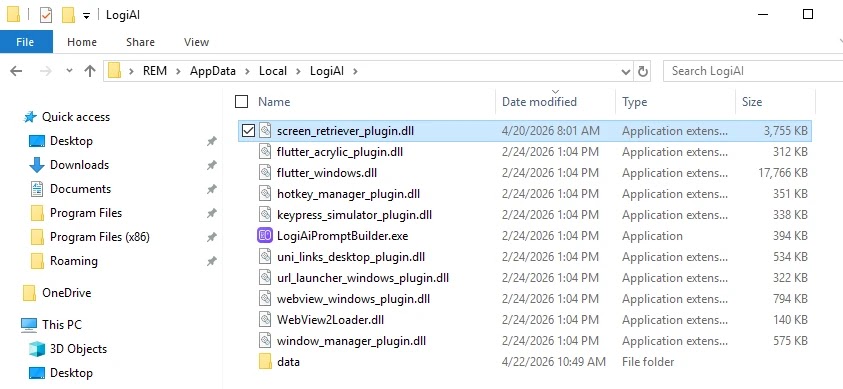
In the REF3076 campaign, attackers abuse LogiAiPromptBuilder.exe, a legitimate Logitech application built on Flutter. They place a malicious DLL named screen_retriever_plugin.dll next to it, where it pretends to be a normal Flutter plugin.
When the trusted application starts, it loads the malicious DLL automatically. This gives the attacker a cleaner execution path because the activity appears tied to recognizable software rather than an unknown executable.
The loader avoids sandboxes and analysts
TCLBANKER uses several checks before it decrypts and runs its real payload. It checks for virtual machines, debuggers, analysis tools, system resources, timing manipulation, and language settings.
The malware verifies whether the system looks like a Brazilian target. It checks the region, timezone, keyboard layout, and default language before continuing.
If the environment looks wrong, the payload may fail to decrypt or stop running. This helps the malware stay quiet inside sandboxes and on systems that do not match the attacker’s target profile.
What happens after infection
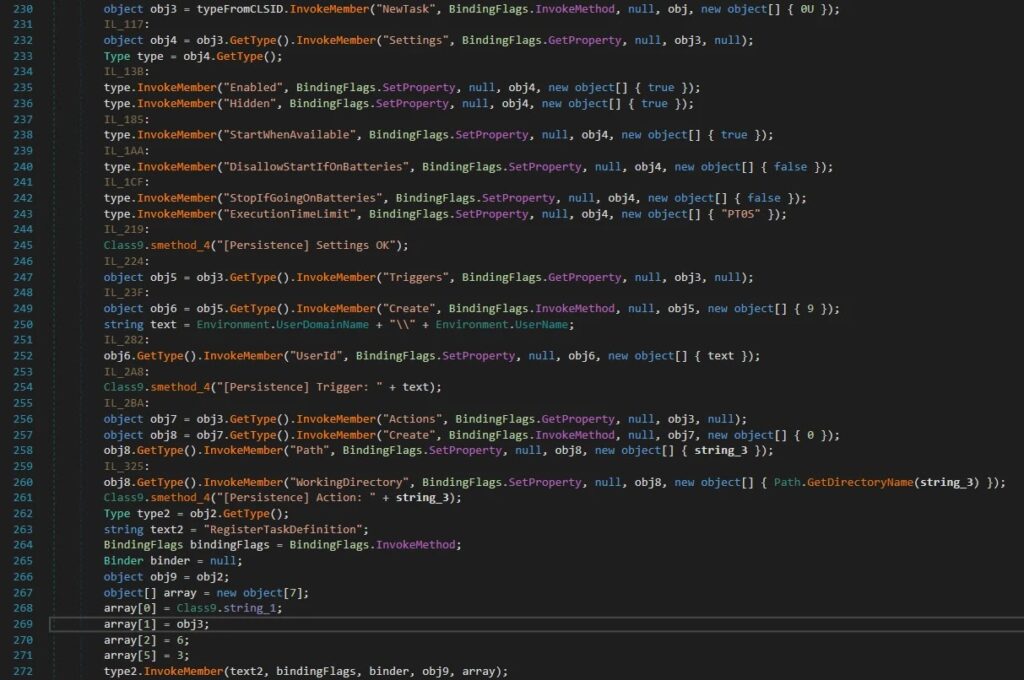
After installation, TCLBANKER copies its files into the user’s local application data folder under a LogiAI path. It then creates a hidden scheduled task named RuntimeOptimizeService to restart the malware when the user logs in.
The banking module checks the active browser window every second. It reads the browser address bar through Windows UI Automation and compares the URL against its encrypted list of target domains.
When a match is found, the malware connects to its command server and sends details such as the victim identifier, machine name, username, operating system version, timestamp, and the matched target ID.
Fake overlays support live banking fraud
TCLBANKER includes a WPF-based overlay system designed for operator-driven fraud. The malware can cover the victim’s screen with full-screen windows that imitate bank pages, verification prompts, waiting screens, or Windows Update screens.
The overlays can block normal interaction and keep the victim waiting while the operator works in the background. Elastic also found commands that can show credential prompts, refresh overlays, and hide overlay windows from screen capture.
The malware can also kill Task Manager every 500 milliseconds during an active session. That makes it harder for the victim to inspect or close the malicious process while the fraud attempt is underway.
How TCLBANKER spreads through WhatsApp and Outlook
The worm module gives TCLBANKER a dangerous distribution model. Instead of sending phishing messages from unknown attacker accounts, it uses the victim’s own WhatsApp Web session or Outlook account.
The WhatsApp module searches Chromium-based browser profiles for active WhatsApp Web sessions. If it finds one, it clones the needed browser data into a temporary profile, launches a headless browser, and sends messages to Brazilian contacts.
The Outlook module uses COM automation to send phishing emails from the victim’s own account. Elastic found configuration data allowing up to 3,000 WhatsApp messages per session and up to 100 emails per session.
Why this makes phishing harder to catch
- The messages come from real accounts that victims already trust.
- Contacts are more likely to open files sent by someone they know.
- Email gateways may treat messages from legitimate accounts as lower risk.
- WhatsApp delivery bypasses many workplace email controls.
- The malware can reuse the same Cloudflare-based infrastructure for distribution and control.
What users should watch for
Users in Brazil should treat unexpected ZIP files, MSI installers, invoices, quotes, and shared documents with caution, even when they come from known contacts. TCLBANKER’s spreading method makes known senders part of the attack path.
Users should also be careful with installers that claim to be Logitech tools but arrive through WhatsApp, email, or third-party links. Logitech’s legitimate AI Prompt Builder is distributed through official Logitech channels and the Logi Options+ ecosystem.
If a banking page suddenly shows a full-screen verification prompt, a fake update screen, or a long waiting screen, users should stop the session, disconnect the device from the network, and contact the bank through a trusted channel.
Security teams should monitor these signs
- ZIP archives that contain MSI installers pretending to be business documents or Logitech software.
- Unexpected execution of LogiAiPromptBuilder.exe from user-writable directories.
- Suspicious screen_retriever_plugin.dll files near Logitech application files.
- Scheduled tasks named RuntimeOptimizeService.
- New files copied into %LocalAppData%\LogiAI.
- Outbound WebSocket traffic to mxtestacionamentos[.]com.
- Traffic to campanha1-api.ef971a42[.]workers.dev or documents.ef971a42[.]workers.dev.
- Browser automation or cloned Chromium profiles linked to WhatsApp Web.
- Outlook COM automation sending unexpected messages.
- Task Manager repeatedly closing during banking sessions.
How to reduce the risk
Organizations should block known indicators, inspect incoming ZIP and MSI files, and monitor for DLL sideloading patterns involving trusted applications. Application control can also stop unsigned or unapproved DLLs from loading in sensitive environments.
Companies should restrict execution from user-writable folders where possible. They should also audit scheduled tasks, monitor Outlook automation, and review unusual WhatsApp Web activity on managed endpoints.
For banking customers, the safest habit is to download software only from official vendor websites or trusted app stores. Any installer received through a message, quote request, invoice email, or shared document link should be treated as suspicious.
Summary
- TCLBANKER is a Brazilian banking trojan tracked by Elastic as REF3076.
- The campaign abuses Logitech’s legitimate Logi AI Prompt Builder through DLL sideloading.
- The malware targets 59 Brazilian banking, fintech, and cryptocurrency domains.
- It uses full-screen overlays, fake prompts, and Task Manager killing to support live fraud.
- It spreads through hijacked WhatsApp Web sessions and Outlook accounts.
- Cloudflare Workers infrastructure supports command-and-control and file delivery.
- Users should avoid unexpected ZIP or MSI files, even from known contacts.
FAQ
TCLBANKER is a Brazilian banking trojan that targets financial websites, launches attacker-controlled fraud sessions, and spreads through WhatsApp and Outlook.
The campaign abuses a legitimate Logitech application named Logi AI Prompt Builder. Attackers use DLL sideloading so a malicious DLL loads when the trusted program starts.
The public research describes abuse of a legitimate Logitech application in a trojanized installer. It does not show that Logitech’s own systems were breached.
The malware mainly targets users in Brazil. It checks for Brazilian language and region indicators and monitors 59 Brazilian banking, fintech, and cryptocurrency domains.


Read our disclosure page to find out how can you help VPNCentral sustain the editorial team Read more


Improve this guide


User forum
0 messages