
Void Dokkaebi uses fake job interviews to spread malware through code repositories


 6 min. read
  Published on
North Korea-linked hackers are using fake job interviews to infect software developers, then turning those developers’ own repositories into malware delivery channels. Trend Micro says the group, tracked as Void Dokkaebi and also known as Famous Chollima, poses as recruiters from crypto and AI companies and sends targets to GitHub, GitLab, or Bitbucket repositories disguised as coding tests.
The campaign does not stop with the first victim. Trend Micro says the attackers weaponize the developer’s machine and repositories so the malware can spread again when new people clone the code, making the operation behave more like a worm than a typical one-off social engineering attack.

Access content across the globe at the highest speed rate.
70% of our readers choose Private Internet Access
70% of our readers choose ExpressVPN

Browse the web from multiple devices with industry-standard security protocols.

Faster dedicated servers for specific actions (currently at summer discounts)
By late March 2026, Trend Micro said it had identified more than 750 infected repositories, over 500 malicious VS Code task configurations, and 101 instances of a commit-tampering tool. The company also said repositories tied to organizations such as DataStax and Neutralinojs carried infection markers, which shows the campaign had already reached into wider open-source and organizational development workflows.
How the fake interview malware chain works
Trend Micro says the first infection path abuses Visual Studio Code workspace tasks. The malicious repository contains a .vscode/tasks.json file configured with runOn: folderOpen, so when a developer opens the project in VS Code and accepts Workspace Trust, the task can run automatically.
Microsoft’s own documentation explains why this works. VS Code says Workspace Trust is the feature that decides whether code in a project folder can execute, and it advises users to leave unfamiliar code in Restricted Mode when they are not sure it is safe.
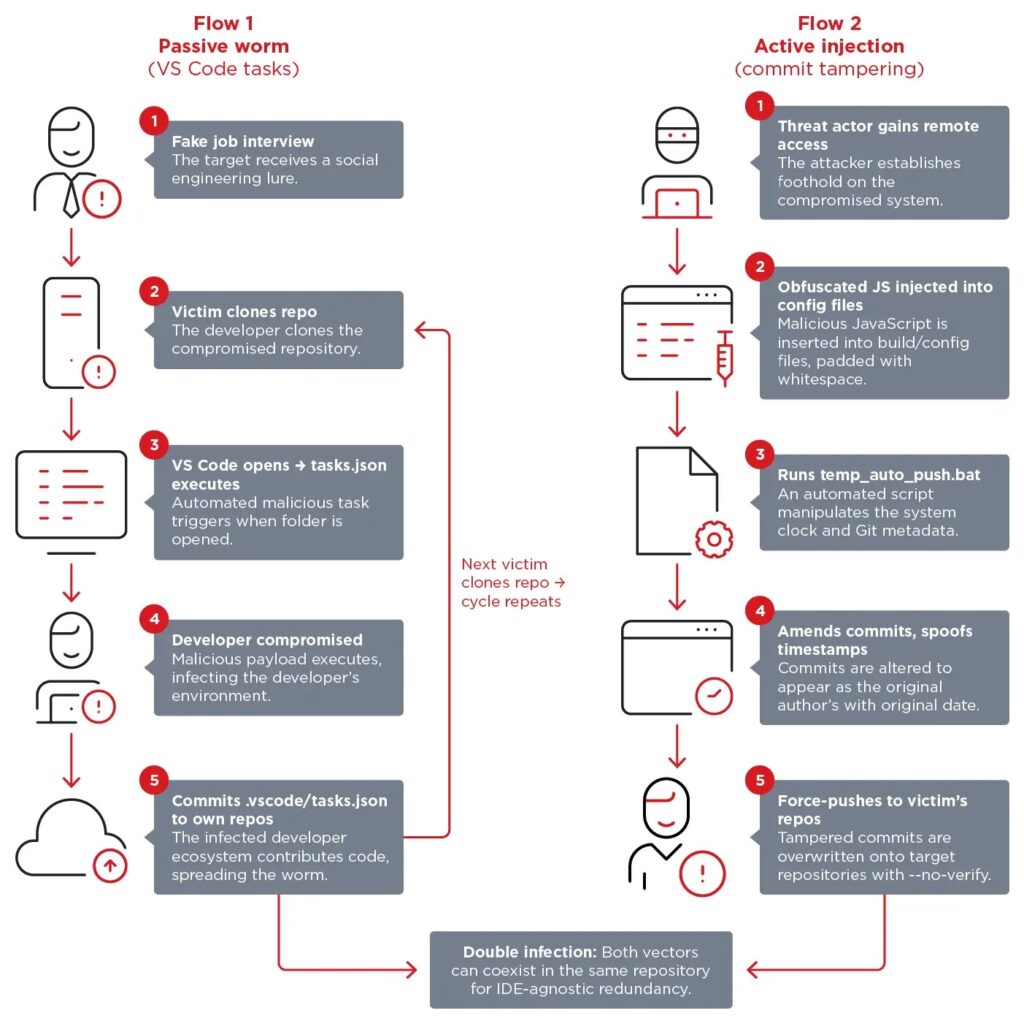
Trend Micro says some malicious tasks fetch the backdoor from a remote URL, while others launch a fake font or image file bundled inside the repository. Either way, once the developer trusts the workspace, the malware gets its foothold without needing a second prompt.
How the campaign becomes self-propagating
Trend Micro says the .vscode folder often slips into repositories because it is hidden in file explorers and is not always included in .gitignore. Once a compromised developer commits that folder, the infection vector can travel with the code into personal projects, company repositories, forks, and downstream copies.
The second infection path is more deliberate. Trend Micro says the attackers, after gaining access to the victim’s machine, inject obfuscated JavaScript into files that developers are less likely to inspect closely, then push the malicious code far to the right with whitespace so it stays hidden during quick reviews and diff checks.
To hide the tampering, Trend Micro says the attackers use a batch file named temp_auto_push.bat to rewrite commit history, preserve the original author metadata, restore the original timestamp, bypass checks with --no-verify, and force-push the altered commit. That makes the malicious update look like it came from the original author at the original time.
What malware this campaign delivers
Trend Micro says one payload delivered through this infrastructure is a variant of the DEV#POPPER remote access trojan, a cross-platform Node.js backdoor that uses WebSocket for command-and-control and HTTP for file uploads and exfiltration. The researchers also say the campaign can swap in other malware families by changing blockchain references rather than rewriting the whole toolchain.
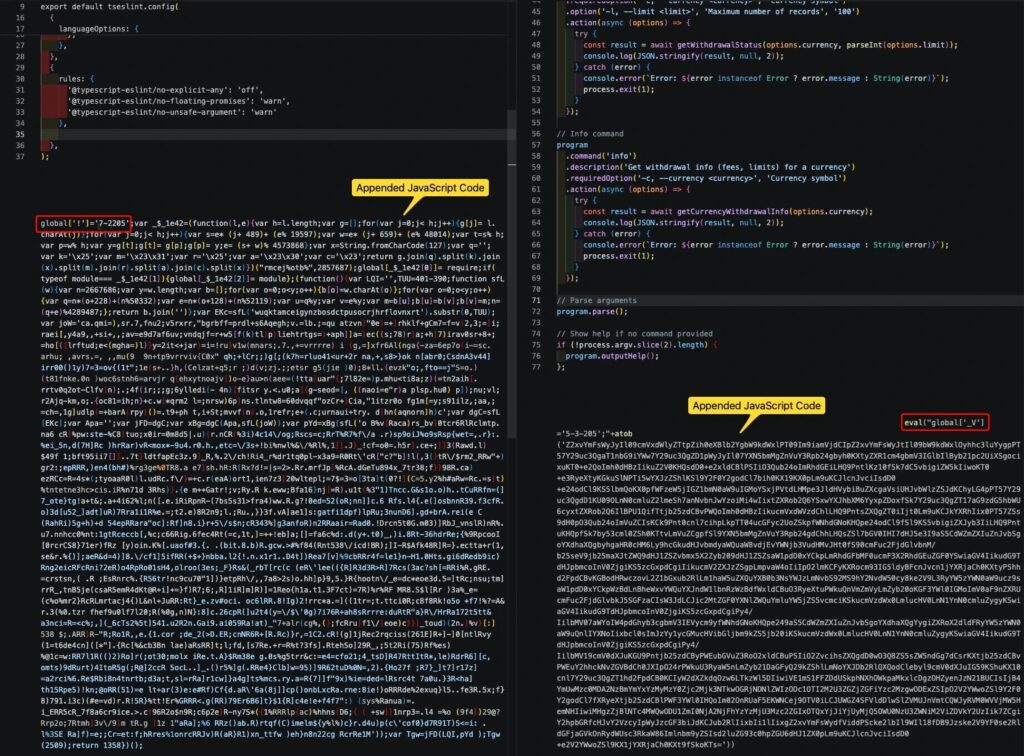
The report says the attackers use blockchain infrastructure such as Tron, Aptos, and Binance Smart Chain for staging. That matters because immutable blockchain-hosted references make takedowns harder and let the operators rotate delivery points without touching the infected repository itself.
Trend Micro also says the RAT avoids CI/CD and sandbox environments, which means pipeline scanning alone will miss part of the threat. In practice, that shifts the burden toward developer workstations, endpoint telemetry, and repository hygiene rather than relying only on build-system controls.
Why developers and organizations should take this seriously
This campaign abuses normal developer trust. A coding exercise, a cloned repository, a VS Code trust prompt, and a routine commit all look harmless on their own. Trend Micro’s point is that the real danger appears when those steps are connected into one chain.
GitHub’s official documentation supports several of the defensive controls Trend Micro recommends. GitHub says branch protection rules can require pull requests, approving reviews, and passing status checks, and it also supports required signed commits on protected branches so unsigned or unverified commits cannot be pushed there.
That does not solve the social engineering problem by itself, but it can make silent tampering much harder. If a threat actor has to deal with protected branches, review requirements, and verified signatures, the temp_auto_push.bat trick becomes less effective as a stealthy propagation tool.
At a glance
| Item | What Trend Micro found |
|---|---|
| Threat actor | Void Dokkaebi, also tracked as Famous Chollima |
| Main lure | Fake job interviews and coding tests |
| Primary platforms | GitHub, GitLab, Bitbucket |
| Passive spread method | Malicious .vscode/tasks.json with runOn: folderOpen |
| Active spread method | Obfuscated JavaScript injection plus commit tampering |
| Noted scale in March 2026 | 750+ infected repositories, 500+ malicious VS Code tasks, 101 commit-tampering instances |
| Example malware | DEV#POPPER RAT |
| Staging infrastructure | Tron, Aptos, and Binance Smart Chain references |
The figures in this table come from Trend Micro’s April 21, 2026 research.
What developers and security teams should do now
- Run interview code only in isolated and disposable environments. Trend Micro says this is the most effective way to stop the initial compromise.
- Add
.vscode/to.gitignoreacross organizational repositories to break the passive spread path. - Treat VS Code Workspace Trust prompts as a security decision, not a routine click-through. Microsoft says unfamiliar code should stay in Restricted Mode until reviewed.
- Inspect
tasks.jsonforrunOn: folderOpenbehavior before trusting a downloaded project. VS Code documents that workspace tasks live in the.vscodefolder and can define project-specific execution behavior. - Require branch protection, pull requests, and signed commits on important branches. GitHub says these controls can block direct, unsigned, or unreviewed changes.
- Monitor developer endpoints for outbound connections to blockchain API infrastructure, WebSocket traffic to unusual endpoints, and files such as
temp_auto_push.bat. Trend Micro says those signals map closely to this campaign’s propagation model.
FAQ
Trend Micro describes Void Dokkaebi as a North Korea-aligned intrusion set also tracked as Famous Chollima. The group targets developers, especially those with access to crypto wallets, signing keys, CI/CD pipelines, and production infrastructure.
The victim is contacted by someone posing as a recruiter and asked to clone and run a repository as part of a technical assessment. Trend Micro says the repository looks legitimate but contains malicious VS Code task files or payload loaders.
Because it can keep spreading after the first compromise. Trend Micro says each infected developer repository can become a new infection source for other developers, which creates a worm-like propagation chain through trusted coding workflows.
Use disposable environments for interview code and never run unknown test repositories on a personal or production machine. Trend Micro says that is the single most effective control against the initial compromise.


Read our disclosure page to find out how can you help VPNCentral sustain the editorial team Read more


Improve this guide


User forum
0 messages