
How to Fix Credit Karma Not Working With VPN (Easy Fix)


 5 min. read
  Published on

Credit Karma not working with VPN is a frustrating issue for many users who want to keep their financial information private. The platform has strong fraud prevention systems, and connecting through masked or foreign IPs can trigger login failures, endless verification loops, or errors like “We couldn’t verify your identity.”
The good news is that you don’t have to choose between privacy and access. With the right setup, you can make your VPN work smoothly with Credit Karma. This guide explains the causes of the problem and provides step by step solutions you can apply immediately.

Access content across the globe at the highest speed rate.
🔥 Save 81% + 2 bonus months! 🔥
70% of our readers choose Private Internet Access
70% of our readers choose Private Internet Access
2
Browse the web from multiple devices with industry-standard security protocols.
🔥 Save 73%! 🔥

Faster dedicated servers for specific actions (currently discounted)
🔥 Save 69%! 🔥
Why Does Credit Karma Reject VPN Connections?
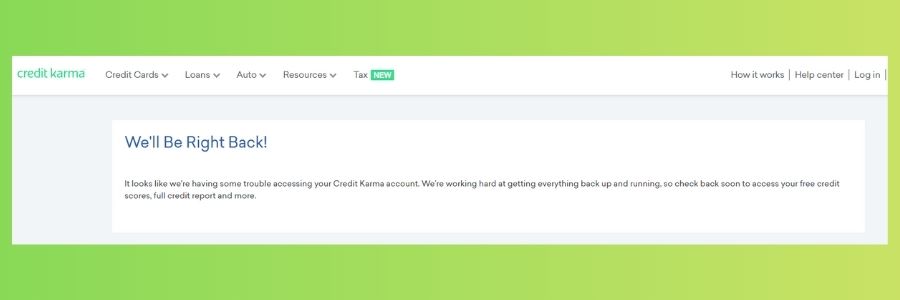
Credit Karma monitors user location and identity to prevent fraud. When your VPN changes your IP address, the platform may flag the login attempt. The most common reasons include:
- Foreign server connections – Logging in from a country different than your registered one looks suspicious.
- IP blacklisting – Some VPN servers are blocked because they are known for shared or anonymous use.
- Cookie and cache mismatches – Old browser data may reveal your real location, conflicting with your VPN.
- IPv6 or DNS leaks – If your VPN doesn’t cover all traffic, your true IP may leak.
- Protocol restrictions – Certain VPN protocols like OpenVPN UDP are sometimes flagged.
Why You Should Use a VPN With Credit Karma
Even if it sometimes causes login issues, using a VPN with Credit Karma has clear benefits:
- Protects sensitive financial data on public Wi Fi.
- Prevents ISP tracking of your credit and banking activity.
- Adds an extra layer of anonymity when checking your score or reports.
- Secures multiple devices if you use Credit Karma on your phone, tablet, and PC.
1) Switch to a Server in Your Home Country
Credit Karma often blocks foreign IPs. If you connect through a server outside your country, access is likely denied. This is similar to issues seen with online banking when using a VPN.
Steps:
- Open your VPN app and go to the server list.
- Select a server in the same country where your Credit Karma account is registered.
- Reconnect and confirm your VPN is active.
- Refresh Credit Karma and try logging in again.
2) Clear Browser Cookies and Cache
Saved cookies may expose your real location and cause login errors. If you’ve recently switched servers, clearing browser data is essential. Guides like how to set up a VPN on any device can also help you double check your configuration.
Steps:
- Open your browser settings (for example, Chrome → Settings → Privacy and security).
- Select Clear browsing data.
- Choose Cookies, Cache, and Site Data, then confirm.
- Reconnect to your VPN and try Credit Karma again.
3) Disable IPv6 to Prevent Leaks
Some VPNs only tunnel IPv4 traffic. If IPv6 leaks, Credit Karma may detect your real IP. This problem is similar to cases when a router blocks VPN connections.
Steps:
- Open Control Panel → Network and Sharing Center.
- Click your active network → Properties.
- Uncheck Internet Protocol Version 6 (TCP/IPv6).
- Press OK and restart your connection.
- Reconnect to your VPN and test Credit Karma.
4) Try a Different VPN Protocol
Credit Karma may restrict some protocols. Switching often fixes the problem. If you use a router setup, review what a VPN router is and how protocols affect connections.
Steps:
- Open your VPN app settings.
- Locate Protocol or Connection Type.
- Switch from UDP to TCP, or test WireGuard/IKEv2.
- Reconnect and check if Credit Karma works.
5) Change VPN Provider
If all else fails, your provider may be blacklisted. Switching to a more reliable VPN often restores access. Whole house setups, like a VPN router configuration, can also help.
Steps:
- Choose a VPN trusted for financial services.
- Sign up and install the app.
- Connect to a server in your home country.
- Enable Kill Switch and DNS leak protection in Settings.
- Retry Credit Karma. If needed, switch servers or change protocols.
Recommended VPNs for Credit Karma:
- NordVPN – large, stable network and strong banking access.
- Surfshark – unlimited devices, affordable, excellent split tunneling.
- ExpressVPN – fast and reliable for bypassing restrictions.
VPN Comparison for Credit Karma Access
| NordVPN | Surfshark | ExpressVPN | |
|---|---|---|---|
| Pros | Large server network Excellent for online banking Advanced privacy features | Unlimited devices Budget friendly Split tunneling included | Very fast speeds Great for bypassing restrictions Easy to set up |
| Cons | Slightly higher price | Fewer advanced tools than NordVPN | More expensive than others |
| Best For | Reliable, secure Credit Karma access | Families and multi device users | Speed and consistent logins |
Bonus: Harden Your Browser to Avoid Identity Loops
- AVG Secure Browser – privacy presets and anti tracking.
- Avast Secure Browser – built in anti fingerprinting controls.
- Opera One – privacy features with integrated tools.
- Opera GX – performance controls that keep sessions stable.
- Prefer a baked in VPN? Try Opera VPN, but use premium VPNs for sensitive logins.
Smart Tips for Fewer VPN Issues
- Keep your VPN updated regularly.
- Use servers geographically closer to you.
- Turn on Kill Switch and DNS leak protection.
- Avoid free VPNs as they are unreliable and often blocked.
Stay Private While Using Credit Karma
If Credit Karma blocks your VPN, simple fixes like changing servers, clearing cookies, or disabling IPv6 usually help. When your provider consistently fails, switching to a premium service such as NordVPN, Surfshark, or ExpressVPN ensures secure, uninterrupted access.
FAQs
Because VPN IPs are often shared, they look suspicious and may indicate fraud.
NordVPN, Surfshark, and ExpressVPN are the most reliable since they rotate servers and maintain high security.
Not effectively. Free VPNs are often blacklisted, slow, and less secure.
No, your VPN has no impact on your credit score. It only affects login access.


Read our disclosure page to find out how can you help VPNCentral sustain the editorial team Read more


Improve this guide




User forum
0 messages