
TrickMo Android Banking Malware Returns With TON-Based Command System and Device Takeover Features


 7 min. read
  Published on
A new TrickMo Android banking malware variant is targeting banking, cryptocurrency wallet, fintech, and authenticator app users with stronger stealth and remote-control features. Security researchers say the latest version, tracked as TrickMo C, uses The Open Network, also known as TON, to hide command-and-control traffic and make takedown efforts harder.
ThreatFabric observed the new activity between January and February 2026, with campaigns focused on users in France, Italy, and Austria. The malware appears in fake app campaigns, including droppers disguised as adult-themed TikTok apps and host apps impersonating Google Play Services.

Access content across the globe at the highest speed rate.
70% of our readers choose Private Internet Access
70% of our readers choose ExpressVPN

Browse the web from multiple devices with industry-standard security protocols.

Faster dedicated servers for specific actions (currently at summer discounts)
Once installed, TrickMo tries to convince victims to grant Android accessibility permissions. If it succeeds, attackers can view the screen, capture credentials, intercept messages, suppress notifications, and control parts of the device remotely.
TrickMo C shifts from banking trojan to mobile foothold
TrickMo has existed for years as an Android banking trojan, but the latest version expands its role. ThreatFabric describes the new variant as a deliberate platform overhaul focused on stealth, persistence, and operator reach.
The malware still targets financial activity, but it now gives operators broader access to the victim’s network environment. This matters because a compromised phone can become more than a credential theft tool. It can act as a network pivot inside a home, office, or public Wi-Fi environment.
The new version uses a runtime-loaded APK module named dex.module. The host app works mainly as a launcher and persistence layer, while the core malicious features arrive later from attacker-controlled infrastructure.
| Threat detail | What researchers found |
|---|---|
| Malware family | TrickMo |
| Latest tracked variant | TrickMo C |
| Main targets | Banking, fintech, wallet, and authenticator app users |
| Observed regions | France, Italy, and Austria |
| Distribution method | Fake TikTok-themed and streaming-style apps, plus malware impersonating Google Play Services |
| Major new feature | TON-based command-and-control communication |
| Risk level | High for users who sideload apps and grant accessibility permissions to unknown apps |
How TrickMo abuses Android accessibility permissions
TrickMo relies heavily on Android’s accessibility service. This feature helps users with disabilities interact with their phones, but banking malware often abuses it to read screens, inject taps, and automate actions.
After installation, TrickMo can show fake login screens over real banking or wallet apps. Victims may think they are signing in to a legitimate service, while the malware captures credentials in the background.
The malware can also log keystrokes, record the screen, intercept SMS messages, and suppress one-time password notifications. This weakens the protection offered by SMS-based two-factor authentication because the attacker may see or block verification codes before the user reacts.
TON makes command servers harder to block
The biggest change in TrickMo C is its use of The Open Network for command-and-control traffic. Instead of relying only on normal web domains and public internet infrastructure, the malware communicates through .adnl endpoints routed through an embedded TON proxy.
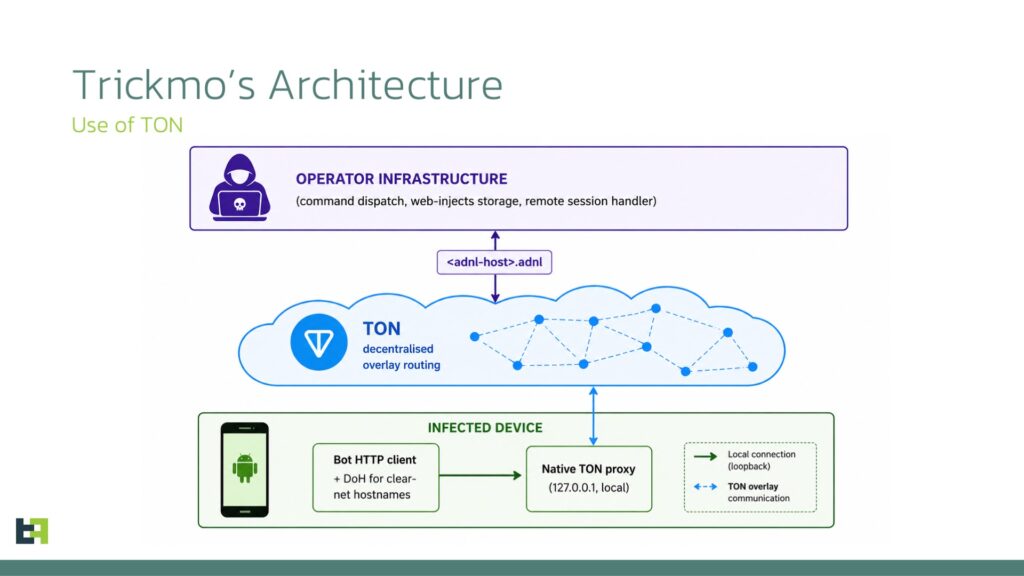
This design makes traditional blocking and domain takedowns less effective. Security teams usually disrupt malware by identifying domains, IP addresses, or hosting providers. TON-based routing gives operators a more resilient channel that blends with decentralized network activity.
ThreatFabric says the bot’s HTTP client runs through the embedded local TON proxy, so outbound command traffic goes through the TON overlay. This gives the malware a stealthier way to receive instructions and keep control of infected devices.
Infected phones can become network exit nodes
TrickMo C also adds network-focused commands that give attackers more visibility from the victim’s location. Researchers found support for commands such as curl, DNS lookup, ping, telnet, and traceroute.
These tools can help an attacker test connections, inspect reachable hosts, and perform reconnaissance from inside the victim’s network. That can matter in corporate environments where the infected phone connects to internal Wi-Fi.
The malware also supports SSH tunnelling and an authenticated on-device SOCKS5 proxy. Together, these features can turn the infected phone into a programmable traffic exit node, making malicious activity appear as if it came from the victim’s own network.
- It can help attackers route traffic through the victim’s IP address.
- It can make suspicious banking or wallet activity look more legitimate.
- It can weaken fraud systems that rely heavily on IP reputation.
- It can expose internal network details when the phone connects to a workplace Wi-Fi network.
Dormant features suggest future expansion
ThreatFabric also found signs that TrickMo’s operators may prepare for future capabilities. The Pine hooking framework remains bundled in the host APK, but researchers did not find active hook installations in the analyzed static code.
The malware also declares NFC-related permissions and reports NFC support details, but researchers did not find reachable NFC code in the current version. This suggests the operators may be collecting device capability data before deploying future modules.
That approach fits the new modular design. Instead of placing every feature inside the original app, operators can push additional code at runtime through the same module delivery path.
How Android users can reduce the risk
Android users should avoid sideloading apps from social media ads, Telegram links, unknown websites, and unofficial app stores. Fake entertainment or adult-themed apps remain a common lure for mobile malware campaigns.
Users should also treat accessibility permission prompts as high-risk. A video app, social media clone, or streaming app should not need permission to read and control everything on the screen.
Google Play Protect can help detect harmful apps, including apps installed from outside Google Play. Users should keep Play Protect enabled and allow scans for unknown apps when prompted.
- Install apps only from trusted stores whenever possible.
- Keep Google Play Protect enabled.
- Do not grant accessibility permissions to unknown apps.
- Remove apps that use names such as Google Play Services but were not installed by the system.
- Check Android security updates regularly.
- Use app-based passkeys or stronger authentication where available instead of relying only on SMS codes.
What banks and enterprises should monitor
Financial institutions should treat TrickMo C as a stronger fraud-enablement tool, not just a credential stealer. The use of SOCKS5 proxying and SSH tunnelling can make transactions appear to originate from the customer’s real device and network.
Enterprises should also watch for Android devices that suddenly generate unusual TON, proxy, tunnelling, or reconnaissance activity. Mobile devices connected to internal Wi-Fi can become useful footholds when malware gains enough control.
Security teams should combine app reputation checks, mobile threat detection, accessibility abuse monitoring, and transaction behavior analytics. IP-based detection alone may miss fraud when attackers route activity through the victim’s own device.
FAQ
TrickMo is an Android banking malware family that targets banking, wallet, fintech, and authenticator apps. It can abuse accessibility permissions to steal credentials, intercept messages, record screens, and help attackers control infected devices.
TrickMo C uses The Open Network for command-and-control traffic and adds network features such as reconnaissance commands, SSH tunnelling, and SOCKS5 proxying. These changes make infected phones more useful as stealthy network pivots.
The latest campaigns use fake apps, including TikTok-themed droppers and apps impersonating Google Play Services. The risk increases when users sideload apps and grant accessibility permissions to unfamiliar software.
Google Play Protect can scan apps for harmful behavior, warn users about dangerous apps, and block some risky installations. Users should keep it enabled and avoid installing apps from unknown sources.
Users should avoid sideloaded apps, keep Play Protect enabled, refuse accessibility permissions for unknown apps, remove suspicious apps, and keep Android updated. Banking and wallet users should also use stronger authentication methods when available.


Read our disclosure page to find out how can you help VPNCentral sustain the editorial team Read more


Improve this guide




User forum
0 messages