
DevilNFC Android Malware Traps Victims in Fake Banking Screens During NFC Relay Attacks


 8 min. read
  Published on
A new Android malware family called DevilNFC is using Kiosk Mode to lock victims inside fake banking screens while attackers relay payment card data. The malware targets banking customers in Europe and LATAM and belongs to a growing wave of NFC relay threats built by local threat actors.
Researchers at Cleafy identified DevilNFC alongside another newly documented NFC relay family called NFCMultiPay. The two families do not share code or infrastructure, but both use social engineering to capture payment card PINs and relay NFC data from the victim’s card to attacker-controlled devices.

Access content across the globe at the highest speed rate.
70% of our readers choose Private Internet Access
70% of our readers choose ExpressVPN

Browse the web from multiple devices with industry-standard security protocols.

Faster dedicated servers for specific actions (currently at summer discounts)
DevilNFC stands out because it combines phishing, fake Google Play pages, Kiosk Mode, PIN harvesting, OTP interception, and a dual-role APK design. Once the victim installs and opens the app, the malware can lock the phone into a fake bank interface and keep the victim there while the relay attack runs.
What is DevilNFC?
DevilNFC is an Android malware family designed for NFC relay fraud. In this type of attack, the victim taps a physical payment card on the infected phone, while the malware forwards NFC data to an attacker’s device.
The attacker can then use that relayed card data to attempt contactless payments, ATM withdrawals, or chip-and-PIN transactions. PIN theft makes the attack more dangerous because it can move beyond normal contactless limits.
Cleafy says DevilNFC is the more advanced of the two newly documented families. NFCMultiPay takes a simpler approach, while DevilNFC uses a single APK that can act as both a victim-side card reader and an attacker-side card emulator.
DevilNFC at a glance
| Detail | Information |
|---|---|
| Malware family | DevilNFC |
| Platform | Android |
| Main technique | NFC relay fraud |
| Key trap | Kiosk Mode locks the victim inside a fake banking screen |
| Initial delivery | SMS or WhatsApp phishing messages leading to fake Google Play pages |
| Data targeted | NFC card data, card PINs, OTP messages, public IP address, and bank name |
| Target regions | Europe and LATAM |
How the attack starts
The attack begins with a phishing message sent through SMS or WhatsApp. The message directs the victim to a landing page that impersonates Google Play.
The page presents the malicious app as a required security update from a legitimate Spanish-language banking institution. This gives the victim a reason to install the APK outside normal safety checks.
After installation, the app activates quickly. The victim sees a banking-themed interface, but the screen comes from a remote social engineering template controlled by the attackers.
How Kiosk Mode traps the victim
DevilNFC uses Android Kiosk Mode to hide the system interface and prevent the victim from leaving the fake banking flow. The app also overrides the hardware back button with an empty handler.
This means the victim cannot easily return to the home screen, switch apps, or back out of the fraudulent banking page. The device appears to remain inside a normal verification process.
During that time, the malware can guide the victim to tap a payment card on the phone and enter a four-digit card PIN. The interface then shows a fake verification error and asks the user to hold the card near the device for extra time, extending the relay window.
Why PIN harvesting matters
NFC relay attacks are not new, but PIN harvesting changes the risk profile. Without a PIN, attackers may face transaction limits or payment controls. With a PIN, they can attempt more valuable fraud.
Cleafy says both DevilNFC and NFCMultiPay treat PIN capture as a core part of the attack flow. The goal is not only to relay the card tap, but also to collect the extra information needed for higher-risk transactions.
In DevilNFC’s case, the stolen PIN is sent to a command-and-control endpoint and to the attacker’s private Telegram channel in plaintext. The message can include the victim’s bank name and public IP address.
What the malware can steal
- NFC payment card data relayed from the victim’s physical card.
- The four-digit card PIN entered into the fake banking screen.
- One-time passwords intercepted from incoming SMS messages.
- The victim’s public IP address.
- The bank name selected or shown during the fake verification flow.
The SMS interception component increases the risk further. If a bank sends a one-time password during the fraud attempt, the malware can silently capture and forward it to the attacker’s infrastructure.
DevilNFC uses a dual-role APK design
DevilNFC uses an unusual architecture. A single APK can serve as the passive NFC reader on the victim’s unrooted device and as the card emulator on the attacker’s rooted device.
On the attacker side, a hooking framework injects the relay module into Android’s NFC daemon process. This allows the malware to work below the normal Android NFC API layer.
This design gives the operator a direct relay pipeline between the victim’s card and the attacker’s device. It also shows a higher level of technical maturity than simpler Android relay tools.
NFCMultiPay shows the same threat shift
Cleafy also documented NFCMultiPay, another Android NFC relay family active in overlapping regions. It uses a simpler design, but it still captures PINs and supports payment relay fraud.
The two families appear to come from unrelated actors. DevilNFC carries Spanish-language indicators, while NFCMultiPay includes Portuguese and Brazilian developer fingerprints.
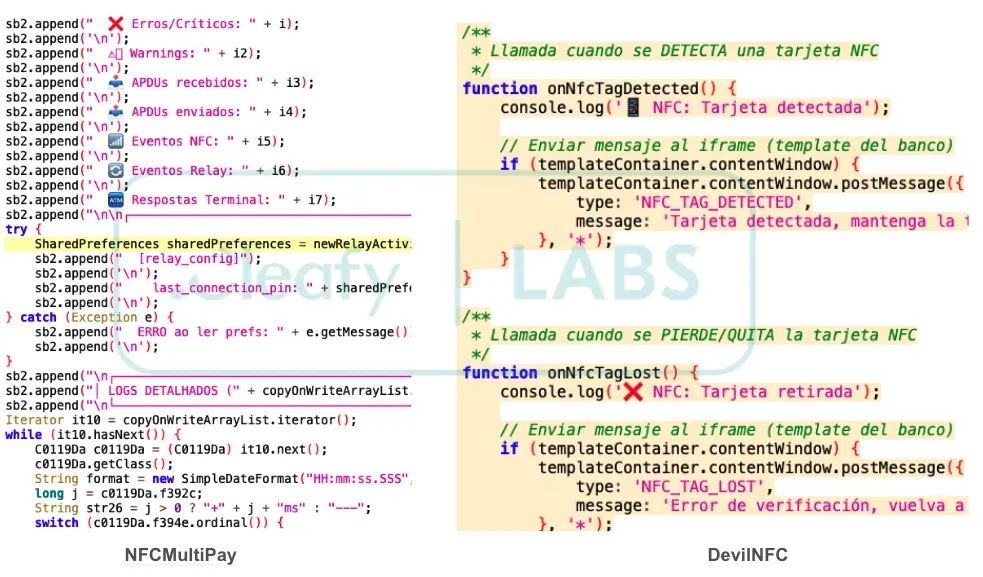
The timing matters. Researchers say these families show that NFC relay fraud is moving beyond Chinese-speaking malware-as-a-service ecosystems. Local groups are now building or adapting their own tools for regional banking fraud.
AI-assisted development signs
Cleafy found signs that both families may have used generative AI during development. DevilNFC includes over-engineered phishing templates, while NFCMultiPay includes emoji-formatted logging patterns often associated with LLM-generated scaffolding.
ESET reported a similar trend in a newer NGate variant that targets Android users in Brazil through a trojanized HandyPay app. That campaign also combined NFC data relay, PIN theft, and signs of AI-generated code.
This does not prove that AI created the malware end to end. It does show that attackers can use AI tools, leaked code, and public repositories to reduce the effort needed to build functional mobile malware.
How users can protect themselves
- Install banking apps only from official app stores.
- Do not install APK files from links received through SMS or WhatsApp.
- Never enter a payment card PIN into an app session you did not initiate.
- Do not tap a physical card on a phone because a message or pop-up tells you to do it.
- Contact your bank immediately if your phone becomes locked inside a full-screen banking interface.
- Disable sideloading when you do not need it.
- Keep Android and banking apps updated through trusted stores.
A real bank security update should not require a user to download an APK from a WhatsApp link or a fake Google Play page. Users should manually open their bank’s official app or website if they receive an urgent alert.
What banks and security teams should monitor
Financial institutions should treat NFC relay malware as a fast-moving fraud channel. These attacks can happen in real time and may not look like normal account takeover activity.
Security teams should watch for unusual device states, suspicious app installation paths, NFC activity paired with full-screen overlays, OTP interception patterns, and transaction attempts that follow recent social engineering reports.
Banks should also warn customers that they should never enter card PINs into mobile app prompts unless they opened the transaction themselves through a trusted official app flow.
Known indicators from the campaign
| Indicator type | Indicator | Description |
|---|---|---|
| Domain | nfcrackatm[.]com | DevilNFC command-and-control or relay server |
| Domain | spicynagets[.]shop | DevilNFC command-and-control or relay server |
| Package name | com.devilnfc.reader | DevilNFC APK package name |
| MD5 | caa5e8cf3275339d251210072ebe88c2 | DevilNFC APK sample |
| IPv4 | 185.203.116[.]18 | NFCMultiPay command-and-control server |
| IPv4 | 47.253.167[.]219 | NFCMultiPay command-and-control server |
The larger NFC relay problem
DevilNFC fits into a wider increase in mobile malware that abuses contactless payment workflows. Earlier campaigns such as SuperCard X and NGate already showed that attackers can relay NFC card data from a victim’s phone to another device.
The newer shift is local development. Instead of only buying ready-made access from established malware-as-a-service operators, regional groups now appear capable of building or adapting their own NFC relay tools.
That makes user education and fraud monitoring more important. If a banking message asks a user to install an app, enter a card PIN, and tap a payment card on a phone, the safest response is to stop and call the bank through a trusted number.
FAQ
DevilNFC is an Android malware family used for NFC relay fraud. It traps victims inside fake banking screens, collects card PINs, and relays NFC payment card data to attacker-controlled devices.
DevilNFC uses Kiosk Mode to hide the Android system interface and disable normal navigation. This keeps the victim inside a fake banking screen while the NFC relay attack completes.
The attack usually starts with an SMS or WhatsApp phishing message. The message leads to a fake Google Play page that presents the malicious APK as a mandatory bank security update.
PIN theft lets attackers attempt higher-risk transactions, including chip-and-PIN purchases and ATM withdrawals. It can reduce the limits that normally restrict contactless-only fraud.
Users should avoid APK links from SMS or WhatsApp, install banking apps only from official stores, never enter a card PIN into an unexpected app flow, and call their bank if a phone becomes locked inside a full-screen banking page.


Read our disclosure page to find out how can you help VPNCentral sustain the editorial team Read more


Improve this guide




User forum
0 messages