
Fake invitation phishing campaign targets U.S. organizations with credential theft and RMM downloads


 6 min. read
  Published on
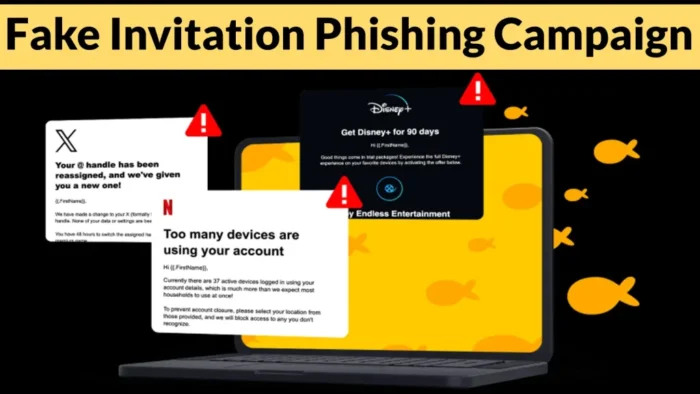
A large phishing campaign is targeting U.S. organizations with fake event invitation pages that steal email credentials, intercept one-time passwords, or push remote management tools onto victim devices.
ANY.RUN researchers said the operation has been active since at least December 2025 and uses a repeatable phishing framework to create event-themed lure sites at scale. As of April 27, 2026, researchers had tracked nearly 160 suspicious links and around 80 phishing domains tied to the campaign.

Access content across the globe at the highest speed rate.
70% of our readers choose Private Internet Access
70% of our readers choose ExpressVPN

Browse the web from multiple devices with industry-standard security protocols.

Faster dedicated servers for specific actions (currently at summer discounts)
The attack flow is designed to feel normal. Victims first see a CAPTCHA page, then a fake invitation page, and then a sign-in prompt or file download. This staged approach gives the phishing page more credibility before the actual theft begins.
How the fake invitation phishing campaign works
The campaign uses party, celebration, and invitation-themed domains to make the lure feel harmless. MANY of the observed domains use the .de top-level domain, although the campaign targets U.S. organizations.
After opening the phishing link, users are typically shown a CAPTCHA check. This can make the page seem safer while also filtering traffic before the victim reaches the lure page.
The next page presents what looks like an event invitation. From there, the victim may be asked to sign in with an email provider, or the page may push a remote access tool download.
| Stage | What the victim sees | What attackers want |
|---|---|---|
| Phishing link | An event or invitation-themed URL | Get the victim to open the lure page |
| CAPTCHA check | A normal-looking verification page | Build trust and filter traffic |
| Fake invitation | An event page that asks the user to continue | Move the victim toward login or download |
| Credential form | Email provider login options | Steal email passwords and OTP codes |
| RMM download | A remote tool installer or automatic download | Gain remote access through legitimate software |
The phishing pages target email accounts and OTP codes
Some pages ask victims to sign in with services such as Google, Yahoo, AOL, Microsoft, or generic email accounts. The forms are designed to resemble normal login pages.
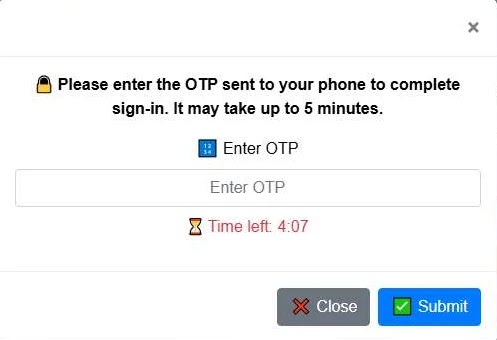
After a victim enters a password, the page may show a fake incorrect password message. This tactic can collect a second password attempt, which helps attackers if the first entry contained a typo.
The campaign also includes one-time password interception. After stealing login details, the phishing page can ask for a verification code and send it to attacker-controlled infrastructure.
Remote access tools create another risk
The campaign does not rely only on credential theft. ANY.RUN observed pages that pushed remote management tools such as ScreenConnect, ITarian, Datto RMM, ConnectWise, and LogMeIn Rescue.
These tools are legitimate in normal business environments, which makes them harder to judge at a glance. The risk comes from how they reach the victim and who controls the remote session afterward.
If attackers convince a user to install one of these tools, they may gain direct access to the device without using traditional malware. This can make the activity harder for security tools to classify immediately.
- Unexpected RMM installation should trigger an investigation.
- Security teams should check how the tool reached the device.
- Admins should review remote sessions and connection history.
- Organizations should restrict who can install remote access software.
- Approved RMM tools should have clear logging and access policies.
Researchers found reusable phishing infrastructure
The campaign uses shared design elements and repeated file paths across many domains. That makes the operation scalable, but it also gives defenders useful detection patterns.
ANY.RUN noted repeated resources such as /blocked.html, /favicon.ico, and image paths used for login provider icons. Examples include office360.png, office.png, yahoo.png, google.png, aol.png, and email.png under an /Image/ directory.
Credential collection endpoints also follow repeated patterns. These include paths such as /processmail.php, /process.php, /pass.php, /mlog.php, and /check_telegram_updates.php.
| Signal type | Example | Why it matters |
|---|---|---|
| Repeated resource path | /blocked.html | Helps connect related phishing domains |
| Login icon path | /Image/google.png | Shows reuse across phishing pages |
| Credential endpoint | /processmail.php | May receive stolen email and password data |
| OTP endpoint | /process.php | May receive stolen verification codes |
| RMM payload behavior | Unexpected remote tool download | May indicate phishing-to-remote-access activity |
Which sectors are being targeted
ANY.RUN said the campaign affects several sectors, including education, banking, government, technology, and healthcare. These industries often rely heavily on email access and remote administration tools.
That makes the attack especially risky. A stolen inbox can expose internal documents, reset links, business contacts, and future phishing targets. A remote access tool can create an even faster path into a device.
The operation also appears built for scale. Researchers said the shared framework lets attackers create many event-themed sites quickly, while repeated infrastructure makes the pages easier to rotate.
How organizations can defend against this campaign
Employees should treat unexpected event invitations with caution, especially when they arrive from unknown senders or lead to unfamiliar domains. A CAPTCHA page does not prove that a site is safe.
Security teams should monitor for suspicious login patterns, repeated failed passwords followed by OTP entry, unusual email access, and unexpected remote access software installations.
Organizations should also limit remote management tool installation to approved IT workflows. When legitimate RMM tools appear outside those workflows, teams should review the source link, download path, user action, and network traffic around the event.
- Train users to verify event invitations before signing in.
- Block newly registered or suspicious invitation-themed domains where possible.
- Watch for credential posts to repeated PHP endpoints.
- Alert on unexpected RMM installer downloads.
- Require admin approval for remote access software installation.
- Review MFA logs after suspected credential theft.
- Reset affected passwords and revoke active sessions after exposure.
FAQ
It is a phishing campaign that uses event invitation pages to trick users into entering email credentials, sharing one-time passwords, or downloading remote management tools.
ANY.RUN said the campaign targets U.S. organizations, with affected sectors including education, banking, government, technology, and healthcare.
The CAPTCHA step makes the page look more legitimate and can help attackers filter automated security scans before showing the fake invitation or login page.
Remote monitoring and management tools are legitimate software, but attackers can abuse them to gain remote access to a victim’s device. This can make the activity harder to detect than traditional malware.


Read our disclosure page to find out how can you help VPNCentral sustain the editorial team Read more


Improve this guide




User forum
0 messages