
Malicious Websites Can Track Users by Measuring SSD Timing Through the Browser


 8 min. read
  Published on

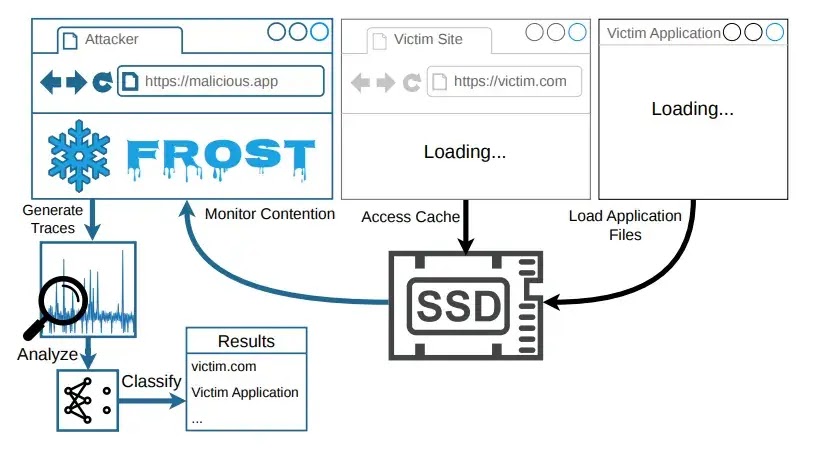
Security researchers have shown that a malicious website can infer what a visitor is doing on their computer by measuring tiny changes in SSD access times from inside the browser. The attack is called FROST, short for Fingerprinting Remotely using OPFS-based SSD Timing.
The technique uses the browser’s Origin Private File System, or OPFS, to create disk activity from JavaScript and measure storage latency. In the FROST research paper, the authors say the attack can run inside the browser sandbox without native code execution and without further user interaction after the victim visits the attacker-controlled page.

Access content across the globe at the highest speed rate.
70% of our readers choose Private Internet Access
70% of our readers choose ExpressVPN

Browse the web from multiple devices with industry-standard security protocols.

Faster dedicated servers for specific actions (currently at summer discounts)
The attack does not read the victim’s files directly. Instead, it uses a side channel. By watching how long SSD reads take, the attacker can detect patterns that match website visits, application launches, and other activity on the host system.
How the FROST Attack Works
OPFS gives each website its own private storage area. It was designed for legitimate web apps that need fast local file access, such as databases, editors, and apps that handle large files.
The problem is that this fast local storage can also create a timing signal. A malicious page can create a large OPFS file, perform repeated random reads, and measure how SSD latency changes while the user opens websites or apps elsewhere on the same machine.
The Graz University of Technology publication entry says the researchers built FROST to show that SSD contention side channels can be mounted remotely from within the browser. The work was accepted for DIMVA 2026.
FROST Results at a Glance
| Test | Platform | Reported Result |
|---|---|---|
| Closed-world website fingerprinting | macOS | 88.95% F1 score |
| Open-world top-50 website fingerprinting | macOS | 86.95% macro-averaged F1 score |
| Application fingerprinting | macOS | 95.83% F1 score |
| Covert channel | Linux | 661.63 bit/s true channel capacity |
| Covert channel | macOS | 891.77 bit/s true channel capacity |
The numbers matter because they show that the signal was strong enough to classify activity, not just create noise in a lab. The researchers used trained models to distinguish activity patterns from SSD timing traces.
In practical terms, a malicious website could try to infer whether a user is visiting certain websites or launching specific applications. That creates a privacy risk because the browser should not normally reveal this kind of system-wide behavior to a random webpage.
The work also shows how modern browser features can introduce unexpected side effects. A web API built for performance and app functionality can still expose measurable signals when paired with high-resolution timing and repeated disk access.
Why OPFS Makes the Attack More Practical
Older SSD contention attacks usually needed native code or low-level interfaces. FROST lowers that barrier because it uses JavaScript and OPFS from inside a regular browser context.
The MDN documentation describes OPFS as a storage endpoint that is private to the origin of the page and not visible to users like the regular file system. It also notes that OPFS provides optimized file access and in-place writes.
That design helps legitimate web apps, but it also gives attackers a way to generate and measure disk activity without asking the user to pick a file. The attack uses that behavior to avoid the permission prompts associated with direct access to user-visible files.
What a Malicious Website Can Learn
- Whether the victim is visiting certain websites during the measurement window.
- Whether the victim launches specific applications that create recognizable SSD activity.
- Whether another cooperating process is sending signals through SSD contention.
- Timing patterns that can help classify activity without reading files directly.
The researchers demonstrated application fingerprinting with common macOS apps, including Safari and System Settings. The attack relies on activity patterns, not the contents of the apps or documents.
The research paper also describes a covert channel where a native application and a malicious website communicate through SSD contention. That does not mean a normal website can automatically steal files, but it shows that the timing channel can carry usable data under the right conditions.
Why This Is a Privacy Issue, Not Just a Performance Quirk
Side channels do not behave like normal bugs. They do not need a stolen password, a browser crash, or a file-read permission. They exploit measurable effects from shared hardware or system resources.
In this case, the shared resource is SSD activity. When the victim’s system does something that touches storage, the attacker’s JavaScript can see timing changes in its own OPFS reads. Those changes become a fingerprint.
The Graz University of Technology summary says the work demonstrates privacy implications for regular users because FROST can predict accessed websites and applications from browser-based SSD measurements.
How Browser Storage Limits Affect the Attack
To make SSD reads happen consistently, the attacker needs a file large enough to avoid relying only on memory cache. OPFS and browser storage quotas therefore matter.
According to the web.dev storage guide, Chrome can allow an origin to use up to 60% of total disk space, while Firefox allows large per-site storage groups under its own quota model. That gives modern websites enough room to store large files in many cases.
The web.dev OPFS guide explains that OPFS supports low-level file manipulation, byte-by-byte access, and file streaming inside an origin-specific virtual filesystem. Those performance features help explain why FROST can collect timing traces from the browser.
Browser Vendors Were Notified
The researchers say they disclosed the findings to Google, Mozilla, and Apple. In their paper, they wrote that Chromium did not consider fingerprinting attacks security vulnerabilities, Apple considered the attack out of scope at the time but may consider mitigation later, and Mozilla acknowledged the findings without implementing mitigations.
That response does not mean users should ignore the issue. It means FROST sits in the difficult space between browser feature design, privacy risk, and side-channel research.
Mitigating this type of issue can also break legitimate browser use cases. OPFS exists because web apps need fast local storage, so browser makers need to balance security, privacy, performance, and compatibility.
Possible Defenses Against FROST
- Limit how much OPFS storage a site can use without persistent-storage permission.
- Warn users when many origins quickly consume large amounts of OPFS storage.
- Restrict high-resolution timers when OPFS activity occurs.
- Require explicit permission before websites can use large OPFS files.
- Detect repeated large random-read patterns from web pages.
- Let users inspect and clear OPFS storage more easily from browser settings.
The MDN OPFS page notes that permission prompts and the same security checks used for user-visible file access are not required for OPFS files. That is useful for performance, but it also makes silent use harder for users to notice.
The web.dev storage guide also explains that modern browsers often allow sites to use their storage quota without prompting the user. FROST shows why silent storage growth can have privacy consequences when paired with timing analysis.
What Users Can Do Right Now
There is no simple user-side switch that fully blocks this class of attack across all browsers. Still, users can reduce exposure by closing untrusted tabs, clearing site data for suspicious domains, and avoiding unknown links that keep pages running in the background.
People with higher privacy needs can also use separate browser profiles for sensitive work, limit background tabs, disable or restrict JavaScript on untrusted sites, and review site storage usage in browser settings where available.
The web.dev OPFS article says OPFS data is origin-specific and can be deleted when users clear site data. That gives users at least one practical cleanup option, even though it does not prevent a site from measuring timing while the tab remains open.
Why FROST Matters
FROST shows that privacy leaks can appear in places most users never think about. A website does not need to read documents or install malware to learn something about a visitor’s activity.
The broader lesson is that browser features with fast access to local hardware resources can create new side channels. SSD timing looks obscure, but the research shows that a browser API can turn it into a remote fingerprinting signal.
For browser vendors, the challenge now is to keep OPFS useful while reducing silent large-scale timing abuse. For users and security teams, FROST is a reminder that modern web privacy risks can come from performance features, not just trackers, cookies, or malicious downloads.
FAQ
FROST stands for Fingerprinting Remotely using OPFS-based SSD Timing. It is a browser-based side-channel attack that uses the Origin Private File System to measure SSD access timing and infer user activity.
The research shows that a website can measure SSD contention through JavaScript and OPFS, then use timing traces to classify activity such as website visits and application launches. The attack infers behavior indirectly and does not read files directly.
No. The OPFS version of FROST runs from JavaScript inside the browser after a victim visits an attacker-controlled page. It does not require native code execution or a traditional malware installation.
The researchers demonstrated website and application fingerprinting on macOS. They also built covert channels on Linux and macOS. The paper does not report Windows testing.
The researchers reported an 88.95% F1 score for closed-world website fingerprinting on macOS, an 86.95% macro-averaged F1 score for open-world top-50 website fingerprinting, and a 95.83% F1 score for application fingerprinting.
Possible mitigations include limiting large OPFS usage, adding permission prompts for heavy OPFS storage, reducing high-resolution timer access during OPFS activity, detecting rapid large storage consumption, and giving users clearer storage warnings.


Read our disclosure page to find out how can you help VPNCentral sustain the editorial team Read more


Improve this guide




User forum
0 messages