
Hackers use fake Gemini CLI and Claude Code installers to target developers with infostealer malware


 10 min. read
  Published on
Hackers are using SEO poisoning to impersonate Gemini CLI and Claude Code installation pages, tricking developers into running malicious PowerShell commands on Windows systems. The campaign targets developer workstations because they often hold source code access, CI/CD credentials, OAuth tokens, VPN details, and session cookies.
The activity was documented by EclecticIQ, which said the campaign surfaced in early March 2026 and used fake pages that closely copied legitimate AI coding tool installation guides. Victims were pushed to paste a single command into a terminal, which downloaded an infostealer through PowerShell.

Access content across the globe at the highest speed rate.
70% of our readers choose Private Internet Access
70% of our readers choose ExpressVPN

Browse the web from multiple devices with industry-standard security protocols.

Faster dedicated servers for specific actions (currently at summer discounts)
The tactic works because developers often install tools from command-line instructions. The fake page shows what looks like a normal setup command, while a hidden PowerShell process runs an in-memory payload that steals credentials and sensitive files.
How the fake installer campaign works
The attack begins when a developer searches for Gemini CLI or Claude Code installation instructions. Attackers use SEO poisoning to make malicious pages appear high in search results, then use typosquatted domains that look close enough to official developer tooling sites.
In the Gemini CLI campaign, the fake page directed users to geminicli[.]co[.]com. The page told them to run a PowerShell command that contacted gemini-setup[.]com and downloaded a payload named Install.ps1.
The deception is more convincing because the legitimate Gemini CLI also installs in parallel. The developer sees a real installation finish successfully, while the stealer collects data in the background.
| Campaign element | What attackers used | Why it worked |
|---|---|---|
| Search lure | SEO-poisoned fake installer pages | Developers often search for setup commands |
| Gemini CLI lure | geminicli[.]co[.]com and gemini-setup[.]com | The domain names looked related to the real tool |
| Claude Code lure | claudecode[.]co[.]com and claude-setup[.]com | The page copied official-looking install guidance |
| Execution method | PowerShell download and execute pattern | The command ran malware directly from memory |
| Cover activity | Real tool installation | The victim saw expected terminal output |
Attackers copied real developer workflows
The official Gemini CLI GitHub repository lists normal installation options such as npx and npm, including npm install -g @google/gemini-cli. The fake Gemini page abused that familiarity by showing developers a command that appeared to install a real package.
Anthropic’s Claude Code quickstart documentation also gives command-line installation options, including Windows PowerShell instructions. Attackers copied the same broad pattern because developers already expect CLI tools to be installed from terminal commands.
This makes the campaign harder to spot than a random malware download. The social engineering is built around normal developer behavior, not a strange attachment or a suspicious popup.
The PowerShell payload runs in memory
The second-stage infostealer runs through PowerShell and uses in-memory execution. EclecticIQ said the payload harvests data from browsers, collaboration tools, developer utilities, cloud storage clients, VPN tools, and Windows Credential Manager before sending the results to attacker infrastructure.
The script also attempts to weaken visibility. It patches Event Tracing for Windows and bypasses the Antimalware Scan Interface, then uses obfuscation and runtime-loaded C# components to collect more data from the host.
The report says the infostealer does not include a persistence mechanism, but it does give operators the ability to run additional code remotely. That means a stolen developer workstation can become a starting point for a deeper enterprise intrusion.
- Browser passwords, cookies, autofill data, and form history
- Slack, Microsoft Teams, Discord, Mattermost, and Telegram data
- Windows Credential Manager entries
- OpenVPN configuration files and embedded key material
- WinSCP and PuTTY session data
- Cloud storage directories from services such as OneDrive and Google Drive
- Desktop, Documents, and Downloads files with sensitive extensions
Why stolen session cookies are a major risk
The campaign does not only steal passwords. Session cookies and OAuth tokens can be even more valuable because they may let attackers access workspaces without triggering a fresh login flow.
If a developer has active sessions for Git repositories, chat platforms, cloud dashboards, or CI/CD services, those sessions can help attackers move into the wider enterprise. Multi-factor authentication may not stop every session replay scenario if the attacker already has a valid token or cookie.
This is why developer-targeted infostealers create supply chain risk. One infected workstation can expose source repositories, build systems, secrets, cloud environments, and internal communication channels.
| Stolen data type | Potential attacker use |
|---|---|
| OAuth tokens | Access cloud or SaaS services without a password prompt |
| Session cookies | Hijack logged-in browser sessions |
| CI/CD credentials | Access pipelines, artifacts, secrets, and deployment systems |
| VPN details | Enter corporate environments through trusted access paths |
| Developer files | Steal source code, documentation, and local secrets |
The campaign expanded beyond AI coding tools
EclecticIQ said infrastructure pivots uncovered more than 30 malicious domains connected to the same activity. The cluster impersonated not only Gemini CLI and Claude Code, but also Node.js, Chocolatey, KeePassXC, and Monero.
The same EclecticIQ report says this shows a clear understanding of developer habits. Attackers are not randomly copying brands. They are choosing tools that developers and IT administrators commonly install from command-line instructions.
The Node.js lure is a good example. It reportedly used a fake Node.js page that sent users toward a spoofed Chocolatey-style install flow, stacking one trusted developer brand on top of another.
Official install sources matter
Developers should install Gemini CLI only from trusted sources such as the Gemini CLI GitHub repository, the official documentation linked from that repository, or the verified npm package name. A missing package scope, odd domain, or extra PowerShell download step should stop the installation.
Claude Code users should follow Anthropic’s Claude Code quickstart documentation and verify that they are using the real claude.ai or anthropic.com ecosystem. A fake domain ending in co[.]com or a separate “setup” domain should raise suspicion.
Teams should also document approved installation commands for common developer tools. When developers have a trusted internal source for setup steps, they have less reason to copy commands from search results.
Detection opportunities for security teams
Defenders should focus on command-line telemetry, PowerShell behavior, and suspicious domain patterns. The strongest early signal is a pasted PowerShell command that chains Invoke-RestMethod or its alias with Invoke-Expression.
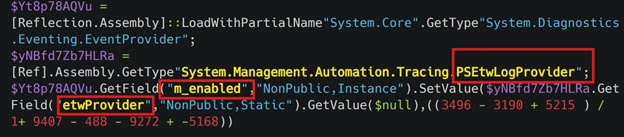
The campaign also uses hidden PowerShell windows. Security teams should alert when powershell.exe starts with hidden window behavior, especially when launched from explorer.exe or cmd.exe and followed quickly by outbound HTTP or HTTPS traffic.
Suspicious domains also matter. Developer-brand lookalikes under co[.]com, setup-style domains, and Microsoft-looking event subdomains should trigger review when seen from developer workstations.
- Command lines containing irm and iex together
- Invoke-RestMethod piped into Invoke-Expression
- powershell.exe launched with hidden window behavior
- Add-Type followed by calls to advapi32.dll CredEnumerate
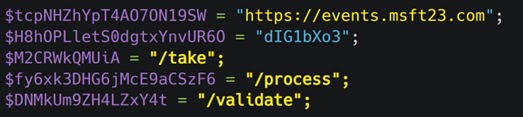
- Outbound traffic to events[.]msft23[.]com or events[.]ms709[.]com
- Developer-brand lookalike domains ending in co[.]com
- PowerShell user agents reaching /take, /process, or /validate paths
How to reduce the risk
PowerShell controls can reduce the impact of this campaign. Microsoft’s PowerShell application control guidance explains that App Control for Business and AppLocker can help secure PowerShell environments and restrict what scripts can do.
Organizations should also use phishing-resistant authentication for developer accounts, reduce the lifetime of OAuth tokens, and apply conditional access controls to sensitive developer services. Shorter-lived tokens reduce the value of stolen sessions.
Browser and endpoint policies can also help. Blocking clipboard write access from untrusted sites, restricting hidden PowerShell execution, and preventing scripts downloaded from the internet from running freely can all weaken this type of lure.
| Control | Recommended action |
|---|---|
| PowerShell hardening | Use application control and restrict dangerous script behavior |
| Developer install policy | Publish approved internal installation commands for common tools |
| Authentication | Use FIDO keys for privileged and developer accounts |
| Token security | Use short-lived OAuth tokens and conditional access |
| Domain monitoring | Alert on developer-brand typosquats and suspicious setup domains |
| Clipboard protection | Limit clipboard writes from untrusted websites where possible |
What infected developers should do
A developer who ran a suspicious installer command should treat the machine as compromised. The immediate priority is to disconnect the device from the network and preserve logs before cleaning or rebuilding the system.
Because this campaign steals tokens and cookies, password resets alone may not be enough. Teams should revoke browser sessions, OAuth tokens, developer access tokens, CI/CD secrets, VPN credentials, and any cloud credentials stored or used on the device.
Security teams should also inspect repositories and pipelines for suspicious commits, new secrets, unusual workflow changes, and unexpected package publishing activity from the affected account.
- Disconnect the device from the network.
- Preserve PowerShell logs, command history, browser artifacts, and EDR telemetry.
- Revoke OAuth tokens, session cookies, CI/CD tokens, and VPN credentials.
- Rotate Git, package registry, cloud, and messaging credentials.
- Review recent repository activity and pipeline changes.
- Rebuild the workstation if compromise is confirmed.
- Block known malicious domains and hashes from the campaign.
Why developers are valuable targets
Developers often have access that ordinary users do not. They can reach source code, internal documentation, build pipelines, secrets, package registries, staging environments, and cloud infrastructure.
That access makes developer workstations attractive to access brokers and financially motivated attackers. A single stolen token can unlock more value than a standard corporate email account.
Microsoft’s PowerShell application control guidance highlights why script and application restrictions remain important even when antivirus is present. Developer workstations need protection without blocking legitimate work.
Bottom line
The fake Gemini CLI and Claude Code installer campaign shows how attackers are adapting to the rise of AI coding tools. They are not only exploiting software flaws. They are exploiting the way developers discover and install new tools.
Developers should avoid copying terminal commands from search results, verify domains carefully, and use official documentation or internal trusted setup guides. Security teams should hunt for suspicious PowerShell download-and-execute patterns, hidden PowerShell windows, and traffic to attacker-controlled domains.
The campaign is a reminder that developer endpoints are part of the software supply chain. Protecting them requires the same urgency as protecting production servers, source repositories, and CI/CD systems.
FAQ
It is an SEO poisoning campaign that uses fake installation pages for Gemini CLI and Claude Code. The pages trick developers into running PowerShell commands that download and execute an infostealer.
Developers often have access to source code, CI/CD systems, cloud services, package registries, VPNs, and corporate collaboration tools. Stolen developer credentials can give attackers a path into the wider enterprise.
The fake page instructs the victim to run a PowerShell command. The malicious chain downloads a second-stage payload and runs it in memory, while in some cases a real CLI tool installs at the same time to make the attack look legitimate.
The stealer targets browser passwords and cookies, OAuth tokens, CI/CD credentials, VPN details, collaboration app sessions, Windows Credential Manager entries, developer files, and locally synced cloud storage data.
Developers should install tools only from official documentation, verify package names and domains, avoid running terminal commands copied from search results, and report any fake installer page to security teams.


Read our disclosure page to find out how can you help VPNCentral sustain the editorial team Read more


Improve this guide




User forum
0 messages